1. Уводзіны
The HP 1910-8G-PoE+ 180W Switch (Model JG350A) is an advanced smart-managed, fixed-configuration Gigabit Ethernet Layer 3 switch. Designed for small businesses, it offers enhanced features in an easy-to-administer solution, providing reliable network connectivity and Power over Ethernet Plus (PoE+) capabilities.
2. Асноўныя магчымасці
- Гігабітныя парты Ethernet: Provides 8 Gigabit Ethernet ports for high-speed network connections.
- PoE+ Capability: Supports Power over Ethernet Plus (802.3at) to power compatible devices such as IP phones, wireless access points, and IP cameras directly through the network cable.
- Парты SFP: Includes additional true Gigabit SFP ports for fiber connectivity, extending network reach.
- Гнуткае разгортванне: Supports both rack mounting and desktop operation.
- Ціхая праца: Utilizes variable-speed fans to minimize noise.
- Падтрымка IPv6: Operates at full wire-speed IPv6.
- Якасць абслугоўвання (QoS): Supports traffic prioritization for optimal performance of critical applications.
- Функцыі бяспекі: Includes 802.1X network login, access control lists (ACLs), and denial-of-service (DoS) prevention.
- Advanced Layer 3 Features: Customizable features such as VLANs, link aggregation trunking, static routing, and Spanning Tree Protocols (STP, RSTP, MSTP).
3. Змесціва ўпакоўкі
Пераканайцеся, што ваш пакет змяшчае наступныя элементы:
- HP 1910-8G-PoE+ 180W Switch (JG350A)
- Шнур харчавання
- Камплект для мантажу ў стойку (пры наяўнасці)
- Кароткае кіраўніцтва і інфармацыя аб гарантыі
Калі якія-небудзь прадметы адсутнічаюць або пашкоджваюцца, неадкладна звярніцеся да прадаўца.
4. Фізічны апісанне
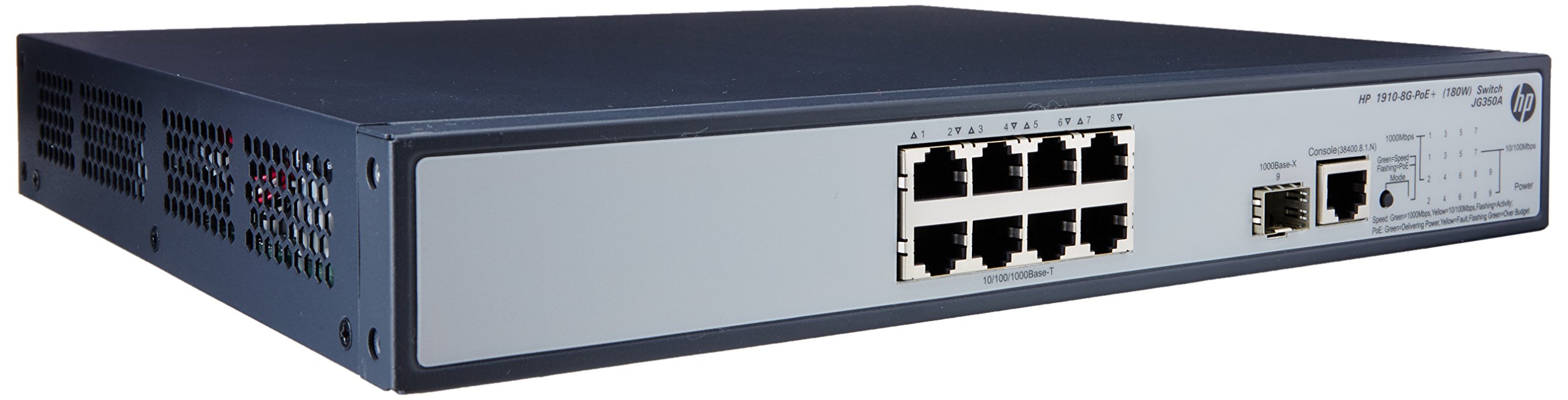

4.1 Пярэдняя панэль
The front panel of the switch includes:
- 8 x RJ45 Gigabit Ethernet Ports: These ports support 10/100/1000 Mbps connections and are PoE+ enabled, providing power to connected devices.
- 2 x SFP Ports: Dedicated slots for Gigabit fiber optic transceivers, allowing for long-distance connections.
- Святлодыёдныя індыкатары: Status lights for power, system, and individual port activity/PoE status.
4.2 Задняя панэль
The rear panel typically contains the AC power input connector and ventilation openings.
5. Настройка
5.1 Меры бяспекі
- Забяспечце належную вентыляцыю вакол выключальніка, каб пазбегнуць перагрэву.
- Не закрывайце вентыляцыйныя адтуліны.
- Выкарыстоўвайце толькі сеткавы шнур, які пастаўляецца з прыладай.
- Avoid placing the switch in direct sunlight or near heat sources.
5.2 Мантаж камутатара
The HP 1910-8G-PoE+ 180W Switch can be deployed in two ways:
- Размяшчэнне на працоўным стале: Place the switch on a flat, stable surface, ensuring adequate space for ventilation.
- Мантаж у стойку: Use the provided rack-mount kit to install the switch into a standard 19-inch equipment rack. Follow the instructions included with the rack-mount kit for proper installation.
5.3 Падключэнне сілкавання
- Падключыце адзін канец шнура харчавання да ўваходу пераменнага току на задняй панэлі камутатара.
- Падключыце другі канец шнура харчавання да заземленай электрычнай разеткі.
- The power LED on the front panel should illuminate, indicating the switch is receiving power.
5.4 Падключэнне сеткавых прылад
- Парты RJ45: Connect your network devices (computers, servers, IP phones, wireless access points) to the RJ45 ports using standard Ethernet cables. For PoE-powered devices, ensure they are PoE+ compatible.
- Парты SFP: Insert compatible SFP transceivers into the SFP slots, then connect fiber optic cables to the transceivers for fiber uplinks or long-distance connections.
5.5 Пачатковая канфігурацыя
The HP 1910 switch is a smart-managed device, typically configured via a web-based graphical user interface (GUI). Refer to the Quick Start Guide for the default IP address, username, and password to access the management interface. It is recommended to change default credentials immediately after initial access for security purposes.
6. Кіраванне перамыкачом
6.1 Уключэнне харчавання
Once connected to power, the switch will automatically power on. Observe the system LED for boot-up status. A steady green light typically indicates normal operation.
6.2 Падключэнне да сеткі
When a device is connected to an RJ45 port, the corresponding port LED will illuminate. A blinking LED indicates network activity. Ensure the link LED is solid green for a stable connection.
6.3 PoE+ Functionality
For devices requiring Power over Ethernet, connect them to the PoE+ enabled RJ45 ports. The switch will automatically detect and provide power to compatible devices. The PoE status LED for the port will indicate power delivery.
7. Тэхнічнае абслугоўванне
7.1 Ачыстка
Перыядычна працірайце знешнія паверхні камутатара мяккай сухой тканінай. Не выкарыстоўвайце вадкія або аэразольныя ачышчальнікі. Для падтрымання належнай цыркуляцыі паветра пераканайцеся, што вентыляцыйныя адтуліны чыстыя ад пылу і смецця.
7.2 Абнаўленне прашыўкі
Рэгулярна правярайце службу падтрымкі HP webсайт для абнаўленняў прашыўкі. Абнаўленне прашыўкі камутатара забяспечвае аптымальную прадукцыйнасць, бяспеку і доступ да новых функцый. Уважліва выконвайце інструкцыі, якія пастаўляюцца з пакетам абнаўлення прашыўкі.
7.3 Экалагічныя меркаванні
Operate the switch within its specified temperature and humidity ranges to ensure longevity and stable performance. Avoid extreme conditions.
8. Выпраўленне непаладак
8.1 Няма харчавання
- Пераканайцеся, што шнур харчавання надзейна падключаны як да выключальніка, так і да электрычнай разеткі.
- Праверце працаздольнасць электрычнай разеткі, падключыўшы да яе іншую прыладу.
- Ensure the power switch (if present) is in the ON position.
8.2 Няма падключэння да сеткі
- Check the Ethernet cable connections between the switch and the device.
- Verify that the port LED on the switch is illuminated for the connected device.
- Ensure the device's network adapter is enabled and configured correctly.
- Try connecting the device to a different port on the switch or using a different Ethernet cable.
8.3 PoE Not Working
- Confirm that the connected device is PoE+ compatible.
- Праверце святлодыёдны індыкатар стану PoE для канкрэтнага порта.
- Ensure the total power budget of the switch is not exceeded.
- Try connecting the PoE device to a different PoE+ port.
8.4 Скід перамыкача
If the switch is unresponsive or experiencing persistent issues, a factory reset may be necessary. Refer to the device's management interface or the full user guide for instructions on performing a factory reset. Папярэджанне: A factory reset will erase all custom configurations and restore the switch to its default settings.
9. Тэхнічныя характарыстыкі
| Асаблівасць | Спецыфікацыя |
|---|---|
| Нумар мадэлі | JG350A |
| Тып інтэрфейсу | PoE+, SFP |
| Колькасць партоў | 8 (Gigabit Ethernet PoE+) |
| Хуткасць перадачы даных | 1000 мегабіт у секунду |
| АЗП | 128 Мб |
| Вага прадмета | 8.35 фунта (3.79 кг) |
| Памеры прадукту (ДxШxВ) | 17.5 х 13.12 х 3.5 цалі (44.45 х 33.32 х 8.89 см) |
| Сумяшчальныя прылады | Камера, настольны кампутар, ноўтбук, прынтар |
| Вытворца | HP |
10. Гарантыя і падтрымка
For detailed warranty information and technical support, please refer to the documentation included with your product or visit the official HP support webсайт. The website provides access to drivers, firmware updates, troubleshooting guides, and contact information for customer service.