1. Уводзіны
This manual provides detailed instructions for the safe and efficient operation of your Samsung Glyde U940 mobile phone. Please read this manual thoroughly before using your device to ensure proper functionality and to understand all features.
2. Змесціва ўпакоўкі
Пераканайцеся, што ў камплекце з вашым прадуктам ёсць наступныя элементы:
- Samsung Glyde U940 Mobile Phone
- Стандартны акумулятар
- Travel Adapter/Charger
- Кіраўніцтва карыстальніка (гэты дакумент)
- Заўвага: Канкрэтныя аксэсуары могуць адрознівацца ў залежнасці ад рэгіёна або прадаўца.
3. Прылада скончанаview
The Samsung Glyde U940 features a large touch-sensitive display and a slide-out QWERTY keyboard for versatile input.
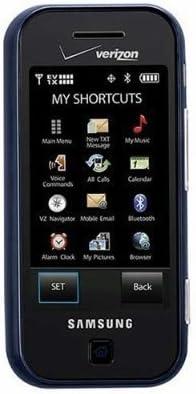
Малюнак 3.1: Фронт view of the Samsung Glyde U940, showing the 2.8-inch display and navigation buttons. The screen displays "MY SHORTCUTS" with icons for various functions like Main Menu, New TXT Message, My Music, Voice Commands, All Calls, Calendar, Mobile Email, Bluetooth, Alarm Clock, My Pictures, and Browser. "SET" and "Back" buttons are visible below the screen.
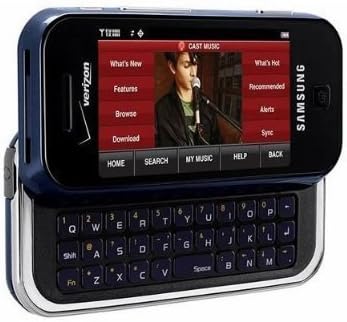
Малюнак 3.2: Samsung Glyde U940 with its full QWERTY keyboard extended. The phone is oriented horizontally, displaying a media interface on the screen with options like "What's New", "Features", "Browse", "Download", "What's Hot", "Recommended", "Alerts", and "Sync". Navigation buttons for "HOME", "SEARCH", "MY MUSIC", "HELP", and "BACK" are visible below the screen.
Асноўныя характарыстыкі:
- Large 2.8" Display
- Slide-out QWERTY Keyboard
- Інтэрфейс сэнсарнага экрана
- Full HTML Browser
- 2.0 MP Camera and Camcorder
4. Настройка
4.1. Устаноўка акумулятара
- Знайдзіце вечка батарэйнага адсека на задняй панэлі тэлефона.
- Gently remove the battery cover by sliding or lifting it.
- Сумясціце залатыя кантакты батарэі з кантактамі ў батарэйным адсеку.
- Шчыльна ўстаўце батарэю на месца.
- Replace the battery cover, ensuring it clicks securely.
4.2. Зарадка акумулятара
- Connect the travel adapter to the charging port on your phone.
- Plug the other end of the travel adapter into a standard electrical outlet.
- Перад першым выкарыстаннем дайце тэлефону цалкам зарадзіцца. Індыкатар батарэі на экране будзе паказваць стан зарадкі.
- Адключыце зарадная прылада, як толькі акумулятар будзе цалкам зараджаны.
4.3. Уключэнне / выключэнне харчавання
- Каб уключыць: Press and hold the Power/End key until the screen lights up.
- Каб выключыць: Press and hold the Power/End key until the power-off options appear, then select "Power off".
5. Інструкцыя па эксплуатацыі
5.1. Выкарыстанне сэнсарнага экрана
The Samsung Glyde U940 features a resistive touch screen. Use your fingertip or a stylus (if provided) to interact with the display.
- Націсніце: Lightly touch the screen once to select an item or open an application.
- Перацягнуць: Дакраніцеся да элемента і ўтрымлівайце яго, а затым правядзіце пальцам па экране, каб змяніць яго становішча.
- Пракрутка: Slide your finger up or down on the screen to navigate through lists or web старонкі.
5.2. Using the QWERTY Keyboard
Slide the screen horizontally to reveal the full QWERTY keyboard. This keyboard is ideal for typing messages, emails, and web адрасы.
- Press individual keys to input characters.
- Выкарыстоўвайце зрух key for uppercase letters and symbols.
- The Fn key provides access to additional functions or symbols.
5.3. Здзяйсненне і прыём званкоў
- Здзяйсненне званка: From the home screen, tap the Phone icon or dial the number using the keypad and press the Call key.
- Прыём званка: When a call comes in, tap the "Answer" button on the screen.
- Завяршэнне выкліку: Tap the "End" button on the screen or press the Power/End key.
5.4. Паведамленні (SMS/MMS)
To send a text or multimedia message:
- From the main menu, select "Messages" or "New TXT Message".
- Увядзіце нумар тэлефона атрымальніка або выберыце яго са спісу кантактаў.
- Type your message using either the touch screen or the QWERTY keyboard.
- To add multimedia (pictures, videos, audio), select the attachment option.
- Tap "Send".
5.5. Camera and Camcorder Functions
The Glyde U940 is equipped with a 2.0 MP camera.
- Фотаздымкі: Open the Camera application, frame your shot, and press the dedicated camera button or tap the capture icon on the screen.
- Запіс відэа: Switch to camcorder mode within the Camera application, press the record button to start, and press again to stop.
- Access your captured media in the "My Pictures" or "Gallery" application.
5.6. Web Браўзэр
Utilize the full HTML browser to access the internet.
- From the main menu, select "Browser".
- Увядзіце жаданае web адрас у ст URL бар.
- Use the touch screen to navigate pages, zoom in/out, and click links.
6. Тэхнічнае абслугоўванне
6.1. Сыход за батарэяй
- Пазбягайце ўздзеяння на батарэю экстрэмальных тэмператур.
- Не праколвайце і не пашкоджвайце акумулятар.
- For optimal battery life, avoid frequent partial discharges and charges.
- Калі тэлефон не будзе выкарыстоўвацца працяглы час, захоўвайце яго з часткова зараджанай батарэяй.
6.2. Ачыстка прылады
- Use a soft, lint-free cloth to clean the screen and exterior of the phone.
- Не выкарыстоўвайце агрэсіўныя хімікаты, ачышчальныя спрэі або абразіўныя матэрыялы.
- Ensure no moisture enters openings such as the charging port or headphone jack.
6.3. Абнаўленне праграмнага забеспячэння
Periodically check for available software updates to improve performance and add new features. Consult your service provider or the Samsung webсайт для працэдур абнаўлення.
7. Выпраўленне непаладак
This section addresses common issues you might encounter with your Samsung Glyde U940.
| праблема | Магчымае рашэнне |
|---|---|
| Тэлефон не ўключаецца. | Ensure the battery is correctly installed and fully charged. Connect the charger and attempt to power on. |
| Touch screen is unresponsive or erratic. |
|
| Акумулятар хутка разраджаецца. |
|
| Нельга рабіць або прымаць званкі. | Check network signal strength. Ensure "Airplane Mode" is not enabled. Contact your service provider if network issues persist. |
| QWERTY keyboard input is incorrect. | Ensure the keyboard is fully extended and locked into position. Restart the device if keys are unresponsive. |
8. Тэхнічныя характарыстыкі
| Асаблівасць | Дэталь |
|---|---|
| Нумар мадэлі | U940 |
| Дысплей | 2.8 Inches, Touch Screen |
| Метад уводу | Touch Screen, Slide-out QWERTY Keyboard |
| Камера | 2.0 MP (Camera and Camcorder) |
| Браўзэр | Full HTML Browser |
| Вага прадмета | 11.2 унцыі |
| Памеры | 8.1 х 5.4 х 2.2 цаляў (памеры ўпакоўкі) |
| Сувязь | Бесправадная сувязь, USB 2.0 |
| Вытворца | Samsung |
9. Гарантыя і падтрымка
Каб атрымаць інфармацыю пра гарантыю, звярніцеся да гарантыйнага талона, які пастаўляецца з вашым прадуктам, або наведайце афіцыйны сайт Samsung. website. For technical support, contact your service provider or Samsung customer service.
Абслугоўванне кліентаў Samsung: www.samsung.com/us/support/


