1. Giriş
Aldığınız üçün təşəkkür edirikasing the VEVOR MD-092P Emergency Weather Radio. This device is designed to provide essential information and power in emergency situations, featuring multiple power sources, NOAA weather alerts, an SOS alarm, and a built-in flashlight. Please read this manual thoroughly before use to ensure proper operation and to maximize the product's lifespan.
2. Məhsul bitdiview
2.1 Paketin məzmunu
- 1 x VEVOR MD-092P Emergency Weather Radio
- 1 x USB şarj kabeli
- 1 x İstifadəçi Təlimatı
2.2 Cihazın komponentləri
Familiarize yourself with the various parts of your emergency radio:

Şəkil: Bitdiview of the VEVOR MD-092P Emergency Weather Radio, highlighting its various ports and features such as the Micro USB input, USB output for power bank function, headphone jack, LED flashlight, SOS alarm button, LCD display, key lock, radio tuner, and integrated bottle opener.
- Antena: Radio qəbulunu yaxşılaşdırmaq üçün genişləndirilə bilər.
- LED Fənər: İşıqlandırma təmin edir.
- LCD displey: Tezliyi, batareya səviyyəsini və digər göstəriciləri göstərir.
- Nəzarət Düymələri: Power, Mode, Tuning, Volume, SOS.
- Əl krankı: Əl ilə enerji istehsalı üçün.
- Günəş paneli: Günəş enerjisi ilə doldurulması üçün.
- USB Output (DC 5V OUT): Xarici cihazları doldurmaq üçün.
- Micro USB Input (DC 5V IN): For charging the radio via USB cable.
- 3.5 mm qulaqlıq girişi: Şəxsi dinləmək üçün.
- SOS düyməsi: Activates emergency alarm and flashlight.
- Şüşə Açıcı: Integrated utility feature.
- AAA Batareya Bölməsi: For optional AAA battery power (batteries not included).
3. Quraşdırma
3.1 İlkin ödəniş
Before first use, fully charge the internal 2000mAh lithium battery. Connect the supplied USB cable to the radio's Micro USB Input and to a USB power adapter (not included) or a computer USB port. The charging indicator on the LCD display will show charging status. A full charge typically takes several hours.
3.2 Optional AAA Batteries
For an additional power source, you can insert 3 AAA batteries (not included) into the battery compartment. Ensure correct polarity. The radio will prioritize the internal lithium battery if charged, but AAA batteries provide a backup.
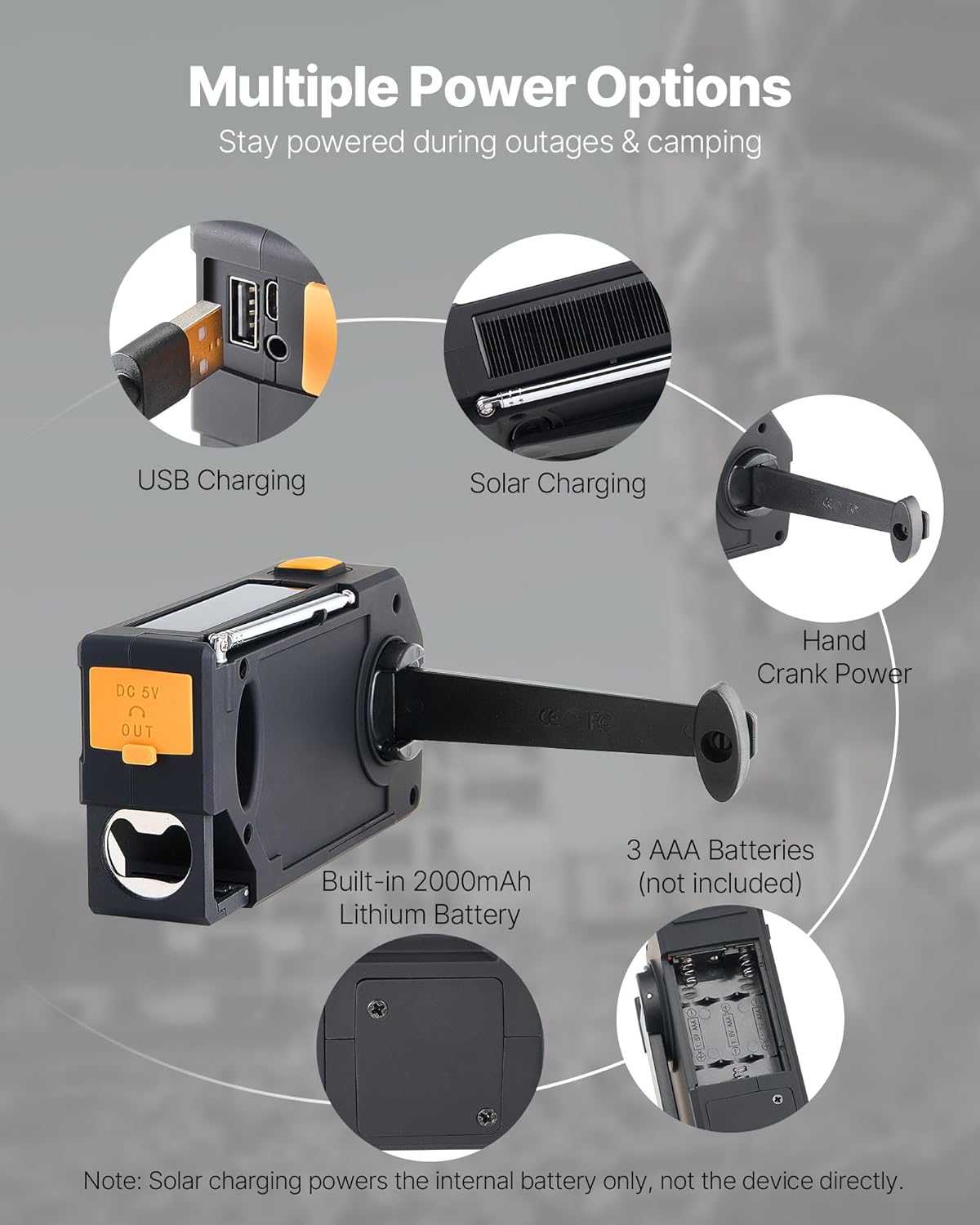
Image: Illustration of the various power input methods for the radio, including USB charging, solar panel, hand crank, the internal 2000mAh battery, and the compartment for 3 AAA batteries. Note that solar charging primarily charges the internal battery.
4. Əməliyyat Təlimatları
4.1 Yandırma/Söndürmə
basın və saxlayın Güc radionu yandırmaq və ya söndürmək üçün düymə.
4.2 Radio Sazlama (FM/AM/WB)
- düyməsini basın BAND button to cycle through FM, AM, and WB (Weather Band) modes.
- Extend the antenna for optimal reception, especially for FM and WB.
- istifadə edin Tuning Up (+) və ya Sazlama (-) stansiyanı əl ilə tənzimləmək üçün düymələr.
- Avtomatik skanlama üçün düyməni basıb saxlayın Tuning Up or Sazlama button. The radio will stop at the next strong signal.
4.3 Səs səviyyəsinə nəzarət
düyməsini basın Səs artır (+) və ya Səsi azaldın (-) buttons to adjust the audio level.
4.4 NOAA Hava Xəbərdarlıqları
The radio supports 7 NOAA Weather Band (WB) channels. In WB mode, the radio can automatically tune to the strongest NOAA channel and provide alerts.
- When a weather alert is received, the radio will display "ALERT", flash a yellow light, and sound an alarm.
- The radio automatically locks onto the strongest NOAA channel for continuous monitoring.

Image: Visual representation of the 7 NOAA weather alert channels and the radio's ability to automatically detect and tune to the strongest signal for timely weather warnings.
4.5 SOS Alarm and Flashlight
In an emergency, the SOS function can be activated:
- basın və saxlayın SOS button to activate a loud alarm (≥78dB) and a flashing LED light.
- This function can last up to 3 hours on a full charge.
- The SOS alarm works even when headphones are connected, ensuring visibility and audibility for rescue.

Image: Depiction of the SOS alarm feature, showing the dedicated SOS button and its function to trigger a loud alarm and flashing light for emergency signaling.
To use the flashlight independently:
- düyməsini basın Fənər button (usually indicated by a light bulb icon) to turn the LED flashlight on or off.
- The 1W LED light can operate for up to 8 hours on a full charge.
4.6 Power Bank funksiyası
The radio can act as a power bank to charge small electronic devices:
- Connect your device's USB charging cable to the radio's USB Output (DC 5V OUT) liman.
- Ensure the radio has sufficient battery charge to power your external device.
5. Doldurma üsulları
The VEVOR MD-092P offers multiple ways to charge its internal 2000mAh battery:
- USB doldurulması: Connect the radio to a USB power source using the provided USB cable. This is the primary and fastest charging method.
- Günəş enerjisi ilə doldurulması: Place the radio with the solar panel facing direct sunlight. This method is ideal for maintaining charge or slow charging in outdoor environments. Note: Solar charging primarily charges the internal battery and is not intended for rapid charging or powering the device directly for extended periods.
- Hand Crank Power: Rotate the hand crank clockwise or counter-clockwise at a steady pace (approximately 130-150 RPM) to generate power. Cranking for 1 minute can provide several minutes of radio operation or flashlight use.
- AAA batareyaları: While not charging the internal battery, 3 AAA batteries (not included) can power the radio as an alternative source.
6. Baxım
- Radionu yumşaq bir vasitə ilə silməklə təmiz saxlayın, damp parça. Sərt kimyəvi maddələrdən və ya aşındırıcı təmizləyicilərdən istifadə etməyin.
- Store the radio in a cool, dry place when not in use. Avoid extreme temperatures and direct sunlight for prolonged periods.
- If storing for an extended time, ensure the internal battery is partially charged (around 50%) and recharge it every 3-6 months to maintain battery health.
- The radio has an IPX3 waterproof rating, meaning it is protected against spraying water. Do not immerse the radio in water.
7. Giderme
| Problem | Mümkün Səbəb | Həll |
|---|---|---|
| Radio açılmır. | Aşağı batareya və ya enerji yoxdur. | Charge the internal battery via USB, solar, or hand crank. Check AAA batteries if installed. |
| Zəif radio qəbulu. | Anten uzadılmamış, zəif siqnal və ya müdaxilə var. | Fully extend the antenna. Try repositioning the radio. Scan for stronger signals. |
| Fənər işləmir. | Aşağı batareya. | Daxili batareyanı doldurun. |
| Xarici cihazları doldurmaq olmur. | Radio battery is too low or device is incompatible. | Ensure the radio's internal battery is sufficiently charged. Some high-power devices may not be fully supported. |
| SOS alarm not loud enough. | Obstruction or environmental noise. | Ensure the speaker is not covered. The alarm is designed to be loud (≥78dB) but may be affected by surroundings. |
8. Spesifikasiyalar
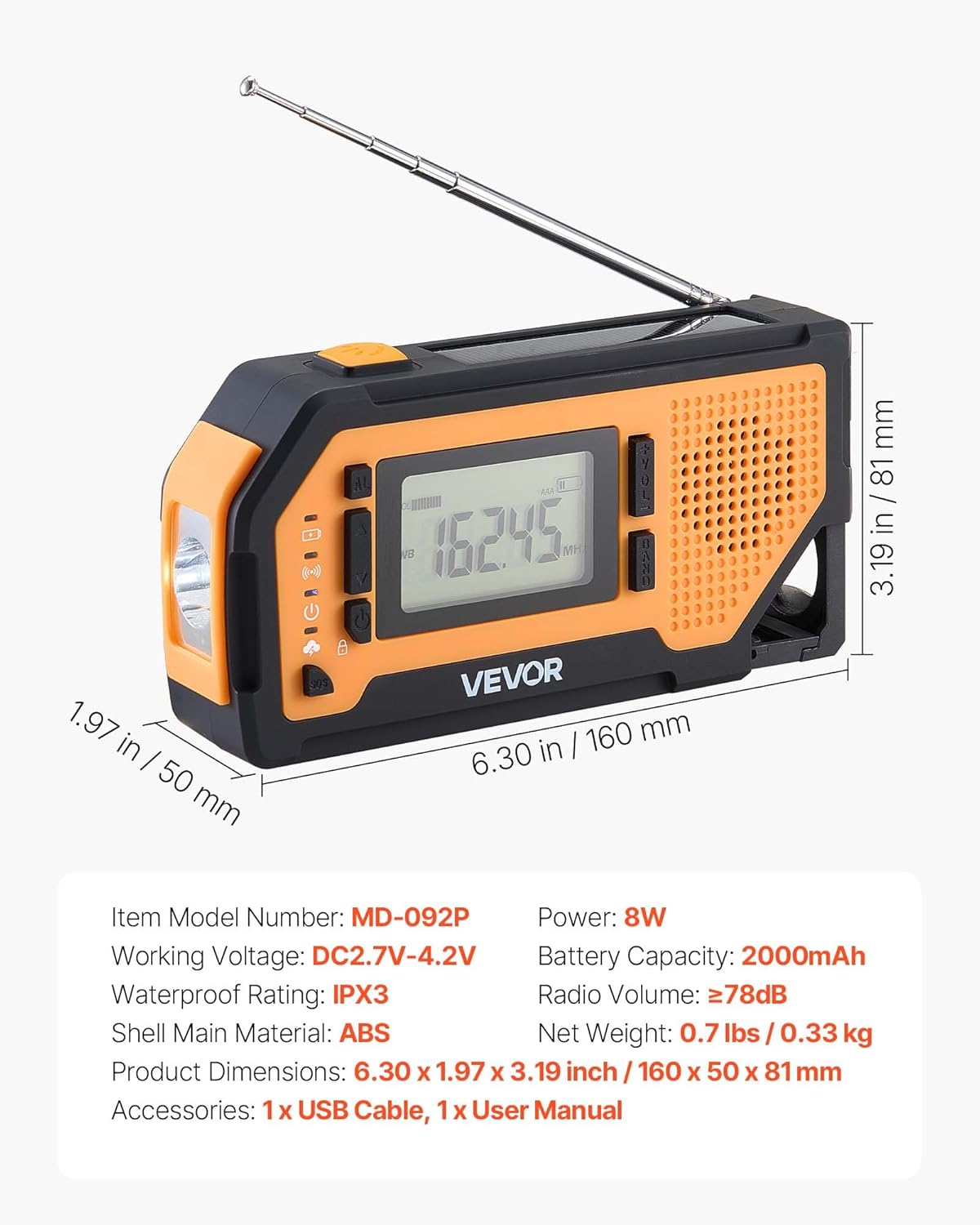
Şəkil: Ətraflı view of the VEVOR MD-092P radio with its physical dimensions and key technical specifications, including model number, working voltage, power, battery capacity, waterproof rating, radio volume, shell material, net weight, and included accessories.
| Model nömrəsi | MD-092P |
| Məhsul Ölçüləri | 6.3 x 1.97 x 3.19 düym (160 x 50 x 81 mm) |
| Maddə Çəkisi | 11.7 unsiya (0.33 kq) |
| Batareya Tutumu | 2000mAh (Built-in Nonstandard Battery) |
| Güc mənbəyi | Battery Powered (USB, Solar, Hand Crank, AAA) |
| İşçi cildtage | DC2.7V-4.2V |
| Güc Çıxışı | 8W |
| Radio Qrupları Dəstəklənir | FM, AM, WB (7-Band NOAA) |
| Suya davamlı reytinq | IPX3 |
| Shell Main Material | ABS |
| Radio Səs | ≥78dB (SOS Alarm) |
| Bağlantı texnologiyası | USB |
| Daxil olan komponentlər | Emergency Weather Radio, USB Cable, Owner's Manual |
9. Zəmanət və Dəstək
VEVOR məhsulları davamlılıq və performans üçün nəzərdə tutulmuşdur. Zəmanət məlumatı və ya texniki dəstək üçün rəsmi VEVOR-a müraciət edin websaytına daxil olun və ya birbaşa müştəri xidmətləri ilə əlaqə saxlayın. Satınalma qəbzinizi zəmanət iddiaları üçün satınalmanın sübutu kimi saxlayın.
Note: Specific warranty terms may vary by region and product. Please consult the VEVOR official channels for the most accurate and up-to-date information.