1. Giriş
This manual provides essential information for the setup, operation, and maintenance of your LILYGO T-Beam V1.2 Meshtastic ESP32 LoRa WiFi BLE GPS TTGO Development Board. This board integrates an ESP32 microcontroller with LoRa, WiFi, Bluetooth, and GPS capabilities, making it suitable for various IoT and communication projects. Please read these instructions carefully before using the device.
2. Məhsul bitdiview
2.1 Əsas Xüsusiyyətlər
- Mikro nəzarətçi: ESP32 with 4MB Flash and 8MB PSRAM
- Simsiz əlaqə: Wi-Fi, Bluetooth 4.2, LoRa (915Mhz)
- GPS Modulu: NEO-6M for positioning and timing
- Güc idarəetməsi: AXP2101 PMU, supports USB and 18650 battery power
- Bortda olan funksiyalar: 3 user-programmable buttons (Power, IO38, Reset)
- LoRa Transceiver: High sensitivity (-148 dBm), 300 kbps transceive rate (SX1276)
2.2 Paketin məzmunu
- LILYGO T-Beam V1.2 Development Board (915Mhz)
- LoRa antenası
- USB kabel
- Unsoldered OLED Screen
- Pin Başlıqları

Figure 1: LILYGO T-Beam V1.2 Development Board with included antenna and pin headers.

Figure 2: Internal component layout of the T-Beam V1.2 board, highlighting the ESP32, LoRa module, GPS module, and AXP2101 charging IC.
3. Quraşdırma
3.1 Connecting the LoRa Antenna
Carefully screw the provided LoRa antenna onto the SMA connector on the board. Ensure it is finger-tight to establish a secure connection. Do not overtighten.
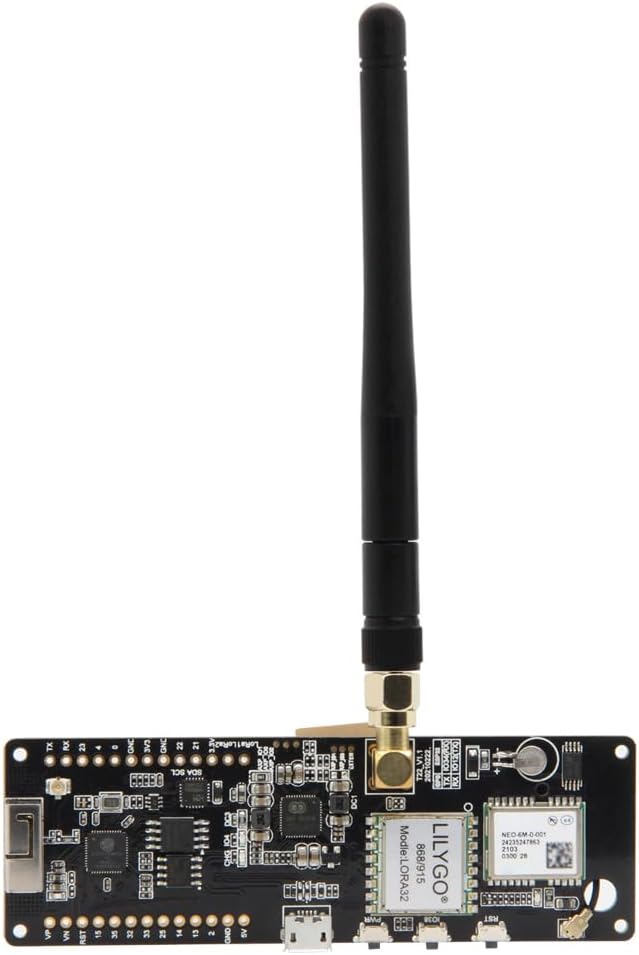
Figure 3: The LoRa antenna properly connected to the T-Beam V1.2 board.
3.2 OLED Screen Installation (Optional)
The OLED screen is provided unsoldered. If you wish to use it, you will need to solder it to the designated pins on the board (VCC, GND, SCL, SDA). Refer to the pinout diagram in Section 4.3 for correct connections.
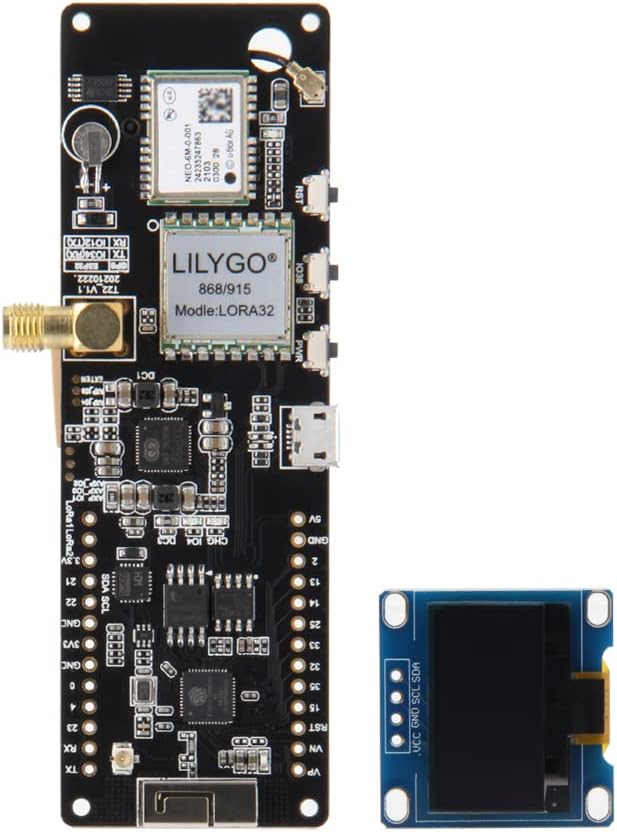
Figure 4: T-Beam V1.2 board with an OLED screen attached (requires soldering).
3.3 Enerji təchizatı
The LILYGO T-Beam V1.2 can be powered via two methods:
- USB-C portu: Connect the provided USB cable to the USB-C port on the board and to a 5V power source (e.g., computer USB port, USB wall adapter).
- 18650 Batareya: Insert a 3.7V 18650 Li-ion battery into the battery holder on the back of the board. Ensure correct polarity (+/-) as indicated on the holder. The board includes a charging circuit for the 18650 battery when powered via USB.

Figure 5: The 18650 battery holder on the reverse side of the T-Beam V1.2 board.

Figure 6: Standard dimensions for an 18650 battery (18mm diameter, 65mm length).
4. Əməliyyat Təlimatları
4.1 Əsas əməliyyat
The board features three buttons for basic interaction:
- Güc düyməsi: Controls the main power to the board. Press and hold to turn on/off.
- IO38 Button: A general-purpose input/output button, typically used for user interaction or specific functions defined by your firmware.
- Sıfırlama düyməsi: Restarts the ESP32 microcontroller.
4.2 LED göstəriciləri
The T-Beam V1.2 board includes two LED indicators:
- LED1 (Charging Indicator): Illuminates when the 18650 battery is charging via USB.
- LED2 (GPS Working Indicator): Indicates activity or status of the GPS module.
4.3 Pinout Diagram
Understanding the pinout is crucial for connecting external components and programming. Refer to the diagram below for detailed pin assignments.

Figure 7: Comprehensive pinout diagram for the LILYGO T-Beam V1.2, including GPIOs, power rails, and module-specific connections.
5. Baxım
- Təmizləmə: Use a dry, soft cloth to clean the board. Avoid liquids or abrasive cleaners.
- Yaddaş: İstifadə edilmədikdə lövhəni quru, antistatik mühitdə saxlayın.
- Batareyaya qulluq: If using an 18650 battery, ensure it is of good quality and handle it with care. Do not short-circuit or expose to extreme temperatures. Remove the battery if the device will not be used for an extended period.
- Antena: Ensure the LoRa antenna remains securely connected during operation to prevent damage to the LoRa module.
6. Giderme
- Lövhə İşləmir:
- USB kabel bağlantısını və güc mənbəyini yoxlayın.
- If using an 18650 battery, ensure it is charged and correctly inserted with proper polarity.
- Güc düyməsini bir neçə saniyə basıb saxlayın.
- No LoRa Communication:
- Verify the LoRa antenna is securely attached.
- Ensure your firmware is correctly configured for the 915Mhz frequency band.
- Check LoRa module initialization in your code.
- GPS Not Acquiring Fix:
- Cihazın şəffaf olduğundan əmin olun view of the sky. GPS signal acquisition can take several minutes.
- Verify GPS module initialization and data parsing in your firmware.
- Check the GPS Working Indicator LED (LED2) for activity.
- OLED Screen Not Displaying:
- Confirm the OLED screen is correctly soldered and connected to the I2C pins (SDA, SCL).
- Verify your firmware includes the correct OLED library and initialization code.
7. Spesifikasiyalar

Figure 8: Summary of key technical specifications for the T-Beam V1.2 board.
| Xüsusiyyət | Təsvir |
|---|---|
| MCU | ESP32 (4MB Flash, 8MB PSRAM) |
| Simsiz Protokol | Wi-Fi, Bluetooth 4.2 |
| LoRa Tezliyi | 915Mhz (SX1276 Transceiver) |
| GPS modulu | NEO-6M |
| Enerji İdarəetmə Bölməsi (PMU) | AXP2101 |
| Elektrik təchizatı rejimi | USB-C (5V), 18650 Battery |
| Bort Düymələr | Power, IO38, Reset |
| Daxil olan komponentlər | USB cable, unsoldered OLED screen |
| LoRa Antena Bağlayıcısı | RG316 |
| İşləmə temperaturu | Refer to ESP32 and module datasheets |
8. Zəmanət və Dəstək
For warranty information and technical support, please refer to the official LILYGO website or contact your retailer. Keep your purchase receipt for warranty claims. Firmware updates and additional resources may be available on the manufacturer's product page or community forums.


