1. Giriş
The Ikan DS1 Beholder Gimbal is a 3-axis gyro-stabilized brushless motor gimbal designed to provide smooth, stable footage for DSLR and mirrorless cameras. It is engineered for portability and ease of use, supporting cameras weighing up to 3.7 lbs (1.7 kg). This manual provides essential information for the proper setup, operation, and maintenance of your DS1 Beholder Gimbal.

Figure 1.1: The Ikan DS1 Beholder Gimbal with a DSLR camera attached, demonstrating its primary function as a camera stabilizer.
2. Paketin məzmunu
Zəhmət olmasa, bütün aşağıdakı elementlərin paketinizə daxil olduğunu yoxlayın:
- Gimbal Stabilizator
- Tez buraxılış plitəsi
- Camera Offset Bracket
- Three Batteries (Type 18650)
- Batareya tutacağı
- Batareya qapağı
- Mikro USB kabel
- USB LED işığı
- Laser Cut Foam Soft Carry Case

Figure 2.1: All components of the Ikan DS1 Beholder Gimbal stored within its protective carry case.
3. Məhsulun xüsusiyyətləri
- 3-Axis Gyro Stabilized Brushless Motors: Ensures smooth and stable video footage by counteracting unwanted camera movements across pan, tilt, and roll axes.
- Camera Weight Capacity: Supports DSLR and mirrorless cameras weighing up to 3.7 lbs (1.7 kg).
- Lithium Battery Powered: Utilizes rechargeable lithium-ion batteries for extended operation.
- 3/8” - 16 Tripod Mount Socket: Allows for easy mounting on tripods, monopods, or other support systems.
- Illuminated ON-OFF Switch/Battery Indicator: Provides clear indication of power status and remaining battery life.
4. Quraşdırma Bələdçisi
4.1 Batareyanın quraşdırılması
- Unscrew the battery cap from the bottom of the gimbal handle.
- Insert the three 18650 lithium-ion batteries into the battery holder, ensuring correct polarity as indicated.
- Place the battery holder with batteries into the gimbal handle.
- Securely screw the battery cap back onto the handle.

Figure 4.1: The battery holder with three 18650 batteries being inserted into the gimbal handle.
4.2 Kameranın quraşdırılması
- Attach the quick release plate to the bottom of your camera using the provided screw. Ensure it is securely fastened.
- If your camera setup requires it, use the camera offset bracket to adjust the camera's position for optimal balance.
- Slide the quick release plate with the camera into the gimbal's camera mount.
- Lock the quick release mechanism to secure the camera.
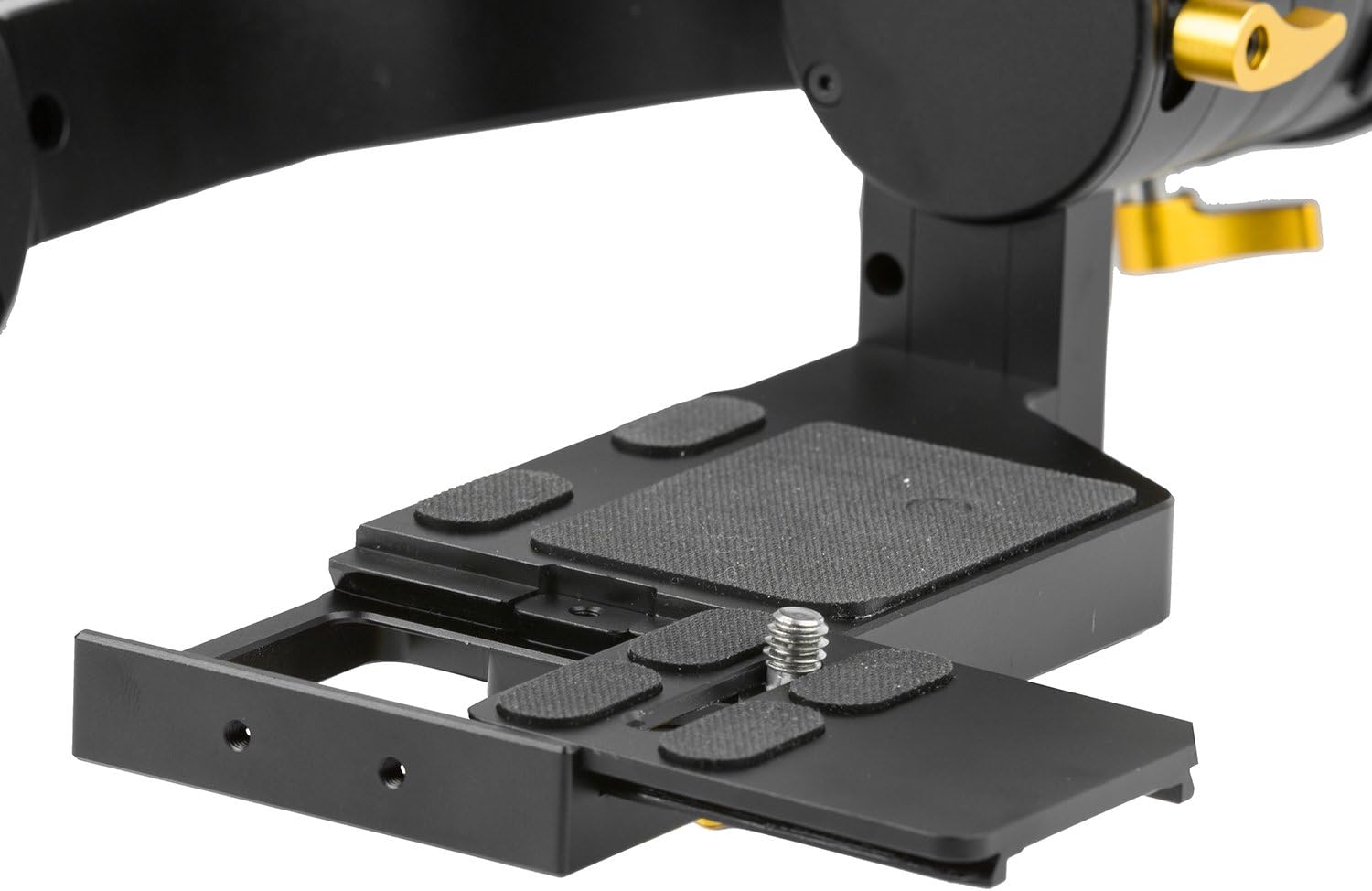
Figure 4.2: The quick release plate and camera mounting area, showing adjustment points for camera placement.
4.3 Balancing the Camera
Proper balancing is critical for optimal gimbal performance and to prevent motor strain. The camera must be balanced on all three axes (tilt, roll, and pan) before powering on the gimbal.
- Əyilmə Oxunun Balansı: Adjust the camera's forward/backward position on the quick release plate until the camera remains level when tilted forward or backward.
- Fırlanma Oxunun Balansı: Adjust the camera's left/right position until the camera remains level when rotated along its roll axis.
- Pan Ox Balansı: Hold the gimbal horizontally and adjust the pan arm until the gimbal remains stable without drifting to one side.
Qeyd: Cameras with heavy front lenses may require careful adjustment or an offset bracket to achieve proper balance. Ensure the camera can move freely without obstruction from the gimbal body.
5. Əməliyyat
5.1 Yandırma/Söndürmə
Press and hold the illuminated ON-OFF switch located on the handle to power the gimbal on or off. The indicator light will show the battery status.
5.2 İş rejimləri
The DS1 Beholder Gimbal typically features multiple operating modes to suit various shooting scenarios. Refer to the quick start guide or manufacturer's website for specific mode activation and functionality. Common modes include:
- İzləmə rejimi: The camera smoothly follows the operator's pan and tilt movements.
- Kilid rejimi: The camera maintains a fixed direction, regardless of the operator's movements.
- Ters çevrilmiş rejim: Allows for underslung shots by holding the gimbal upside down.
İpucu: Practice with the gimbal in a safe environment to familiarize yourself with its controls and modes before critical shoots.
6. Baxım
- Təmizləmə: Gimbalı təmizləmək üçün yumşaq, quru bir parça istifadə edin. Maye təmizləyicilərdən və ya həlledicilərdən istifadə etməkdən çəkinin.
- Yaddaş: Store the gimbal in its protective carry case in a cool, dry place when not in use. Remove batteries if storing for extended periods.
- Batareyaya qulluq: Charge batteries fully before each use. Do not overcharge or completely drain the batteries.
- Firmware Güncellemeleri: Periodically check the Ikan weboptimal performans və uyğunluğu təmin etmək üçün mövcud olan hər hansı bir proqram təminatı yeniləmələri üçün sayt.
7. Giderme
| Problem | Mümkün Səbəb | Həll |
|---|---|---|
| Gimbal shakes or vibrates uncontrollably. | Improper camera balance; camera weight exceeds limit; motor calibration issue. | Ensure camera is perfectly balanced on all axes. Verify camera weight is within 3.7 lbs. Perform a motor calibration as per manufacturer instructions. |
| Gimbal işə düşmür. | Depleted batteries; incorrect battery installation. | Charge batteries fully. Re-install batteries, ensuring correct polarity. |
| Camera movement is not smooth. | Poor balance; obstruction; low battery. | Re-balance the camera. Check for any physical obstructions. Ensure batteries are sufficiently charged. |
| Gimbal motors make unusual noises. | Overloaded motors due to imbalance or excessive weight. | Immediately power off the gimbal. Re-balance the camera. Reduce camera payload if it exceeds the specified limit. |
8. Spesifikasiyalar
| Xüsusiyyət | Detal |
|---|---|
| Model nömrəsi | DS1 |
| Brend | İkan |
| Məhsul Ölçüləri | 3.9 x 14.8 x 7.9 düym (9.9 x 37.6 x 20.1 sm) |
| Maddə Çəkisi | 4 funt (1.8 kq) |
| Uyğun Cihazlar | Cameras (DSLRs and Mirrorless up to 3.7 lbs / 1.7 kg) |
| Batareyalar | 3 Lithium Ion batteries (Type 18650, included) |
| Tripod montajı | 3/8” - 16 Socket |
| Rəng | Qara |
| İstehsalçı | İkan |
| UPC | 847983015429, 715658504151 |
9. Zəmanət və Dəstək
For warranty information, technical support, or service inquiries, please contact Ikan customer support directly. Details can typically be found on the official Ikan websaytda və ya məhsul qablaşdırmasının içərisində.
Websayt: www.ikancorp.com


