
Introduction
Welcome to the Mr. Coffee 12-Cup Programmable Coffee Maker. This appliance is designed to provide versatile coffee brewing options, including hot, iced, strong, and small batch settings. Please read this manual thoroughly before first use to ensure proper operation and maintenance.

Image: The Mr. Coffee 12-Cup Programmable Coffee Maker, showcasing its ability to brew both hot coffee in a mug and iced coffee in a tall glass.
Key Features:
- Hot or Iced Coffee: Select between Regular, Strong, or Iced coffee.
- Cool Brew Cover: Maintains iced coffee temperature during brewing.
- Small Batch Setting: Optimizes flavor for 1 to 4 cups.
- Easy Clean Cycle: Automated cleaning function.
- Programmable Brewing: Set brew time in advance.
- Warming Plate: Keeps coffee hot for up to 4 hours.
- Accessories: Includes coffee scoop and Cool Brew Warming Plate Cover.
- Capacity: 12 cups (60 fl oz / 1.774 L).
Setup and First Use
- Unpack: Remove all packaging materials and accessories.
- Clean Components: Wash the carafe, filter basket, and Cool Brew Warming Plate Cover in warm, soapy water. Rinse thoroughly.
- Position: Place the coffee maker on a flat, stable surface.
- Initial Rinse:
- Fill the water reservoir with clean water up to the 12-cup mark.
- Place an empty filter basket with no coffee grounds into the filter basket holder.
- Place the empty carafe on the warming plate.
- Run a full brew cycle without coffee grounds to clean the internal components. Discard the water.
- Power Connection: Plug the coffee maker into a standard 120-volt AC outlet.
Operating Instructions
1. Brewing Hot Coffee (Regular or Strong)
- Fill Water Reservoir: Open the lid and fill the water reservoir with fresh, cold water to your desired level (up to 12 cups).
- Add Coffee Grounds: Place a paper filter (basket style) or the reusable filter (if included) into the filter basket. Add your desired amount of ground coffee. For best results, use 1 tablespoon of ground coffee per cup.
- Position Carafe: Ensure the empty carafe is placed correctly on the warming plate.
- Select Brew Strength: Press the STRONG button if you prefer a bolder coffee. The indicator light will illuminate. For regular strength, no selection is needed.
- Start Brewing: Press the BREW/STOP button to begin brewing. The brew indicator light will turn on.
- Serve: Once brewing is complete, the warming plate will keep the coffee hot for up to 4 hours before automatically shutting off.

Image: The Mr. Coffee maker with a glass mug of hot coffee, illustrating a typical hot brew setup.
2. Brewing Iced Coffee
- Fill Water Reservoir: Fill the water reservoir with fresh, cold water to the designated "ICED" fill line (usually 6 cups for a 12-cup machine, check specific markings).
- Add Coffee Grounds: Place a paper filter or reusable filter into the filter basket. Add your desired amount of ground coffee. For iced coffee, a slightly stronger ratio is often recommended (e.g., 1.5 tablespoons per cup).
- Prepare Carafe: Fill the carafe with ice cubes up to the "ICED" fill line. Place the Cool Brew Warming Plate Cover over the warming plate and then place the carafe with ice on top of the cover.
- Select Iced Brew: Press the ICED button. The indicator light will illuminate.
- Start Brewing: Press the BREW/STOP button. The brew indicator light will turn on.
- Serve: Once brewing is complete, remove the carafe and stir the iced coffee. Serve immediately over additional ice if desired.

Image: A tall glass of iced coffee with cream swirling, demonstrating the refreshing result of the iced brew setting.
3. Small Batch Brewing (1-4 Cups)
The Small Batch Setting optimizes brewing for smaller quantities to ensure full flavor.
- Follow steps 1-3 for brewing hot coffee.
- Press the 1-4 CUPS button. The indicator light will illuminate.
- Press the BREW/STOP button to start.

Image: Two clear glass mugs filled with hot coffee, illustrating the small batch brewing capability.
4. Programmable Brewing (Brew Later)
Set your coffee maker to brew at a specific time.
- Prepare the coffee maker for brewing as described in the "Brewing Hot Coffee" section (water, grounds, carafe).
- Press the BREW LATER button. The indicator light will flash.
- Use the HR and MIN buttons to set your desired brew time.
- Press BREW LATER again to confirm. The indicator light will stop flashing and remain on, indicating the timer is set.
- The coffee maker will automatically start brewing at the programmed time.
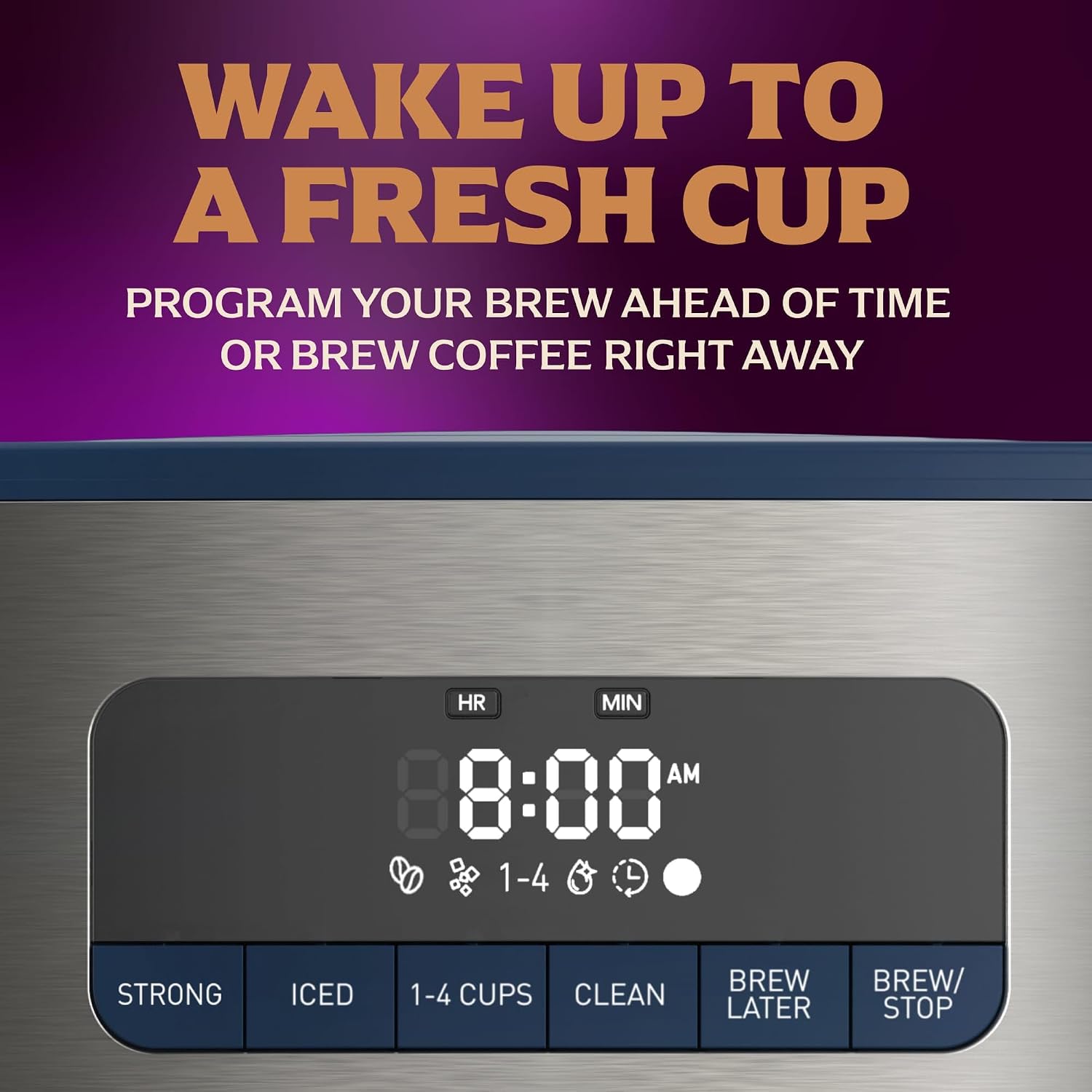
Image: A close-up view of the coffee maker's digital control panel, displaying "8:00 AM" and various brew options, highlighting the programmable feature.
Maintenance and Cleaning
Regular cleaning ensures optimal performance and coffee taste.
Daily Cleaning:
- Carafe and Filter Basket: Wash the carafe, lid, and filter basket in warm, soapy water after each use. These parts are top-shelf dishwasher safe.
- Exterior: Wipe the exterior of the coffee maker with a soft, damp cloth. Do not immerse the coffee maker in water.
Descaling (Monthly or as needed):
Mineral deposits can build up over time, affecting performance. The CLEAN button indicator will illuminate when descaling is recommended.
- Prepare Solution: Fill the water reservoir with 4 cups of undiluted white vinegar.
- Start Clean Cycle: Place an empty carafe on the warming plate. Press the CLEAN button. The indicator light will illuminate.
- Run Cycle: The coffee maker will run a cleaning cycle. This cycle may pause periodically. Do not interrupt.
- Rinse: Once the clean cycle is complete, discard the vinegar solution. Run 2-3 full cycles with fresh, cold water to rinse out any remaining vinegar.

Image: A hand pressing the "CLEAN" button on the coffee maker's control panel, indicating the start of the automated cleaning function.
Troubleshooting
| Problem | Possible Cause | Solution |
|---|---|---|
| Coffee does not brew. | Not plugged in; water reservoir empty; brew cycle not started. | Ensure unit is plugged in. Fill water reservoir. Press BREW/STOP. |
| Coffee tastes weak. | Insufficient coffee grounds; incorrect water-to-coffee ratio; clogged unit. | Use more coffee grounds. Try the STRONG brew setting. Perform a descaling cycle. |
| Coffee overflows from filter basket. | Too much coffee grounds; filter not seated correctly; clogged unit. | Reduce coffee grounds. Ensure filter is properly seated. Perform a descaling cycle. |
| Iced coffee is not cold enough. | Insufficient ice in carafe; Cool Brew Cover not used. | Ensure carafe is filled with ice to the marked line. Use the Cool Brew Warming Plate Cover. |
Specifications
- Brand: Mr. Coffee
- Model Number: 2245244
- Capacity: 12 cups (approx. 60 fl oz / 1.774 L)
- Color: Abyss Blue
- Product Dimensions (D x W x H): 8.5" x 10.3" x 14.1"
- Wattage: 1100 Watts
- Voltage: 120 Volts
- Coffee Input Type: Ground coffee
- Special Features: Adjustable Brew Strength, Iced Coffee Brew, Small Batch Setting, Programmable, Automatic Shut-off
- Included Components: Coffee Maker, Glass Carafe, Coffee Scoop, Cool Brew Warming Plate Cover

Image: The Mr. Coffee 12-Cup Programmable Coffee Maker with its key dimensions (depth, width, height) clearly labeled.
Warranty and Support
This Mr. Coffee product comes with a limited warranty. For specific warranty details, please refer to the documentation included with your purchase or visit the official Mr. Coffee website.
For customer support, troubleshooting assistance, or to inquire about replacement parts, please contact Mr. Coffee customer service or visit their official brand store:
Visit the Official Mr. Coffee Store on Amazon
An installation manual is also available for download: Installation Manual (PDF)


