
1. Product Overview
The LongPlus 5MP 3K SafeView Window Security Camera is designed for indoor security, offering advanced features for monitoring outdoor areas through a window. Key features include 3K 5MP resolution, Blacklight Full-Color Night Vision, AI Person & Vehicle Detection, and dual-band Wi-Fi 6 connectivity. It supports 24/7 recording with local and cloud storage options and offers flexible mounting solutions.
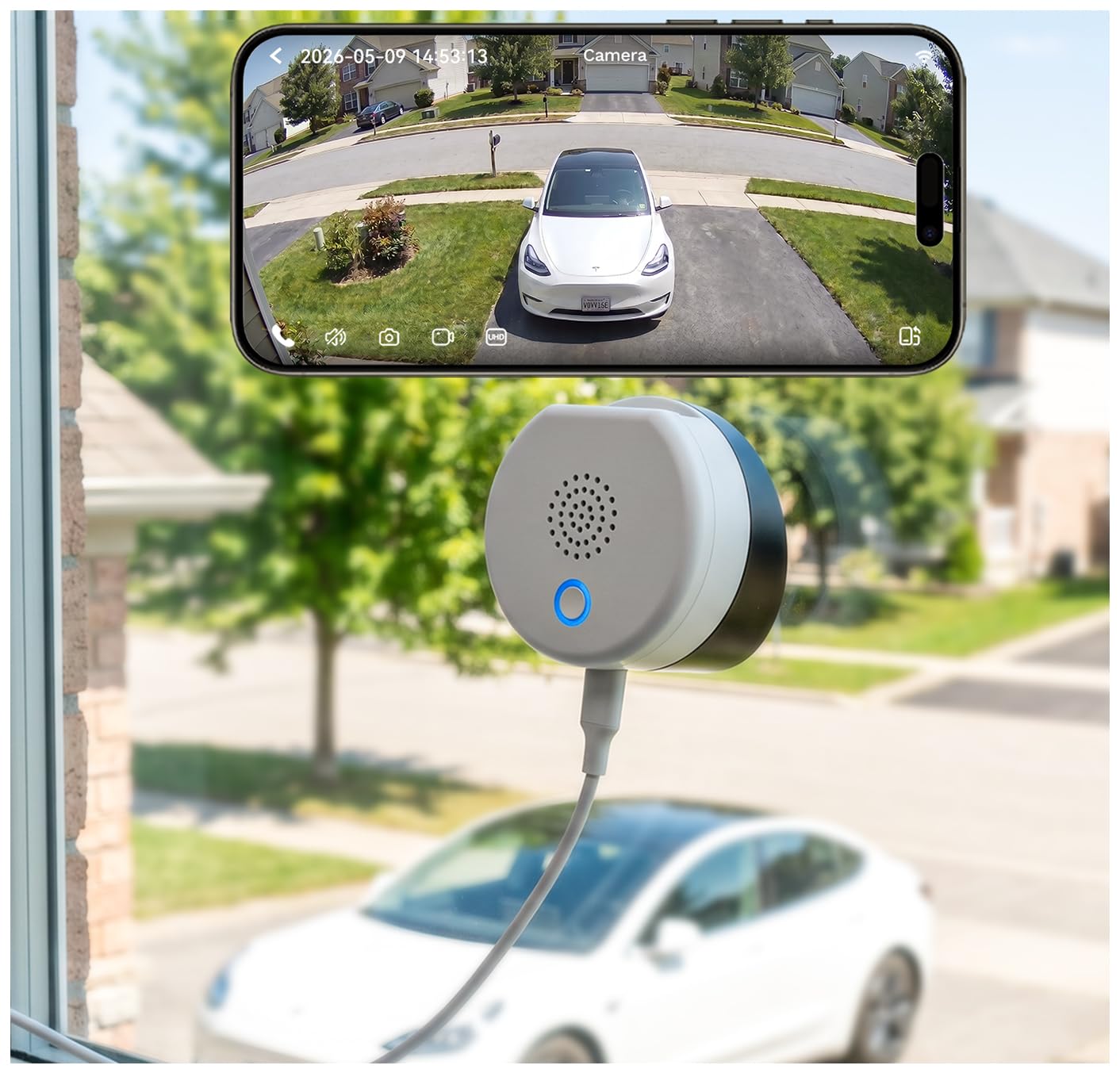
Image: LongPlus 5MP 3K SafeView Window Security Camera, showcasing its compact design and window-mounted setup.
Key Features:
- 3K 5MP Blacklight Full-Color Night Vision: Captures clear, vivid color video in low light through anti-glare and anti-reflection optics.
- Flexible Mounting: Includes both a flat mount and a 20° tilt mount for various viewing angles.
- Wi-Fi 6 Dual-Band: Supports 2.4GHz and 5GHz Wi-Fi 6 for stable and reliable connections.
- AI Person & Vehicle Detection: Smart detection with instant alerts and two-way audio communication.
- 24/7 Recording: Supports continuous recording to a microSD card (up to 512GB, sold separately) and optional cloud storage.
2. Setup and Installation
2.1 What's Included in the Box:

Image: Diagram showing the camera's components and the accessories included in the package.
- Window Security Camera x 1
- Charging Cable
- 9.84ft/3m USB-C Power Cable x 1
- Flat Mount x 1
- 20° Tilt Mount x 1
- Instruction Manual
2.2 Choosing a Mounting Angle:
The camera comes with two mounting options to suit different viewing needs:
- Flat Mount: For level views, ideal for monitoring areas directly in front of the window.
- 20° Tilt Mount: Provides a downward viewing angle, suitable for monitoring parking spaces, yards, or areas below upper-floor windows.

Image: Visual comparison of the camera mounted with the flat mount and the 20-degree tilt mount, demonstrating different viewing angles.
2.3 No-Drill Installation Steps:
The camera features a peel-and-stick installation method, requiring no drilling and preventing wall damage.
- Step 1: Clean the Window. Ensure both sides of the window surface are clean and dry for optimal adhesion.
- Step 2: Peel Off Protective Film. Remove the protective film from the adhesive side of your chosen mount (flat or 20° tilt).
- Step 3: Attach the Camera. Firmly press the camera with the mount onto the desired spot on the window.

Image: Step-by-step visual guide for the no-drill installation process, showing cleaning the window, peeling the film, and attaching the camera.
2.4 App Download and Pairing:
To set up and control your camera, download the SV360 app and follow these steps:
- Step 1: Download SV360 APP. Search for 'SV360' in the App Store (iOS) or Google Play Store (Android) and install the application.
- Step 2: Enable Wi-Fi and Bluetooth. On your smartphone, ensure both Wi-Fi and Bluetooth are enabled.
- Step 3: Add Device. Open the SV360 app, tap the '+' button, and select 'Add Wireless Camera'. The app will discover nearby devices via Bluetooth.
- Step 4: Connect to Wi-Fi. Select your camera from the discovered devices, enter your Wi-Fi network name and password (supports 2.4GHz and 5GHz Wi-Fi 6).

Image: Screenshots illustrating the SV360 app interface for downloading, enabling Wi-Fi/Bluetooth, adding a device, and connecting to a Wi-Fi network.
2.5 Setup Video Guide:
Video: Official LongPlus Safeview Window Security Camera overview and setup guide. This video demonstrates the camera's features and initial setup process.
3. Operating Instructions
3.1 Powering On:
Connect the provided USB-C power cable to the camera and a suitable power adapter (5V). The camera will power on automatically.
3.2 Using the SV360 App:
The SV360 app is your primary interface for controlling and monitoring the camera. Through the app, you can:
- View live video feed.
- Access recorded footage.
- Adjust camera settings (e.g., detection sensitivity, night vision mode).
- Utilize two-way audio to communicate.
- Receive instant alerts.
3.3 Video Quality and Night Vision:
The camera delivers sharp 3K 5MP video resolution with 8x digital zoom. Its Blacklight Full-Color Night Vision technology ensures clear, natural-looking color images even in low-light conditions, surpassing traditional IR or LED spotlight night vision.

Image: Comparison of LongPlus 5MP 3K video quality against other 3MP 2K cameras, highlighting superior clarity.

Image: Comparison of LongPlus Blacklight Full-Color Night Vision with LED Spotlight and Traditional IR Night Vision, demonstrating enhanced color and clarity.
3.4 Smart AI Detection and Alerts:
The camera's AI capabilities allow it to intelligently detect people and vehicles, reducing false alarms. When relevant activity is detected, you will receive instant alerts on your smartphone via the SV360 app. The two-way audio feature enables remote communication.

Image: Illustration of the camera's AI detection identifying a person and a vehicle, with an accompanying app alert.
3.5 Dual-Band Wi-Fi 6 Connectivity:
The camera supports both 2.4GHz and 5GHz Wi-Fi 6, providing lower latency, better signal coverage, and a more stable connection. One-tap Bluetooth pairing simplifies the initial setup process.

Image: Diagram showing the camera's support for 2.4GHz and 5GHz Wi-Fi 6, highlighting benefits like lower latency and better signal coverage.
3.6 Recording and Storage Options:
The camera offers continuous 24/7 recording. You can store footage locally on a microSD card (up to 512GB, sold separately) or opt for cloud storage for event backup and remote access. A 7-day cloud storage trial is available for new users.

Image: Visual representation of the camera's support for both SD card storage (up to 512GB) and optional cloud storage with a 7-day free trial.
3.7 Multiple Security Uses:
The LongPlus SafeView camera is versatile and can be used for various indoor security applications, including:
- Front Door Security
- Driveway Monitoring
- Backyard Protection
- Office Security

Image: Collage showing different scenarios where the camera can be used, such as monitoring a front door, driveway, backyard, or office.
4. Maintenance
Regular maintenance ensures optimal performance and longevity of your LongPlus SafeView Window Security Camera.
4.1 Cleaning:
- Gently wipe the camera lens and body with a soft, dry, lint-free cloth.
- Avoid using harsh chemicals, cleaning solvents, or abrasive materials, as these can damage the camera's finish or optics.
- Ensure the window surface where the camera is mounted is clean to maintain clear views and strong adhesion.
4.2 Firmware Updates:
- Periodically check the SV360 app for available firmware updates.
- Keeping your camera's firmware up-to-date ensures you have the latest features, security enhancements, and bug fixes.
- Follow the in-app instructions carefully when performing updates.
5. Troubleshooting
If you encounter issues with your LongPlus SafeView Window Security Camera, refer to the following common troubleshooting steps:
5.1 Connectivity Issues:
- No Wi-Fi Connection: Ensure your Wi-Fi router is working correctly and the camera is within range. Verify the Wi-Fi password entered in the app is correct.
- Weak Signal: If using 2.4GHz, try switching to 5GHz if your router supports it, or move the camera closer to the router. Wi-Fi 6 dual-band helps maintain a stable connection.
- Bluetooth Pairing Failure: Ensure Bluetooth is enabled on your phone and the camera is in pairing mode. Try restarting both devices.
5.2 Image/Video Quality Issues:
- Blurry Image: Clean the camera lens and the window surface. Ensure the camera is securely mounted and not vibrating.
- Poor Night Vision: Check for obstructions on the window or external light sources causing glare. The anti-glare optics are designed to minimize this, but extreme conditions can still affect performance.
5.3 Detection and Alerts:
- No Alerts: Verify that AI detection is enabled in the SV360 app and notification settings are configured correctly on your phone.
- False Alerts: Adjust the detection sensitivity settings within the app to reduce unwanted notifications.
5.4 Camera Not Responding:
- Power Cycle: Disconnect the power cable, wait a few seconds, and then reconnect it.
- Reset Button: If the camera remains unresponsive, locate the reset button (refer to the 'What's Included' diagram) and press it for 5-10 seconds until the indicator light changes, then re-pair the camera with the app.
6. Specifications
Detailed technical specifications for the LongPlus 5MP 3K SafeView Window Security Camera (Model CDK1-W1X5-B).
| Feature | Specification |
|---|---|
| Model Name | CDK1-W1X5-B |
| Video Capture Resolution | 3K, 5MP |
| Effective Still Resolution | 5 MP |
| Frame Rate | Maximum 15fps |
| Viewing Angle | 108 degrees |
| Night Vision | Blacklight Full-Color Night Vision (Night Color) |
| Night Vision Range | 66 feet |
| Connectivity Technology | Wired (Power), Wireless (Wi-Fi, Bluetooth) |
| Wireless Technology | Bluetooth, Wi-Fi 6 (2.4GHz & 5GHz Dual-Band) |
| Storage Options | Micro SD (up to 512GB), Cloud Storage |
| Power Source | Corded Electric (5 volts) |
| Mount Type | Window Mount (Flat & 20° Tilt) |
| Indoor/Outdoor Usage | Indoor (for outdoor monitoring) |
| AI Features | AI Person & Vehicle Detection |
| Alert Type | Audio and Motion |
| Item Dimensions | 2.5 x 1.5 x 2.5 inches |
| Enclosure Material | Acrylonitrile Butadiene Styrene (ABS) |
7. Warranty Information
LongPlus products are designed for reliability and performance. For specific warranty terms and conditions applicable to your LongPlus 5MP 3K SafeView Window Security Camera, please refer to the warranty card included in your product packaging or visit the official LongPlus website. Typically, LongPlus offers a limited warranty covering manufacturing defects from the date of purchase.
Please retain your proof of purchase for any warranty claims.
8. Support
For further assistance, technical support, or inquiries regarding your LongPlus SafeView Window Security Camera, please use the following resources:
- SV360 App: The application often includes a 'Help' or 'FAQ' section with answers to common questions and troubleshooting guides.
- Online Support: Visit the official LongPlus website for comprehensive support resources, including FAQs, user manuals, and contact information.
- Customer Service: If you require direct assistance, please contact LongPlus customer service through the contact details provided on their official website or within the SV360 app.