
1. Important Safety Information
Please read all instructions and warnings carefully before installation and operation of the PowMr Hybrid Solar Inverter. Failure to follow these instructions may result in electric shock, fire, serious injury, or death, and may damage the inverter or other equipment.
- Installation must be performed by qualified personnel.
- Ensure all power sources (PV, battery, AC grid) are disconnected before wiring or servicing.
- Do not disassemble the inverter. There are no user-serviceable parts inside.
- Install in a well-ventilated area, away from flammable materials and moisture.
- Verify correct polarity for all DC connections (PV and battery).
- Ensure proper grounding of the inverter.
- Always verify your continuous load requirements and startup surge wattage by summing up connected appliances to ensure they operate within the rated output capacity of this 4000W inverter device.
2. Product Overview
The PowMr 4000W 24V Hybrid Solar Inverter is an all-in-one solution combining a pure sine wave inverter, a solar charge controller, and a battery charger. It is designed for off-grid solar systems, providing reliable power for homes, RVs, and offices.
Key Features:
- All-in-One Design: Integrates a 4000W pure sine wave inverter, 100A MPPT solar charge controller, and battery charger.
- High Power Output: Delivers 4000W continuous power with an 8000W peak surge output.
- Efficient MPPT Charging: Up to 92.6% conversion efficiency with a maximum 500V PV open circuit voltage and 18A PV input current.
- Seamless Transfer: 10ms battery mode transfer speed prevents disruption during grid failures.
- Smart Monitoring: Built-in WiFi module for real-time tracking and parameter adjustment via smartphone app. Intuitive LCD display for operational metrics.
- Comprehensive Protection: Features overcurrent, overvoltage, short circuit, reverse connection, and thermal protection.
- Versatile Compatibility: Supports battery-less operation, lead-acid, and lithium batteries.
Package Contents:
- PowMr Hybrid Solar Inverter Charger (1 unit)
- User Manual (Physical copy)

Image 2.1: Overview of the PowMr 4000W 24V Hybrid Solar Inverter, highlighting its all-in-one functionality, pure sine wave output, MPPT charge controller, and battery charging capabilities.

Image 2.2: Illustration of the pure sine wave output provided by the inverter, ensuring stable and safe power for sensitive electronics like refrigerators, TVs, laptops, microwaves, fans, and coffee makers.
3. Setup and Installation
Proper installation is crucial for the safe and efficient operation of your inverter. Refer to the wiring diagram and technical specifications carefully.
3.1 Mounting the Inverter
- Choose a suitable location indoors, away from direct sunlight, heat sources, and moisture.
- Ensure adequate clearance around the inverter for proper ventilation and heat dissipation.
- Mount the inverter vertically on a sturdy wall using appropriate fasteners.
3.2 Wiring Connections
All wiring must comply with local electrical codes. Use appropriately sized cables for all connections.
- Grounding: Connect the inverter's ground terminal to an earth ground.
- Battery Connection: Connect the battery bank (24V) to the inverter's battery terminals (BAT+ and BAT-). Ensure correct polarity.
- PV Input: Connect the solar panel array to the PV input terminals (PV+ and PV-). Verify that the PV open circuit voltage and current are within the inverter's specifications.
- AC Input (Mains/Generator): Connect the AC grid or generator supply to the AC input terminals (L and N).
- AC Output (Load): Connect your household loads to the AC output terminals (L and N).
Warning: Double-check all connections for correct polarity and secure fastening before powering on the system.

Image 3.1: Detailed wiring diagram illustrating connections for PV modules, AC input (mains/generator), battery bank, and AC output (load). This image also includes a summary of key technical specifications for each input/output.
4. Operating Instructions
4.1 Initial Power-Up
- Ensure all wiring is correct and secure.
- Connect the battery breaker first.
- Connect the PV array breaker.
- Connect the AC input breaker (if using grid/generator).
- Turn on the inverter's power switch. The LCD display will illuminate.
4.2 LCD Display and Control Panel
The intuitive LCD screen provides real-time operational metrics. Use the buttons below the screen to navigate menus and adjust settings.
- PV Status: Displays solar panel voltage, current, and power.
- Utility Grid Status: Shows AC input voltage, frequency, and current.
- Battery Status: Indicates battery voltage, charge/discharge current, and state of charge.
- Load Levels: Displays AC output voltage, frequency, current, and power consumption.
- System Settings: Allows configuration of charging parameters, output modes, and other system preferences.
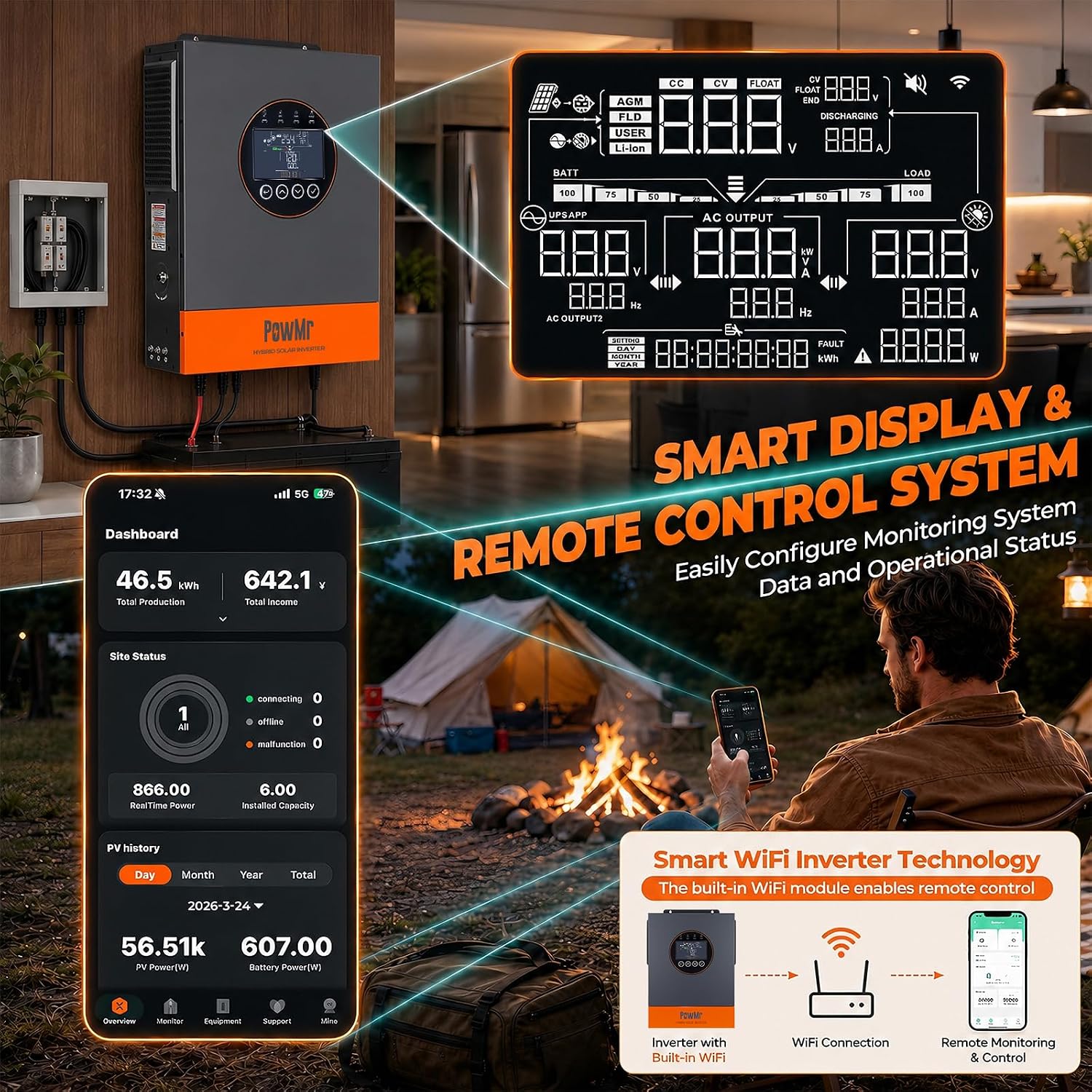
Image 4.1: The inverter's smart LCD display showing various operational parameters, alongside a smartphone screen demonstrating the remote monitoring and control capabilities via the built-in WiFi module and dedicated app.
4.3 Charging and Output Modes
The inverter supports multiple operational modes to suit different energy management needs.
- Charging Modes:
- Only Solar: Prioritizes solar power for battery charging.
- Mains & Solar Hybrid Charging: Uses both solar and grid power to charge batteries.
- Output Modes:
- Mains Bypass: Loads are powered directly by the grid/mains.
- Inverter Output: Loads are powered by the inverter from battery energy.
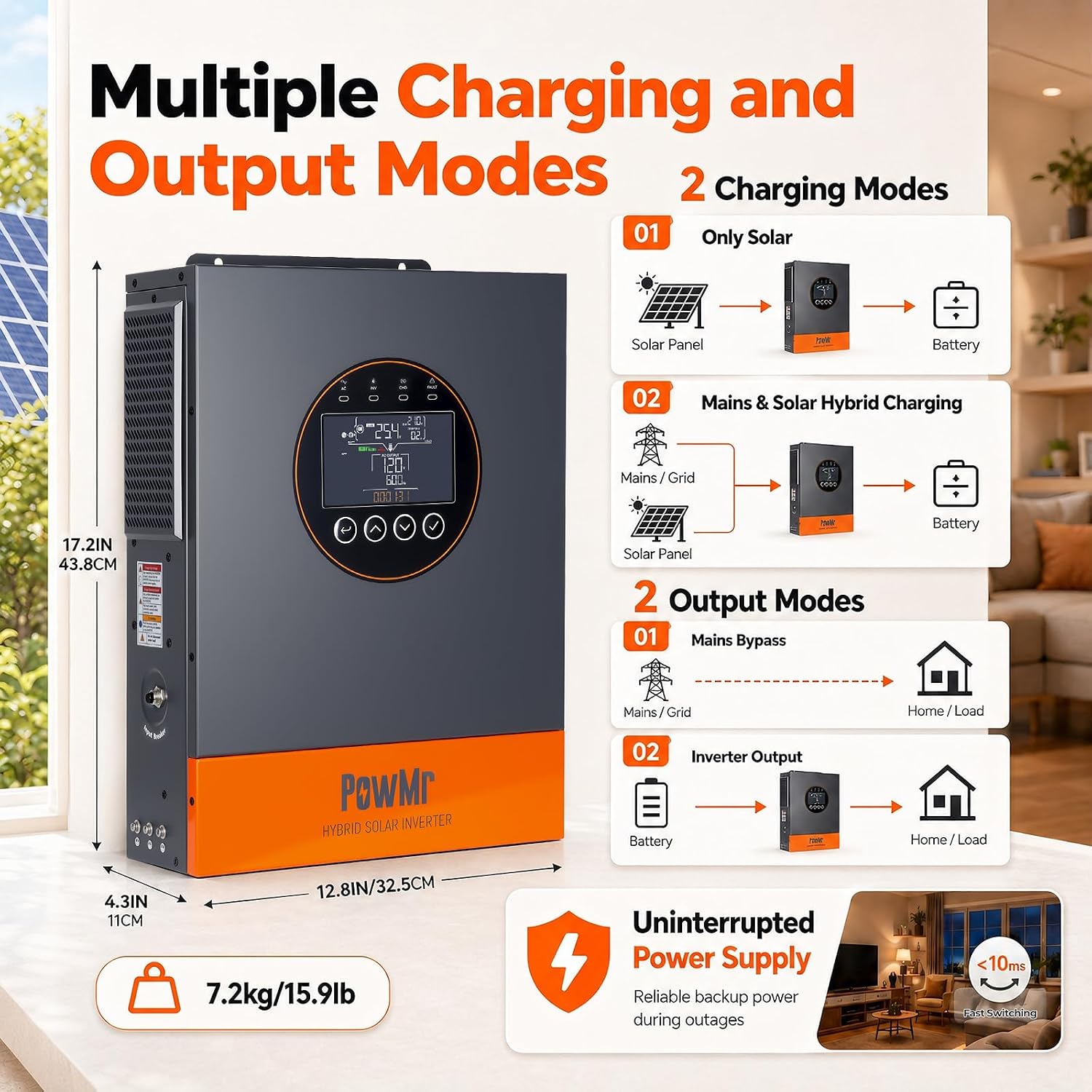
Image 4.2: Visual representation of the two charging modes (Only Solar, Mains & Solar Hybrid Charging) and two output modes (Mains Bypass, Inverter Output) available on the PowMr Hybrid Solar Inverter. The image also shows the physical dimensions of the unit.
4.4 WiFi Module and App Control
The built-in WiFi module allows for remote monitoring and control via a dedicated smartphone application. Follow the instructions in the app to connect your inverter to your local WiFi network.
- Monitor real-time system data (PV production, battery status, load consumption).
- Adjust operational parameters remotely.
- Receive alerts and notifications.
5. Maintenance
Regular maintenance ensures optimal performance and extends the lifespan of your PowMr Hybrid Solar Inverter.
- Cleaning: Periodically clean the inverter's exterior with a dry cloth. Ensure ventilation openings are free from dust and debris. Do not use liquid cleaners.
- Connections: Annually check all electrical connections (PV, battery, AC input/output) for tightness and corrosion. Tighten any loose connections.
- Ventilation: Ensure the inverter's cooling fans are operating correctly and that airflow is not obstructed.
- Battery Health: Monitor battery voltage and performance regularly, especially for lead-acid batteries, to ensure they are functioning within their optimal range.
Warning: Disconnect all power sources before performing any maintenance or inspection.
6. Troubleshooting
If you encounter issues with your inverter, refer to the following basic troubleshooting steps. For more complex problems, contact customer support.
| Problem | Possible Cause | Solution |
|---|---|---|
| Inverter not turning on | No battery power; loose battery connections; inverter switch off. | Check battery voltage; secure battery connections; turn on inverter switch. |
| No AC output | Overload; short circuit; low battery voltage; inverter fault. | Reduce load; check for short circuits; charge battery; check LCD for fault codes. |
| Low PV charging | Shaded panels; dirty panels; incorrect PV wiring; low sunlight. | Clear shading; clean panels; verify PV connections; wait for better sunlight. |
| WiFi connection issues | Incorrect WiFi password; router too far; network interference. | Re-enter password; move router closer; check router settings. |

Image 6.1: Diagram illustrating the 7-layer smart protection system of the inverter, including reverse connection, overcurrent, thermal, overvoltage, short circuit, DC component monitoring, and overvoltage load drop protection.
7. Technical Specifications
| Parameter | Value |
|---|---|
| Brand | PowMr |
| Model | 4000W 24V |
| Rated Power | 4000W |
| Peak Output Power | 8000W |
| Input Voltage (DC) | 24V |
| Output Voltage (AC) | 110V / 120V |
| Electrical Output Waveform | Pure Sine Wave |
| Frequency | 60 Hz |
| MPPT PV Voltage Range | 60-450Vdc |
| Max. PV Open Circuit Voltage | 500Vdc |
| Max. PV Input Current | 18A |
| Max. Charge Current (AC/Solar) | 100A |
| Standby Power Shutoff Efficiency | 92.6% |
| Transfer Time (APP/UPS Mode) | 10ms |
| Dimensions (L x W x H) | 12.8"L x 4.3"W x 17.2"H (32.5cm x 11cm x 43.8cm) |
| Item Weight | 15.9 pounds (7.2 kg) |
| Recommended Uses | Farm, Home, Off Grid Solar System, Office, RV |
8. Warranty and Support
The PowMr Hybrid Solar Inverter comes with an 18-month warranty from the date of purchase. This warranty covers defects in materials and workmanship under normal use.
For technical assistance, troubleshooting, or warranty claims, please contact PowMr customer support. Have your product model and purchase details ready when contacting support.
For further information, you may visit the official PowMr store on Amazon: PowMr Store