
1. Introduction
This manual provides essential information for the safe and efficient operation, installation, and maintenance of your Samsung WindFree AI Pro 12,000 BTU Inverter Split Air Conditioner. Please read this manual thoroughly before using the appliance and keep it for future reference.
The Samsung WindFree AI Pro air conditioner is designed to provide comfortable cooling without direct cold airflow, thanks to its innovative WindFree technology. It features an Inverter compressor for energy efficiency, integrated Wi-Fi for smart control, and an R32 ecological refrigerant.
2. Safety Information
Always follow basic safety precautions when using electrical appliances to reduce the risk of fire, electric shock, or injury.
- Ensure the air conditioner is installed by a qualified professional.
- Do not attempt to repair or modify the unit yourself. Contact authorized service personnel.
- Always disconnect power before cleaning or performing maintenance.
- Do not insert fingers or foreign objects into the air inlet or outlet.
- Keep packaging materials out of reach of children.
- Use only the specified power supply (220V, 60Hz).
- Ensure proper grounding to prevent electric shock.
3. Product Overview and Features
Your Samsung WindFree AI Pro air conditioner combines advanced technology with user-friendly features for optimal comfort and efficiency.
Key Features:
- WindFree™ Technology: Cools the room without direct cold airflow, utilizing 23,000 micro-holes for gentle air dispersion.
- Digital Inverter Compressor: Provides efficient and stable cooling, reducing energy consumption.
- Integrated Wi-Fi: Control your air conditioner remotely via the SmartThings app, or with voice assistants like Alexa, Google Assistant, and Bixby.
- AI Energy Mode: Optimizes energy consumption based on usage patterns.
- Fast Cool Mode: Rapidly cools the room to the desired temperature.
- Anti-Bacteria Copper Filter: Helps maintain air quality by filtering dust and bacteria.
- Auto Clean Function: Automatically dries the evaporator to prevent mold and bacteria growth.
- R32 Refrigerant: Environmentally friendly refrigerant with lower global warming potential.
- Blue Fin Dura+ Protection: Anti-corrosion coating on the outdoor unit's condenser for enhanced durability.
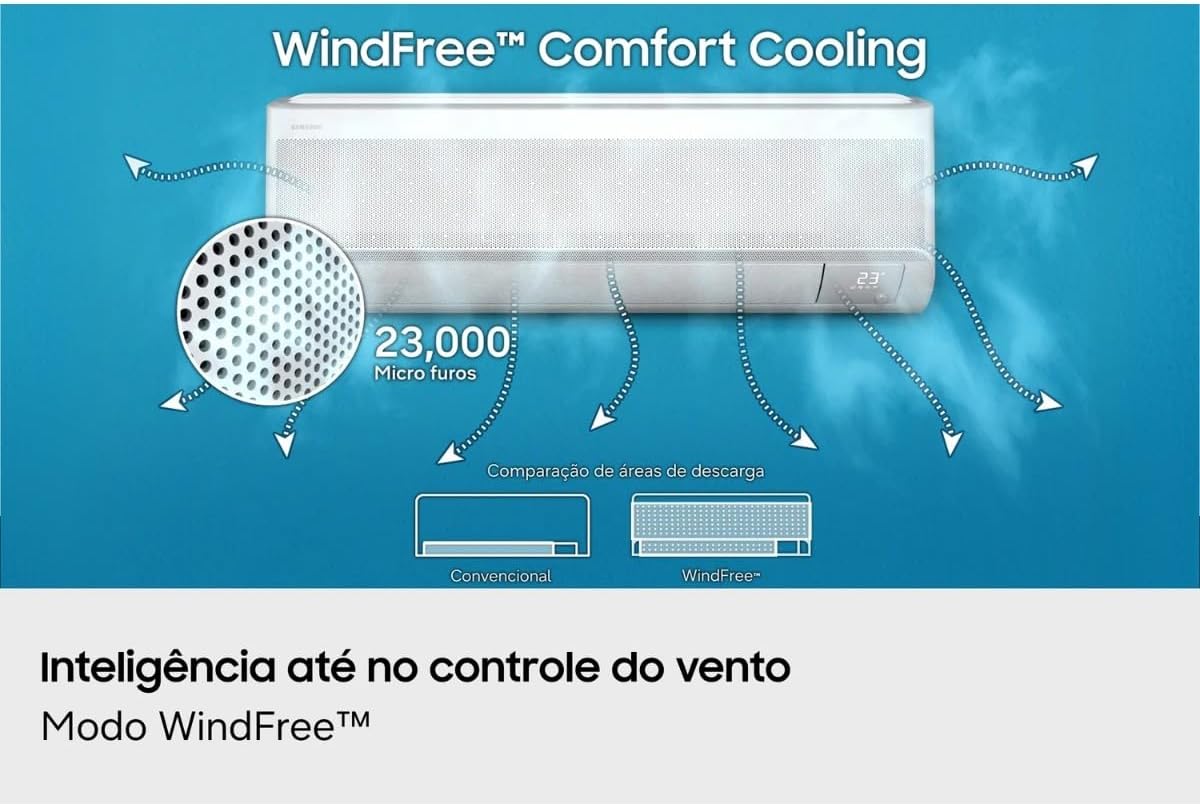
Image: The indoor unit illustrating WindFree™ Comfort Cooling with 23,000 micro-holes for gentle air distribution, compared to conventional direct airflow.

Image: The indoor unit highlighting WindFree™ Energy Saving, showing how gentle airflow can lead to significant energy savings compared to rapid cooling with an open vane.
4. Setup and Installation
Proper installation is crucial for the performance and longevity of your air conditioner. It is highly recommended that installation be performed by a certified technician.
4.1 Pre-Installation Checks:
- Verify the power supply matches the unit's requirements (220V, 60Hz).
- Ensure the installation location for both indoor and outdoor units allows for proper airflow and maintenance access.
- Confirm that the wall structure can support the weight of the indoor unit.
4.2 Installation Steps (Summary for reference, professional installation required):
- Mount the indoor unit (evaporator) on a suitable wall, ensuring it is level.
- Install the outdoor unit (condenser) on a stable surface, away from direct sunlight or obstructions.
- Connect the refrigerant piping between the indoor and outdoor units. Ensure proper vacuuming and charging with R32 refrigerant (0.43 kg factory charge).
- Connect the electrical wiring, ensuring correct polarity and grounding.
- Perform a leak test on all refrigerant connections.
- Conduct a test run to verify proper operation of all modes.
Note: The maximum vertical distance (desnível máximo) between units is 8 meters, and the maximum piping length (distância máxima de tubulação) is 15 meters.
5. Operating Instructions
Your air conditioner can be controlled using the included remote control or via the SmartThings app on your smartphone.
5.1 Remote Control Operation:
Use the remote control to select operating modes, adjust temperature, and set fan speed.
- Power Button: Turns the unit On/Off.
- Mode Button: Cycles through operating modes:
- Cool: Standard cooling.
- WindFree™: Gentle cooling without direct airflow.
- Fan: Circulates air without cooling.
- Dry (Dehumidification): Reduces humidity.
- Auto: Automatically selects the optimal mode based on room temperature.
- Temperature Adjustment: Use the Up/Down arrows to set the desired temperature.
- Fan Speed: Adjusts the fan speed (Auto, Low, Medium, High).
- Fast Cool: Activates rapid cooling.
- Sleep Mode: Optimizes temperature and fan speed for comfortable sleep.
- Swing Function: Controls the horizontal and vertical airflow direction (automatic 4-direction swing).
- Timer: Sets a timer for automatic On/Off.
5.2 SmartThings App and Voice Control:
With integrated Wi-Fi, you can control your air conditioner from anywhere using the Samsung SmartThings app on your smartphone or through compatible voice assistants.
- Download the Samsung SmartThings app from your device's app store.
- Follow the in-app instructions to connect your air conditioner to your home Wi-Fi network.
- Once connected, you can remotely power on/off, change modes, adjust temperature, and monitor energy usage.
- Integrate with voice assistants (Alexa, Google Assistant, Bixby) by linking your SmartThings account in their respective apps.

Image: Demonstrates Wi-Fi connectivity via SmartThings, allowing control from a smartphone and compatibility with voice assistants like Bixby, Google Assistant, and Amazon Alexa.
6. Maintenance
Regular maintenance ensures optimal performance, energy efficiency, and air quality.
6.1 Filter Cleaning:
The Anti-Bacteria copper filter should be cleaned regularly. The unit will display a "Filter Clean" notice when cleaning is recommended.
- Turn off the air conditioner and disconnect it from the power supply.
- Open the front panel of the indoor unit.
- Remove the air filter(s).
- Clean the filter(s) with a vacuum cleaner or wash them with lukewarm water and a mild detergent.
- Rinse thoroughly and allow to dry completely in a shaded area before re-installing.
- Close the front panel.
6.2 Auto Clean Function:
The Auto Clean function automatically dries the evaporator coil to prevent mold and bacteria buildup. It activates after the unit is turned off from cooling or dry mode.
- To activate/deactivate Auto Clean, refer to your remote control or SmartThings app settings.
6.3 Outdoor Unit Maintenance:
Periodically check the outdoor unit for any obstructions (leaves, debris) around the air inlet and outlet. Clean gently if necessary. Do not spray water directly onto the electrical components.
7. Troubleshooting
Before contacting service, refer to the following common issues and solutions.
| Problem | Possible Cause | Solution |
|---|---|---|
| Unit does not turn on. | No power, circuit breaker tripped, remote control battery low. | Check power supply, reset circuit breaker, replace remote control batteries. |
| Insufficient cooling. | Dirty air filter, blocked outdoor unit, wrong mode selected, room too large. | Clean air filter, clear obstructions from outdoor unit, select Cool or Fast Cool mode, ensure room size is appropriate for 12,000 BTU. |
| Unusual noise. | Loose parts, foreign object, unit not level. | Check for loose parts, remove foreign objects, ensure unit is level. If noise persists, contact service. |
| Water leakage from indoor unit. | Blocked drain hose, improper installation. | Check and clear drain hose. If issue persists, contact a professional for inspection. |
| Wi-Fi connection issues. | Router issues, incorrect password, unit too far from router. | Restart router, re-enter Wi-Fi password in SmartThings app, ensure unit is within Wi-Fi range. |
If the problem persists after attempting these solutions, please contact Samsung customer support.
8. Specifications
Detailed technical specifications for the Samsung WindFree AI Pro 12,000 BTU Inverter Split Air Conditioner.
| Feature | Specification |
|---|---|
| Brand | Samsung |
| Model (Indoor Unit) | AR60H12D1AWNAZ |
| Model (Outdoor Unit) | AR60H12D1AWXAZ |
| Type | Split Inverter |
| Cycle | Cooling (Frio) |
| Refrigerant Gas | R32 |
| Nominal Cooling Capacity | 12,000 BTU/h |
| Min/Max Cooling Capacity | 3,500 ~ 14,000 BTU/h |
| Voltage | 220 V |
| Frequency | 60 Hz |
| Power Supply | Via Outdoor Unit (ODU) |
| Energy Efficiency (Inmetro) | A (3.06 W/W) |
| Power Consumption (Cooling) | 1,150 W |
| Annual Energy Consumption | 416 kWh/year |
| Airflow Volume | 672 m³/h |
| Compressor Type | Inverter |
| Noise Level (Indoor Unit) | 40/21 dBA (Silent Mode) |
| Noise Level (Outdoor Unit) | 50 dBA |
| Condenser Coil Type | Copper |
| Anti-Corrosion Protection | Blue Fin Dura+ |
| Max Vertical Distance | 8 m |
| Max Piping Length | 15 m |
| Origin | Brazil |
| Inmetro Registration | 012321/2024 |
| Anatel Approval | 10725-21-02752 |
Dimensions (Approximate):
- Indoor Unit (Evaporator): 299 x 820 x 215 mm (H x W x D)
- Outdoor Unit (Condenser): 620 x 834 x 375 mm (H x W x D)

Image: The outdoor unit, highlighting the use of R32 ecological refrigerant and the 10-year warranty on the Digital Inverter compressor.
9. Warranty and Support
9.1 Warranty Information:
Your Samsung WindFree AI Pro air conditioner comes with a 10-year warranty on the Digital Inverter compressor. For specific terms and conditions, please refer to the warranty card included with your product or visit the official Samsung website.
The product also features Blue Fin Dura+ anti-corrosion protection on the condenser coil, contributing to its long-term durability.
9.2 Customer Support:
For technical assistance, troubleshooting beyond this manual, or warranty claims, please contact Samsung customer support. You can find contact information on the official Samsung website or in your product documentation.
When contacting support, please have your model number (AR60H12D1AWNAZ) and serial number ready.


