
1. Introduction and System Overview
The LWOHSI A107F-EU-F is a comprehensive wireless anti-intrusion alarm system designed for home security. It features a 4.3-inch IPS color capacitive touch screen for intuitive control and real-time status display. The system supports both Wi-Fi and 4G connectivity, ensuring stable and reliable alarm performance through multiple communication channels including app, SMS, and voice monitoring. This kit includes a control panel, door/motion detectors, SOS button, siren, RFID tags, and remote controls.
Key functionalities include multi-language support, voice control, SMS alerts, and the ability to manage up to 100 wireless accessories. The system also offers advanced features such as remote arming/disarming via SMS, timed on/off functions for home appliances, and an anti-disarming alarm function with low voltage battery sensors. It supports various zone settings (access, indoor, peripheral, 24-hour) and can record up to 20 seconds of alarm voice messages.
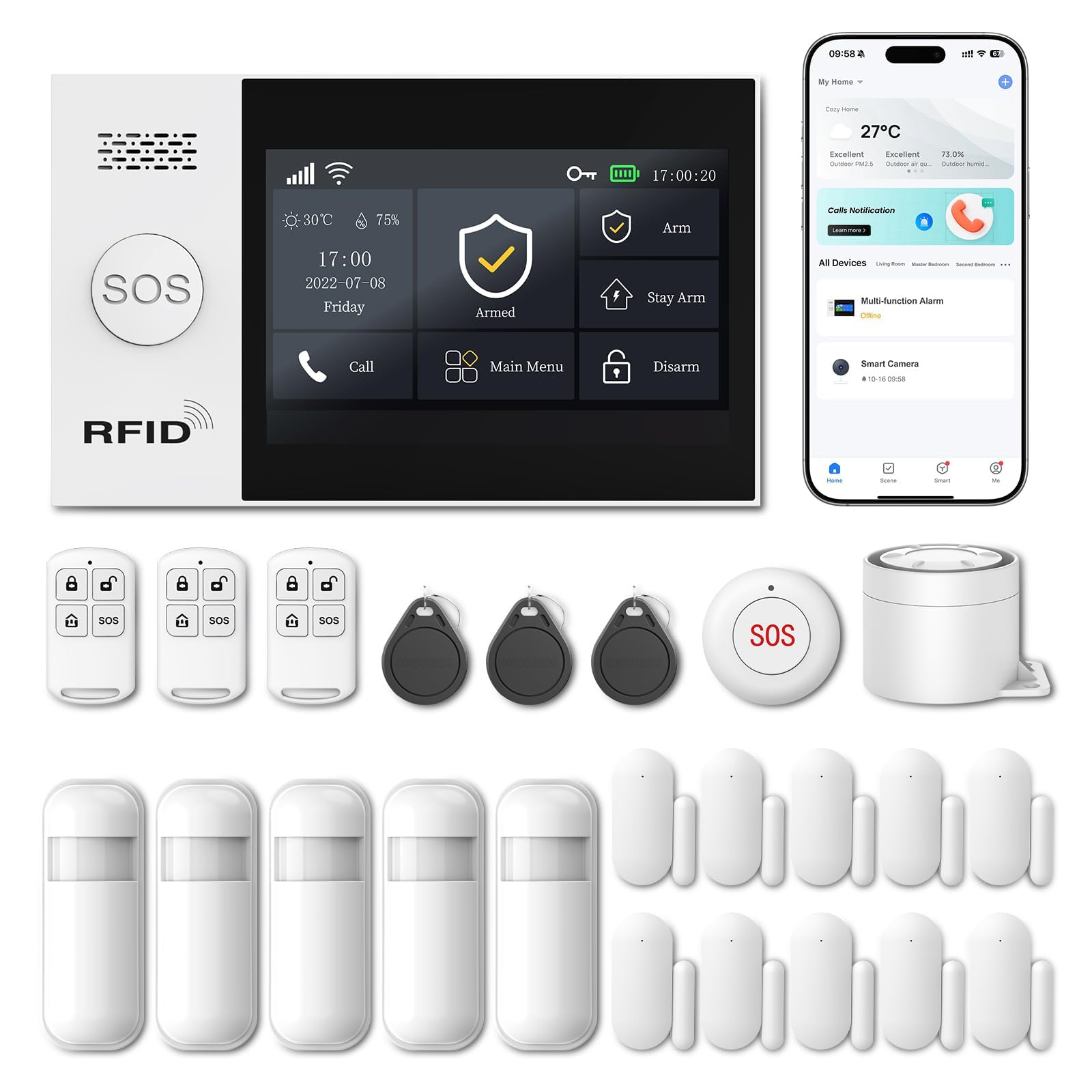
Image 1.1: Overview of the LWOHSI A107F-EU-F Home Alarm System and its included components.
2. Components Included
The standard LWOHSI A107F-EU-F kit typically includes the following:
- 1 x LWOHSI A107F Control Panel with 4.3-inch Touch Screen
- Wireless Door/Window Sensors
- Wireless PIR Motion Sensor
- Remote Controls
- RFID Tags
- 120 dB Siren
- Power Adapter
- User Manual

Image 2.1: Detailed view of the control panel and included accessories.
3. Setup Instructions
Follow these steps to set up your LWOHSI A107F-EU-F alarm system. Ensure the control panel is powered on before proceeding.
3.1. Wi-Fi and 4G Card Insertion
The system supports both Wi-Fi and 4G connectivity. For 4G functionality, insert a compatible 4G SIM card into the designated slot on the control panel.

Image 3.1: Steps for configuring Wi-Fi or inserting a 4G card.
Method 1: Software Access Point Configuration
- On Central Unit: Navigate to Menu > Wi-Fi > Software Access Point Configuration.
- On Phone: Connect to your home Wi-Fi (2.4GHz). Enable Bluetooth. Open the Smart Life App.
- In the app, select Automatic Search or Add Devices to find and connect your alarm system.
Method 2: Wireless Link Configuration
- On Central Unit: Navigate to Menu > Wi-Fi > Wireless Link Configuration.
- On Phone: Connect to your home Wi-Fi (2.4GHz). Open the Smart Life App.
- In the app, select Add Devices > Sensors > Alarm > WiFi. Ensure the alarm system's Wi-Fi indicator is Fast Blinking.
3.2. Pairing Sensors and Accessories
Refer to the specific instructions provided with each sensor (door/window, motion) and accessory (remote, RFID tag) for pairing them with the main control panel. Generally, this involves putting the control panel into pairing mode and then activating the sensor/accessory.
4. Operating Instructions
4.1. Arming and Disarming the System
The system can be armed or disarmed using the touch screen panel, remote controls, RFID tags, or the mobile application. Ensure all doors and windows are closed before arming to avoid false alarms.
- Arm (Away Mode): Activates all sensors. Ideal when leaving the property.
- Stay Arm (Home Mode): Activates perimeter sensors (e.g., door/window sensors) while allowing movement within the property (e.g., motion sensors deactivated).
- Disarm: Deactivates all alarm functions.
Note: Some users have reported a potential confusion where the 'open padlock' icon arms the system and the 'closed padlock' icon disarms it. Please verify the icons' functions on your specific device.
4.2. Mobile Application Control
The Smart Life App allows you to remotely control your alarm system, receive notifications, and manage devices. You can arm/disarm, check sensor status, and receive instant alerts on your smartphone.

Image 4.1: Smart Life App interface for adding and managing devices.

Image 4.2: App interface for checking sensor status and renaming zones.
4.3. Voice Control (Alexa & Google Assistant)
Integrate your LWOHSI alarm system with Amazon Alexa or Google Assistant for convenient voice control. Once configured, you can arm or disarm your system using simple voice commands.

Image 4.3: Voice control integration with Alexa.
4.4. SOS Function
The system includes an SOS function for emergencies. Pressing the SOS button on the control panel or a dedicated remote will trigger an immediate alarm and send notifications to predefined contacts.

Image 4.4: SOS function for emergency assistance.
5. Advanced Features
5.1. Instant Alerts and Notifications
Upon activation of a door sensor or motion detector, the system immediately triggers the siren, sends a 4G GSM call, an SMS, and an app notification to your registered phone numbers.

Image 5.1: Instant notification when a door or window is opened.

Image 5.2: Precise alarm and immediate notification process.
5.2. PIR Motion Detector
The PIR (Passive Infrared) motion detector uses advanced infrared technology to accurately detect movement within its detection field, providing robust security against intruders.

Image 5.3: PIR Motion Detector in action.
5.3. Door and Window Sensors
These magnetic sensors utilize advanced magnetic field technology to precisely detect the opening and closing of doors and windows, providing immediate alerts for unauthorized access.

Image 5.4: Door and Window Sensor installation and function.
5.4. No Monthly Subscription Fees
The LWOHSI A107F-EU-F system operates without requiring any monthly subscription fees, offering a cost-effective home security solution.

Image 5.5: The system operates without monthly subscription fees.
5.5. Wide Application
The alarm system is suitable for various environments, including homes, offices, warehouses, and supermarkets, providing versatile security solutions.

Image 5.6: The alarm system is suitable for various environments.
6. Maintenance
- Cleaning: Gently wipe the control panel and sensors with a soft, dry cloth. Avoid using abrasive cleaners or solvents.
- Battery Replacement: The system includes a low voltage battery sensor. When a sensor's battery is low, you will receive an alert. Replace batteries promptly with the recommended type (Alkaline). Refer to individual sensor manuals for specific battery types and replacement procedures.
- System Updates: Periodically check for firmware updates for the main control panel via the Smart Life App to ensure optimal performance and security.
7. Troubleshooting
| Problem | Possible Cause | Solution |
|---|---|---|
| System not connecting to Wi-Fi/4G | Incorrect Wi-Fi password, 2.4GHz vs 5GHz network, weak signal, no 4G SIM card or poor signal. | Ensure correct Wi-Fi password. Confirm your router supports 2.4GHz. Check 4G SIM card insertion and network coverage. Try both Wi-Fi setup methods. |
| Sensor not triggering alarm | Sensor battery low/dead, sensor not paired, sensor out of range, incorrect zone settings. | Check and replace sensor batteries. Re-pair the sensor with the control panel. Ensure sensor is within range. Verify zone settings in the app. |
| False alarms | Improper sensor placement, pets triggering motion sensors, doors/windows not fully closed. | Adjust motion sensor sensitivity or placement to avoid pets. Ensure all entry points are securely closed. Check for drafts that might move curtains near sensors. |
| No app notifications | Phone notification settings, app not running in background, network issues. | Check your phone's notification settings for the Smart Life App. Ensure the app has background data access. Verify your phone has internet connectivity. |
| Siren not sounding | Siren not paired, siren power issue, volume settings. | Ensure the siren is properly paired and powered. Check volume settings on the control panel. |
| Arm/Disarm icons seem reversed | User interface interpretation. | Familiarize yourself with the specific icons and their functions through practice or by referring to the quick start guide. |
8. Specifications
| Feature | Detail |
|---|---|
| Brand | LWOHSI |
| Model Number | A107F |
| Power Source | Battery powered |
| Item Dimensions (L x W x H) | 20.3 x 15.2 x 10.2 centimeters |
| Connectivity Technology | Wireless (Wi-Fi, 4G) |
| Installation Type | Wireless |
| Alert Type | Audio and motion |
| Item Weight | 1.2 Kilograms |
| Control Method | Application, Touch Screen, Remote Control |
| Battery Composition | Alkaline |
| Included Components | 1 X LWOHSI A107F Home Alarm (kit contents may vary) |
| Noise Level | 120 Decibels |
| Analog RGB Input | USB Type-C |
| Unit Count | 1.0 unit |
| Country of Origin | China |
| Manufacturer | LWOHSI |
9. Warranty and Support
For warranty information, technical support, or service inquiries, please refer to the documentation included with your product or contact LWOHSI customer support directly. Keep your purchase receipt as proof of purchase for any warranty claims.
You can often find support resources, FAQs, and contact information on the official LWOHSI website or through the retailer where you purchased the product.
