
1. Introduction
Thank you for choosing the KIPTUMTEK Smart Watch. This device is designed to enhance your daily life with features such as Bluetooth calling, activity tracking, and smartphone notifications. This manual provides essential information for setting up, operating, maintaining, and troubleshooting your new smart watch. Please read it carefully before use and retain it for future reference.
2. Package Contents
Please check the package for the following items:
- KIPTUMTEK Smart Watch
- Charging Cable
- User Manual
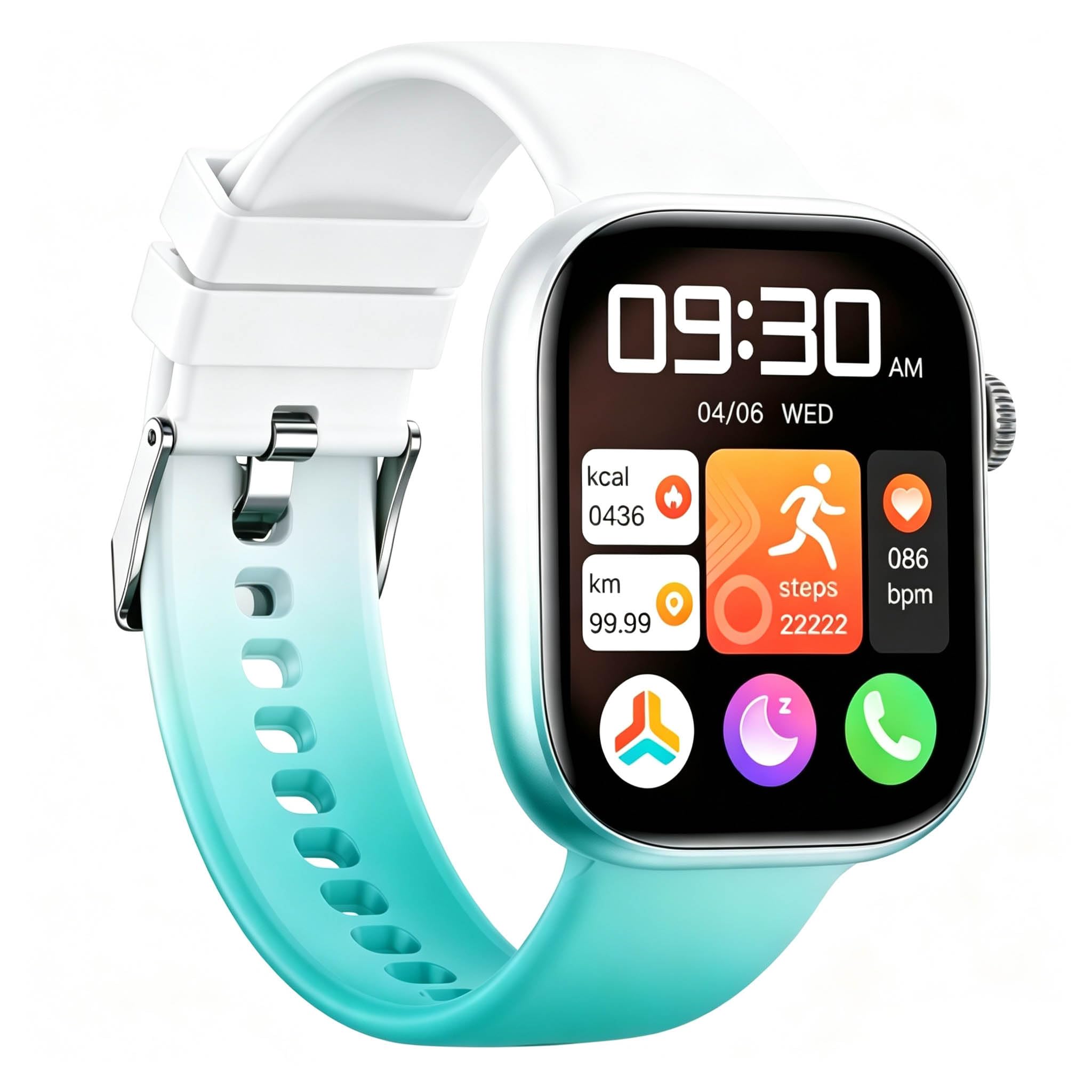
Image 1: KIPTUMTEK Smart Watch. This image shows the smart watch with its whiteCyan strap and rectangular screen, providing a visual reference of the product.
3. Setup
3.1. Charging the Smart Watch
Before first use, fully charge your smart watch. Connect the charging cable to the charging port on the back of the watch and plug the USB end into a standard USB power adapter (not included) or a computer's USB port. The watch screen will display the charging status. A full charge typically takes about 2 hours.
3.2. Power On/Off
- Power On: Press and hold the side button for 3-5 seconds until the screen lights up.
- Power Off: Press and hold the side button for 3-5 seconds, then select "Power Off" on the screen.
3.3. App Installation and Pairing
To unlock the full functionality of your KIPTUMTEK Smart Watch, you need to install the companion app on your smartphone. Search for the app name (refer to the watch screen or packaging for the specific app name) in your smartphone's app store (Google Play Store for Android or Apple App Store for iOS) and install it.
- Ensure your smartphone's Bluetooth is enabled.
- Open the installed companion app on your smartphone.
- Follow the on-screen instructions in the app to create an account or log in.
- In the app, navigate to the device pairing section and select your KIPTUMTEK Smart Watch from the list of available devices.
- Confirm the pairing request on both your smartphone and the smart watch.
Once successfully paired, the watch will synchronize data with your smartphone, and you can customize settings through the app.
4. Operating Instructions
4.1. Basic Navigation
- Touchscreen: Swipe left/right, up/down to navigate through menus and features. Tap to select.
- Side Button: Press once to return to the previous screen or the watch face. Press and hold for power options.
4.2. Bluetooth Calling
The KIPTUMTEK Smart Watch supports Bluetooth calling, allowing you to make and receive calls directly from your wrist when connected to your smartphone.
- Ensure the watch is successfully paired with your smartphone and Bluetooth calling is enabled in the app settings.
- To make a call: Access the dial pad or contacts list on your watch, select a contact or dial a number, and tap to initiate the call.
- To receive a call: When a call comes in, the watch will display the caller ID. Tap the green icon to answer or the red icon to reject.
The watch uses its built-in microphone and speaker for calls.
4.3. Activity Tracking
Your smart watch functions as an activity tracker, monitoring various health and fitness metrics.
- Steps: Automatically counts your daily steps.
- Distance: Estimates distance covered based on steps.
- Calories: Estimates calories burned.
- Heart Rate: Access the heart rate monitor feature on the watch to measure your heart rate.
Detailed activity data can be viewed and analyzed in the companion app on your smartphone.
4.4. Notifications
Receive notifications from your smartphone directly on your watch.
- Ensure notification access is granted to the companion app in your smartphone's settings.
- Customize which app notifications you wish to receive through the companion app.
- Swipe down on the watch face to view recent notifications.
5. Maintenance
5.1. Cleaning
To keep your smart watch clean and functioning properly:
- Wipe the screen and strap regularly with a soft, damp, lint-free cloth.
- Do not use harsh chemicals, abrasive cleaners, or solvents.
- Ensure the charging contacts are clean and dry before charging.
5.2. Water Resistance (IP67)
The KIPTUMTEK Smart Watch is IP67 waterproof. This means it is protected from dust and can withstand immersion in water up to 1 meter for up to 30 minutes. It is suitable for daily use, such as washing hands or light rain.
Important:
- Do not use the watch for swimming, diving, or showering with hot water.
- Avoid exposing the watch to high-pressure water or steam.
- Water resistance is not a permanent condition and may decrease over time.
6. Troubleshooting
If you encounter issues with your KIPTUMTEK Smart Watch, please refer to the following common solutions:
| Problem | Solution |
|---|---|
| Watch does not power on. | Ensure the watch is fully charged. Connect it to the charger for at least 30 minutes. |
| Cannot pair with smartphone. | Check if Bluetooth is enabled on your phone. Restart both the watch and phone. Ensure the watch is not paired with another device. |
| Notifications are not received. | Verify notification permissions for the companion app on your smartphone. Ensure the watch is connected via Bluetooth. |
| Inaccurate activity data. | Ensure the watch is worn snugly on your wrist. Update your personal information (height, weight) in the companion app. |
| Bluetooth calling not working. | Confirm that Bluetooth calling is enabled in the app settings and that the watch is properly connected to your phone for calls. |
If the problem persists, please contact KIPTUMTEK customer support.
7. Specifications
| Feature | Description |
|---|---|
| Brand | KIPTUMTEK |
| Model | Smart Watch |
| Operating System | Custom Android OS |
| Screen Size | 1.83 inches |
| Connectivity Technology | Bluetooth |
| Wireless Communication Standard | Bluetooth |
| Battery Cell Composition | Lithium Polymer |
| Special Feature | Activity Tracker |
| Human Interface Input | Microphone, Touchscreen |
| Water Resistance Rating | IP67 |
| Compatible Devices | Smartphone |
| Color | WhiteCyan |
8. Warranty and Support
The KIPTUMTEK Smart Watch comes with a 1-Year Limited Warranty from the date of purchase. This warranty covers manufacturing defects and workmanship under normal use.
The warranty does not cover:
- Damage caused by accident, abuse, misuse, flood, fire, earthquake, or other external causes.
- Damage caused by operating the product outside the permitted or intended uses described by KIPTUMTEK.
- Damage caused by service performed by anyone who is not a representative of KIPTUMTEK.
For warranty claims or technical support, please contact KIPTUMTEK customer service through the contact information provided on our official website or your purchase platform. Please have your purchase receipt and product model information ready.