
BORGUSI USNC-CTM5314P
BORGUSI Auto Incline Treadmill USNC-CTM5314P Instruction Manual
Model: USNC-CTM5314P
1. Introduction
Thank you for choosing the BORGUSI Auto Incline Treadmill. This manual provides essential information for the safe and efficient use of your new fitness equipment. Please read all instructions carefully before assembly and operation. Keep this manual for future reference.
2. Important Safety Information
To reduce the risk of serious injury, read all important precautions and instructions in this manual before using the treadmill. BORGUSI assumes no responsibility for personal injury or property damage sustained by or through the use of this product.
- Always consult with a physician before beginning any exercise program.
- Keep children and pets away from the treadmill.
- Place the treadmill on a level surface with at least 6 feet of clear space behind it and 2 feet on each side.
- Wear appropriate exercise clothing and athletic shoes.
- Use the safety key clip at all times. If you fall, the safety key will pull from the console, stopping the treadmill.
- Do not operate the treadmill if it has a damaged cord or plug, or if it is not working properly.
- The maximum user weight capacity for this treadmill is 320 pounds.
3. What's in the Box
Your BORGUSI Auto Incline Treadmill package includes the following components:
- Treadmill Main Unit (90% pre-assembled)
- Safety Key
- Lubricant
- User Manual
- Tool Kit

Image: Components included with the BORGUSI Treadmill: main unit, safety key, lubricant, user manual, and tool kit.
4. Setup and Assembly
The BORGUSI Auto Incline Treadmill comes 90% pre-assembled, simplifying the setup process. Follow these steps to complete the assembly:
- Carefully remove all components from the packaging.
- Lift the console upright and secure it according to the instructions in the included user manual.
- Connect any remaining cables as specified.
- Ensure all bolts and screws are tightened securely.
Video: This video provides step-by-step instructions for the assembly of the BORGUSI Auto Incline Treadmill, demonstrating how to connect components and prepare the unit for first use.

Image: BORGUSI Treadmill with dimensions showing 55.3 inches depth, 26.2 inches width, 52.2 inches height, and console height of 43.5 inches. Highlights transport wheels and soft-drop system.
5. Operating Instructions
5.1 Control Panel Overview
The treadmill features an upgraded backlit LCD display and intuitive controls for managing your workout. The console provides clear visibility of your workout data.
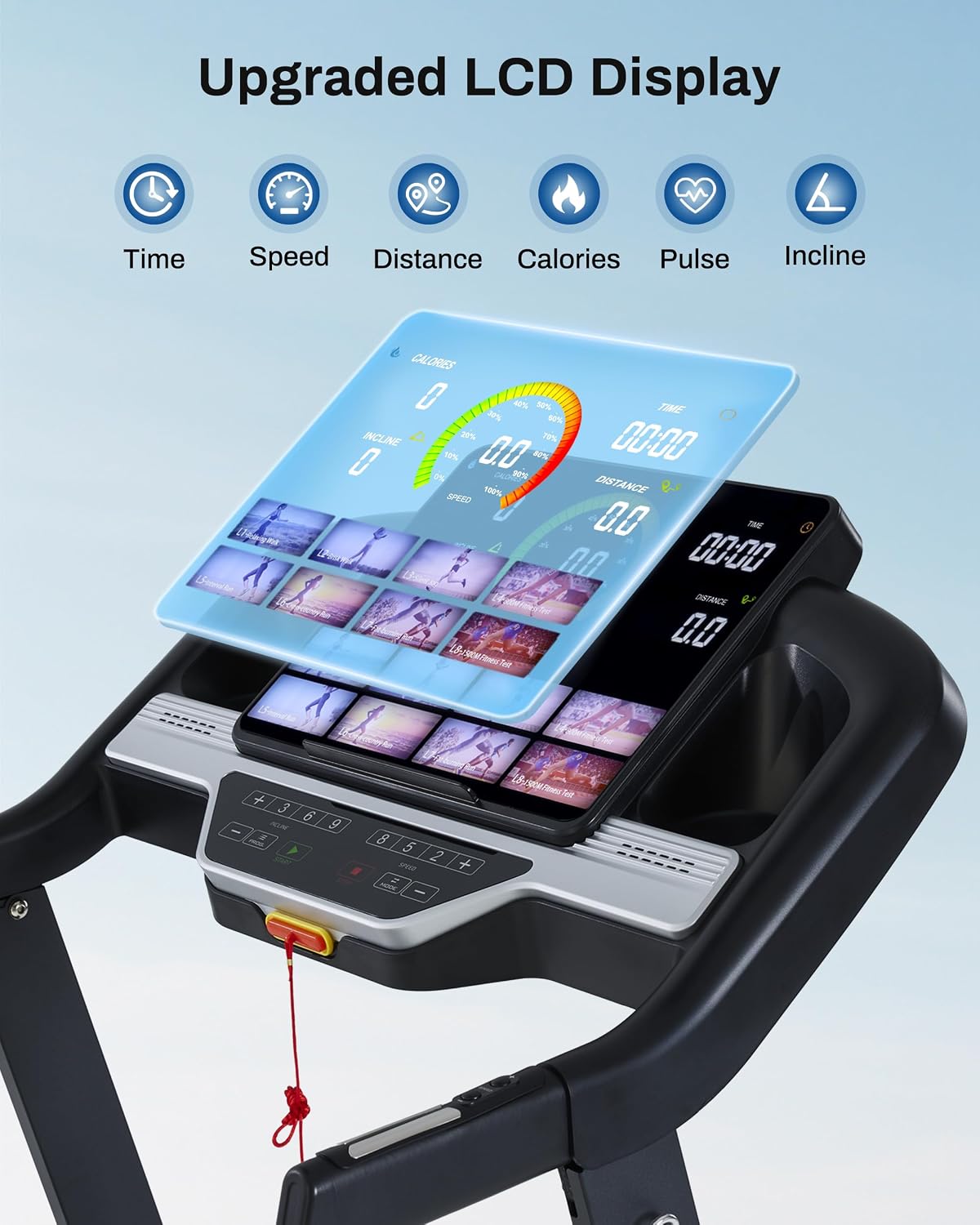
Image: Close-up of the BORGUSI Treadmill's upgraded LCD display, showing workout metrics such as time, speed, distance, calories, pulse, and incline.
5.2 Starting a Workout
- Attach the safety key clip to your clothing and insert the safety key into the console.
- Press the 'START' button to begin the treadmill belt movement.
- Adjust speed and incline as desired using the console buttons or handrail controls.
5.3 Speed Adjustment
The treadmill offers a speed range from 0.5 to 10 miles per hour (MPH). Use the '+' and '-' buttons on the console or the handrail controls to adjust the speed. Quick speed buttons (e.g., 3, 6, 9 MPH) are also available for rapid changes.
5.4 Incline Adjustment
The auto incline feature allows adjustment from 0 to 15 levels. Use the 'INCLINE +' and '-' buttons on the console or handrail controls to increase or decrease the incline. Higher incline levels intensify your workout.

Image: Woman running on BORGUSI Treadmill, illustrating 320 lbs weight capacity and 0-15% auto incline feature.
5.5 Preset Programs
The treadmill includes 36 preset workout programs designed to provide varied and challenging routines. Select a program from the console to automatically adjust speed and incline throughout your workout.

Image: Woman running on BORGUSI Treadmill, with the console displaying various workout programs and app connectivity options like Kinomap, Fitshow, and Zwift.
5.6 Bluetooth App Connectivity
Connect your treadmill to a compatible Bluetooth app for smart control over your workouts. This feature allows for tracking, program selection, and data synchronization.
5.7 Folding and Storage
The treadmill features an easy-to-use folding mechanism for convenient storage in small spaces. To fold, ensure the treadmill is off and unplugged, then follow the instructions in the user manual to lift and secure the running deck in an upright position. The soft-drop system assists in safely lowering the deck when unfolding.
Video: This video showcases key features of the BORGUSI Auto Incline Treadmill, including its 3.5HP motor, 300+ lbs capacity, and auto-incline functionality.
6. Maintenance
Regular maintenance ensures the longevity and optimal performance of your treadmill.
6.1 Cleaning
- Wipe down the console and other surfaces with a damp cloth after each use.
- Do not use abrasive cleaners or solvents.
- Vacuum underneath the treadmill regularly to prevent dust buildup.
6.2 Lubrication
The running belt requires periodic lubrication to reduce friction and wear. Refer to the user manual for specific instructions on how often to lubricate and the correct application method using the provided lubricant.
6.3 Belt Tension and Alignment
Check the running belt tension and alignment periodically. If the belt feels loose or drifts to one side, consult the user manual for adjustment procedures. Proper tension and alignment prevent premature wear and ensure smooth operation.
Image: Underside view of the BORGUSI Treadmill's running deck, highlighting the 10+4 silicone shock absorbers designed to reduce impact.
7. Troubleshooting
If you encounter issues with your treadmill, refer to the following common problems and solutions:
| Problem | Possible Cause | Solution |
|---|---|---|
| Treadmill does not start | Power cord unplugged, safety key not inserted, circuit breaker tripped. | Ensure power cord is securely plugged in. Insert safety key fully. Check household circuit breaker. |
| Running belt slips or hesitates | Belt too loose, belt requires lubrication. | Adjust belt tension according to manual. Apply lubricant to the running deck. |
| Unusual noise during operation | Loose parts, motor issue, belt friction. | Check for and tighten any loose components. If noise persists, contact customer support. |
| Incline not adjusting | Incline motor issue, obstruction. | Ensure no obstructions are present. If issue continues, contact customer support. |
For problems not listed here, or if solutions do not resolve the issue, please contact BORGUSI customer support.
8. Specifications
| Feature | Detail |
|---|---|
| Brand | BORGUSI |
| Model Name | USNC-CTM5314P |
| Product Dimensions (D x W x H) | 55.3" x 26.2" x 52.2" |
| Folded Size | 33" x 26.3" x 52.3" |
| Item Weight | 111 pounds |
| Material | Alloy Steel |
| Maximum Horsepower | 3.5 hp |
| Speed Range | 0.5 - 10 miles per hour |
| Maximum Incline Percentage | 15% (Auto Incline) |
| Running Track Dimensions | 45.5" x 16.5" |
| Maximum Weight Recommendation | 320 pounds |
| Number of Programs | 36 Preset Programs |
| Display Type | LCD (15.6 inches) |
| Connectivity | Bluetooth |
| Metrics Measured | Calories Burned, Distance, Incline, Heart Rate, Speed, Time |
| Special Features | Elevated handlebars, High console, Water Bottle Holder, Wheeled, Shock Absorbent, Touch Screen |
9. Warranty and Support
9.1 Warranty Information
The BORGUSI Auto Incline Treadmill comes with a 1-year parts protection plan. Please retain your proof of purchase for warranty claims.
9.2 Customer Support
For technical assistance, warranty inquiries, or to purchase replacement parts, please visit the official BORGUSI Store or contact their customer service department. You can find more information and contact details at the BORGUSI Store on Amazon.
Related documentsUSNC-CTM5314P


Ask a question about this manual
Ask about setup, troubleshooting, compatibility, parts, safety, or missing instructions. Manuals+ will review the question and use this page’s manual context to help answer it.