
1. Introduction
Thank you for choosing the Moen Jaslynn 87618EWBRB MotionSense Wave Kitchen Faucet. This faucet combines hands-free technology with powerful cleaning performance, designed for convenience and efficiency in your kitchen. This manual provides detailed instructions for proper installation, operation, and maintenance to ensure optimal performance and longevity of your faucet.

Image 1.1: The Moen Jaslynn faucet, a trusted fixture in homes.
2. Safety Information
Please read all instructions carefully before installation and use. Failure to follow these instructions may result in property damage, personal injury, or voiding of the warranty.
- Always turn off the main water supply before beginning any installation or maintenance.
- Wear appropriate personal protective equipment, such as safety glasses, during installation.
- Ensure all connections are secure to prevent leaks.
- Do not use harsh chemicals or abrasive cleaners on the faucet finish.
- Keep batteries away from children and dispose of them properly.
3. Package Contents
Verify that all components are present before starting installation:
- Moen Jaslynn Kitchen Faucet
- Flexible supply lines with 1 cm compression fittings
- 6 AA batteries
- Control box
- Optional deck plate
- Installation tool
- Mounting hardware
- 68-inch Reflex™ Hose Kit and Weight
4. Specifications
| Feature | Detail |
|---|---|
| Brand | Moen |
| Model Name | Jaslynn |
| Model Number | 87618EWBRB |
| Color | Mediterranean Bronze |
| Material | Zinc |
| Mounting Type | Deck Mount |
| Number of Handles | 1 |
| Number of Holes Required | 1 or 3 (with optional deck plate) |
| Special Feature | Touchless (MotionSense Wave) |
| Flow Rate | 1.5 Gallons per minute |
| Dimensions (D x W x H) | 10.2 cm x 36.6 cm x 9.8 cm |
| Faucet Height | 16.38 inches |
| Spout Reach | 7.63 inches |
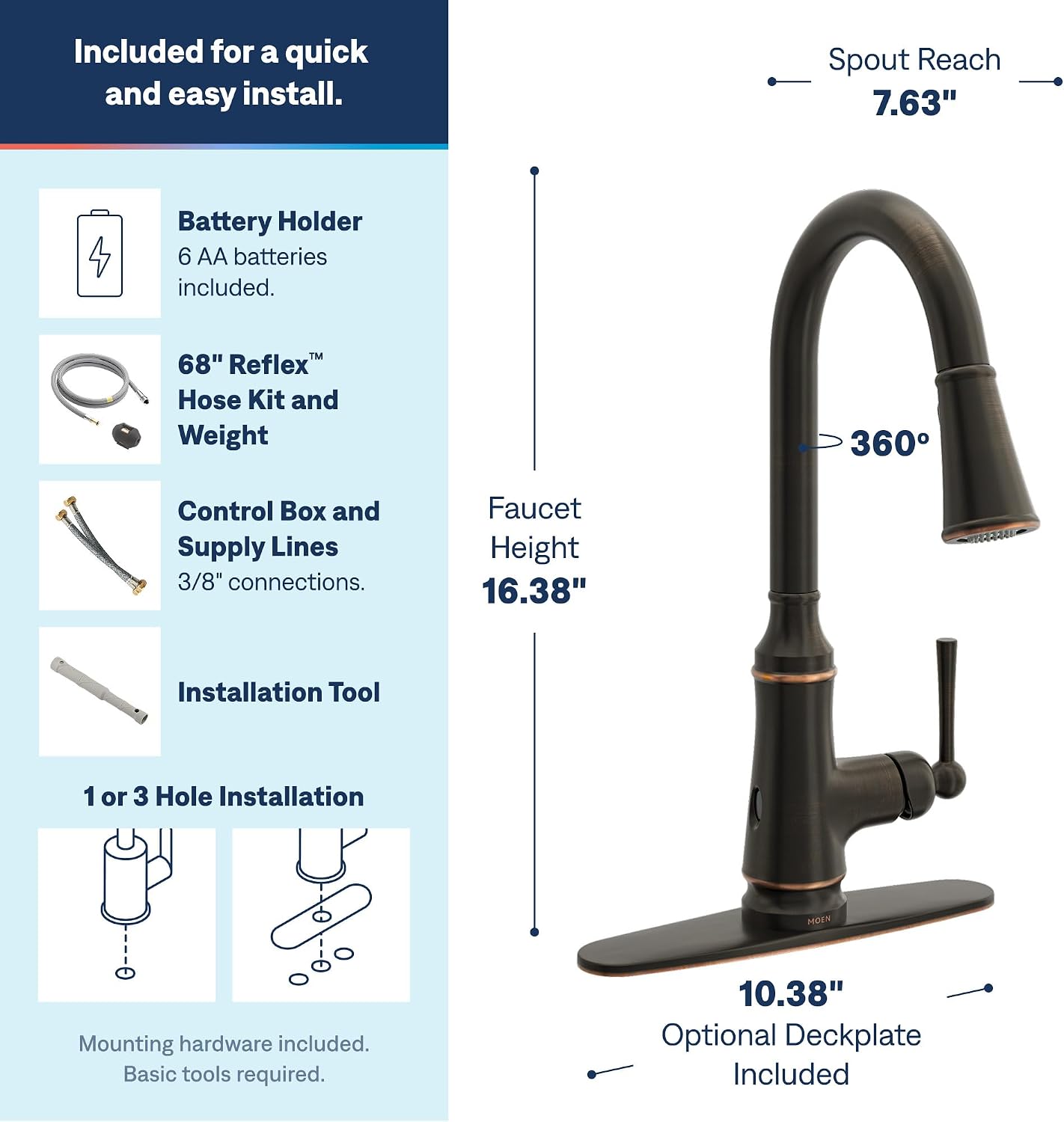
Image 4.1: Faucet dimensions and installation options.
5. Setup & Installation
This faucet is designed for either 1-hole or 3-hole installation, utilizing the included optional deck plate for 3-hole configurations. Basic tools are required for installation.
5.1. Pre-Installation Steps
- Turn off the main water supply to your kitchen.
- Clear the area under the sink and remove any old faucet.
- Ensure the mounting surface is clean and dry.
5.2. Faucet Installation
- If using, place the optional deck plate over the sink holes.
- Insert the faucet body through the mounting hole(s).
- Secure the faucet from underneath the sink using the provided mounting hardware and installation tool.
- Connect the flexible supply lines to your hot and cold water supply valves. Ensure connections are hand-tight, then tighten an additional 1/4 turn with a wrench.
- Connect the pull-down spray hose to the quick-connect fitting on the supply line. The Duralock quick connect system ensures a secure, tool-free connection.
- Attach the hose weight to the pull-down hose at the marked location to ensure proper retraction.
5.3. Control Box and Battery Installation
- Mount the control box in an accessible location under the sink, away from direct water spray.
- Connect the faucet's data cable and water lines to the control box as per the diagrams in the full installation guide.
- Install the 6 AA batteries into the battery holder and connect it to the control box. Ensure correct polarity.
Refer to the detailed installation instructions included in your package for specific diagrams and step-by-step guidance.
6. Operating Instructions
6.1. MotionSense Wave Hands-Free Activation
The MotionSense Wave feature allows for hands-free operation. Simply wave your hand over the sensor located on the front of the faucet to turn the water on or off. The water will flow for a set period or until you wave your hand again.

Image 6.1: Activating water flow with MotionSense Wave.
6.2. Manual Handle Operation
You can also operate the faucet manually using the single handle. Lift the handle to turn on the water and adjust the temperature by moving it left for hot and right for cold. The handle overrides the MotionSense Wave sensor when in use.
6.3. Pull-Down Spray Head with Power Boost and Reflex™
The pull-down spray head offers increased maneuverability for various kitchen tasks. It features:
- Power Boost: Press the Power Boost button on the spray head for a concentrated stream, providing 50% more spray power than standard Moen pull-down faucets for faster cleaning and filling.
- Reflex™ System: This technology ensures smooth operation, easy movement, and secure docking of the spray head back into the faucet spout after use.

Image 6.2: Power Clean for tough messes and Reflex for effortless retraction.
7. Maintenance
7.1. Cleaning the Faucet
To maintain the Mediterranean Bronze finish, clean the faucet regularly with a soft, damp cloth. Avoid using abrasive cleaners, harsh chemicals, or polishes, as these can damage the finish and void your warranty.
7.2. Battery Replacement
When the batteries are low, the MotionSense Wave sensor may become less responsive or stop working. Replace all 6 AA batteries in the control box simultaneously. Use only new, high-quality alkaline batteries for optimal performance. Ensure correct polarity when inserting new batteries.
7.3. Aerator Cleaning
If water flow decreases, the aerator may be clogged. Unscrew the aerator from the end of the spout, clean any debris, and rinse thoroughly before reattaching.
8. Troubleshooting
| Problem | Possible Cause | Solution |
|---|---|---|
| No water flow or low flow | Water supply turned off; clogged aerator; kinked supply line. | Check water supply valves; clean aerator; inspect supply lines for kinks. |
| MotionSense Wave not responding | Low batteries; sensor obstructed; manual handle engaged. | Replace batteries; ensure sensor is clear; check if manual handle is fully closed. |
| Leaking from faucet base | Loose mounting nut; damaged O-rings. | Tighten mounting nut; contact Moen support for replacement parts. |
| Spray head does not retract fully | Hose weight misplaced or obstructed; debris in hose. | Check and reposition hose weight; clear any obstructions around the hose. |
For further assistance, please contact Moen customer support.
9. Warranty & Support
9.1. Warranty Information
The Moen Jaslynn 87618EWBRB MotionSense Kitchen Faucet is backed by a 5-year warranty on digital components and Moen's Limited Lifetime Warranty against leaks, drips, and finish defects to the original consumer purchaser. Please retain your proof of purchase for warranty claims.
For full warranty details, please refer to the warranty card included with your product or visit the official Moen website.
9.2. Customer Support
If you have any questions, require technical assistance, or need to order replacement parts, please contact Moen customer support:
- Website: www.moen.com
- Phone: Refer to your local Moen contact information provided in the product packaging.


