
Introduction
This manual provides detailed instructions for the ZHIWHIS A330 Wide Frequency Scanner Radio. Please read this manual thoroughly before operating the device to ensure proper use and to maximize your listening experience.
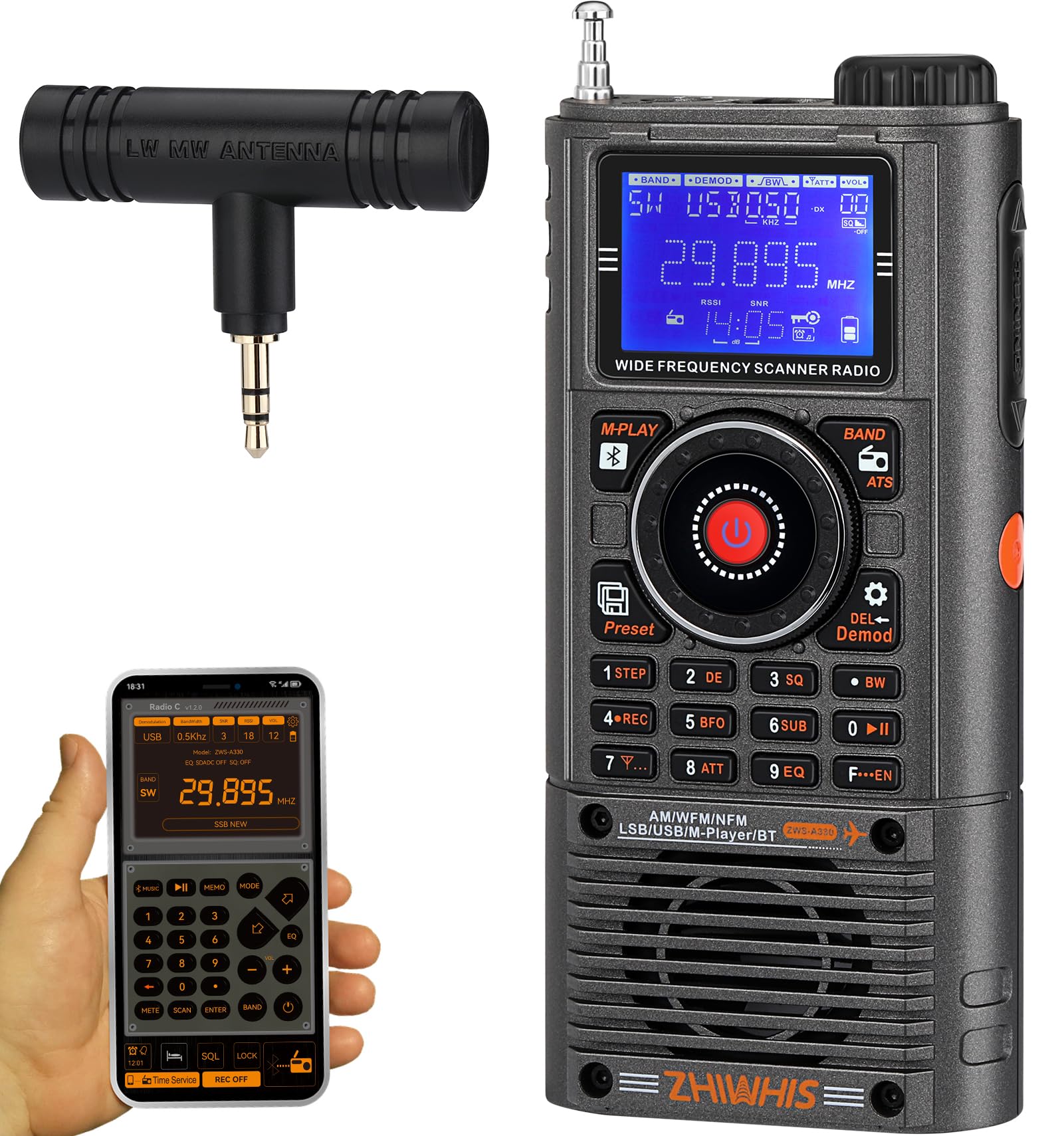
Image: The ZHIWHIS A330 SSB Shortwave Radio Receiver, showcasing its compact design and display.
Package Contents
Verify that all items are present in the package:
- 1 x ZWS-A330 Wide Frequency Scanner Radio
- 1 x Lithium Battery (BL5C, 3.7V, 1000mAh)
- 1 x USB Type-C Data Charging Cable
- 1 x T-Shaped Ferrite Bar Medium Wave Antenna (Exclusive for A330)
- 1 x Small Screwdriver
- 1 x Strap
- 1 x Dust Brush
- 1 x English User Manual

Image: All items included in the ZHIWHIS A330 package, neatly arranged next to the radio and its box.
Setup
1. Battery Installation
- Locate the battery compartment cover on the back of the radio.
- Use the provided small screwdriver to gently open the cover.
- Insert the BL5C lithium battery, ensuring the contacts align correctly.
- Replace the battery compartment cover and secure it with the screwdriver.

Image: A view of the ZHIWHIS A330 radio with its battery compartment open, showing the BL5C lithium battery being inserted.
2. Charging the Battery
- Connect the supplied USB Type-C cable to the radio's charging port.
- Connect the other end of the cable to a USB power adapter (not included) or a computer's USB port.
- The radio requires approximately 4 hours to fully charge, providing up to 11 hours of usage (at 16 levels of volume in FM mode).
3. Antenna Connection
- For enhanced reception, especially for MW (Medium Wave) and SW (Shortwave) bands, connect the T-Shaped Ferrite Bar Medium Wave Antenna to the external antenna port (3.5mm jack) on the side of the radio.
- Extend the built-in telescopic antenna for optimal FM, VHF, UHF, and AIR band reception.

Image: A close-up view of the ZHIWHIS A330 radio's top and side, highlighting the external antenna port, volume knob, and USB-C charging port.
Operating Instructions
1. Power On/Off
Press and hold the power button (usually located on the top or side) to turn the radio on or off. The STN LCD with blue backlight will illuminate upon power-on.
2. Volume Adjustment
Rotate the dedicated volume knob, located on the top of the radio, to adjust the audio output level. Turn clockwise to increase volume, counter-clockwise to decrease.

Image: A detailed view of the ZHIWHIS A330 radio's STN LCD display, volume knob, lock/unlock button, and numeric keypad, illustrating its intuitive design.
3. Band Selection
Press the BAND button to cycle through available frequency bands: FM, MW, SW, AIR, CB, WB, VHF, UHF.
4. Tuning Methods
- Manual Tuning: Use the tuning knob (often combined with the volume knob or a separate rotary encoder) to manually adjust the frequency.
- Automatic Search: Press the SCAN or ATS button to automatically scan for and store available stations.
- Direct Frequency Entry: Use the numeric keypad to directly input a desired frequency, then press ENTER.

Image: The ZHIWHIS A330 radio's tuning knob in use, alongside a smartphone screen demonstrating the APP-based intelligent remote control function.
5. SSB (Single Sideband) Operation (SW Mode)
In Shortwave (SW) mode, the radio supports AM, LSB (Lower Sideband), and USB (Upper Sideband) demodulation. Use the BFO (Beat Frequency Oscillator) adjustment for precise tuning of SSB signals.
6. Station Memory (Presets)
The radio can store up to 200 stations per frequency band, totaling 1400 presets.
- Saving a Station: Tune to the desired station, then press and hold the MEMO or PRESET button, select a memory location, and confirm.
- Recalling a Station: Press the MEMO or PRESET button, then use the tuning knob or numeric keypad to select the desired stored station.
7. Bluetooth & Media Playback
- Bluetooth Connectivity: Activate Bluetooth on the radio and your device. Pair with "ZWS-A330" to stream audio wirelessly.
- TF Card Playback: Insert a TF card (up to 256GB) with MP3, WMA, WAV, APE, FLAC audio files into the designated slot. Use the M-PLAY controls to navigate and play tracks.
- APP Control: Download the dedicated ZHIWHIS app to control the radio remotely via Bluetooth.
8. Recording Function
The radio includes a built-in recording function. Refer to the on-screen prompts or specific button labels (e.g., REC) for initiating and managing recordings.
9. EQ Sound Effects
Press the EQ button to cycle through 6 different equalizer sound effects to customize your audio experience.
10. NOAA Weather Alert
The radio supports NOAA Weather Band (WB) reception and alerts. Tune to the WB band to receive local weather broadcasts and alerts.
11. Lock/Unlock Button
Use the lock switch on the side of the radio to prevent accidental button presses during transport or storage.
Maintenance
- Cleaning: Use the provided dust brush or a soft, dry cloth to clean the radio's exterior. Avoid using liquid cleaners or abrasive materials.
- Battery Care: To prolong battery life, avoid fully discharging the battery frequently. If storing the radio for an extended period, charge the battery to about 50% and store in a cool, dry place.
- Storage: Store the radio in a dry environment, away from extreme temperatures and direct sunlight.
Troubleshooting
| Problem | Possible Cause | Solution |
|---|---|---|
| No power | Battery discharged or incorrectly installed. | Charge the battery. Ensure the battery is installed with correct polarity. |
| Poor reception | Weak signal, antenna not extended, or interference. | Extend the telescopic antenna fully. Connect the external antenna for MW/SW. Move to an open area away from electronic devices. Adjust BFO for SSB. |
| No sound | Volume too low, headphones connected, or mute activated. | Increase volume. Disconnect headphones if not in use. Check for mute function. |
| Bluetooth not connecting | Bluetooth not enabled on radio or device, or device out of range. | Ensure Bluetooth is active on both devices. Keep devices within 20 meters. Re-pair if necessary. |
| TF card not recognized | Card incorrectly inserted, unsupported format, or card capacity too large. | Reinsert TF card correctly. Ensure files are MP3, WMA, WAV, APE, or FLAC. Max capacity is 256GB. |
Specifications
| Feature | Detail |
|---|---|
| Brand | ZHIWHIS |
| Model Number | ZWS-A330 |
| Tuner Type | FM/MW/Shortwave(SSB)/AIR/CB/NOAA Weather/VHF/UHF |
| Receiving Bands |
|
| Tuning Steps (STEP) |
|
| Number of Presets | Total 1400 units |
| Bluetooth Version | VER 5.2 |
| Bluetooth Reception Distance | ≤20 meters |
| Lithium Battery | BL5C, 3.7V, 1000mAh |
| TF Card Supported Formats | MP3, WMA, WAV, APE, FLAC |
| Max TF Card Capacity | 256GB |
| Earphone Jack | 3.5mm |
| Speaker | 4Ω, 3W |
| Dimensions (D x W x H) | 2.4"D x 1.4"W x 5.4"H (6x3.5x14cm) |
| Weight | 0.35 lb (160 g) |
| Included Components | 1 x English User Manual, 1 x Lithium Battery, 1 x Small Screwdriver, 1 x Strap, 1 x Dust Brush, 1 x T-Shaped Ferrite Bar Medium Wave Antenna, 1 x USB Type-C Data Charging Cable, 1 x ZWS-A330 Wide Frequency Scanner Radio |
Warranty and Support
Warranty Information
- This product is covered under warranty for a period of 12 months from the date of retail purchase.
- The product has been strictly inspected before leaving the factory. If it has any quality issues, the manufacturer will provide service for 100% return or replacement.
Customer Support
If you encounter any product problems or require assistance, please contact ZHIWHIS customer support. We are committed to resolving your issues as soon as possible.
For support, please refer to the contact information provided on the product packaging or the official ZHIWHIS website.