
Introduction
This manual provides detailed instructions for the proper setup, operation, maintenance, and care of your Konus KonuSpot 15-45x65 Spotting Scope, Model 7128. Please read this manual thoroughly before using your spotting scope to ensure optimal performance and longevity.
What's in the Box
Carefully unpack all components and verify that you have received the following items:
- Konus KonuSpot 15-45x65 Spotting Scope
- Table Top Tripod
- Smartphone Adapter
- Camera Adapter
- Protective Carry Case
- Instruction Manual (this document)
Product Overview
Familiarize yourself with the main components of your Konus KonuSpot spotting scope.
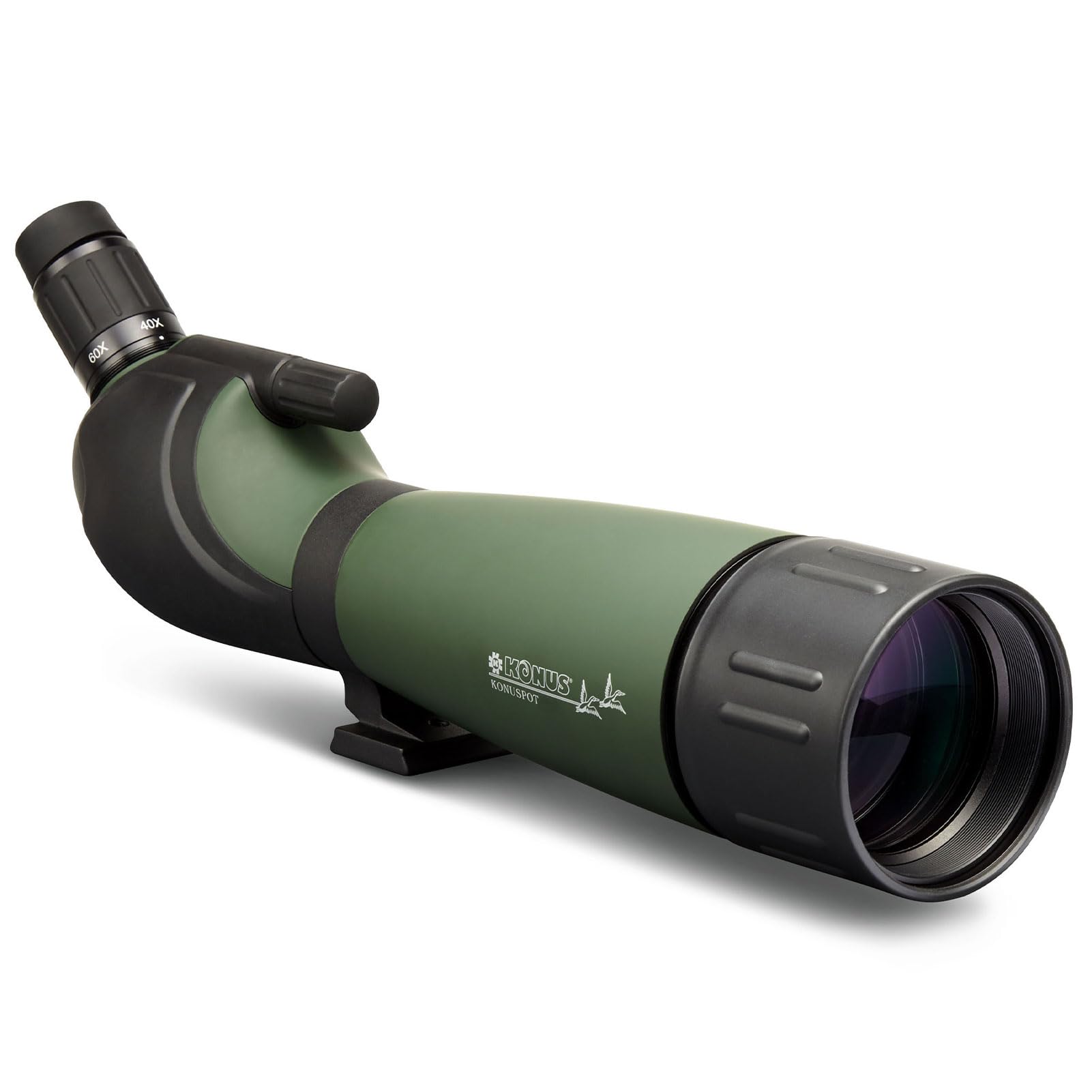
Figure 1: Konus KonuSpot 15-45x65 Spotting Scope with included table tripod. This image displays the overall structure, including the objective lens, eyepiece, and main body.
- Objective Lens: The large front lens that gathers light.
- Eyepiece: Where you look through to view the image. Features an angled design for comfortable viewing.
- Zoom Ring: Adjusts the magnification from 15x to 45x.
- Focus Knob: Used to achieve a sharp image.
- Tripod Mounting Collar: Attaches the scope to the tripod.
- Sunshade (Retractable): Extends to reduce glare and protect the objective lens.
Setup
1. Attaching the Tripod
- Unfold the legs of the included table tripod.
- Locate the tripod mounting collar on the underside of the spotting scope.
- Align the tripod's mounting screw with the threaded hole on the collar.
- Securely tighten the screw by turning the tripod's handle clockwise until the scope is firmly attached. Do not overtighten.
2. Adjusting the Eyepiece
- The eyepiece is angled at 45 degrees for comfortable viewing.
- If wearing eyeglasses, you may need to fold down the rubber eyecup for a full field of view.
Operating the Spotting Scope
1. Initial Observation
- Point the objective lens towards your desired subject.
- Look through the eyepiece.
- Rotate the Focus Knob until the image appears sharp and clear.
2. Adjusting Magnification (Zoom)
- To change the magnification, rotate the Zoom Ring located on the eyepiece.
- Start with the lowest magnification (15x) to locate your subject easily, then gradually increase to higher magnifications (up to 45x) for more detail.
- After adjusting the zoom, you may need to slightly re-adjust the Focus Knob to maintain image sharpness.
3. Using the Retractable Sunshade
- Extend the sunshade by gently pulling it forward from the objective lens housing.
- This helps to reduce glare in bright conditions and protects the objective lens from rain or dust.
Using Smartphone and Camera Adapters
The KonuSpot 15-45x65 includes adapters for connecting smartphones and cameras, allowing for digiscoping (taking photos or videos through the scope).

Figure 2: Spotting scope with a smartphone adapter attached to the eyepiece, demonstrating how to use a smartphone for photography.
1. Attaching the Smartphone Adapter
- Mount the spotting scope securely on a stable tripod.
- Attach your smartphone to the smartphone adapter, ensuring the phone's camera lens is aligned with the adapter's opening.
- Carefully slide the adapter onto the spotting scope's eyepiece. Ensure a snug fit without forcing it.
- Open your phone's camera app. Adjust the phone's position on the adapter until the scope's view fills the screen.
- Use the scope's focus and zoom controls to achieve the desired image.
2. Attaching the Camera Adapter
Specific instructions for the camera adapter will depend on your camera model. Generally, the adapter will connect to your camera's lens mount or filter thread and then attach to the spotting scope's eyepiece. Refer to your camera's manual for compatibility and attachment methods.
Maintenance and Care
- Cleaning Lenses: Use a soft, lint-free cloth specifically designed for optical lenses. For stubborn smudges, use a small amount of optical lens cleaning fluid applied to the cloth, not directly to the lens.
- Cleaning Body: Wipe the rubber-armored body with a soft, damp cloth. Avoid harsh chemicals.
- Storage: When not in use, store the spotting scope in its protective carry case in a cool, dry place, away from direct sunlight and extreme temperatures.
- Moisture: If the scope gets wet, wipe it dry immediately. Avoid submerging the scope in water.
- Transport: Always use the protective carry case when transporting the scope to prevent damage.

Figure 3: The Konus KonuSpot spotting scope inside its protective carry case, demonstrating proper storage and transport.
Troubleshooting
| Problem | Possible Cause | Solution |
|---|---|---|
| Image is blurry or out of focus. | Improper focus adjustment. | Rotate the focus knob slowly until the image becomes sharp. Re-adjust after changing zoom. |
| Dark edges or vignetting in the view. | Eyecup not properly adjusted (if wearing glasses) or eye not centered. | Adjust the rubber eyecup (fold down for glasses). Ensure your eye is centered with the eyepiece. |
| Image appears dim. | Low light conditions, high magnification, or dirty objective lens. | Use lower magnification in low light. Clean the objective lens if dirty. |
| Glare or reflections in the view. | Direct sunlight hitting the objective lens. | Extend the retractable sunshade. Reposition the scope to avoid direct sunlight. |
Specifications
| Feature | Detail |
|---|---|
| Brand | Konus |
| Model Name | 7128 |
| Magnification | 15-45x (Zoom) |
| Objective Lens Diameter | 65 mm |
| Optical Tube Length | 14 inches |
| Eyepiece Design | Angled (45-degree), Kellner |
| Lens Coating | Multi-Coated |
| Body Material | Lightweight Polycarbonate with Rubber Armor |
| Compatible Devices | Camera, Smartphone (adapters included) |
| Included Accessories | Table Top Tripod, Smartphone Adapter, Camera Adapter, Protective Carry Case |
| GTIN / UPC | 00698156071281 |
Warranty Information
The Konus KonuSpot 15-45x65 Spotting Scope (Model 7128) is covered by a 2-Year Manufacturer's Warranty. This warranty covers defects in materials and workmanship under normal use. Please retain your proof of purchase for warranty claims. For specific terms and conditions, please refer to the warranty card included with your product or contact Konus customer support.
Support
If you encounter any issues or have questions regarding your Konus KonuSpot spotting scope that are not addressed in this manual, please contact Konus customer support. Visit the official Konus website for contact information and additional resources.
Official Konus Website: www.konususa.com