
1. Introduction
The Aninerel 4200W Hybrid Solar Inverter is designed to create a flexible 120V off-grid power system. This compact unit integrates a pure sine wave inverter, a high-voltage MPPT solar charger, a utility charger, an automatic transfer function, and programmable source priorities. It supports up to 6200W of PV input and charges a 24V battery bank at up to 120A. Output voltage is selectable between 110V, 115V, or 120V, with 50Hz or 60Hz operation. A Wi-Fi adapter is included for remote monitoring.
This inverter is a single-phase 110V/120V off-grid inverter charger. It does not provide 220V/240V split-phase output and cannot be connected in parallel.

Image 1.1: Aninerel 4200W Hybrid Solar Inverter highlighting its main features including 24V battery system, 110/120V pure sine wave, 6200W max PV power, 120A MPPT solar charger, and battery-free operation.
2. Safety Information
Please read and understand all safety instructions before installation and operation. Failure to follow these instructions may result in electric shock, fire, serious injury, or death.
- Installation must be performed by qualified personnel in accordance with all local and national electrical codes.
- Install the inverter indoors on a non-combustible surface.
- Ensure suitable DC and AC protection devices (e.g., circuit breakers, fuses) are installed upstream and downstream of the inverter.
- Do not exceed the maximum PV open-circuit voltage of 500V. Always calculate cold-weather string Voc below this limit.
- Do not attempt to open or repair the inverter. There are no user-serviceable parts inside. Refer all servicing to qualified service personnel.
- Ensure proper grounding of the inverter.
- Keep children away from the inverter and its wiring.
- This unit is designed for indoor IP21 installation.
3. Product Overview
3.1 Key Features
- 4200W Pure Sine Wave Output: Delivers 4200W rated power at 110V/115V/120V AC with selectable 50Hz/60Hz output. Provides up to 8400W surge power for 5 seconds.
- 120A MPPT Solar Charger: High-voltage solar input accepts up to 6200W of PV power, with a 60V-450V MPPT operating range and 500V maximum PV open-circuit voltage.
- Flexible Off-Grid Power Management: Supports Utility First, Solar First, SBU (Solar-Battery-Utility), and SUB (Solar-Utility-Battery) output priorities. Charging modes include Solar First, Solar + Utility, or Solar Only.
- 24V Battery Support: Compatible with AGM, flooded lead-acid, user-defined, and LiFePO4 battery configurations.
- Communication Options: RS485 BMS communication (Pylontech US2000 supported), RS232, RS485, and a 3A/250V AC dry-contact port.
- Wi-Fi Adapter Included: External Wi-Fi adapter for remote monitoring.
- Battery-Free Operation: Supported when system conditions allow.
3.2 Physical Description and Dimensions
The inverter features a compact, wall-mount design with a practical port layout for easy installation and wiring.
- Dimensions (L x W x H): 12.2" x 4.7" x 14.17" (368 x 312.4 x 120.5 mm)
- Net Weight: 7 pounds (7.4 kg)

Image 3.1: Front and bottom view of the Aninerel Hybrid Solar Inverter showing its compact design, dimensions, and labeled ports for AC Input, AC Output, RS485, RS232, PV Input, and Battery Input.
4. Setup and Installation
4.1 Site Selection
- Install the inverter indoors, away from direct sunlight, rain, and moisture.
- Mount on a non-combustible surface.
- Ensure adequate ventilation around the unit to prevent overheating.
- Maintain sufficient clearance from other equipment.
4.2 Wiring Connections
All wiring should be performed by a qualified electrician.
- PV Input: Connect solar panels to the PV input terminals. Ensure the PV string voltage remains below 500V open circuit at the lowest expected temperature. The MPPT operating range is 60V-450V.
- Battery Input: Connect the 24V battery bank to the battery input terminals. Observe correct polarity.
- AC Input: Connect the utility grid or generator AC power to the AC input terminals.
- AC Output: Connect your loads (appliances, electronics) to the AC output terminals.
- Grounding: Ensure the inverter chassis is properly grounded.
Important: This inverter is for single-phase 110V/120V systems only. Do not attempt to connect it in parallel or for split-phase 220V/240V output.

Image 4.1: Diagram illustrating the solar power input to the ANJ-4.2KW-LV-W Hybrid Inverter, converting high-voltage input from solar panels into pure sine wave AC output for home loads.
5. Operating Instructions
5.1 Powering On/Off
- Ensure all wiring connections are secure and correct.
- Turn on the battery breaker (if applicable).
- Turn on the PV array breaker (if applicable).
- Turn on the AC input breaker (if applicable).
- Press the power button on the inverter to turn it on.
- To power off, reverse the sequence: turn off AC input, then PV, then battery, then the inverter.
5.2 LCD Display and Buttons
The inverter features an LCD display for monitoring system status and configuring settings. Use the navigation buttons (UP, DOWN, ENTER, ESC) to navigate menus and adjust parameters.
5.3 Operating Modes and Priorities
The inverter offers flexible power management options:
- Output Priorities: Utility First, Solar First, SBU (Solar-Battery-Utility), SUB (Solar-Utility-Battery).
- Charging Modes: Solar First, Solar + Utility, or Solar Only.
- Battery-Free Operation: The inverter can operate without a battery under specific system conditions (e.g., sufficient solar or utility power).
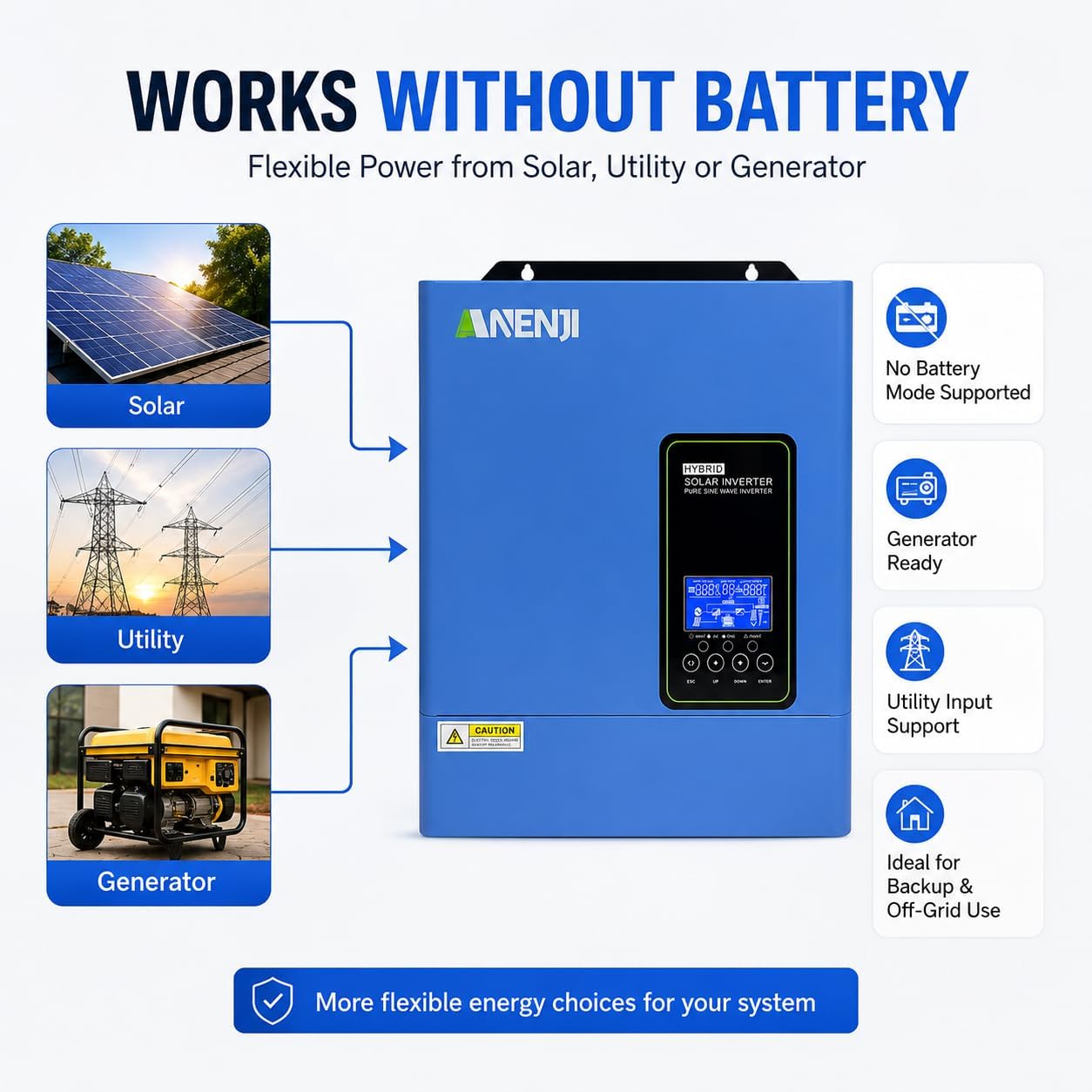
Image 5.1: Illustration of the inverter's ability to work without a battery, drawing power flexibly from solar, utility, or a generator, making it ideal for backup and off-grid use.
5.4 Pure Sine Wave Output
The inverter provides a clean and stable pure sine wave output, suitable for sensitive electronics. The transfer time is typically 10ms for PCs and 20ms for home appliances.
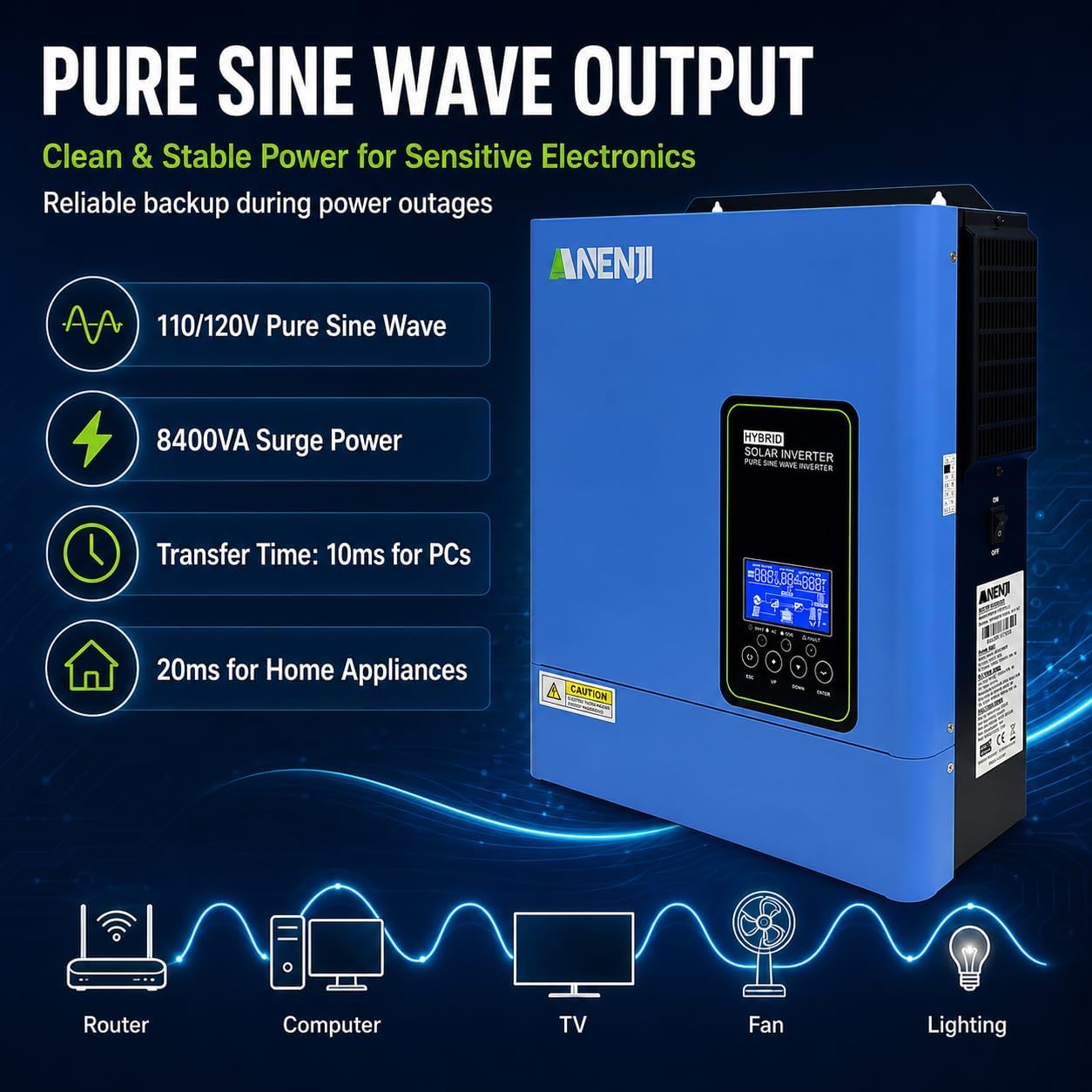
Image 5.2: Details on the pure sine wave output, including 110/120V output, 8400VA surge power, and typical transfer times for various devices like routers, computers, TVs, fans, and lighting.
6. Battery Support and Communication
6.1 Battery Compatibility
The inverter supports various 24V battery types:
- AGM batteries
- Flooded lead-acid batteries
- User-defined battery settings
- Compatible LiFePO4 (Lithium Iron Phosphate) batteries
The maximum combined charging current is 120A, including up to 60A from AC.

Image 6.1: Visual representation of the inverter's compatibility with various 24V battery types, including LiFePO4, AGM, and Flooded Lead-Acid, along with RS485 BMS communication and user-defined charging settings.
6.2 Communication Ports
The inverter provides several communication options for monitoring and control:
- RS485 Communication Port: Supports configured protocols, including Pylontech US2000 for BMS communication.
- RS232 Communication Port: For data exchange with external devices.
- Dry Contact Output (3A/250V AC): For external control or signaling.

Image 6.2: Rear view of the inverter highlighting the RS232, RS485, Dry Contact Output, and the optional WiFi Monitoring port for system integration and monitoring.
7. Wi-Fi Monitoring
An external Wi-Fi adapter is included in the package for remote monitoring capabilities. This allows you to monitor your inverter's performance and status from a compatible device without additional accessory purchases. Refer to the separate Wi-Fi adapter manual for detailed setup instructions.
8. Maintenance
- Regular Inspection: Periodically check all wiring connections for tightness and signs of corrosion.
- Cleaning: Keep the inverter's ventilation openings clear of dust and debris to ensure proper airflow. Use a soft, dry cloth for cleaning the exterior.
- Battery Maintenance: Follow the battery manufacturer's recommendations for maintenance, including checking electrolyte levels for flooded batteries and ensuring terminals are clean.
- Environmental Check: Ensure the installation environment remains within the specified temperature and humidity ranges.
9. Troubleshooting
This section provides general troubleshooting tips. For complex issues, contact technical support.
9.1 Common Issues and Solutions
- Inverter Not Powering On: Check battery connections, battery voltage, and all circuit breakers.
- No AC Output: Verify AC output breaker, check for overload, ensure battery voltage is sufficient, and check operating mode settings.
- No Solar Charging: Check PV connections, PV voltage (must be within MPPT range), and ensure solar panels are receiving adequate sunlight.
- Overload Warning: Reduce the connected load. The inverter has an 8400W surge capacity but continuous operation above 4200W will trigger an overload.
- Communication Issues: Ensure communication cables are securely connected and the correct protocol is selected in the settings. For Wi-Fi, verify adapter connection and network configuration.
10. Specifications
| Feature | Specification |
|---|---|
| Brand | Aninerel |
| Model Name | ANJ-4.2KW-LV-W |
| Wattage | 4200 watts |
| Surge Protection Rating | 8400 watts |
| Voltage | 24 volts (DC) |
| Input Voltage | 120 volts (AC) |
| Output Voltage | 110V/115V/120V AC |
| Frequency | 50/60 hertz (selectable) |
| Electrical Output Waveform | Pure Sine Wave |
| Max PV Power | 6200W |
| MPPT Operating Range | 60V-450V |
| Max PV Open Circuit Voltage | 500V |
| Max Solar Input Current | 27A |
| Max Combined Charging Current | 120A (up to 60A from AC) |
| Display Type | LCD |
| Item Dimensions (L x W x H) | 12.2"L x 4.7"W x 14.17"H |
| Item Weight | 7 pounds |
| Upper Temperature Rating | 60 °C |
| UPC | 717235756823 |
11. Warranty and Support
11.1 Warranty Information
This Aninerel Hybrid Solar Inverter comes with a 2-year manufacturer's warranty. Please retain your proof of purchase for warranty claims.
11.2 Customer Support
For technical assistance, troubleshooting beyond this manual, or warranty inquiries, please contact Aninerel customer support. Refer to the product packaging or the official Aninerel website for the most current contact information.