
1. Introduction
Thank you for choosing the Merach V33 Pro Vibration Plate Exercise Machine. This manual provides essential information for the safe and effective operation, maintenance, and troubleshooting of your new fitness equipment. Please read this manual thoroughly before use and retain it for future reference.
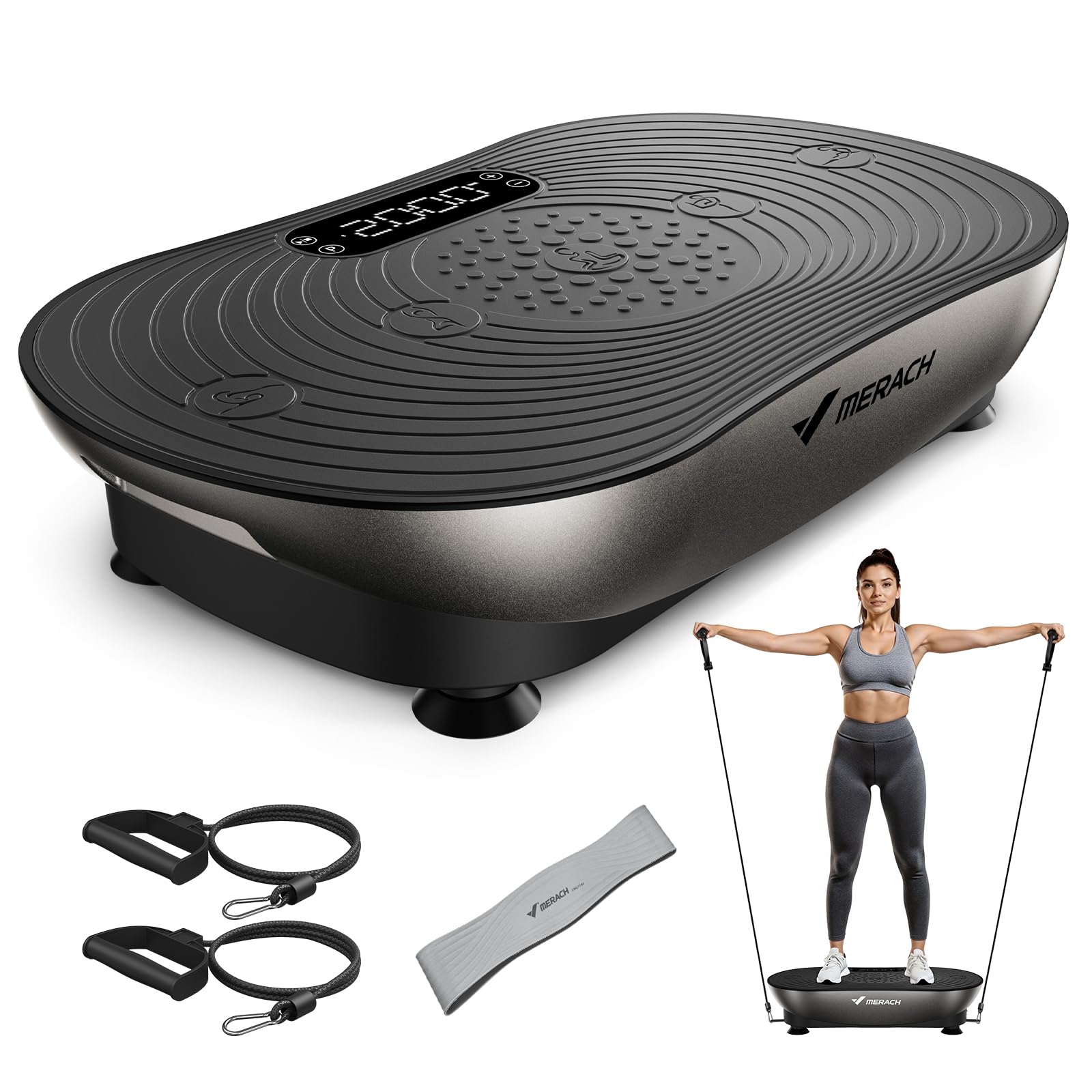
The Merach V33 Pro Vibration Plate Exercise Machine, shown in Arc-Silver Black.
2. Safety Information
To reduce the risk of serious injury, read all important precautions and instructions in this manual and on your equipment before using the Merach V33 Pro. MERACH assumes no responsibility for personal injury or property damage sustained by or through the use of this product.
- Consult your physician before starting any exercise program, especially if you have pre-existing medical conditions.
- Use the equipment only for its intended purpose as described in this manual.
- Keep children and pets away from the equipment during operation.
- Place the equipment on a level, stable surface. Ensure adequate space around the machine.
- Do not use the equipment if it has been damaged. Contact customer support for assistance.
- Maximum user weight capacity: 350 pounds. Do not exceed this limit.
- Always wear appropriate athletic footwear when using the vibration plate.
- Do not insert any objects into openings.
- Unplug the equipment when not in use and before cleaning.
3. Package Contents
Verify that all components are present in the package:
- Merach V33 Pro Vibration Plate Exercise Machine
- Power Cord
- Pull Cords (2)
- Assistance Training Belt
- Remote Control
- Instruction Manual (this document)

Visual representation of the Merach V33 Pro package contents, including the main unit, power cord, pull cords, assistance training belt, and remote control.
4. Setup
- Unpacking: Carefully remove all components from the packaging. Retain packaging for storage or future transport.
- Placement: Place the Merach V33 Pro on a firm, level surface. Ensure there is enough clear space around the unit for safe operation. The non-slip suction cups on the base provide stability.
- Power Connection: Insert the power cord into the power inlet on the side of the vibration plate, then plug the other end into a grounded electrical outlet.
- Remote Control: Ensure batteries are installed in the remote control. The remote allows for convenient operation without bending over.
- Attach Accessories (Optional): If desired, attach the pull cords to the designated anchor points on the vibration plate for upper body exercises. The assistance training belt can also be used for various exercises.

The Merach V33 Pro features soft, non-slip silicone pedals, a remote control for ease of use, and non-slip suction cups for stability during workouts.
5. Operating Instructions
5.1 Powering On/Off
- Press the power button on the unit or the remote control to turn the machine on or off.
- The advanced LED touchscreen will illuminate upon power-on.
5.2 Using the Touchscreen Display
The Merach V33 Pro features an advanced LED touchscreen for intuitive control. The display is designed to be clear and readable even when standing.

The Merach V33 Pro's responsive touchscreen offers clear visibility and ease of use compared to smaller physical buttons.
5.3 Modes of Operation
The Merach V33 Pro offers both manual and automatic modes:
- Manual Mode: Allows you to set the vibration speed and time duration (1-20 minutes) manually. Adjust speed using the '+' and '-' buttons on the touchscreen or remote. The machine offers 99 adjustable speed levels.
- Automatic Programs: Choose from 5 pre-set automatic programs designed for different fitness goals. Select a program using the 'P' button on the control panel or remote.
5.4 Vibration Zones and Intensity
The vibration plate provides varying intensity based on foot placement:
- Low Speed (1-25): Feet closer together, ideal for recovery and relaxation.
- Middle Speed (26-50): Feet slightly wider, suitable for fat burning and endurance.
- High Speed (51-75): Feet wider apart, for strength and power training.
- Super Speed (76-99): Widest stance, for professional-level training.

Illustration of foot placement on the Merach V33 Pro to achieve different vibration intensities and target specific workout goals.
5.5 Bluetooth Connectivity
Connect your device via Bluetooth to play music during your workout. Refer to your device's Bluetooth settings to pair with the Merach V33 Pro.
5.6 Using Pull Cords and Assistance Training Belt
Attach the pull cords to the designated hooks on the vibration plate. These can be used for various upper body exercises while standing or sitting on the plate. The assistance training belt can be incorporated into your routine for added resistance or support.

The Merach V33 Pro supports various activities including relaxation, recovery, general fitness, and fat burning, making it a versatile home gym solution.
6. Maintenance
- Cleaning: Wipe the surface of the vibration plate with a soft, damp cloth after each use. Do not use abrasive cleaners or solvents. Ensure the machine is unplugged before cleaning.
- Storage: Store the machine in a cool, dry place away from direct sunlight and moisture. Its compact design allows for easy storage under furniture.
- Inspection: Periodically check the power cord for any damage. Ensure all connections are secure.

The Merach V33 Pro's compact design and light weight (15.9 lbs) allow for easy movement and storage, such as sliding it under a bed.
7. Troubleshooting
| Problem | Possible Cause | Solution |
|---|---|---|
| Machine does not power on. | Power cord not properly connected; no power from outlet. | Ensure power cord is securely plugged into both the machine and a working electrical outlet. Check circuit breaker. |
| Remote control not working. | Dead batteries; remote out of range; obstruction. | Replace remote control batteries. Ensure remote is pointed at the machine's receiver and within range. Remove any obstructions. |
| Unusual noise during operation. | Loose components; machine not on a level surface. | Ensure the machine is on a flat, stable surface. Check for any loose parts. If noise persists, discontinue use and contact customer support. |
| Vibration feels too weak/strong. | Incorrect speed setting; foot placement. | Adjust the speed setting using the '+' or '-' buttons. Refer to section 5.4 for guidance on foot placement for desired intensity. |
8. Specifications
| Feature | Detail |
|---|---|
| Brand | MERACH |
| Model Number | V33 |
| Item Weight | 15.9 pounds |
| Color | Arc-Silver Black |
| Material | Acrylonitrile Butadiene Styrene (ABS) |
| Product Dimensions (D x W x H) | 22"D x 13.4"W x 4.9"H |
| Controls Type | Touch Button (LED Touchscreen) |
| Operation Mode | Automatic, Manual |
| Number of Programs | 5 |
| Adjustable Speeds | 99 |
| Maximum Weight Recommendation | 350 pounds |
| Connectivity | Bluetooth |
9. Warranty and Support
Warranty: The Merach V33 Pro Vibration Plate Exercise Machine comes with a 1-year warranty from the date of purchase. This warranty covers manufacturing defects under normal use conditions. Please retain your proof of purchase for warranty claims.
Customer Support: For any questions, technical assistance, or warranty claims, please contact MERACH customer support. Contact information can typically be found on the product packaging or the official MERACH website.


