
Introduction
Welcome and thank you for choosing the GIDIGI GX-pEST05AEU Digital pH and Salinity Tester. This device is designed for accurate and reliable measurement of pH, salinity, EC (Electrical Conductivity), TDS (Total Dissolved Solids), and temperature in various water environments. It is ideal for monitoring water quality in saltwater pools, freshwater pools, aquariums, spas, hot tubs, and hydroponic systems. Please read this manual carefully before use to ensure proper operation, maintenance, and to achieve the most accurate results.
Package Contents
- 1 x GIDIGI GX-pEST05AEU Digital pH and Salinity Tester
- 1 x User Manual
- 6 x pH Buffer Powders (for pH 4.00, 7.00, 10.01)
- 1 x Salinity Calibration Solution (12.88 mS/cm)
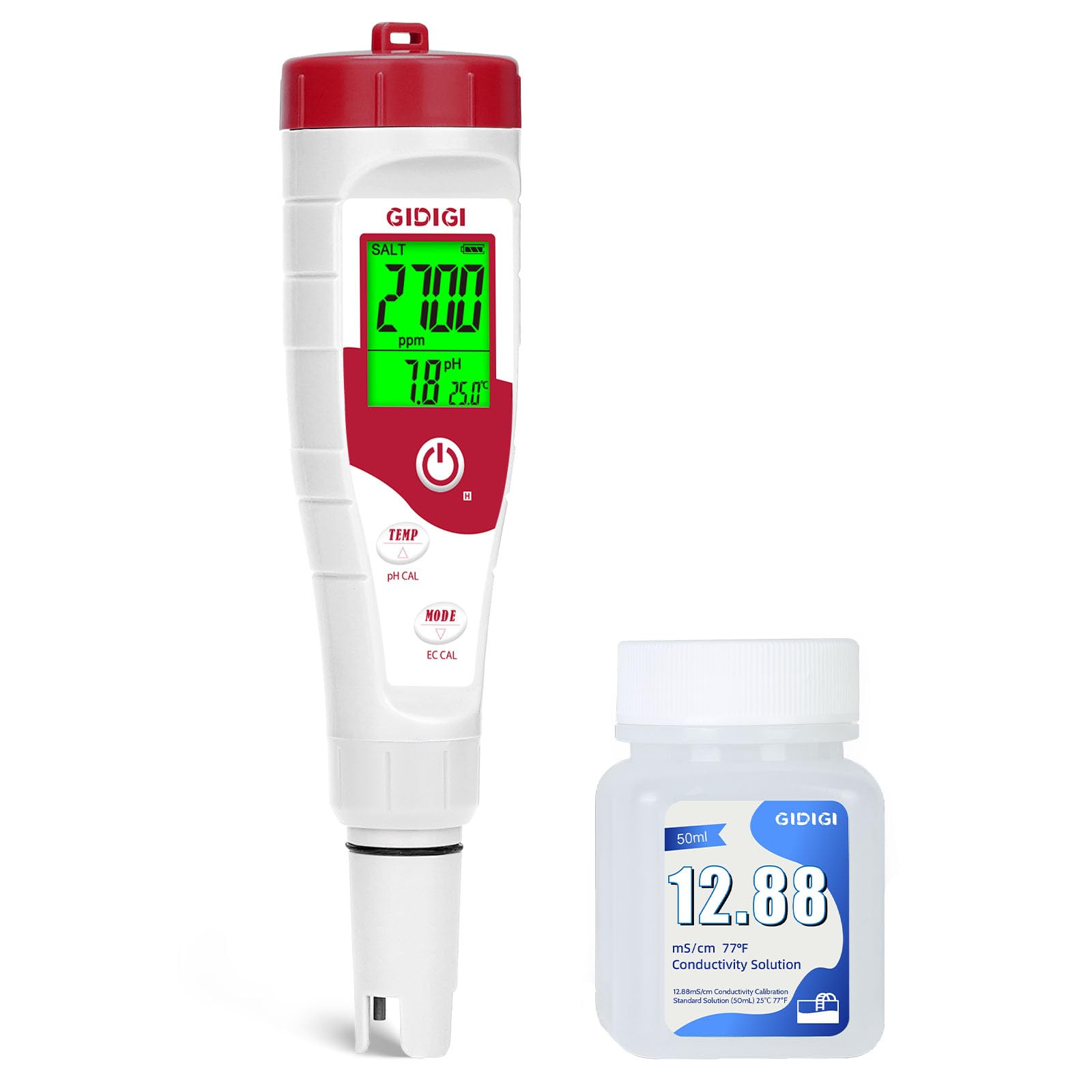
Image: A close-up view of the GIDIGI GX-pEST05AEU digital tester, showing its red and white body, LCD screen displaying 'SALT', 'ppm', 'pH', and 'TEMP', and the probe.
Key Features
- Multi-Parameter Measurement: Measures pH, Salinity, EC, TDS, and Temperature.
- High Accuracy: Equipped with a sensitive glass probe and an upgraded chip for precise readings.
- Automatic Temperature Compensation (ATC): Ensures accurate readings across a temperature range of 0°C to 60°C (32°F to 140°F).
- Dual Salinity Display: Automatically switches between ppm (0-9990 ppm) for saltwater pools and ppt (10.1-100.0 ppt) for seawater.
- Backlit LCD Display: Large, clear screen displays multiple parameters simultaneously for easy readability.
- Wide Application: Suitable for pools, aquariums, spas, hot tubs, koi ponds, drinking water, and hydroponics.
- Easy to Use: Simple one-button operation for quick measurements.

Image: An exploded view diagram of the GIDIGI tester, pointing out the backlit LCD screen, sensitive glass probe, upgraded superchip, and the importance of the moist sponge cap for electrode maintenance.
Initial Setup
Battery Installation
The device typically comes with batteries pre-installed. If not, or if replacement is needed, locate the battery compartment on the top of the device. Insert the batteries according to the polarity markings. Ensure the compartment is securely closed.
First-Time Use
Before first use, it is recommended to perform a calibration to ensure optimal accuracy. Refer to the 'Calibration' section for detailed instructions.
Operation
Taking a Measurement
- Prepare the Tester: Remove the protective cap from the electrode. If the electrode is dry, rinse it with distilled water.
- Turn On: Press the 'ON/OFF' button to power on the device.
- Select Mode (if applicable): Press the 'MODE' button to cycle through pH, Salinity, EC, or TDS measurement modes if your device supports separate modes. The display will show the selected parameter.
- Immerse Electrode: Dip the electrode into the water sample you wish to test. Ensure the electrode is fully submerged but do not immerse the entire device.
- Wait for Reading: Gently stir the tester to remove any air bubbles and wait for the reading to stabilize on the LCD screen (typically a few seconds).
- Record Results: Note down the displayed values for pH, salinity, EC, TDS, and temperature.
- Clean and Store: After use, rinse the electrode thoroughly with distilled water. Replace the protective cap, ensuring the sponge inside remains moist with a few drops of distilled water or electrode storage solution to prevent the electrode from drying out.

Image: The tester held in hand, showing its digital display, alongside smaller images depicting its use in a hot tub, spa, hydroponics, and for drinking water.
Calibration
Regular calibration is essential to maintain the accuracy of your GIDIGI tester. The frequency of calibration depends on usage and storage conditions. It is recommended to calibrate at least once a month or if readings appear inconsistent.
pH Calibration (3-Point)
- Prepare pH buffer solutions (pH 4.00, 7.00, and 10.01) by dissolving the provided powders in 250ml of distilled water each.
- Turn on the tester and press the 'MODE/CAL' button to enter pH calibration mode. The display will show 'CAL'.
- Rinse the electrode with distilled water and immerse it into the pH 7.00 buffer solution. Wait for the reading to stabilize, then press 'CAL' to confirm. The device will automatically recognize the buffer.
- Repeat the process for pH 4.00 and pH 10.01 buffer solutions. After each successful calibration, the device will confirm and exit calibration mode.
Salinity/EC Calibration
- Turn on the tester and press the 'MODE/CAL' button until the device is in EC or Salinity measurement mode.
- Press and hold the 'CAL' button to enter calibration mode. The display will show 'CAL'.
- Rinse the electrode with distilled water and immerse it into the 12.88 mS/cm salinity calibration solution.
- Wait for the reading to stabilize. The device will automatically recognize the solution and calibrate. Once complete, it will exit calibration mode.

Image: An image illustrating the three easy steps for calibration: 1) Removing the cap and turning on, 2) Pressing MODE/CAL and setting to EC mode, 3) Immersing the probe in calibration solution.
Maintenance
- Electrode Cleaning: Always rinse the electrode with distilled water after each use to prevent contamination. For stubborn residue, gently clean with a soft brush and a mild detergent solution, then rinse thoroughly.
- Electrode Storage: Keep the protective cap on the electrode when not in use. Ensure the sponge inside the cap remains moist with distilled water or a dedicated electrode storage solution. This prevents the electrode from drying out, which can affect its performance and lifespan.
- Battery Replacement: If the display becomes dim or the device fails to power on, replace the batteries.
- General Care: Store the tester in a cool, dry place, away from direct sunlight and extreme temperatures. Avoid dropping or subjecting the device to strong impacts.
Troubleshooting
| Problem | Possible Cause | Solution |
|---|---|---|
| Inaccurate readings | Uncalibrated device, dirty electrode, dried-out electrode. | Perform calibration. Clean the electrode. Moisten the sponge cap. |
| Display is dim or blank | Low or dead batteries. | Replace batteries. |
| Slow response time | Dirty or aged electrode. | Clean the electrode. If problem persists, consider electrode replacement. |
| Cannot calibrate | Incorrect buffer solution, dirty electrode, damaged electrode. | Ensure correct buffer solutions are used. Clean electrode. If still unable to calibrate, contact customer support. |
Technical Specifications
- Model: GX-pEST05AEU
- pH Measurement Range: 0.00 - 14.00 pH
- pH Accuracy: ±0.1 pH
- Salinity Measurement Range: 0 - 9990 ppm (saltwater pools), 10.1 - 100.0 ppt (seawater)
- EC Measurement Range: 0 - 9990 µS/cm, 10.01 - 200.0 mS/cm
- TDS Measurement Range: 0 - 9990 ppm, 10.0 - 100.0 ppt
- Temperature Measurement Range: 0°C - 60°C (32°F - 140°F)
- Automatic Temperature Compensation (ATC): 0°C - 60°C
- Calibration: 3-point pH calibration (4.00, 7.00, 10.01), 1-point EC/Salinity calibration (12.88 mS/cm)
- Power Supply: (Typically button cell batteries, e.g., 3x LR44 - specific type not provided in JSON)
- Country of Origin: China

Image: An image highlighting the tester's capability to measure across a 0-100 PPT range for different pool types, including in-ground, above-ground, architectural, lap, infinity, natural, and plunge pools, along with temperature and conductivity icons.
Warranty and Customer Support
GIDIGI products are manufactured to high-quality standards. This product comes with a standard manufacturer's warranty against defects in materials and workmanship. Please retain your proof of purchase for warranty claims.
For technical assistance, troubleshooting, or warranty inquiries, please contact GIDIGI customer support through the retailer where the product was purchased or refer to the contact information provided on the product packaging or official GIDIGI website.