
Introduction
This manual provides detailed instructions for the assembly, operation, and maintenance of your MSmask Twin Bed with Desk. This multi-functional corner bed frame is designed to optimize space, integrating sleeping and study areas with ample storage and a built-in charging station. Please read all instructions carefully before beginning assembly and retain this manual for future reference.
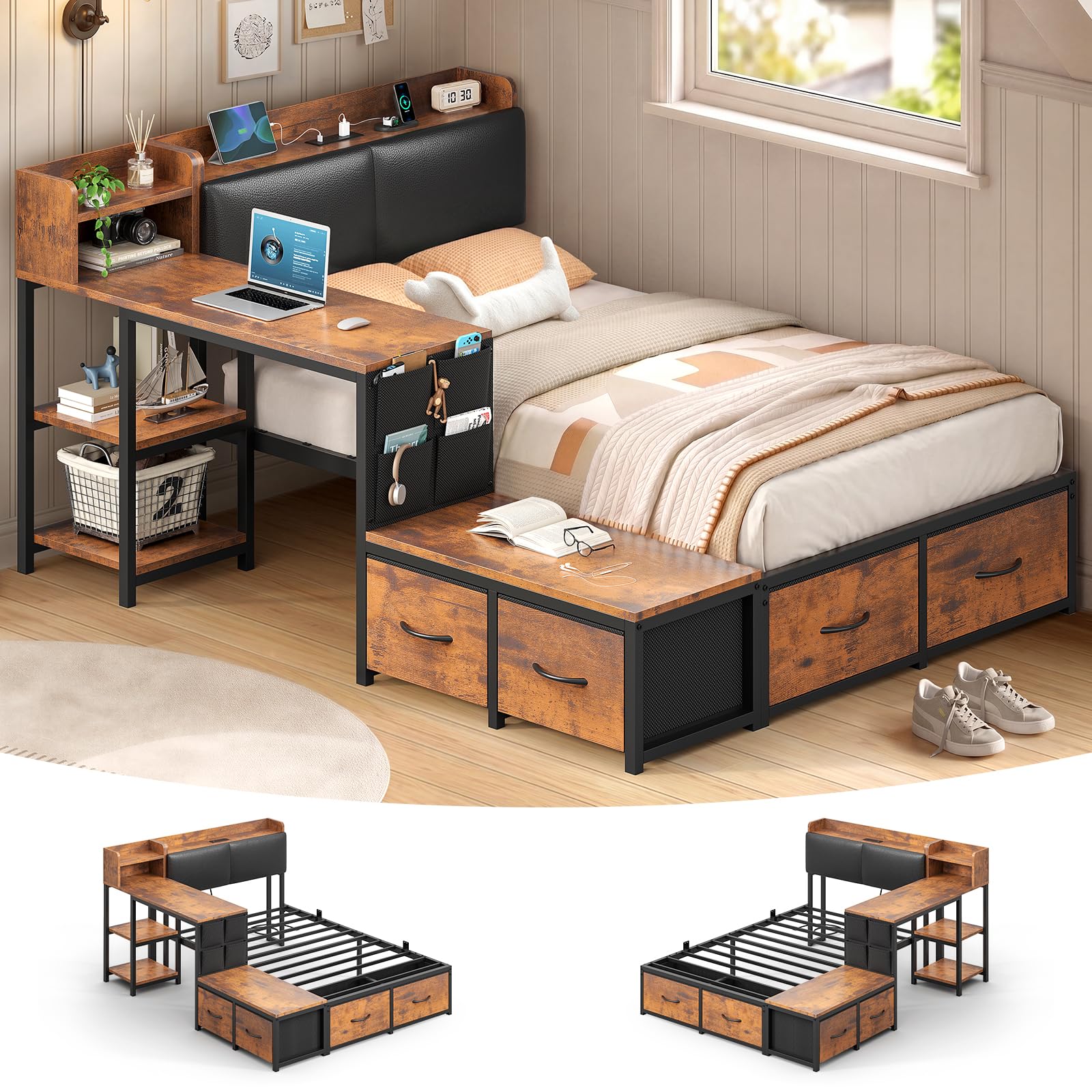
Image: Fully assembled MSmask Twin Bed with Desk, showcasing the integrated desk, storage, and bed frame.
Safety Information
- Weight Capacity: This bed frame supports up to 800 pounds. Do not exceed this maximum weight capacity to prevent damage or injury.
- Ensure all screws and fasteners are securely tightened before use. Periodically check and re-tighten as necessary.
- Keep small parts away from children during assembly to avoid choking hazards.
- Use the product on a flat, stable surface.
- Do not stand or jump on the bed frame.
Package Contents
Before beginning assembly, verify that all components listed below are present and undamaged. If any parts are missing or damaged, please contact customer support.
- 14 Inch High Platform Twin Bed Frame
- Integrated Desk
- Storage Bench
- 4 Fabric Drawers
- 2-Tier Shelves
- Storage Headboard
- Power Strip (pre-installed in headboard)
- Installation Manual
- Necessary Tools for Assembly

Image: Exploded view diagram illustrating all included components and their dimensions.
Setup and Assembly
Assembly requires two people and approximately 1-2 hours. Follow the numbered steps in the included installation manual. Ensure you have adequate space for assembly.
Key Assembly Points:
- Desk and Bench Orientation: The desk and bench side of this corner bed can be assembled on either the left or right side to suit your room layout. Refer to the specific sections in the provided instruction booklet for your desired configuration.
- Secure Connections: Ensure all metal tubing and engineered wood components are firmly connected using the provided hardware.
- Mattress Stops: Install the two mattress slide stops to secure your mattress in place on the platform.

Image: Illustration demonstrating the optional left or right side assembly for the desk and bench components.

Image: Close-up of the integrated desk, highlighting its dimensions (47.7"L x 16.1"W) and the two-tier storage shelves beneath.
Operating Instructions
Integrated Desk:
The large desk (47.7''L x 16.1''W) provides a dedicated workspace. Its 14-inch height allows for comfortable use from the side of the bed or with a chair. Utilize the two-tier shelves beneath the desk for books, stationery, or storage baskets.

Image: Demonstrates flexible use of the desk, both from a chair outside the bed and while seated on the bed.
Charging Station:
The headboard features a built-in charging station. This includes:
- 2 AC Outlets (125V/12A)
- 1 USB Port (5V/2A)
- 1 Type-C Port (5V/3A)
Use these ports to conveniently charge mobile phones, laptops, and other electronic devices. The recessed design helps keep cables tidy.

Image: Detailed view of the charging station integrated into the headboard, showing the power outlets and USB ports.
Storage Features:
- 4 Large Fabric Drawers: These drawers are located under the bed and are suitable for storing clothes, bedding, and other personal items.
- Storage Headboard: The headboard offers additional space for small items, books, or decorative elements.
- 2 Shelves: Integrated into the desk structure for easy access to study materials.
- 4 Side Pockets: Located on the side of the desk, these pockets are ideal for smaller items like pens, notebooks, or remote controls.
- Storage Bench: The bench provides temporary seating and additional storage space.

Image: Comprehensive view highlighting the various storage options: under-bed drawers, storage bench, and headboard compartments.
Maintenance
- Cleaning: Wipe down metal and engineered wood surfaces with a soft, damp cloth. Avoid harsh chemicals or abrasive cleaners.
- Fabric Drawers: The fabric drawers can be spot cleaned with a mild detergent and water. Allow to air dry completely.
- Hardware Check: Periodically inspect all bolts and screws to ensure they remain tight. Re-tighten as needed to maintain stability.
- Power Strip: Ensure the power strip remains free of dust and debris. Do not overload the outlets.
Troubleshooting
| Problem | Possible Cause | Solution |
|---|---|---|
| Bed frame feels unstable or wobbly. | Loose connections or uneven floor. | Check and tighten all bolts and screws. Ensure the bed is on a level surface. |
| Drawers do not slide smoothly. | Obstruction in the drawer track or misaligned fabric drawer. | Remove drawers and check for any obstructions. Ensure fabric drawers are correctly assembled and seated on their supports. |
| Charging station not working. | Power cable not plugged in, circuit breaker tripped, or device issue. | Ensure the bed's power cable is securely plugged into a functional wall outlet. Check your home's circuit breaker. Test with a different device. |
| Parts do not align during assembly. | Incorrect orientation of parts or manufacturing tolerance. | Review the assembly instructions carefully to ensure parts are oriented correctly. If issues persist, contact customer support. |
Specifications
| Feature | Detail |
|---|---|
| Model Name | Corner Bed with Desk |
| Size | Twin |
| Product Dimensions (L x W x H) | 82.1" x 55.3" x 38.8" |
| Material | Engineered Wood, Fabric, Faux Leather, Metal, Sponge |
| Color | Black & Vintage Brown |
| Maximum Weight Recommendation | 800 pounds |
| Number of Drawers | 4 |
| Desk Dimensions (L x W) | 47.7" x 16.1" |
| Charging Station | 2 AC Outlets (125V/12A), 1 USB Port (5V/2A), 1 Type-C Port (5V/3A) |
| Recommended Mattress Thickness | 6-10 inches |
Warranty and Support
For any issues regarding missing parts, damaged components, or assembly assistance, please contact MSmask customer support. While specific warranty details are not provided in this manual, most products come with a manufacturer's warranty against defects in materials and workmanship.
Please refer to your purchase documentation or the seller's website for detailed warranty information.
Contact Information:
- Visit the MSmask Store on Amazon for support and product information.
- For direct assistance, please use the contact methods provided by your retailer or the manufacturer's official website.