
1. Introduction
This manual provides essential instructions for the safe and effective use of your WALKINGPAD Z1 Foldable Walking Pad Treadmill. Please read this manual thoroughly before operation and retain it for future reference. The WALKINGPAD Z1 is designed for under-desk walking, general walking, and light jogging in home and office environments.
2. Safety Information
- Ensure the treadmill is placed on a flat, stable surface.
- Keep children and pets away from the treadmill during operation.
- Do not exceed the maximum weight capacity of 242 lbs (110 kg).
- Wear appropriate athletic footwear.
- Always hold onto a stable support if you feel unsteady.
- Unplug the treadmill when not in use or before cleaning/maintenance.
- Do not operate the treadmill if it is damaged or malfunctioning.
3. Unpacking and Initial Setup
Your WALKINGPAD Z1 comes pre-assembled and requires minimal setup. Carefully remove all packaging materials and inspect the unit for any damage.
3.1 Unfolding the Treadmill
The WALKINGPAD Z1 features a 180-degree foldable design for compact storage. To unfold, gently lift the rear section of the treadmill until it locks into its flat, operational position. Ensure it is fully extended and stable before use.

The WalkingPad Z1 features a 180-degree foldable design, allowing it to be easily folded in half for storage. This significantly reduces its footprint, making it convenient to store under furniture or in small spaces.
3.2 Connecting Power
Connect the power cord to the treadmill's power input and then to a standard electrical outlet. The LED display will illuminate, indicating the unit is ready for use.
3.3 Overview Video
This video demonstrates the key features and folding mechanism of the WALKINGPAD Z1, providing a visual guide to its compact design and ease of storage.
4. Operating Instructions
4.1 Power On/Off
Press the power button located on the front panel to turn the treadmill on or off.
4.2 Adjusting Speed
The WALKINGPAD Z1 offers a speed range of 1 to 4 mph. Use the included remote control to increase or decrease the walking speed. The current speed will be displayed on the LED panel.

The LED digital display panel shows essential workout data such as calories burned, time, and distance. The included remote control allows for easy adjustment of speed and other settings.
4.3 LED Display
The integrated LED display provides real-time feedback on your workout, including:
- Speed: Current walking speed in miles per hour (mph).
- Calories: Estimated calories burned during the session.
- Time: Duration of the current workout.
- Distance: Total distance covered during the session.
4.4 Mobile App Control
For enhanced functionality and tracking, download the official WALKINGPAD app. The app allows you to control the treadmill, monitor your progress, and access additional features.

The WalkingPad Z1 can be controlled via a dedicated mobile application, offering additional features and tracking capabilities for your workouts.
5. Maintenance
Regular maintenance ensures the longevity and optimal performance of your treadmill.
5.1 Cleaning
Wipe down the treadmill surface with a damp cloth after each use. Avoid using abrasive cleaners or solvents. Ensure no moisture enters the motor or electronic components.
5.2 Belt Lubrication
The walking belt requires periodic lubrication to reduce friction and extend its lifespan. Refer to the specific instructions provided with your lubrication kit for proper application frequency and method. Generally, lubrication is recommended every 3-6 months depending on usage.
5.3 Belt Alignment
Over time, the walking belt may shift to one side. If the belt is rubbing against the side rails or appears off-center, it needs adjustment. Use the provided Allen wrench to turn the rear roller adjustment bolts. Turn the bolt on the side towards which the belt has shifted clockwise, or the opposite side counter-clockwise, in small increments (quarter turns) until the belt is centered. Test the treadmill after each adjustment.
6. Troubleshooting
If you encounter issues with your WALKINGPAD Z1, refer to the following common solutions:
- Treadmill not powering on: Ensure the power cord is securely plugged into both the treadmill and a working electrical outlet. Check the power switch on the unit.
- Belt rubbing noise or shifting: This indicates the walking belt needs alignment. Refer to section 5.3 for detailed instructions on how to adjust the belt.
- Unresponsive remote control: Check the battery in the remote control and replace if necessary. Ensure there are no obstructions between the remote and the treadmill's sensor.
- Unusual noises during operation: Stop the treadmill immediately. Inspect the belt for foreign objects or damage. If the noise persists, contact customer support.
For issues not covered here, please refer to the warranty and support section.
7. Product Specifications
Detailed specifications for the WALKINGPAD Z1 Foldable Walking Pad Treadmill:
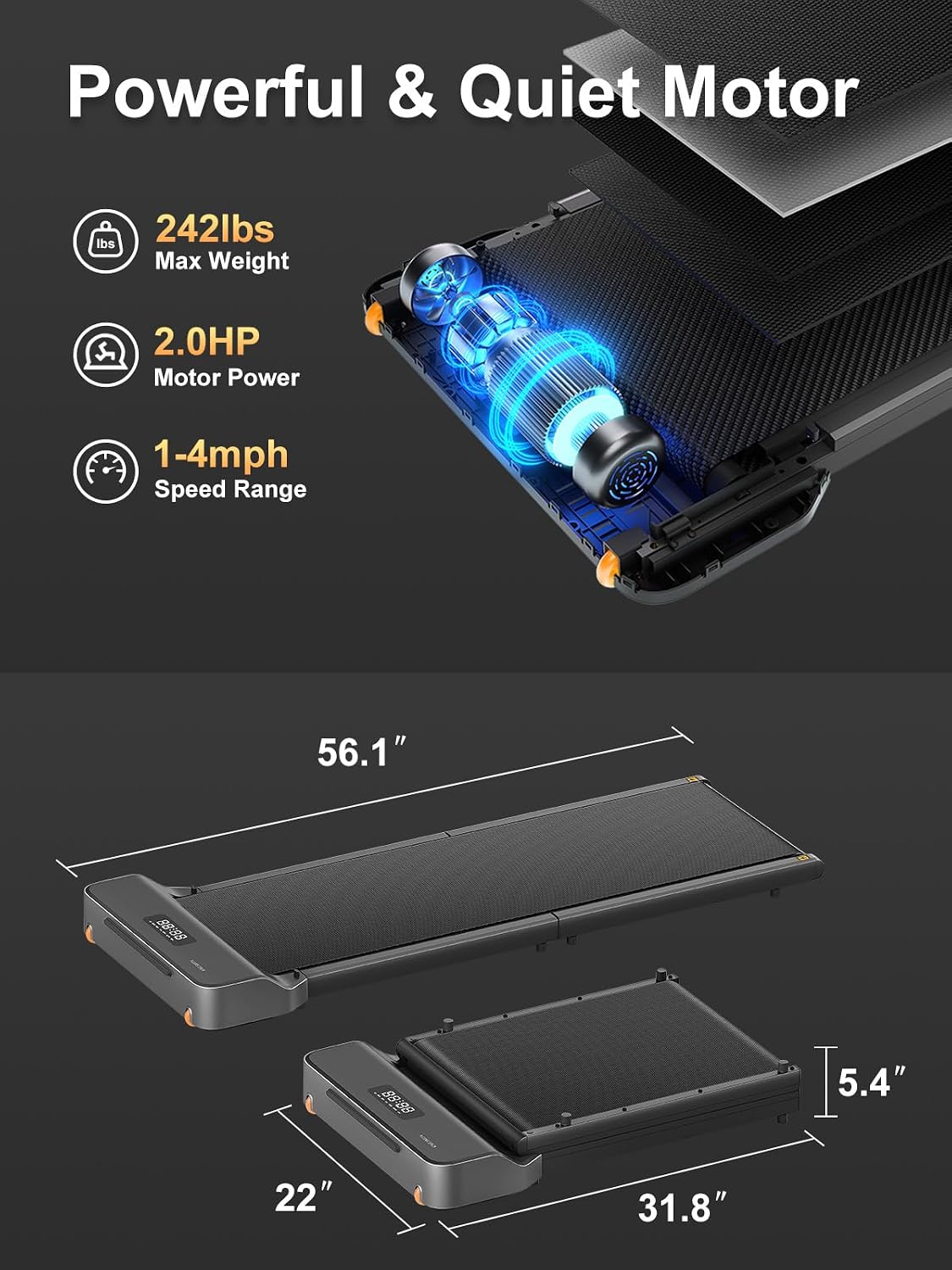
This image highlights the treadmill's 2.0 HP brushless motor, 242 lbs maximum weight capacity, 1-4 mph speed range, and overall dimensions (56.1"D x 22"W x 4.1"H).
| Feature | Detail |
|---|---|
| Brand | WALKINGPAD |
| Model Name | WALKINGPAD Z1 |
| Model Number | WP400F4 |
| Product Dimensions | 56.1"D x 22"W x 4.1"H |
| Folded Size | 31.8" x 22" x 5.4" |
| Item Weight | 50 pounds |
| Material | Aluminum |
| Maximum Speed | 4 miles per hour |
| Minimum Speed | 1 miles per hour |
| Maximum Weight Recommendation | 242 pounds |
| Maximum Horsepower | 2 hp |
| Power Source | Corded Electric |
| Special Feature | Foldable |
| Metrics Measured | Calories Burned, Distance, Speed, Time |
| Included Components | Power Cord, Remote Control, User Manual |

The WalkingPad Z1 features an 8-layer composite running belt designed for durability, comfort, and joint protection.
8. Warranty and Support
8.1 Manufacturer's Warranty
The WALKINGPAD Z1 is covered by a 1-Year Manufacturer's Warranty. This warranty covers defects in materials and workmanship under normal use. Please retain your proof of purchase for warranty claims.
8.2 Customer Support
For technical assistance, warranty claims, or any questions regarding your WALKINGPAD Z1, please contact WALKINGPAD customer support. Refer to the contact information provided on the product packaging or the official WALKINGPAD website.


