
1. Product Overview
The mxuteuk HZ-JTSS is a momentary start-stop push button station designed for industrial control applications. It features a red emergency stop mushroom button, a red momentary stop button (1NC), and a green momentary start button (1NO), all housed within a durable plastic enclosure. This manual provides essential information for the safe and effective installation, operation, and maintenance of the switch.
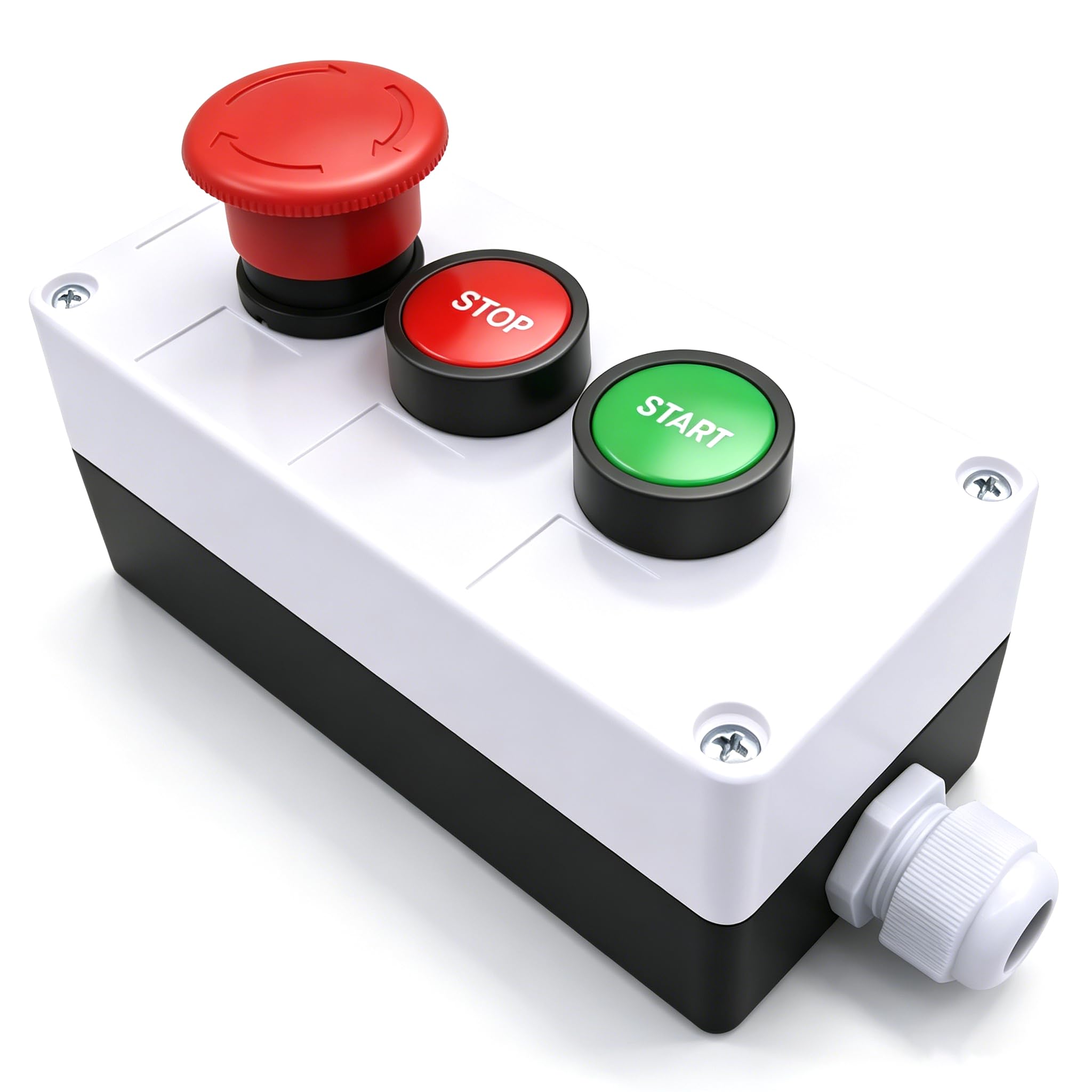
Figure 1: Overall view of the mxuteuk HZ-JTSS Start Stop Switch with emergency stop, start, and stop buttons.
2. Product Features
- Action Type: Red Emergency Stop (latching), Red Momentary Stop (1NC), Green Momentary Start (1NO).
- Rated Current (Ith): 10A
- Rated Insulation Voltage (Ui): 600V
- Rated Impulse Withstand Voltage (Uimp): 6KV
- Operating Voltage/Current: 240V 3A
- Shell Material: Plastic
- Overall Size (Exclude Mushroom Head): Approximately 150 x 68 x 64mm (5.9" x 2.7" x 2.5")
- International Protection Rating: IP65 (Dust tight and protected against low-pressure water jets from any direction).
3. Installation and Wiring
Proper installation and wiring are crucial for the safe and correct operation of the switch. Ensure all power is disconnected before proceeding with installation.
- Mounting: The switch station can be surface-mounted using appropriate fasteners. Ensure the mounting surface is stable and secure.
- Accessing Terminals: Carefully open the switch enclosure to access the internal contact blocks.
- Wiring Connections:
- The green "START" button is a Normally Open (1NO) contact. It closes when pressed.
- The red "STOP" button is a Normally Closed (1NC) contact. It opens when pressed.
- The red mushroom "EMERGENCY STOP" button is a Normally Closed (1NC) contact. It opens when pressed and latches, requiring a twist to reset.
- Securing Wires: Ensure all wire connections are tight and secure. Use the cable gland on the enclosure for strain relief and environmental protection.
- Enclosure Closure: Close the enclosure securely, ensuring the gasket is properly seated to maintain the IP65 rating.

Figure 2: Internal view of the switch showing contact blocks for the START (1NO), STOP (1NC), and Emergency Stop (1NC) buttons.

Figure 3: Close-up of the individual Start and Stop push buttons and their contact blocks.
4. Operating Instructions
This push button station provides intuitive control for connected equipment.
- START Button (Green): Press the green button to initiate the connected equipment or process. This is a momentary action; the contact closes only while the button is held down. In typical control circuits, this button is used to energize a latching relay or contactor.
- STOP Button (Red): Press the red button to halt the connected equipment or process. This is a momentary action; the contact opens only while the button is held down. In typical control circuits, this button is used to de-energize a latching relay or contactor.
- EMERGENCY STOP Button (Red Mushroom): In an emergency, press the red mushroom button firmly to immediately stop all connected operations. This button latches in the depressed position, maintaining the stop condition. To reset, twist the mushroom head clockwise until it pops back out.
Video 1: Demonstration of the momentary start and stop buttons, and the latching emergency stop button operation.
5. Maintenance
The mxuteuk HZ-JTSS switch is designed for durability and requires minimal maintenance. However, periodic checks are recommended to ensure continued reliable operation.
- Cleaning: Keep the exterior of the switch station clean and free from dust, dirt, and debris. Use a soft, damp cloth for cleaning. Do not use abrasive cleaners or solvents.
- Inspection: Periodically inspect the enclosure for any signs of damage, cracks, or loose components. Check the cable gland for a secure seal.
- Contact Check: If the switch is frequently used in critical applications, consider periodically checking the contact blocks for wear or corrosion. Ensure all wiring connections remain tight. (Note: This should only be performed by qualified personnel with power disconnected.)
6. Troubleshooting
| Problem | Possible Cause | Solution |
|---|---|---|
| Switch does not activate equipment. |
|
|
| Equipment does not stop when STOP button is pressed. |
|
|
| Emergency Stop button does not latch or release. |
|
|
7. Specifications
| Parameter | Value |
|---|---|
| Operation Mode | Push button |
| Current Rating | 10 Amps (Ith), 3 Amps (Rated) |
| Operating Voltage | 600 Volts (Ui) |
| Contact Type | Normally Open (START), Normally Closed (STOP, Emergency Stop) |
| Brand | mxuteuk |
| Switch Type | Push Button |
| Terminal Type | Spade |
| Material | Plastic (Shell), Copper, Brass (Contacts) |
| Circuit Type | 1-way |
| Mounting Type | Panel Mount (buttons), Surface Mount (box) |
| Actuator Type | Push Button |
| Number of Positions | 2 (ON/OFF states for momentary buttons) |
| Control Method | Touch |
| Wattage | 720 watts |
| Control Type | Start/Stop |
| Color | Red & Green/HB2-Start Stop (Buttons) |
| Unit Count | 1 |
| International Protection Rating | IP65 |
| Model | HZ-JTSS |
8. Warranty and Support
mxuteuk provides a one-year warranty for this product. If you encounter any issues during use, please contact mxuteuk customer support for assistance. We are committed to helping you resolve any problems promptly.
For support, please refer to the contact information provided with your purchase or visit the official mxuteuk store on Amazon: mxuteuk Store.