
1. Introduction
This manual provides essential information for the safe and efficient operation of your Luminous NXH 150 A48 Single Phase High Frequency Hybrid Solar Inverter. This advanced inverter is designed for efficient solar power management in residential and commercial applications, offering high efficiency, hybrid battery support, and remote monitoring capabilities. Please read this manual thoroughly before installation and operation.
2. Safety Information
Always observe the following safety precautions to reduce the risk of electric shock, fire, or injury:
- Installation and maintenance must be performed by qualified personnel only.
- Ensure the inverter is disconnected from all power sources (solar, battery, grid) before performing any service or maintenance.
- Do not operate the inverter if it appears damaged or has been dropped.
- The inverter includes anti-islanding protection. Do not attempt to bypass or disable this safety feature.
- Keep the inverter away from flammable materials, moisture, and direct sunlight.
- Ensure proper ventilation around the inverter to prevent overheating.
- Use appropriate personal protective equipment (PPE) during installation and maintenance.
3. Product Overview
The Luminous NXH 150 A48 is a 5kVA single-phase hybrid solar inverter featuring transformer-less HF technology for over 98% efficiency. It supports both lithium-ion and lead-acid batteries and offers seamless integration with solar and grid power. Key features include:
- 5kVA Rated Capacity: Suitable for residential and small commercial solar applications.
- High Efficiency: Advanced transformer-less HF technology ensures maximum solar energy utilization.
- Hybrid Battery Support: Compatible with both Lithium-ion and Lead Acid batteries.
- Smart Wi-Fi Monitoring: Real-time performance tracking via a mobile application.
- 150% PV Oversizing: Supports higher solar input for increased energy generation.
- Advanced Safety: Includes anti-islanding, overload, and short-circuit protection.
- Compact Design: Wall-mount design for easy installation.
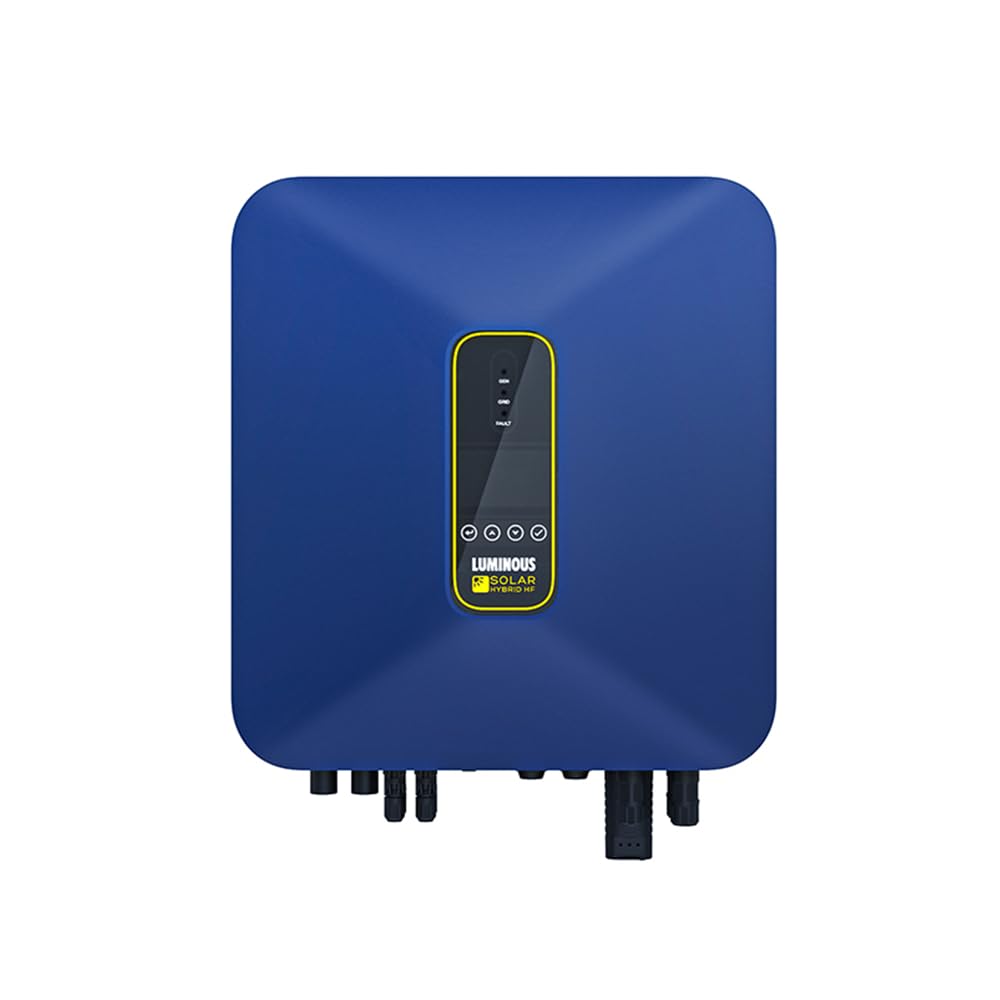
This image displays the Luminous NXH 150 A48 Hybrid Solar Inverter, showcasing its compact form factor and typical wall-mount installation design. The front panel includes indicators and a display for operational status.
4. Setup
Proper installation is crucial for the inverter's performance and safety. It is recommended that installation be performed by a certified electrician or solar professional.
4.1 Site Selection
- Choose a cool, dry, and well-ventilated area.
- Mount the inverter vertically on a solid wall, away from direct sunlight and rain.
- Ensure sufficient clearance around the inverter for airflow (minimum 20 cm on all sides).
- Avoid areas with flammable gases or corrosive substances.
4.2 Electrical Connections
- DC Input (PV Array): Connect the solar panel strings to the designated DC input terminals. Observe correct polarity.
- Battery Connection: Connect the battery bank (Lithium-ion or Lead-acid) to the battery terminals. Ensure correct voltage and polarity.
- AC Input (Grid): Connect the utility grid power to the AC input terminals.
- AC Output (Load): Connect your household or commercial loads to the AC output terminals.
- Grounding: Ensure the inverter chassis is properly grounded according to local electrical codes.
Refer to the wiring diagram provided in the packaging for detailed connection instructions.
5. Operating Instructions
5.1 Initial Power-Up
- After all connections are secure, switch on the DC breaker for the solar array.
- Switch on the battery breaker.
- Switch on the AC input (grid) breaker.
- Finally, switch on the AC output (load) breaker.
- The inverter will perform a self-test and then begin operation. Monitor the display for status messages.
5.2 User Selectable Priority
The NXH 150 A48 allows users to set power source priority (e.g., Solar first, Battery first, Grid first) via the inverter's display interface or the mobile monitoring application. Consult the on-screen menu or app settings for configuration options.
5.3 Remote Monitoring (Wi-Fi)
The inverter features integrated Wi-Fi for remote monitoring. Download the official Luminous monitoring application from your device's app store. Follow the in-app instructions to connect your inverter to your home Wi-Fi network and register your device. This allows real-time tracking of energy generation, consumption, battery status, and system alerts.
6. Maintenance
Regular maintenance ensures optimal performance and longevity of your inverter.
- Monthly: Inspect the inverter for any visible damage, loose connections, or unusual noises. Clean the exterior with a dry, soft cloth. Ensure ventilation openings are clear of dust and debris.
- Quarterly: Check all electrical connections for tightness. Verify that the grounding connection is secure. Monitor system performance via the mobile app or display for any anomalies.
- Annually: Have a qualified technician perform a comprehensive inspection, including checking internal components, verifying voltage and current readings, and testing safety features.
Always disconnect all power sources before performing any maintenance.
7. Troubleshooting
This section provides solutions to common issues. For problems not listed here, contact Luminous customer support.
| Problem | Possible Cause | Solution |
|---|---|---|
| Inverter not turning on | No DC input from solar panels or battery; AC input not connected; Breakers off. | Check solar panel connections, battery charge, and all breakers (DC, AC input, AC output). |
| Low power output | Insufficient solar irradiation; Dirty solar panels; Battery issues; Overload. | Clean solar panels; Check battery health; Reduce load; Verify PV array performance. |
| Error code on display | Internal fault; Grid instability; Over-voltage/current. | Note the error code and consult the detailed error code list in the full manual or contact support. |
| Wi-Fi monitoring not working | Poor Wi-Fi signal; Incorrect network settings; App issues. | Ensure inverter is within Wi-Fi range; Reconfigure Wi-Fi settings via inverter display or app; Restart app/phone. |
8. Specifications
| Feature | Detail |
|---|---|
| Brand | Luminous |
| Model Name | NXH 150 A48 |
| Inverter Capacity | 5000 VA (5kVA) |
| Power Source | Solar and Battery Powered |
| Electrical Output Waveform | Pure Sine Wave |
| Efficiency | Over 98% (Transformer-less HF technology) |
| Battery Compatibility | Lithium-ion and Lead Acid batteries |
| PV Oversizing Support | Up to 150% |
| Monitoring | Smart Wi-Fi Monitoring (Mobile App) |
| Safety Features | Anti-islanding, Overload, Short-circuit protection |
| Product Dimensions (L x W x H) | 48.5L x 52.7W x 23H Centimeters |
| Item Weight | 24 Kilograms |
9. Warranty and Support
9.1 Warranty Information
The Luminous NXH 150 A48 Hybrid Solar Inverter comes with a 60 Months (5 Years) warranty from the date of purchase. This warranty covers manufacturing defects and malfunctions under normal use conditions. Please retain your purchase receipt for warranty claims. The warranty does not cover damage due to improper installation, misuse, natural disasters, or unauthorized repairs.
9.2 Customer Support
For technical assistance, troubleshooting, or warranty claims, please contact Luminous customer support:
- Manufacturer: Luminous Power Technologies Private Limited
- Importer Contact Information: Luminous Power Technologies Private Limited, Plot 150 Honda City Road, Sector 44, Gurugram, Haryana 122003
- Website: www.luminousindia.com
- Phone: Refer to the official Luminous website or product packaging for the latest contact numbers.
When contacting support, please have your inverter model number (NXH 150 A48) and purchase details ready.
