
Introduction
Thank you for purchasing the TIMU Portable Bluetooth Speaker M9. This manual provides important information regarding the setup, operation, and maintenance of your speaker. Please read it carefully before use and retain it for future reference.
Package Contents
- 1 x TIMU Portable Bluetooth Speaker M9
- 1 x Type-C Charging Cable
- 1 x Nylon Braided Hanging Rope
- 1 x AUX Connecting Cable
- 1 x User Manual (this document)
Product Overview
The TIMU M9 is a compact and versatile portable speaker designed for various environments, including outdoor use and shower settings, thanks to its IP67 waterproof rating. It features multiple playback options and TWS pairing for enhanced stereo sound.
Key Features
- Powerful Sound: Delivers 15W audio output.
- IP67 Waterproof: Protected against dust and water immersion up to 1 meter for 30 minutes.
- Digital Battery Display: Real-time battery level indication.
- Extended Playtime: Up to 24 hours of continuous playback.
- Multiple Playback Modes: Bluetooth, USB drive, TF card, and FM radio.
- TWS Pairing: Connect two M9 speakers for true wireless stereo sound.
- Portable Design: Compact, phone-sized with a convenient carry loop.
- Built-in Powerbank: Can charge other small devices via its USB port.

Image: The TIMU M9 speaker shown alongside a smartphone, highlighting its compact and portable, phone-sized design.
Speaker Components
Refer to the image below for an overview of the speaker's physical features and controls.
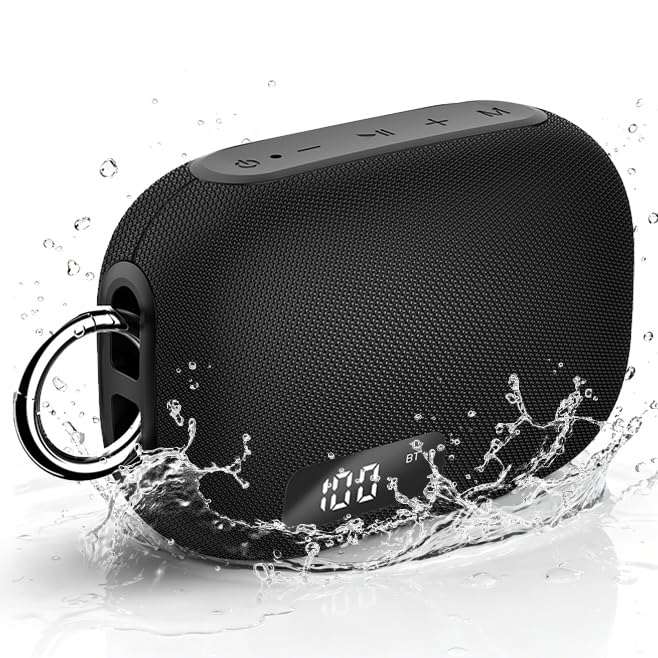
Image: Front view of the TIMU M9 speaker showing the digital display and top-mounted control buttons.
The speaker features a digital display on the front, indicating battery level and connection status. On the top panel, you will find buttons for power, volume control, track navigation, and mode selection. The side panel includes ports for charging, USB, and TF card insertion.
Setup
1. Charging the Speaker
- Connect the provided Type-C charging cable to the charging port on the speaker.
- Connect the other end of the cable to a USB power adapter (not included) or a computer's USB port.
- The digital display will show the charging status. A full charge is indicated when the display shows "100".
- For optimal battery life, fully charge the speaker before first use.
2. Powering On/Off
- To Power On: Press and hold the Power button (⏻) for approximately 2-3 seconds until the digital display lights up.
- To Power Off: Press and hold the Power button (⏻) for approximately 2-3 seconds until the display turns off.
3. Bluetooth Pairing
Pair your speaker with a Bluetooth-enabled device to stream audio wirelessly.
- Ensure the speaker is powered on and in Bluetooth mode. The display will show "BT" and flash, indicating it's ready for pairing.
- On your device (e.g., smartphone, tablet), enable Bluetooth and search for available devices.
- Select "TIMU M9" from the list of found devices.
- Once paired, the speaker will emit a confirmation sound, and "BT" on the display will stop flashing.
- The speaker will automatically reconnect to the last paired device when powered on, if the device is within range and Bluetooth is enabled.
4. TWS (True Wireless Stereo) Pairing
For an immersive stereo experience, you can pair two TIMU M9 speakers together.

Image: Two TIMU M9 speakers shown together, illustrating the TWS pairing feature for stereo sound.
- Ensure both TIMU M9 speakers are powered on and not connected to any Bluetooth device.
- On one of the speakers (this will be the primary speaker), double-press the Power button (⏻). The speaker will enter TWS pairing mode.
- The two speakers will automatically search for and connect to each other. A confirmation sound will indicate successful TWS pairing.
- Once TWS paired, connect your device to the primary speaker via Bluetooth as described in "3. Bluetooth Pairing". Audio will now play in stereo through both speakers.
- To disconnect TWS, double-press the Power button (⏻) on either speaker.
Operating Instructions
1. Mode Selection
The TIMU M9 supports multiple playback modes. Press the "M" (Mode) button to cycle through modes: Bluetooth, USB, TF Card, and FM Radio.

Image: Diagram illustrating the four available music playback modes: Bluetooth, USB Drive, TF Card, and FM Radio.
2. Bluetooth Mode
- After successful Bluetooth pairing, music from your connected device will play through the speaker.
- Use the Play/Pause button to play or pause music.
- Press the + button to increase volume; press and hold to skip to the next track.
- Press the - button to decrease volume; press and hold to go to the previous track.
3. USB Drive / TF Card Mode
- Insert a USB drive or TF card (with supported audio files) into the corresponding port.
- The speaker will automatically switch to USB or TF Card mode and begin playing music. If not, press the "M" button to select the correct mode.
- Use the Play/Pause, +, and - buttons for playback control as in Bluetooth mode.
4. FM Radio Mode
- Press the "M" button to switch to FM Radio mode.
- Press the Play/Pause button once to automatically scan and save available FM stations.
- Use the + and - buttons to navigate between saved stations.
- For better reception, ensure the speaker is in an open area.
5. Answering Calls
The TIMU M9 has a built-in microphone for hands-free calling when connected via Bluetooth.
- To Answer a Call: Press the Play/Pause button once.
- To End a Call: Press the Play/Pause button once during a call.
- To Reject a Call: Press and hold the Play/Pause button for 2 seconds.
Maintenance
Proper care ensures the longevity and performance of your TIMU M9 speaker.
1. Cleaning
- Wipe the speaker with a soft, damp cloth.
- Do not use abrasive cleaners, alcohol, or chemical solvents, as these may damage the surface.
- Ensure all ports are dry before charging or connecting other devices.
2. Water Resistance (IP67)

Image: The TIMU M9 speaker positioned in a bathroom, demonstrating its suitability as a shower speaker due to IP67 waterproofing.
- The speaker is IP67 rated, meaning it is protected from dust and can withstand immersion in water up to 1 meter for 30 minutes.
- Always ensure the charging port cover is securely closed before exposing the speaker to water.
- Do not intentionally submerge the speaker for extended periods or in depths greater than 1 meter.
- Avoid exposing the speaker to saltwater or chlorinated water, as these can corrode the seals over time. If exposed, rinse with fresh water and dry thoroughly.
3. Storage
- Store the speaker in a cool, dry place away from direct sunlight and extreme temperatures.
- If storing for an extended period, charge the battery to about 50% to preserve battery health.
Troubleshooting
If you encounter issues with your TIMU M9 speaker, refer to the following common problems and solutions.
| Problem | Possible Solution |
|---|---|
| Speaker does not power on. | Ensure the battery is charged. Connect the speaker to a power source using the Type-C cable. |
| Cannot pair via Bluetooth. |
|
| No sound or low volume. |
|
| TWS pairing fails. |
|
| FM radio reception is poor. |
|
Specifications
Technical details for the TIMU Portable Bluetooth Speaker M9.
| Feature | Detail |
|---|---|
| Model Name | M9 |
| Brand | TIMU |
| Connectivity Technology | Wireless (Bluetooth) |
| Speaker Output Power | 15W (RMS), 30W (Peak) |
| Waterproof Rating | IP67 |
| Playtime | Up to 24 hours (varies by volume and content) |
| Charging Port | Type-C |
| Supported Playback Modes | Bluetooth, USB Drive, TF Card, FM Radio |
| Special Features | Digital Battery Display, TWS Pairing, Built-in Microphone, Lightweight, Built-in Powerbank, Display |
| Impedance | 4 Ohms |
| Dimensions (D x W x H) | 38D x 38W x 51H Millimeters |
| Weight | 100 Grams |

Image: The TIMU M9 speaker visually representing its powerful 15W sound output.
Warranty and Support
TIMU products are designed for reliability and performance. For warranty information or technical support, please refer to the contact details provided on the product packaging or the official TIMU website.
Please retain your proof of purchase for any warranty claims.