
1. Introduction
Thank you for purchasing the HOMCOM Corner Desk. This L-shaped reversible desk is designed to optimize your workspace with integrated power outlets, USB ports, a monitor stand, and convenient fabric drawers. Please read this manual carefully before assembly and use to ensure proper installation and safe operation.
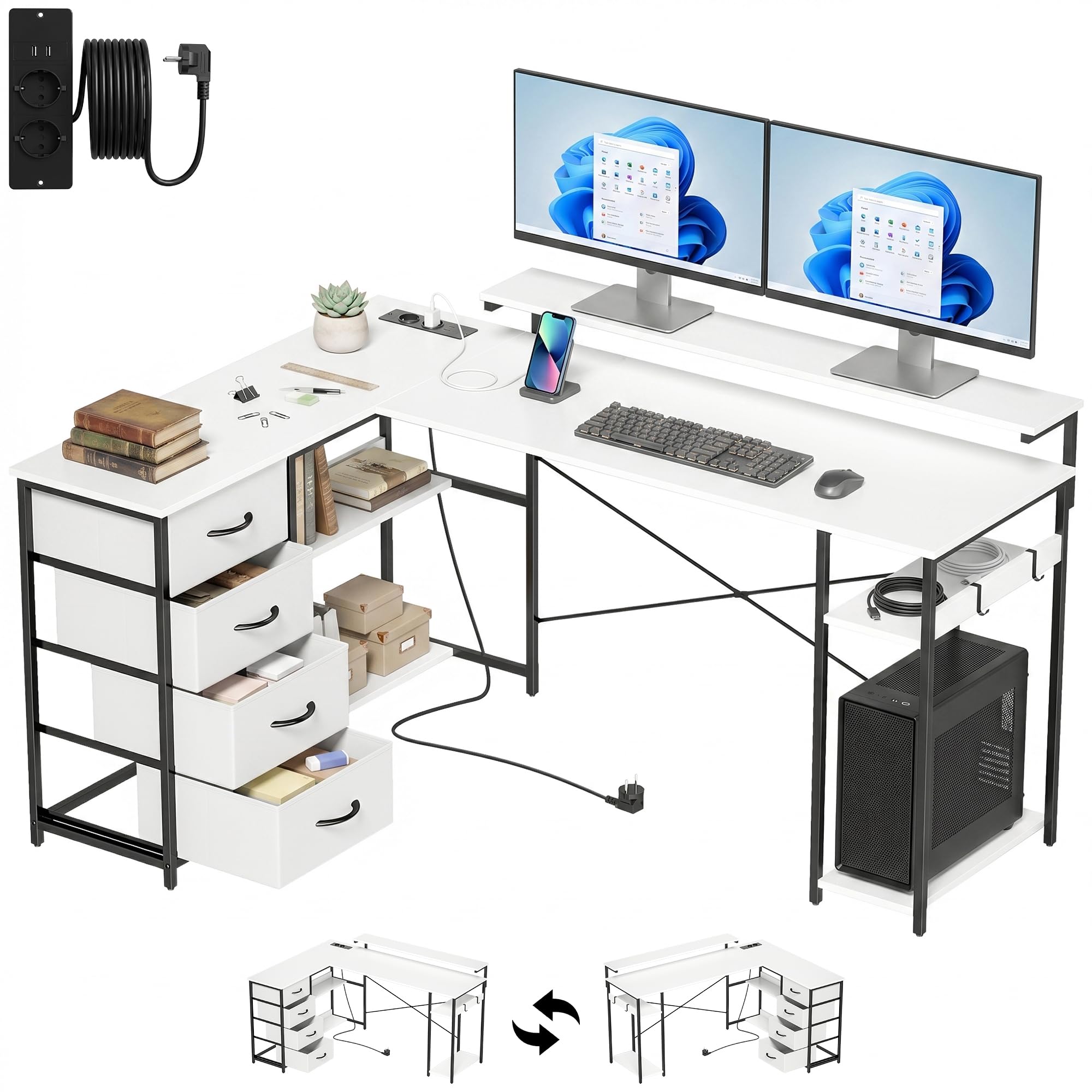
Image: The HOMCOM L-shaped corner desk, featuring its white surface, black metal frame, four fabric drawers, and integrated charging station, set up in a modern office environment with two monitors.
2. Safety Information
- Always follow assembly instructions carefully.
- Ensure all connections are secure before use.
- Do not overload the desk or shelves. The maximum recommended weight capacity is 53 kg.
- Keep liquids away from electrical outlets and USB ports.
- Use only in dry indoor environments.
- Keep small parts away from children during assembly.
3. Package Contents
Please verify that all components are present before beginning assembly:
- Desk panels (Melamine wood)
- Metal frame components
- 4 Fabric drawers
- Integrated power strip with 2 AC outlets and 2 USB ports
- Monitor stand
- 2 Side hooks
- Assembly hardware (screws, bolts, etc.)
- Instruction manual

Image: A close-up showing the various storage and functional components of the desk: open shelves, a dedicated space for a PC tower, four fabric drawers, and two side hooks for accessories.
4. Setup and Assembly
Assembly is required for this product. It is recommended that two people assemble the desk for ease and safety.
- Unpack and Organize: Carefully unpack all components and lay them out on a clean, soft surface to prevent scratches. Verify all parts against the package contents list.
- Review Instructions: Read the entire assembly manual before starting. Identify each part and hardware piece.
- Assemble Frame: Begin by assembling the metal frame structure according to the diagrams in the included manual. Ensure all screws are finger-tightened initially.
- Attach Desk Panels: Secure the melamine desk panels to the assembled frame.
- Install Reversible L-Shape: The desk features a reversible L-shape design. Decide whether you want the longer side on the left or right before fully tightening the frame connections. Follow the specific steps in your manual for the desired orientation.
- Install Drawers and Shelves: Insert the fabric drawers into their designated compartments and attach any open shelves.
- Mount Monitor Stand: Secure the monitor stand to the main desk surface.
- Install Charging Station: Integrate the power strip with AC outlets and USB ports into the designated cutout on the desk surface. Connect the power cable.
- Attach Hooks: Secure the two side hooks to the metal frame.
- Final Tightening: Once all components are in place and aligned, fully tighten all screws and bolts. Do not overtighten.
- Adjust Leveling Feet: The desk includes adjustable feet to ensure stability on uneven floors.

Image: An illustration demonstrating the reversible L-shaped design of the desk, allowing it to be configured with the longer section on either the left or right side to suit different room layouts.
5. Operating Instructions
5.1 Using the Charging Station
- Plug the desk's power cable into a standard wall outlet (220-250V, 12A).
- Use the 2 AC outlets to power your laptop, monitor, or other devices.
- Use the 2 USB ports (5V, 2A) to charge smartphones, tablets, or other USB-powered devices.
- Avoid plugging in high-power appliances that exceed the station's capacity.

Image: A detailed view of the integrated power strip on the desk, highlighting the two AC power outlets and two USB charging ports, with a smartphone connected for charging.
5.2 Utilizing the Monitor Stand
- Place your monitor(s) on the elevated stand to achieve an ergonomic eye-level viewing position.
- The stand helps reduce neck and eye strain during long work or gaming sessions.

Image: An illustration demonstrating the ergonomic monitor stand, showing how it elevates the screen to eye level for improved posture and comfort during extended use.
5.3 Storage Features
- Use the 4 fabric drawers for organizing documents, stationery, and personal items.
- Utilize the open shelves for books, decorative items, or additional storage.
- The dedicated CPU space keeps your computer tower off the floor and easily accessible.
- Hang headphones, bags, or other accessories on the side hooks to keep your workspace tidy.
6. Maintenance
- Cleaning: Wipe the desk surfaces with a damp cloth. Avoid harsh chemicals or abrasive cleaners that may damage the melamine finish.
- Spills: Immediately wipe up any spills to prevent water damage, as the surface is water-resistant but not waterproof.
- Inspection: Periodically check all screws and connections to ensure they remain tight. Retighten if necessary.
- Fabric Drawers: The fabric drawers can be spot cleaned with a mild detergent and damp cloth. Allow to air dry completely.

Image: A close-up of the desk surface illustrating its smooth texture and highlighting its water-resistant, scratch-resistant, and easy-to-clean features.
7. Troubleshooting
- Desk Wobbles: Ensure all assembly screws are fully tightened. Adjust the leveling feet on the bottom of the desk legs to stabilize it on uneven floors.
- Power Outlets/USB Not Working: Check if the desk's main power cable is securely plugged into a functional wall outlet. Ensure the wall outlet itself is receiving power.
- Difficulty Assembling: Refer to the detailed assembly diagrams in the included manual. Ensure you are using the correct hardware for each step. If parts are missing, contact customer support.
- Drawers Not Sliding Smoothly: Ensure the fabric drawers are correctly inserted and not overloaded. Check for any obstructions.
8. Specifications
| Feature | Detail |
|---|---|
| Brand | HOMCOM |
| Model Number | 836-685V90WT |
| Dimensions (D x W x H) | 112 cm x 155 cm x 91.5 cm |
| Weight | 26.5 kg |
| Max. Weight Capacity | 53 kg |
| Material | Melamine Wood, Metal |
| Color | White (top), Black (base) |
| Drawers | 4 Fabric Drawers |
| Power Outlets | 2 AC Outlets (220-250V, 12A) |
| USB Ports | 2 USB Ports (5V, 2A) |
| Special Features | Reversible L-shape, Monitor Stand, Adjustable Feet, Side Hooks |

Image: A technical diagram showing the precise dimensions of the HOMCOM corner desk, including length, width, height, and individual component measurements.
9. Warranty and Support
This HOMCOM product comes with a 3-year limited warranty. The warranty covers manufacturing defects under normal use. Please retain your proof of purchase for warranty claims.
For technical assistance, missing parts, or warranty inquiries, please contact the seller, Spanish Aosom, S.L. (EU), through your purchase platform or their official contact channels.


