
1. Introduction
Thank you for choosing the RAVEMEN FR1100 SE Bike Headlight and AOM05 Out-Front Mount. This manual provides essential information for the proper setup, operation, and maintenance of your new bike light system. Please read it thoroughly before use to ensure optimal performance and safety.
2. Package Contents
Verify that all items are present in your package:
- 1 x RAVEMEN FR1100 SE Bike Headlight
- 1 x AOM05 Out-Front Mount
- 1 x USB Charging Cable (not explicitly listed but standard for such devices)
3. Setup and Installation
3.1 Mounting the AOM05 Out-Front Mount
The AOM05 mount is designed for handlebar installation and offers compatibility with various cycling computers.

Image: The AOM05 mount is widely compatible with Garmin, Wahoo, and Bryton cycling computers, allowing for a streamlined setup on your handlebars.
- Attach the AOM05 mount securely to your bicycle's handlebar using the provided hardware. Ensure it is centered and tightened to prevent movement during rides.
- The mount features interchangeable inserts for Garmin, Wahoo, and Bryton cycling computers. Select the appropriate insert for your device and secure it into the top slot of the AOM05 mount.
3.2 Attaching the FR1100 SE Headlight
The FR1100 SE headlight can be mounted either above or below the AOM05 out-front mount, offering flexible setup options.
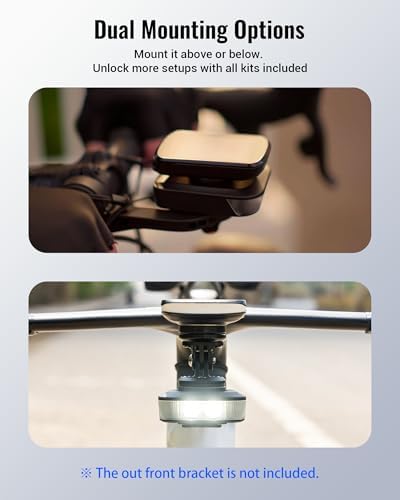
Image: The FR1100 SE headlight can be mounted above or below the AOM05 out-front mount, providing versatility for different handlebar setups.
- Slide the FR1100 SE headlight onto the designated slot on the AOM05 mount until it clicks into place.
- Ensure the light is firmly secured and facing forward.
4. Operating Instructions
4.1 Power On/Off and Mode Selection
The FR1100 SE features multiple lighting modes for various riding conditions.

Image: The FR1100 SE offers 6 distinct lighting modes, including High, Mid, Low, Warning flash, Rapid flash, and Slow flash, each with specified lumen output and runtime. Power status is indicated by LED color.
- Power On/Off: Press and hold the power button for approximately 1 second to turn the light on or off.
- Change Modes: With the light on, short press the power button to cycle through the available modes: High, Mid, Low, Warning flash, Rapid flash, Slow flash.
4.2 Lighting Modes and Performance
The FR1100 SE provides powerful illumination for both nighttime and daytime visibility.

Image: The FR1100 SE delivers up to 1100 lumens for nighttime illumination, projecting a wide 270-degree flood beam for enhanced visibility.
- High: 1100 lumens, approximately 1.8 hours runtime.
- Mid: 500 lumens, approximately 3.5 hours runtime.
- Low: 250 lumens, approximately 7.5 hours runtime.

Image: The FR1100 SE features a 500-lumen warning flash with a wide-angle lens for daytime running, ensuring you are noticed even in bright sunlight.
- Warning Flash: 500 lumens, approximately 45 hours runtime.
- Rapid Flash: 300 lumens, approximately 21 hours runtime.
- Slow Flash: 150 lumens, approximately 46 hours runtime.
4.3 Power Status Indication
The power button LED indicates the remaining battery level:
- Green: 40% - 100% battery remaining.
- Blue: 5% - 40% battery remaining.
- Red: Less than 5% battery remaining.
4.4 Automatic Start and Stop (Motion Activated)
The FR1100 SE is equipped with a motion sensor for convenience.

Image: The FR1100 SE automatically turns off after 2 minutes of inactivity and can be reactivated with a shake, conserving battery life.
- The light will automatically turn off after 2 minutes of being idle.
- It will turn on again with a shake or movement of the bicycle.
5. Charging
To charge the FR1100 SE headlight:
- Locate the USB charging port on the side of the headlight.
- Connect the provided USB charging cable to the headlight and to a standard USB power source (e.g., computer, wall adapter).
- The power indicator LED will show charging status (typically red while charging, green when fully charged).
- Charging time may vary depending on the power source.
6. Maintenance
6.1 Cleaning
- Wipe the light and mount with a soft, damp cloth.
- Do not use abrasive cleaners or solvents, as they may damage the surface.
6.2 Storage
- Store the light in a cool, dry place when not in use.
- For long-term storage, charge the battery to approximately 50% every few months to maintain battery health.
6.3 Thermal Management
The FR1100 SE is designed with advanced thermal management to ensure consistent output and prevent overheating.

Image: The FR1100 SE incorporates an aluminum base with airflow fins, smart thermal control, and an upgraded copper base plate for stable output performance and heat dissipation.
7. Troubleshooting
- Light not turning on: Ensure the battery is charged. Press and hold the power button for 1 second.
- Light not charging: Check the USB cable and power source. Ensure the cable is securely connected to both the light and the power source.
- Modes not changing: Short press the power button to cycle through modes. If unresponsive, try turning the light off and on again.
- Light turns off unexpectedly: Check battery level. If the light is idle for 2 minutes, the automatic start/stop feature will turn it off. Shake the bike to reactivate.
8. Specifications
| Brand | Ravemen |
| Model | FR1100 SE (Headlight), AOM05 (Mount) |
| Mounting Type | Handlebar Mount |
| Max Lumens | 1100 lm |
| Runtimes (Approx.) | High: 1.8 Hrs (1100lm) Mid: 3.5 Hrs (500lm) Low: 7.5 Hrs (250lm) Warning Flash: 45 Hrs (500lm) Rapid Flash: 21 Hrs (300lm) Slow Flash: 46 Hrs (150lm) |
| Compatibility | Garmin, Wahoo, Bryton Cycling Computers |
| Thermal Management | Aluminum base with airflow fins, smart thermal control, upgraded copper base plate |
| ASIN | B0H69W4XF9 |
9. Warranty Information
RAVEMEN products are manufactured to high-quality standards. For specific warranty details, please refer to the warranty card included with your product or visit the official RAVEMEN website. Keep your proof of purchase for warranty claims.
10. Support
If you encounter any issues or have questions regarding your RAVEMEN FR1100 SE Bike Headlight and AOM05 Mount, please contact RAVEMEN customer support through their official website or the retailer from whom you purchased the product. Provide your product model and ASIN (B0H69W4XF9) for faster assistance.