
1. Introduction
Thank you for choosing the Aeitto Nugget Ice Maker Countertop. This manual provides essential information for the safe and efficient operation, maintenance, and care of your ice maker. Please read it thoroughly before first use and keep it for future reference.
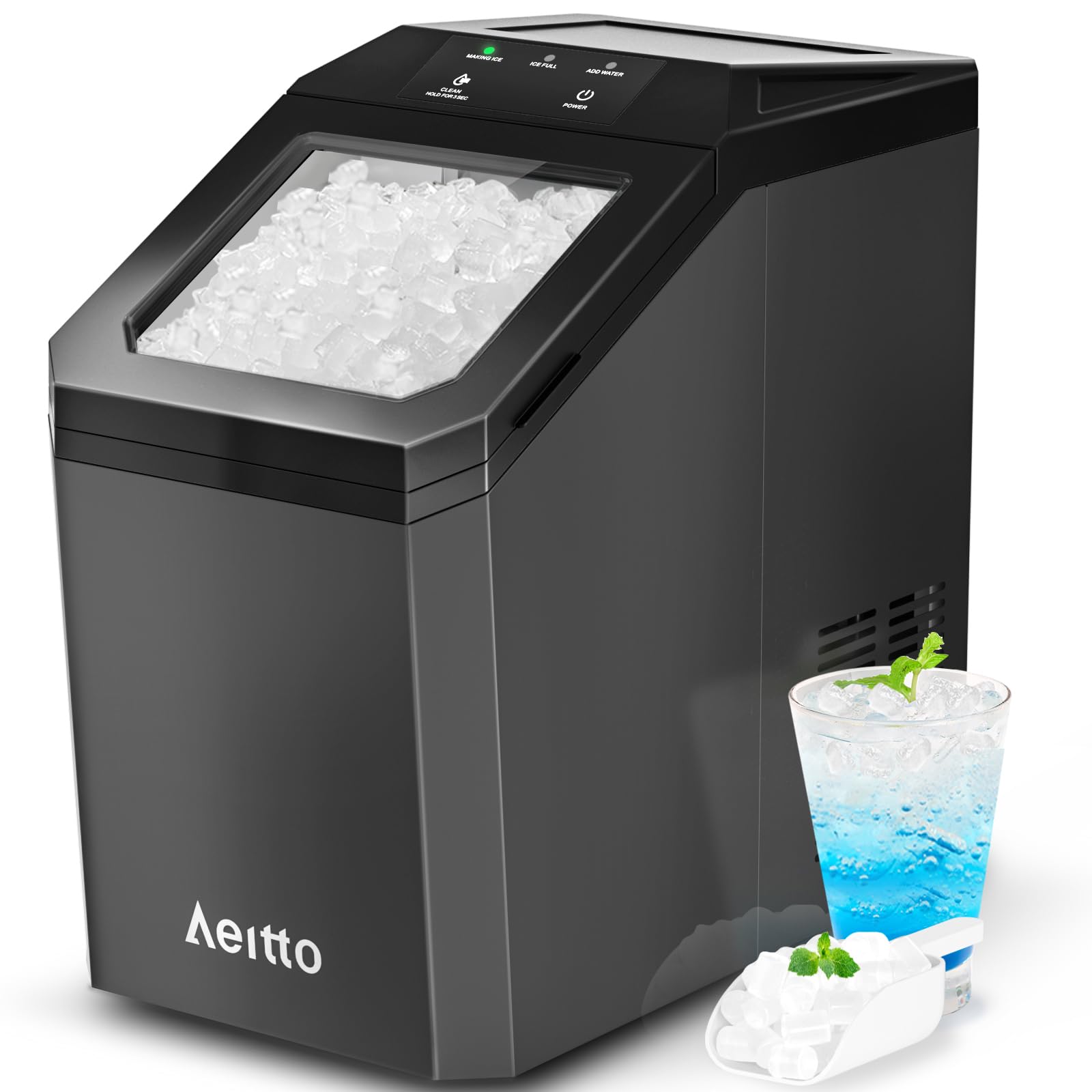
Image: The Aeitto Nugget Ice Maker Countertop in black, showcasing its compact design suitable for various settings.
2. Safety Instructions
- Ensure the ice maker is placed on a stable, level surface away from direct sunlight and heat sources.
- Do not immerse the appliance, power cord, or plug in water or other liquids.
- Use only potable water in the water tank.
- Unplug the ice maker before cleaning or when not in use for extended periods.
- Keep children away from the appliance during operation.
- Do not operate the appliance with a damaged cord or plug.
3. Setup
- Unpacking: Carefully remove the ice maker from its packaging. Remove all packing materials, including tape and labels.
- Placement: Place the unit on a flat, stable, and heat-resistant surface. Ensure there is adequate ventilation around the unit.
- Initial Cleaning: Before first use, it is recommended to perform an initial cleaning cycle. Refer to the "Maintenance" section for detailed instructions on using the self-cleaning function.
- Water Tank Filling: Open the lid and fill the water tank with potable water up to the maximum fill line. The water tank has a capacity of 3.6 liters.
- Power Connection: Plug the ice maker into a grounded electrical outlet.
4. Operating Instructions
4.1 Starting Ice Production
- Ensure the water tank is filled and the unit is plugged in.
- Press the "POWER" button to start the ice-making process.
- The ice maker will begin producing nugget ice. The first batch of ice can be released in approximately 5 minutes.

Image: Illustration showing the rapid ice release feature, producing ice within 5 minutes of operation.
4.2 Ice Characteristics and Capacity
- This machine produces chewable, crunchy nugget ice, which is softer and tooth-friendly compared to traditional cube or bullet ice.
- The ice maker has a strong ice-making capacity, capable of producing up to 55 pounds of ice per day under optimal conditions.
- The removable ice basket has a capacity of 3.2 pounds, and the water tank holds 3.6 liters, reducing the need for frequent refills.

Image: Visual comparison highlighting the benefits of soft nugget ice over other ice types, including better taste and being tooth-friendly.

Image: Infographic illustrating the ice maker's strong ice-making capacity, showing daily production rates.

Image: View of the ice maker highlighting its 3.6L water tank and 3.2lb ice basket, indicating larger capacity.
4.3 Automatic Ice Making Cycle
The ice maker features an automatic ice-making cycle. An infrared sensor detects the ice level in the basket. When the ice level is above the sensor, ice production will stop. It will resume automatically after 30 minutes once the ice level drops below the sensor, ensuring a continuous supply of ice.
Note: The ice maker does not have a refrigeration function for storing ice long-term. It is recommended to transfer ice to a freezer for storage if not used immediately.

Image: Diagram illustrating the auto-continuous ice making process, showing the infrared sensor's role in maintaining ice levels.
5. Maintenance
5.1 Self-Cleaning Function
The ice maker is equipped with an auto-clean mode to simplify maintenance. To activate:
- Ensure the water tank is filled with clean water.
- Press and hold the "CLEAN" button for 3 seconds.
- The cleaning cycle will run for approximately 15 minutes.
- After the cycle, drain the water from the unit as per the instructions in the user manual (not provided in JSON, but a standard step).
Regular use of the self-cleaning function helps maintain hygiene and prevents limescale buildup. For effective limescale removal, descalers may be needed periodically.

Image: Visual representation of the auto-cleaning function, showing water circulation to clean the internal components and remove limescale.
5.2 General Cleaning
- Wipe the exterior of the unit with a soft, damp cloth.
- Clean the ice basket and water tank regularly with mild soap and water. Rinse thoroughly.
- Ensure all parts are dry before reassembling and operating the ice maker.
6. Troubleshooting
| Problem | Possible Cause | Solution |
|---|---|---|
| Ice maker not producing ice. | No water in the tank; power issue; unit too warm. | Fill water tank; check power connection; ensure proper ventilation and ambient temperature. |
| "ADD WATER" indicator light is on. | Water tank is empty or water level is too low. | Refill the water tank with potable water. |
| "ICE FULL" indicator light is on. | Ice basket is full. | Remove ice from the basket. The unit will resume ice production automatically. |
| Ice tastes unusual or has an odor. | Unit needs cleaning; stale water. | Perform a self-cleaning cycle. Replace water in the tank regularly. |
If you encounter issues not listed here or if the problem persists after attempting the solutions, please contact customer support.
7. Specifications
- Brand: Aeitto
- Model Name: NIMB
- Product Dimensions (D x W x H): 16.9" x 9.84" x 16.9"
- Water Tank Capacity: 3.6 Liters
- Ice Basket Capacity: 3.2 pounds
- Daily Ice Production: Up to 55 lbs/day
- Voltage: 110 volts
- Item Weight: 32.6 pounds
- Refrigerant: R600a
8. Warranty and Support
8.1 Warranty Information
Specific warranty details for your Aeitto Nugget Ice Maker are typically provided with your purchase documentation or on the manufacturer's official website. Please refer to these resources for information regarding warranty coverage, terms, and conditions.
8.2 Customer Support
For technical assistance, troubleshooting, or inquiries about your product, please contact Aeitto customer support. Contact information can usually be found on the product packaging, the official Aeitto website, or through your retailer.