
1. Introduction
Thank you for purchasing the Garvee 40" W Mini Fridge Cabinet with Storage. This versatile furniture piece is designed to accommodate most mini-fridges or wine coolers up to 20" wide and 36" tall, while also serving as a functional coffee bar or an organized storage solution for your kitchen, living room, or home bar. Please read this manual carefully before assembly and use to ensure safe operation and optimal performance.
2. Safety Instructions
Please observe the following safety precautions to prevent injury or damage to the product:
- Assembly: Assemble the unit on a soft, clean surface to prevent scratches. Ensure all hardware is securely tightened before use. Do not overtighten screws.
- Stability: Place the cabinet on a flat, level, and stable surface. Uneven surfaces can cause the unit to tip over.
- Weight Capacity: Do not exceed the recommended weight capacity for the top surface or shelves. Overloading can cause structural failure.
- Tip-Over Prevention: For added safety, especially in households with children or pets, consider securing the cabinet to a wall using appropriate anti-tip hardware (not included).
- Electrical Safety: The integrated power strip is designed for standard household appliances. Do not overload the power strip. Ensure all connected appliances are in good working order and their cords are not pinched or damaged.
- Ventilation: Ensure the mini-fridge compartment has adequate airflow as designed. Do not block the ventilation opening.
- Children: Keep small parts and packaging materials away from children during assembly. Do not allow children to climb on or play with the cabinet.
3. Package Contents
Before beginning assembly, please check that all parts are present and undamaged. If any parts are missing or damaged, please contact customer support.
- Cabinet Panels (various sizes)
- Hardware Pack (screws, dowels, cam locks, hinges, handles, etc.)
- Integrated Power Strip
- Instruction Manual
4. Assembly and Setup
4.1 Pre-Assembly Checklist
- Read all instructions before starting.
- Identify all parts and hardware.
- Gather necessary tools: Phillips head screwdriver (not included).
- Clear a spacious, clean, and soft area for assembly.
4.2 Assembly Steps
Follow the step-by-step diagrams provided in the included assembly guide. General steps include:
- Attach cam bolts to designated panels.
- Connect panels using dowels and cam locks.
- Install back panels.
- Assemble and attach drawer slides and drawer box.
- Attach door hinges and doors.
- Install handles.
- Secure the integrated power strip into its designated slot on the top panel.
4.3 Placement Considerations
- Place the cabinet on a firm, level floor.
- Ensure there is sufficient space around the unit for proper ventilation, especially if a mini-fridge is installed.
- Avoid direct sunlight or proximity to heat sources to prevent material warping or discoloration.
- Position near a wall outlet for the power strip.

Figure 1: Product Dimensions. This diagram illustrates the overall dimensions of the cabinet: 40 inches wide, 20 inches deep, and 36.5 inches high. It also details the internal dimensions for the mini fridge compartment and the storage shelves and cabinets.

Figure 2: Assembled Cabinet in Use. An assembled Garvee cabinet in a living space, showcasing its use as a coffee bar with an espresso machine on top, a wine cooler in the dedicated compartment, and storage for glasses and bottles in the adjacent shelves and cabinets.
5. Operating Instructions
5.1 Using the Power Strip
The cabinet features a built-in power strip with 4 AC outlets and an on/off switch for convenient power access.
- Plug the cabinet's power cord into a grounded wall outlet.
- Connect your mini-fridge, coffee maker, blender, or other small appliances to the AC outlets.
- Use the integrated on/off switch to control power to all connected devices.
- Do not exceed the maximum wattage rating of the power strip.

Figure 3: Integrated Charging Station. A detailed view of the cabinet's top surface, highlighting the integrated power strip with four AC outlets and an on/off switch, providing convenient power for various appliances.
5.2 Adjusting Shelves
The integrated storage cabinet features three adjustable shelves, allowing you to customize the storage space to fit your needs. To adjust a shelf:
- Empty the shelf.
- Carefully lift the shelf and remove it from the shelf pins.
- Relocate the shelf pins to the desired height. Ensure all four pins are at the same level.
- Place the shelf back onto the pins, ensuring it is stable.
5.3 Loading the Cabinet
- Place your mini-fridge or wine cooler into the dedicated compartment. Ensure it fits within the specified dimensions (up to 20" W x 36" H).
- Utilize the open shelves, integrated drawer, and enclosed cabinet spaces for organizing barware, snacks, beverages, coffee supplies, or other items.
- Distribute weight evenly across shelves and the top surface.

Figure 4: Versatile Storage. This image displays the various storage compartments within the cabinet, including three-layer open shelves, an integrated pull-out drawer, and enclosed cabinet spaces, suitable for organizing kitchenware, snacks, and beverages.
6. Maintenance and Care
- Cleaning: Wipe surfaces with a soft, damp cloth. Avoid using harsh chemicals, abrasive cleaners, or furniture polish that may damage the finish.
- Spills: Clean up spills immediately to prevent staining or damage to the engineered wood.
- Hardware: Periodically check all screws and fasteners to ensure they remain tight. Retighten if necessary.
- Power Strip: Keep the power strip clean and dry. Do not expose it to liquids.
- Avoid Extreme Conditions: Do not place hot items directly on the surface without protection. Avoid prolonged exposure to direct sunlight or high humidity.
7. Troubleshooting
| Problem | Possible Cause | Solution |
|---|---|---|
| Cabinet feels wobbly or unstable. | Uneven floor; loose hardware. | Ensure cabinet is on a level surface. Check and tighten all assembly hardware. |
| Power strip is not working. | Power cord not plugged in; switch is off; overloaded circuit. | Ensure the cabinet's power cord is securely plugged into a working wall outlet. Turn the power strip switch to 'ON'. Reduce the number of connected devices if overloaded. |
| Drawer does not slide smoothly. | Improperly installed slides; debris in slides. | Check drawer slide alignment and ensure they are installed correctly. Clear any debris from the slides. |
| Door does not close properly. | Misaligned hinges; obstruction. | Adjust hinge screws to align the door. Check for any items obstructing the door's path. |
8. Specifications
| Feature | Detail |
|---|---|
| Brand | Garvee |
| Model Number | ccp-uKh51dXd-pMLGit44-ZSkbTER |
| Color | White |
| Material | Engineered Wood |
| Product Dimensions (Overall) | 40" W x 20" D x 36.5" H (approximate, refer to dimension diagram for exact details) |
| Mini Fridge Compartment Size | Fits units up to 20" W x 36" H |
| Item Weight | 83.1 pounds |
| Number of Shelves | 3 (adjustable) |
| Number of Drawers | 1 |
| Power Outlet | Integrated 4 AC outlets with on/off switch |
| Mounting Type | Floor Mount (Freestanding) |
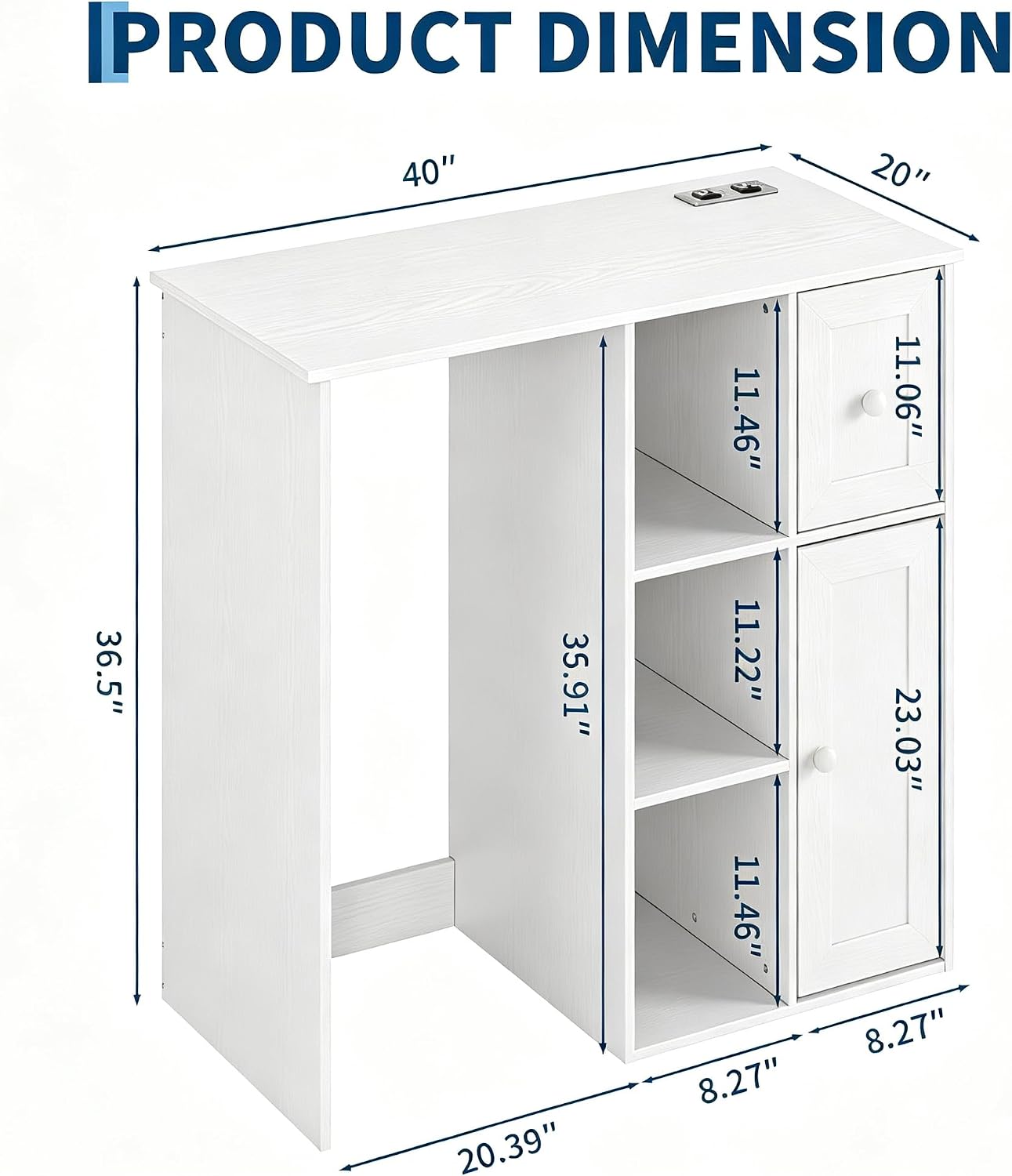
Figure 5: Cabinet in a Modern Setting. The cabinet is shown in a modern room, featuring a beverage cooler filled with drinks on the left, open shelves for glasses, and closed cabinets for additional storage. A coffee machine and accessories are placed on the top surface.
9. Warranty and Support
Garvee products are manufactured to high-quality standards. This product comes with a manufacturer's warranty against defects in materials and workmanship. Please refer to your purchase documentation or contact Garvee customer service for specific warranty terms and conditions.
For assistance with assembly, missing parts, or any other inquiries, please contact Garvee customer support through the retailer where the product was purchased or visit the official Garvee store page: Garvee Store on Amazon.