
1. Introduction
The OTTOCAST Baby Car Camera & Wireless CarPlay Adapter 2026 is designed to enhance your driving safety and convenience. This device streams real-time 1080P footage of your baby in the back seat directly to your car's factory display, eliminating the need for an extra monitor. It also converts your factory-wired CarPlay to wireless, offering a seamless and integrated experience. This manual provides comprehensive instructions for installation, operation, and maintenance.

Figure 1.1: OTTOCAST Baby Car Camera and Wireless CarPlay Adapter.
The OTTOCAST system integrates a baby car camera and a wireless CarPlay adapter into a single, compact unit, providing a clear view of your child on your existing car screen.
2. What's in the Box
Please check the package contents upon unboxing:
- 1 x Owl Camera monitor
- 1 x Wireless CarPlay Adapter
- 1 x Charging Cable (Camera Power Cable, 3m)
- 1 x USB A to USB C Adapter
- 1 x Mounting Plate (for bracket fixation)
- 1 x Receiver
- 2 x Cable Ties (for strap fixation)
- 1 x Bracket (for strap fixation)
- 1 x Nut
- 1 x User Manual

Figure 2.1: Package Contents.
All components included in the OTTOCAST Cabin Care Car Adapter package are shown, with each item numbered for easy identification.
3. Product Overview
The OTTOCAST system combines a high-definition baby camera with a wireless CarPlay adapter. Key features include:
- 1080P HD Video: Clear, real-time view of your baby.
- 150° Wide Angle Lens: Covers the entire rear seat with no blind spots.
- 360° Rotation: Adjustable camera angle for optimal viewing.
- 940nm Invisible Night Vision: Provides clear footage in darkness without disturbing your baby with a red glow.
- Multiple Display Modes: Full baby view, full CarPlay, split screen, and picture-in-picture.
- Wireless CarPlay: Converts wired CarPlay to wireless functionality.
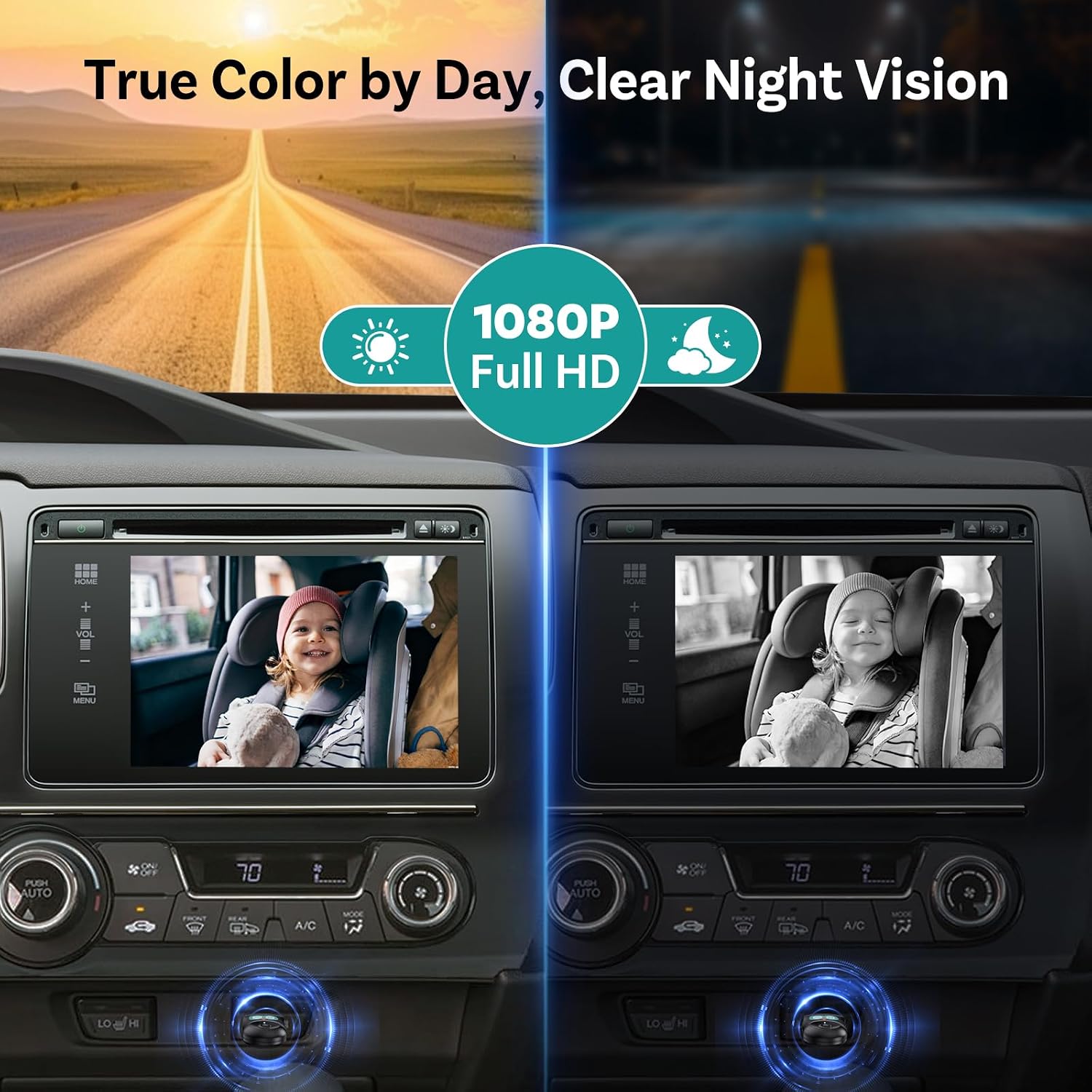
Figure 3.1: True Color by Day, Clear Night Vision.
The camera provides full 1080P HD resolution, offering true color during the day and clear, detailed black-and-white images at night.
Video 3.1: Ottocast Baby Car Camera: Safer. Smoother. Smarter.
This video provides an overview of the OTTOCAST Baby Car Camera's features, highlighting its safety and convenience aspects for monitoring children in the car.
4. Setup
The OTTOCAST system is designed for quick and easy installation, typically under 6 minutes.
4.1. Mounting the Camera
The camera offers two mounting options to fit any headrest:
- Velcro Strap Mount: Wrap the included velcro strap around the headrest and secure the camera to it.
- Snap-on Mount: Attach the snap-on mount to the headrest posts and then secure the camera.
Ensure the camera is positioned to provide a clear view of your child. The camera features 360° rotation for precise angle adjustment.
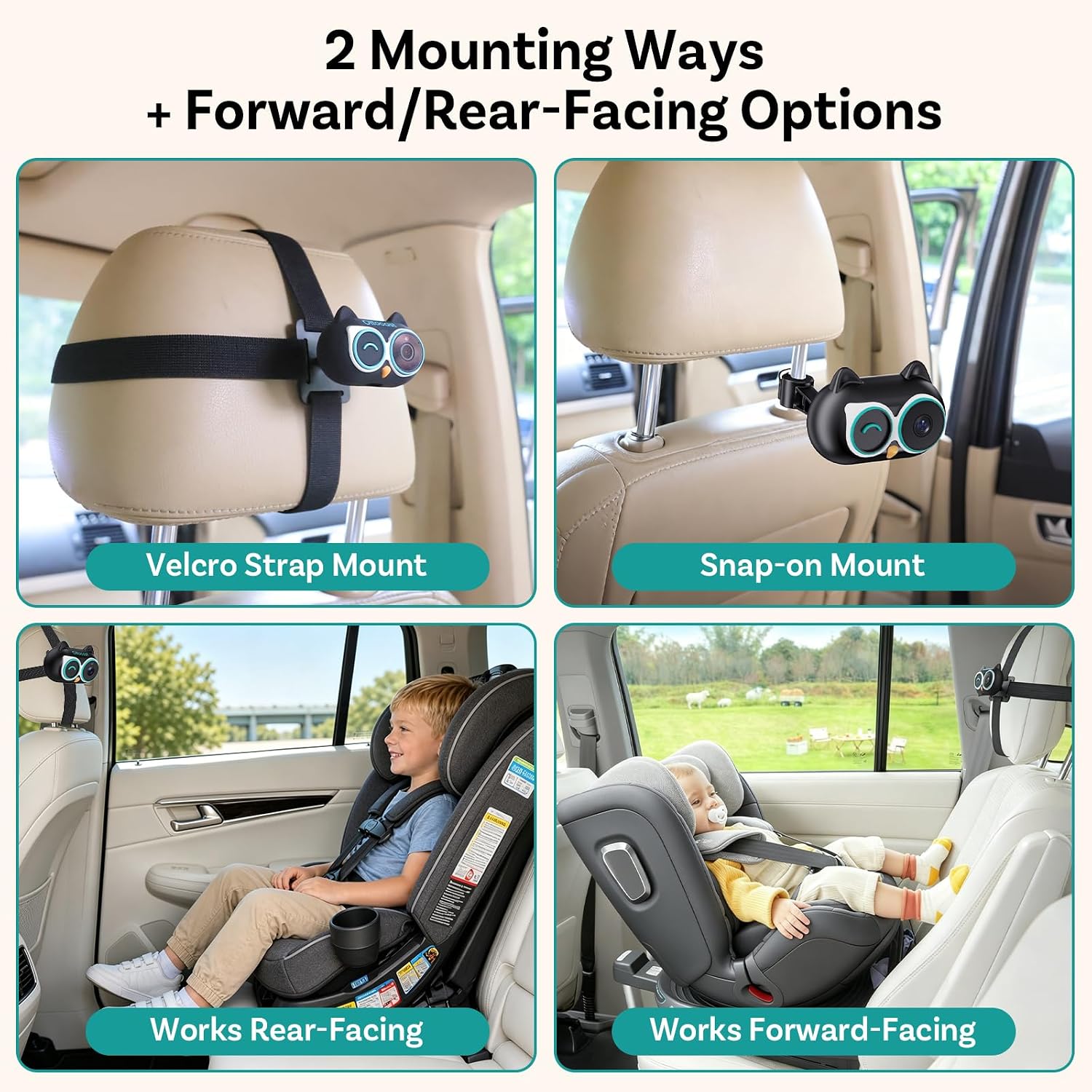
Figure 4.1: Two Mounting Ways.
The camera can be mounted using a velcro strap around the headrest or a snap-on mount to the headrest posts, accommodating various car interiors.
4.2. Connecting and Pairing
- Step 1: Mount Camera & Connect: Clip the camera onto the headrest using your preferred method. Connect the camera's power cable to the receiver.
- Step 2: Plug into USB: Plug the Wireless CarPlay Adapter (receiver) into your car's USB port that supports wired CarPlay.
- Step 3: Pair with iPhone: On your iPhone (iOS 10+), turn on Bluetooth and Wi-Fi. Search for the device (e.g., "CARR-XXXX") and pair with it.
- Step 4: Enjoy: Once paired, your car's screen will display options for CarPlay and the camera view.

Figure 4.2: Setup Steps.
A visual guide to the four-step setup process: mounting the camera, plugging into USB, pairing with an iPhone, and enjoying the view.
Video 4.1: Ottocast Baby Cam + Wireless CarPlay Adapter Setup.
This video demonstrates the complete setup process for the OTTOCAST Baby Cam and Wireless CarPlay Adapter, from installation to initial pairing.
5. Operating Instructions
5.1. Display Modes
The system offers four display modes to suit your needs:
- Baby Views: Full screen view of the baby camera.
- Picture-in-Picture (PiP): Baby camera view displayed as a small overlay while CarPlay is active.
- Split View: CarPlay and baby camera view displayed side-by-side.
- Wireless CarPlay Mode: Full screen CarPlay display.

Figure 5.1: Navigation/Music, Baby Monitor, All in One Glance.
The system allows simultaneous navigation, music playback, and baby monitoring through various display configurations.
5.2. Night Vision
The camera utilizes 940nm invisible infrared technology for clear night vision without emitting any visible red glow. This ensures your baby's sleep is not disturbed while providing you with a clear view in complete darkness.

Figure 5.2: Invisible Infrared – No Red Glow, No Sleep Disruptions.
Unlike traditional IR cameras that emit a visible red light, OTTOCAST's invisible infrared technology ensures your baby remains undisturbed during night monitoring.
5.3. Wireless CarPlay Functions
- Auto-Reconnect: After initial pairing, the device will automatically reconnect to your iPhone when you start your car.
- Quick Disconnect: Short press the button on the adapter to instantly disconnect the current iPhone.
- Auto Switch: The adapter can memorize up to 2 iPhones and seamlessly switch between them.
- Original Car Controls: Maintain full functionality of your car's original controls, including voice control, steering wheel controls, touch screen, and OEM knobs.

Figure 5.3: Quick Disconnect.
The adapter allows for quick disconnection, automatic switching between memorized iPhones, and supports up to two paired devices for seamless transitions.

Figure 5.4: Keep Your Car's Original Controls.
The system integrates seamlessly with your vehicle's existing controls, including voice commands, steering wheel buttons, touchscreen, and OEM knobs.
5.4. AI Assistant Integration (Optional)
For enhanced functionality, you can integrate AI assistants with your CarPlay experience. This requires:
- iPhone updated to iOS 28.3+ (or newer compatible version).
To use:
- Download your preferred AI Assistant app from the App Store.
- Add the AI app widget in your CarPlay settings.
- Tap the AI icon in CarPlay or open the app on your phone to start interacting.

Figure 5.5: How to Use AI Assistant in CarPlay.
Instructions for integrating and using AI assistants like ChatGPT or Gemini within your CarPlay interface.
6. Compatibility
Please review the compatibility requirements before use:
- Vehicle Compatibility: Requires cars with factory-installed wired CarPlay and a touchscreen display.
- Phone Compatibility: iPhone (iOS 10+) only.
- Not Supported: Android phones, Tesla vehicles, and BMW vehicles are NOT supported.

Figure 6.1: Universal Compatibility.
This chart details the compatibility requirements, indicating support for cars with wired CarPlay and iPhones (iOS 10+), while explicitly stating non-compatibility with Android, Tesla, and BMW.
7. Maintenance
- Cleaning: Use a soft, dry cloth to clean the camera lens and adapter. Do not use liquid cleaners or solvents.
- Temperature: Avoid exposing the device to extreme temperatures (very hot or very cold) for extended periods. The adapter features upgraded heat dissipation for stable performance during long drives.
- Storage: When not in use, store the device in a cool, dry place.

Figure 7.1: Upgraded Heat Dissipation.
The enhanced heat dissipation system ensures the adapter remains stable and cool even during prolonged use and hot weather conditions.
8. Troubleshooting
- No Display/Connection:
- Ensure your car has factory-wired CarPlay and a touchscreen.
- Check if the adapter is fully plugged into the USB port.
- Verify Bluetooth and Wi-Fi are enabled on your iPhone and correctly paired.
- Restart your iPhone and car's infotainment system.
- Camera Image Not Appearing:
- Ensure the camera is properly connected to the receiver.
- Check the camera's power connection.
- Select the camera view option on your car's screen.
- Intermittent Connection:
- Ensure there are no other strong Wi-Fi or Bluetooth interferences nearby.
- Try a different USB port in your car if available.
- Update your iPhone's iOS to the latest version.
- Poor Night Vision:
- Ensure the camera lens is clean and free from obstructions.
- Verify the camera is not pointed directly at a light source that could interfere with infrared sensors.
9. Specifications
| Feature | Detail |
|---|---|
| Brand | OTTOCAST |
| Model Name | 123 |
| Vehicle Service Type | Cars with factory-installed wired CarPlay |
| Connectivity Technology | Bluetooth, Wi-Fi, Wireless |
| Special Features | 1080P HD, 150° Wide Angle, No-Glow Night Vision, Split Screen Display, Wireless Carplay Function |
| Video Capture Resolution | 1080p |
| Mounting Type | Velcro Strap Mount & Snap-on Mount |
| Color | Black |
| Field Of View | 150 degrees |
| Auto Part Position | Rear |
| Compatible Devices | Car with factory-wired CarPlay, iPhone 6 and newer models. NOT Android, Tesla, & BMW. |
| Item Dimensions (D x W x H) | 2.6"D x 1.2"W x 1.7"H |
| Item Weight | 1.44 ounces |
10. Warranty and Support
Every OTTOCAST Cabin Care product comes with a 2-year warranty and lifetime support. If you encounter any issues or have questions, please contact our support team:
- Email: service@ottocast.com
- Phone: (+1) 7179358636
- Online Compatibility Check: check.adaptermanual.com/AMZ/
Our support team is available via phone, email, or live chat, with responses typically within 24 hours.