
1. Introduction
This manual provides essential information for the ZTVVSNC BN44-00510B P51FW_CDY TV Power Supply Board. It covers product specifications, safety guidelines, installation overview, and general maintenance. This component is designed as a replacement part for specific Samsung TV models. Proper installation by a qualified technician is highly recommended to ensure safety and correct functionality.
2. Product Overview
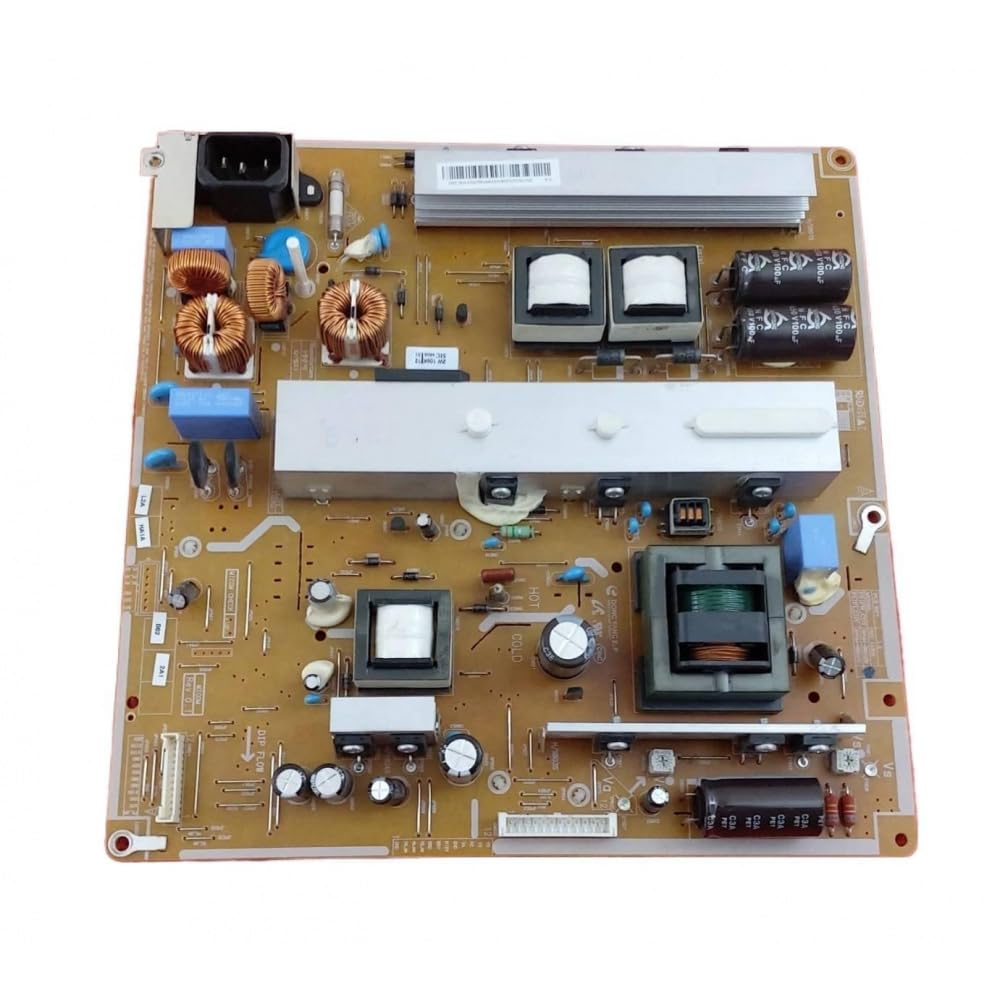
Image 1: ZTVVSNC BN44-00510B P51FW_CDY TV Power Supply Board. This image displays the full power supply board with various electronic components, including capacitors, transformers, and heat sinks, arranged on a brown circuit board.
The BN44-00510B P51FW_CDY is a replacement power supply board for compatible Samsung television models. It is responsible for converting AC power from the wall outlet into the various DC voltages required by the TV's internal components.
3. Specifications
- Part Numbers: BN44-00510B, P51FW_CDY
- Type: TV Power Supply Board
- Manufacturer: ZTVVSNC
- ASIN: B0H5QV4Q2V
- Item Model Number: ZTVVSNC-
- Safety Features: Built-in overvoltage, overcurrent, and short-circuit protection mechanisms.
4. Compatible TV Models
This power supply board is compatible with the following Samsung TV models:
- Samsung PN51E490B4FXZA
- Samsung PN51E530A3FXZA
- Samsung PN51E535A3FXZA
- Samsung PN51E550D1FXZA
- Samsung PN51E6500EFXZA
Note: Always verify the part number on your existing board matches BN44-00510B or P51FW_CDY before purchasing or installing to ensure compatibility.
5. Safety Information
Working with television power supply units involves high voltages and can be dangerous. Please observe the following safety precautions:
- Professional Installation Recommended: Installation should only be performed by qualified and experienced technicians.
- Disconnect Power: Always unplug the television from the main power outlet and allow sufficient time for capacitors to discharge before beginning any work.
- Static Electricity: Use anti-static precautions (e.g., anti-static wrist strap) to prevent damage to sensitive electronic components.
- Inspect Components: Before installation, visually inspect the new board for any signs of damage.
- Secure Connections: Ensure all connectors are properly seated and secured after installation.
- Protection Mechanisms: This board includes overvoltage, overcurrent, and short-circuit protection to enhance safety during operation.
6. Installation Overview
This section provides a general overview. Specific steps may vary depending on the TV model. Refer to your TV's service manual for detailed instructions.
- Preparation: Disconnect the TV from power. Place the TV face down on a soft, clean surface to protect the screen.
- Access the Board: Remove the back cover of the television to expose the internal components.
- Locate and Disconnect: Identify the existing power supply board. Carefully disconnect all cables and connectors attached to it. Note their positions for reassembly.
- Remove Old Board: Unscrew and remove the old power supply board from the TV chassis.
- Install New Board: Position the new BN44-00510B P51FW_CDY board in place and secure it with the appropriate screws.
- Reconnect Cables: Reconnect all cables and connectors to the new board, ensuring they are firmly seated.
- Test: Before replacing the back cover, temporarily plug in the TV and power it on to verify functionality. If the TV powers on correctly, unplug it again.
- Final Assembly: Reattach the TV's back cover.
Warning: Incorrect installation can cause damage to the TV or personal injury. If you are unsure, seek assistance from a professional technician.
7. Operation
Once the power supply board is correctly installed, the television should operate as intended. The power supply board functions automatically to provide the necessary power to the TV's components. No user interaction with the board itself is required during normal TV operation.
8. Maintenance
The BN44-00510B P51FW_CDY power supply board is designed for long-term reliability and generally requires no routine maintenance. To ensure its longevity:
- Keep Clean: Ensure the TV's ventilation openings are clear of dust and debris to prevent overheating of internal components, including the power supply.
- Stable Power: Connect the TV to a stable power source, preferably with surge protection, to prevent damage from power fluctuations.
- Avoid Liquids: Keep liquids away from the television to prevent short circuits.
9. Troubleshooting
If your TV experiences issues after replacing the power supply board, consider the following general troubleshooting steps:
- No Power:
- Check if the TV is properly plugged into a working power outlet.
- Verify all internal cable connections to the power supply board are secure.
- Ensure the power button on the TV or remote is functioning.
- Intermittent Power:
- Inspect for loose connections on the power supply board.
- Check for any visible damage or burnt components on the board (only if safely accessible and power is disconnected).
- Other Issues: If the TV powers on but exhibits other problems (e.g., no picture, distorted image, no sound), the issue may lie with other components (e.g., main board, T-con board, backlight inverter) rather than the power supply board.
Important: For complex issues, it is advisable to consult a professional TV repair technician. Do not attempt repairs beyond your skill level.
10. Package Contents
The package for the ZTVVSNC BN44-00510B P51FW_CDY TV Power Supply Board typically includes:
- 1 x TV Power Supply Board (BN44-00510B, P51FW_CDY)
Note: Additional tools or mounting hardware are generally not included and must be sourced separately if needed.
11. Support and Warranty
For any questions or concerns regarding the ZTVVSNC BN44-00510B P51FW_CDY TV Power Supply Board, please contact ZTVVSNC customer service. They are available to provide assistance and support.
- Customer Service: Refer to your purchase documentation or the seller's contact information for support.
- Warranty: Specific warranty details may vary by retailer or region. Please consult your purchase receipt or contact the seller for warranty information.