
WOLFBOX BC40
Contents
WOLFBOX BC40 4A Car Battery Charger User Manual
Model: BC40
1. Introduction
This manual provides essential information for the safe and effective operation of your WOLFBOX BC40 4A Car Battery Charger. The BC40 is a smart battery maintainer designed for 6V and 12V lead-acid batteries (WET, AGM, GEL, SLA, VRLA, Flooded) and 12V LiFePO4 batteries, ranging from 4Ah to 120Ah. It features a 10-step charging program, battery testing, pulse repair, and a supply mode to ensure optimal battery health and longevity.
2. Safety Information
Please read and understand all safety information before using this product. Failure to follow these instructions may result in electric shock, fire, or serious injury.
- Always wear eye protection and protective clothing when working with batteries.
- Ensure the charging area is well-ventilated.
- Keep the charger away from flammable materials and liquids.
- Do not charge frozen batteries.
- Connect the charger to the battery before plugging it into a power outlet. Disconnect from the power outlet before disconnecting from the battery.
- Avoid short-circuiting the battery clamps.
- Do not attempt to repair the charger yourself. Contact customer support for assistance.
3. Package Contents
Verify that all items are present in your package:
- WOLFBOX BC40 Battery Charger Main Unit
- Battery Clamps (18.11 inches)
- O-Type Terminal Wire (16.14 inches)
- User Manual

Image: Contents of the WOLFBOX BC40 package, showing the main charger unit, battery clamps, O-type terminal wire, and user manual.
4. Product Features
The WOLFBOX BC40 offers a range of features for comprehensive battery care:
- 3-in-1 Battery Care: Monitors voltage, charges, and maintains batteries from as low as 1 volt.
- Automatic Maintenance & Repair: Features a 10-stage charging program, Pulse Recovery to reduce sulfation, and Float Mode to prevent overcharging. Recond Mode helps recover deeply discharged 12V batteries.
- Wide Compatibility: Works with 6V & 12V lead-acid batteries (WET, AGM, GEL, SLA, VRLA, Flooded) and 12V LiFePO4 batteries (4Ah–120Ah). Suitable for cars, motorcycles, ATVs, lawn mowers, boats, SUVs, and more.
- Clear LCD Display: Shows real-time charging status, battery voltage, charging progress, and selected mode.
- Memory Function: Resumes the previous charging mode after a power interruption.
- Safety Protections: Includes reverse polarity, overcharge, low voltage, wrong battery, overvoltage, short circuit, and over-temperature protection. IP65 rated.

Image: The WOLFBOX BC40 charger connected to a car battery, illustrating its 3-in-1 functions: Battery Charger, Battery Maintenance, and Voltage Detection.

Image: The WOLFBOX BC40 display showing features like Float Mode for automatic charge maintenance and Pulse Recovery for restoring battery performance.

Image: The WOLFBOX BC40 connected to a battery, surrounded by various battery types (GEL, AGM, WET, SLA, VRLA, LiFePO4), highlighting its wide compatibility.

Image: The WOLFBOX BC40 charger shown in both cold (-4°F) and hot (104°F) weather conditions, emphasizing its ability to prevent under-charging and over-charging in extreme temperatures.

Image: A close-up of the WOLFBOX BC40's LCD display, detailing indicators for various modes (12V STD, 12V AGM/C, 12V M, 12V LFP, 6V STD, RECOND, SUPPLY), real-time voltage, and battery level.

Image: The WOLFBOX BC40 charger with various vehicles (Motorcycle, Lawn Mower, Car, SUV, Pickup, RV, Boat, Tractor, ATV) in the background, illustrating its versatility for different applications.
5. Setup
Before operating the WOLFBOX BC40, ensure proper connection to your battery and power source.
5.1 Connecting to the Battery
The BC40 offers two connection methods: battery clamps for temporary connections or O-type terminal wires for long-term charging.

Image: Demonstrates two connection methods for the WOLFBOX BC40: using battery clamps for direct connection and O-type terminal wires for a more permanent setup.
- Identify Battery Terminals: Locate the positive (+) and negative (-) terminals on your battery.
- Connect Red Clamp/Terminal: Attach the red (+) battery clamp or O-type terminal to the positive (+) battery terminal.
- Connect Black Clamp/Terminal: Attach the black (-) battery clamp or O-type terminal to the negative (-) battery terminal.
- Ensure Secure Connection: Make sure both connections are firm and secure.
5.2 Connecting to Power
- After connecting to the battery, plug the charger's AC power cord into a standard 110V AC wall socket.
- The charger will power on, and the LCD display will illuminate.
Video: An official WOLFBOX user guide demonstrating the setup and basic operation of the BC40 battery charger.
6. Operating Instructions
The WOLFBOX BC40 is designed for easy operation. Follow these steps to begin charging your battery:
6.1 Selecting a Charging Mode
Once connected to the battery and power, the charger will display the current battery voltage. Press the 'M' (Mode) button to cycle through the available charging modes.

Image: Step-by-step guide for 12V charging mode: plug into SAE connector, attach clamps, connect to wall socket, and press 'M' to select the 12V charging mode.
- 12V STD: Standard 12V lead-acid batteries.
- 12V AGM/C: 12V AGM batteries and for charging in cold weather.
- 12V M: 12V Maintenance mode.
- 12V LFP: 12V LiFePO4 batteries.
For 6V STD, RECOND, and SUPPLY modes, press and hold the 'M' button for 3-5 seconds when the charger is not connected to a battery. Then connect to the battery and select the desired mode.

Image: Step-by-step guide for other charging modes (6V, RECOND, SUPPLY): plug into SAE connector, connect to wall socket, press and hold 'M' for 3-5 seconds to select mode, then attach clamps to battery terminals.
- 6V STD: Standard 6V lead-acid batteries.
- RECOND: Recovery mode for deeply discharged or sulfated 12V lead-acid batteries.
- SUPPLY: Provides a constant 12V power supply.
6.2 10-Step Automatic Charging Process
The BC40 utilizes an advanced 10-step charging process to optimize battery performance and extend life:
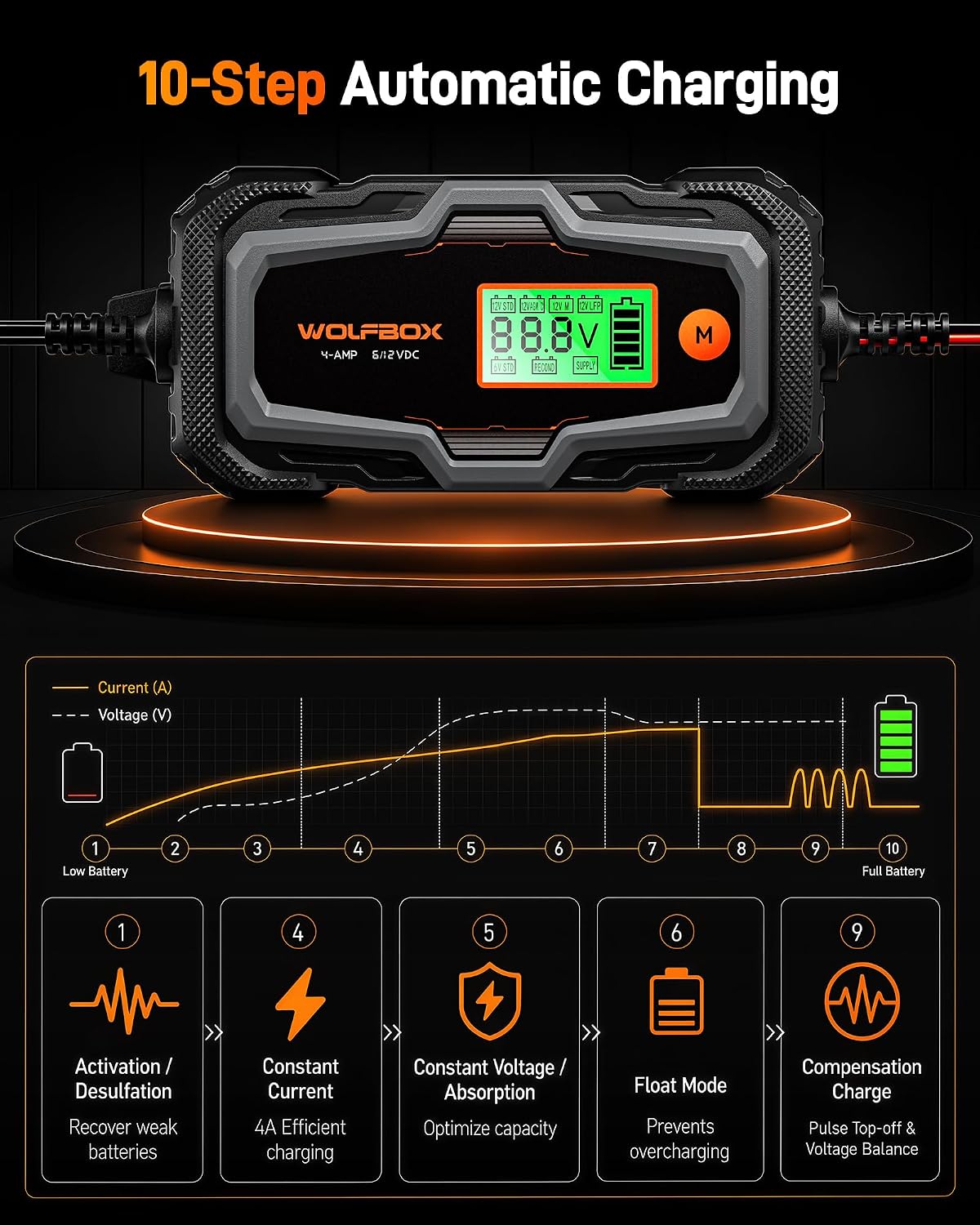
Image: Diagram illustrating the WOLFBOX BC40's 10-step automatic charging process, including Activation/Desulfation, Constant Current (4A), Constant Voltage/Absorption, Float Mode, and Compensation Charge.
- Activation / Desulfation: Recovers weak batteries by breaking down lead-sulfate crystals.
- Soft Start: Gradually introduces power to the battery.
- Pulse: Further prepares the battery for bulk charging.
- Constant Current (Bulk Charge): Provides 4A efficient charging to quickly bring the battery to approximately 80% capacity.
- Constant Voltage / Absorption: Optimizes capacity by charging at a constant voltage.
- Analysis: Checks battery condition.
- Recondition: (If selected) Restores deeply discharged batteries.
- Float Mode: Maintains a full charge without overcharging, ideal for long-term storage.
- Compensation Charge: Pulse top-off and voltage balance.
- Maintenance: Continuously monitors and maintains the battery.
7. Maintenance
The WOLFBOX BC40 is designed to be a low-maintenance device. However, proper care ensures its longevity and optimal performance.
- Cleaning: Wipe the charger's exterior with a soft, damp cloth. Do not use harsh chemicals or abrasives.
- Storage: Store the charger in a cool, dry place when not in use. Ensure cables are neatly coiled to prevent damage.
- Cable Inspection: Regularly inspect the charging cables and connectors for any signs of wear, cuts, or damage. Replace if necessary.
- Battery Maintenance: The charger's Float Mode automatically maintains the battery's charge during long-term storage, preventing overcharging and sulfation.
8. Troubleshooting
If you encounter issues with your WOLFBOX BC40, refer to the following common problems and solutions:
| Problem | Possible Cause | Solution |
|---|---|---|
| Charger does not turn on. | No power from outlet; faulty power cord. | Check power outlet with another device. Inspect power cord for damage. |
| Charger not detecting battery. | Incorrect connection; battery voltage too low; battery is faulty. | Ensure clamps/terminals are securely connected to correct battery poles. The charger supports batteries as low as 1V. If still not detected, the battery may be beyond recovery. |
| Charging process is slow or incomplete. | Incorrect mode selected; battery capacity is large; battery is sulfated. | Verify the correct charging mode is selected for your battery type. Larger batteries take longer to charge. Consider using RECOND mode for sulfated batteries. |
| Error message on LCD. | Reverse polarity; short circuit; over-temperature. | Refer to the specific error code in the full user manual (PDF) for detailed instructions. Disconnect and re-connect carefully. Allow charger to cool if over-temperature. |
If the problem persists, please contact WOLFBOX customer support.
9. Specifications
| Feature | Specification |
|---|---|
| Brand | WOLFBOX |
| Model Number | BC40 |
| Input Voltage | 110 volts |
| Output Voltage | 6 volts, 12 volts |
| Current Rating | 4 A |
| Compatible Battery Types | 6V and 12V Lead-Acid (WET, AGM, GEL, SLA, VRLA, Flooded), 12V LiFePO4 |
| Battery Capacity Range | 4Ah – 120Ah |
| Product Dimensions (D x W x H) | 3.74"D x 2.17"W x 1.57"H |
| Item Weight | 1.5 pounds |
| Safety Rating | IP65 |
10. Warranty and Support
WOLFBOX stands behind the quality of its products.
- Warranty: The WOLFBOX BC40 comes with a 24-month warranty.
- Return Policy: Enjoy a 7-day return policy. Returns are accepted for defects.
- Customer Support: For any questions, technical assistance, or warranty claims, please contact us:
Email: service@wolfbox.com
Phone: +1 888 296 8399
Ask a question about this manual
Ask about setup, troubleshooting, compatibility, parts, safety, or missing instructions. Manuals+ will review the question and use this page’s manual context to help answer it.