
Introduction
Thank you for choosing the KEGIAN Smart Pedestal Fan. This manual provides important information regarding the safe operation, installation, maintenance, and troubleshooting of your new fan. Please read this manual thoroughly before use and retain it for future reference.
Important Safety Instructions
- Always unplug the fan before cleaning or performing any maintenance.
- Do not insert fingers or any objects through the grille when the fan is operating.
- Ensure the fan is placed on a stable, level surface to prevent tipping.
- Do not use the fan in wet or damp locations, such as bathrooms or laundry areas.
- Keep the power cord away from heated surfaces.
- This appliance is not intended for use by persons (including children) with reduced physical, sensory or mental capabilities, or lack of experience and knowledge, unless they have been given supervision or instruction concerning use of the appliance by a person responsible for their safety.
- Children should be supervised to ensure that they do not play with the appliance.
Package Contents
- 1 x KEGIAN Smart Pedestal Fan
- 1 x Remote Control
- 1 x User Manual
Setup and Assembly
Follow these steps to assemble your KEGIAN Smart Pedestal Fan:
- Unpack Components: Carefully remove all parts from the packaging. Ensure all listed components are present.
- Assemble Base: Attach the fan pole to the base. Secure it firmly according to the diagrams provided in the quick start guide (if applicable).
- Attach Fan Head: Connect the fan head unit to the top of the assembled pole. Ensure it clicks securely into place.
- Position Fan: Place the fan on a firm, level surface. Ensure there is adequate space around the fan for optimal airflow and oscillation.
- Connect Power: Plug the power cord into a standard 120V AC electrical outlet.

Image: The KEGIAN Smart Pedestal Fan fully assembled, showcasing its sleek design and adjustable height.
Operating Instructions
Control Panel and Remote Control
The fan can be operated using the touch control panel on the unit or the included remote control. Both offer access to all functions.
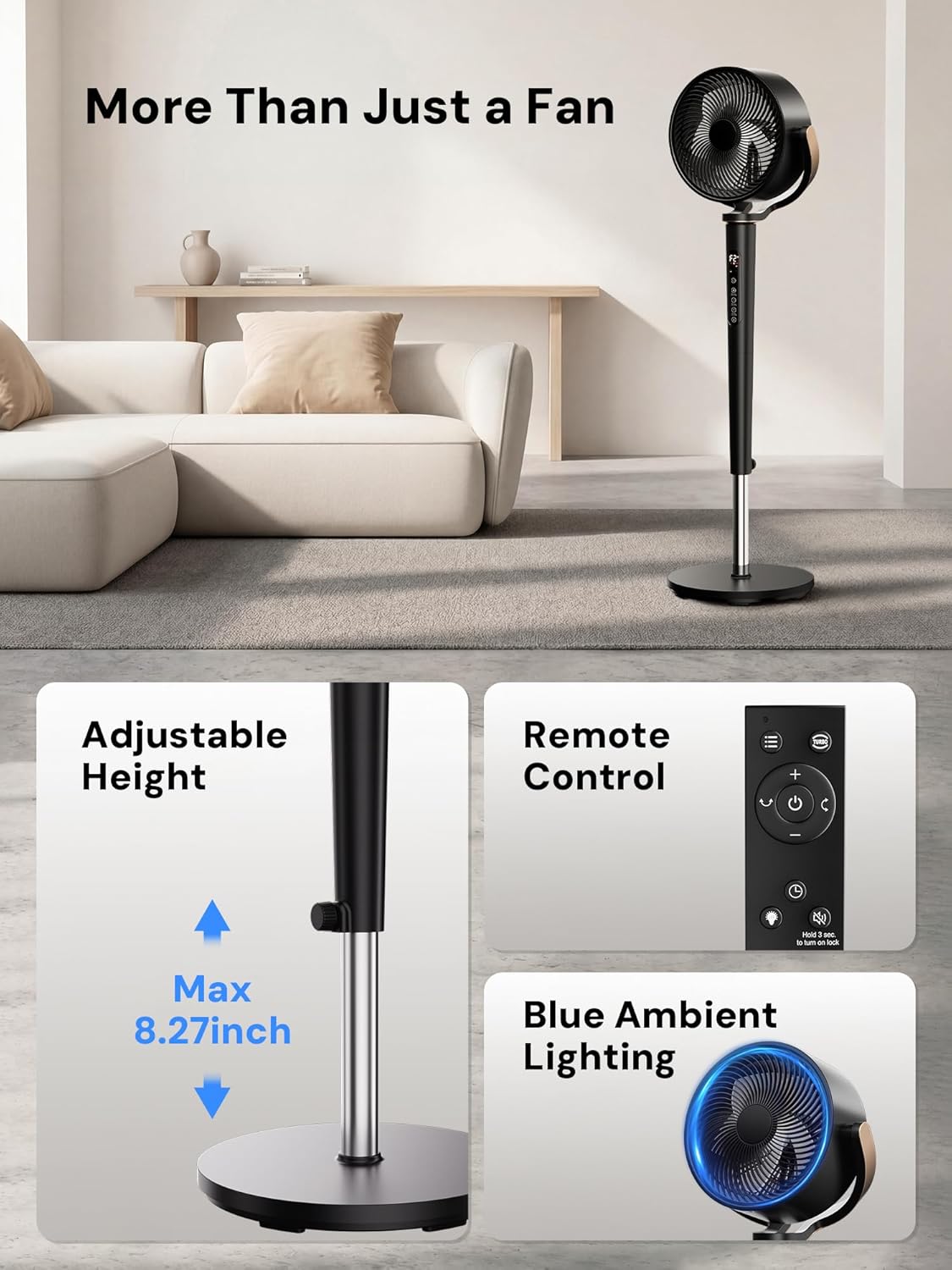
Image: The fan's control panel and remote control, highlighting adjustable height, remote functionality, and blue ambient lighting.
Power On/Off
- Press the Power button on the control panel or remote to turn the fan on or off.
Speed Settings (16 Speeds)
- Use the '+' or '-' buttons on the control panel or remote to adjust the fan speed from 1 to 16.

Image: The fan's digital display indicating 16 fan speeds and options for Normal, Sleep, Auto, and Turbo modes.
Operating Modes (4 Modes)
Press the Mode button to cycle through the following modes:
- Normal Mode: Provides a constant airflow at the selected speed.
- Natural Mode: Simulates a natural breeze by varying fan speed.
- Sleep Mode: Operates at a progressively quieter breeze for undisturbed sleep, with reduced noise levels (as low as 20dB).
- ECO Mode: Adjusts fan speed automatically based on the room temperature for optimal comfort and energy efficiency.
- Turbo Mode: Delivers maximum airflow for rapid cooling.
Oscillation (120° Horizontal & 120° Vertical)
The fan features motorized 3D oscillation to distribute air effectively throughout the room.
- Press the Horizontal Oscillation button to activate or deactivate 120° horizontal movement.
- Press the Vertical Oscillation button to activate or deactivate 120° vertical movement.

Image: The fan head rotating to illustrate its 120° horizontal and 120° vertical oscillation capabilities.
Timer Function (1-12 Hours)
- Press the Timer button to set the fan to automatically turn off after a set period (1 to 12 hours). Each press increases the timer by one hour.
Ambient Light
- The fan includes a built-in night ambient light. Press the Light button to turn it on or off.
Child Lock Function
- Activate the child lock to prevent accidental changes to settings. Refer to the remote control or control panel for the specific button combination or dedicated button to engage/disengage.
Height Adjustment
The fan's height can be adjusted to suit your needs, functioning as both a stand-up fan and a floor fan.
Image: The fan's adjustable pole, illustrating the maximum 8.27-inch height extension.
Maintenance and Cleaning
Regular cleaning ensures optimal performance and extends the life of your fan.
- Before Cleaning: Always unplug the fan from the power outlet before cleaning.
- Exterior Cleaning: Wipe the exterior surfaces of the fan with a soft, damp cloth. Do not use abrasive cleaners or solvents.
- Grille Cleaning: The front grille is removable for easy cleaning. Gently detach the front grille and wipe it clean with a damp cloth. Ensure it is completely dry before reattaching.
- Blade Cleaning: If accessible, carefully wipe the fan blades with a soft, dry or slightly damp cloth.
- Storage: When not in use for extended periods, store the fan in a cool, dry place, preferably in its original packaging.
Troubleshooting
| Problem | Possible Cause | Solution |
|---|---|---|
| Fan does not turn on. | No power supply; Power button not pressed; Child lock engaged. | Check if the power cord is securely plugged into a working outlet. Press the power button. Deactivate child lock. |
| Weak airflow. | Low speed setting; Blocked air intake/outlet; Dirty blades/grille. | Increase fan speed. Ensure no obstructions. Clean the fan grille and blades. |
| Fan is noisy. | Fan not on a level surface; Loose parts; Obstruction. | Place the fan on a flat, stable surface. Check for any loose components. Ensure nothing is obstructing the fan blades. |
| Remote control not working. | Dead batteries; Obstruction between remote and fan; Remote out of range. | Replace batteries in the remote. Ensure a clear line of sight to the fan's receiver. Move closer to the fan. |
| Oscillation not working. | Oscillation function not activated. | Press the horizontal or vertical oscillation button to activate. |
Specifications
| Brand | KEGIAN |
| Model Name | Pedestal Fans (38-46inch) |
| Color | Black |
| Electric Fan Design | Floor Fan |
| Power Source | Electric (Corded) |
| Product Dimensions (D x W x H) | 13"D x 14"W x 46"H |
| Adjustable Height | Max 8.27 inches |
| Special Features | 16 Speeds, 1-12H Timer, Brushless DC Motor, ECO Mode, Sleep Mode, Turbo Mode, Remote, Touch Screen, Ambient Night Lighting, 120° Horizontal & Vertical Oscillation, Height Adjustable |
| Controller Type | Remote Control, Touchpad Control |
| Number of Speeds | 16 |
| Noise Level | 20 Decibels (minimum) |
| Wattage | 50 watts |
| Number of Blades | 5 (Biomimetic) |
| Air Flow Capacity | 1200 Cubic Feet Per Minute (CFM) |
| Max Air Speed | 30 Feet Per Second |
| Max Airflow Distance | 120 ft |
| Room Coverage | Up to 120 ft² |
| Voltage | 120 Volts (AC) |
| Indoor/Outdoor Usage | Indoor |
| Motor Type | Brushless DC Motor |
| Material | Acrylonitrile Butadiene Styrene, Plastic |
| Certification | ETL |
Product Video Demonstration
Video: An official demonstration of the KEGIAN Pedestal Fan, showcasing its features and operation in a home environment.
Warranty and Support
KEGIAN products are designed for reliability and performance. For warranty information, technical support, or customer service inquiries, please contact KEGIAN directly through their official website or the retailer where the product was purchased.
Please have your model number (38-46inch) and purchase date available when contacting support.
Manufacturer: KEGIAN
Website: Visit the KEGIAN Store on Amazon