
1. Introduction
This manual provides essential information for the safe and efficient use of your FOSSIBOT F2400 Portable Power Station. The F2400 is a high-capacity 2048Wh LiFePO4 solar generator designed to provide reliable power for various applications, including home backup, RV travel, and off-grid living. It features a 2400W AC output (4800W surge), adjustable fast charging, and a 15ms Uninterruptible Power Supply (UPS) function.
Please read this manual thoroughly before operating the device and retain it for future reference.
2. Safety Instructions
WARNING: Failure to follow these safety instructions may result in fire, electric shock, injury, or damage to the product or property.
- Do not disassemble, repair, or modify the unit. Incorrect reassembly may cause fire or electric shock.
- Do not place the unit near fire or expose it to heat. Keep out of direct sunlight.
- Do not charge, use, or store the unit in a bathroom or in an area exposed to water or moisture.
- Use only the provided charger and cables.
- Do not use the unit if it is damaged or has been dropped.
- Keep out of reach of children and pets.
- Ensure proper ventilation during use and charging. Do not cover the unit.
- Do not insert foreign objects into the ports or openings.
- Dispose of the product according to local regulations. Do not dispose of with household waste.
3. Product Overview
The FOSSIBOT F2400 is equipped with a durable LiFePO4 battery, offering a long lifespan and enhanced safety. It features multiple output ports to power a wide range of devices simultaneously.
3.1 Key Features
- 2048Wh LiFePO4 Battery: Provides reliable and long-lasting power with over 3,500 cycles to 80% capacity.
- 2400W AC Output (4800W Surge): Capable of powering 99% of common household appliances.
- 1100W Adjustable Fast Charging: Recharges the unit in approximately 1.5 hours with adjustable input power.
- 15ms UPS Function: Provides uninterrupted power backup for sensitive electronics during outages.
- Multiple Output Ports: Includes AC, DC, USB-A, USB-C, Car Outlet, and XT60 ports.
- Smart APP Control: Monitor and control the power station remotely via Bluetooth and Wi-Fi.
3.2 Components and Ports
The F2400 features a comprehensive array of input and output ports for versatile power delivery.

Image: Overview of the FOSSIBOT F2400 showing its various ports and their capacities. It can power 16 devices simultaneously, including 1 Car Outlet (12V/10A), 1 XT60 (12V/25A), 2 DC Outputs (12V/3A Each), 2 USB-A Ports (18W Each), 4 Type-C Ports (20W/100W), and 6 AC Outlets (2400W Output).

Image: Detailed view of the FOSSIBOT F2400's front panel, highlighting the 16 versatile ports for various power requirements, including Cigar Lighter, RV Outlet, DC Output, USB-A, USB-C, and AC Outlets.
3.3 Informative Display
The integrated display provides real-time information about the power station's status.

Image: Diagram illustrating the informative display icons on the FOSSIBOT F2400. Icons include AC Charging, Bluetooth, WiFi, XT90 Interface, Battery Level Indicator, AC Output, DC (12V) Output, USB Output, PD Output, Input Power in Total, Output Power in Total, High/Low Temperature Protection, Fan Status, Remain Using/Recharging Time, XT60 (12V) Output, and Cigar Lighter (12V) Output.
4. Setup
4.1 Unpacking and Initial Inspection
Upon receiving your FOSSIBOT F2400, carefully unpack all components and inspect for any damage. The standard packing list includes:

Image: The standard packing list for the FOSSIBOT F2400, showing the power station unit, AC Charging Cable, Solar Charging Cable, Car Charging Cable, and User Manual.
4.2 Initial Charging
Before first use, fully charge the FOSSIBOT F2400. You can charge it via AC wall outlet, solar panels, or a car charger.
- AC Charging: Connect the provided AC charging cable to the AC input port on the power station and then to a wall outlet. The display will indicate charging status.
- Solar Charging: Connect compatible solar panels (up to 500W) to the XT60 input port using the provided solar charging cable. Ensure the solar panels are placed in direct sunlight for optimal charging.
- Car Charging: Use the provided car charging cable to connect the power station to your vehicle's 12V cigarette lighter port.
5. Operation
5.1 Powering On/Off
Press and hold the main power button for a few seconds to turn the unit on or off. The display will illuminate upon activation.
5.2 Using AC Outlets
Press the AC power button to activate the AC outlets. Plug your devices into the AC ports. The F2400 provides a 2400W continuous output with a 4800W surge capability, suitable for most household appliances.

Image: The FOSSIBOT F2400 demonstrating its ability to charge 99% of devices, including a phone, laptop, drone, blender, mini cooler, and electric grill, with estimated usage times.
5.3 Using DC, USB, and Type-C Ports
Press the respective DC or USB power buttons to activate these output groups. Connect your compatible devices. The USB-C ports support Power Delivery (PD) for fast charging compatible devices.
5.4 Adjustable Input Power Regulation
The F2400 features an adjustable input power knob, allowing you to regulate the charging speed from 300W to 1100W. This protects your home circuits and can extend the power station's lifespan.

Image: A diagram illustrating the adjustable input power regulation knob on the FOSSIBOT F2400, showing settings from 300W to 1100W and corresponding charging times (e.g., 700W for 3 hours 20 minutes).
5.5 Uninterruptible Power Supply (UPS) Function
When the F2400 is connected to an AC wall outlet and has devices plugged into its AC output, it can function as a UPS. In case of a power outage, the unit will automatically switch to battery power within 15ms, providing seamless backup for connected devices like computers or CPAP machines.

Image: The FOSSIBOT F2400 acting as an Uninterruptible Power Supply (UPS), illustrating its use with a computer, CPAP machine, refrigerator, and security camera, with a switchover time of less than 8ms.
5.6 Smart APP Control
Download the FOSSIBOT app to monitor and control your power station remotely via Bluetooth or Wi-Fi. The app allows you to view battery status, input/output levels, control ports, set charging schedules, and perform remote shutdowns.
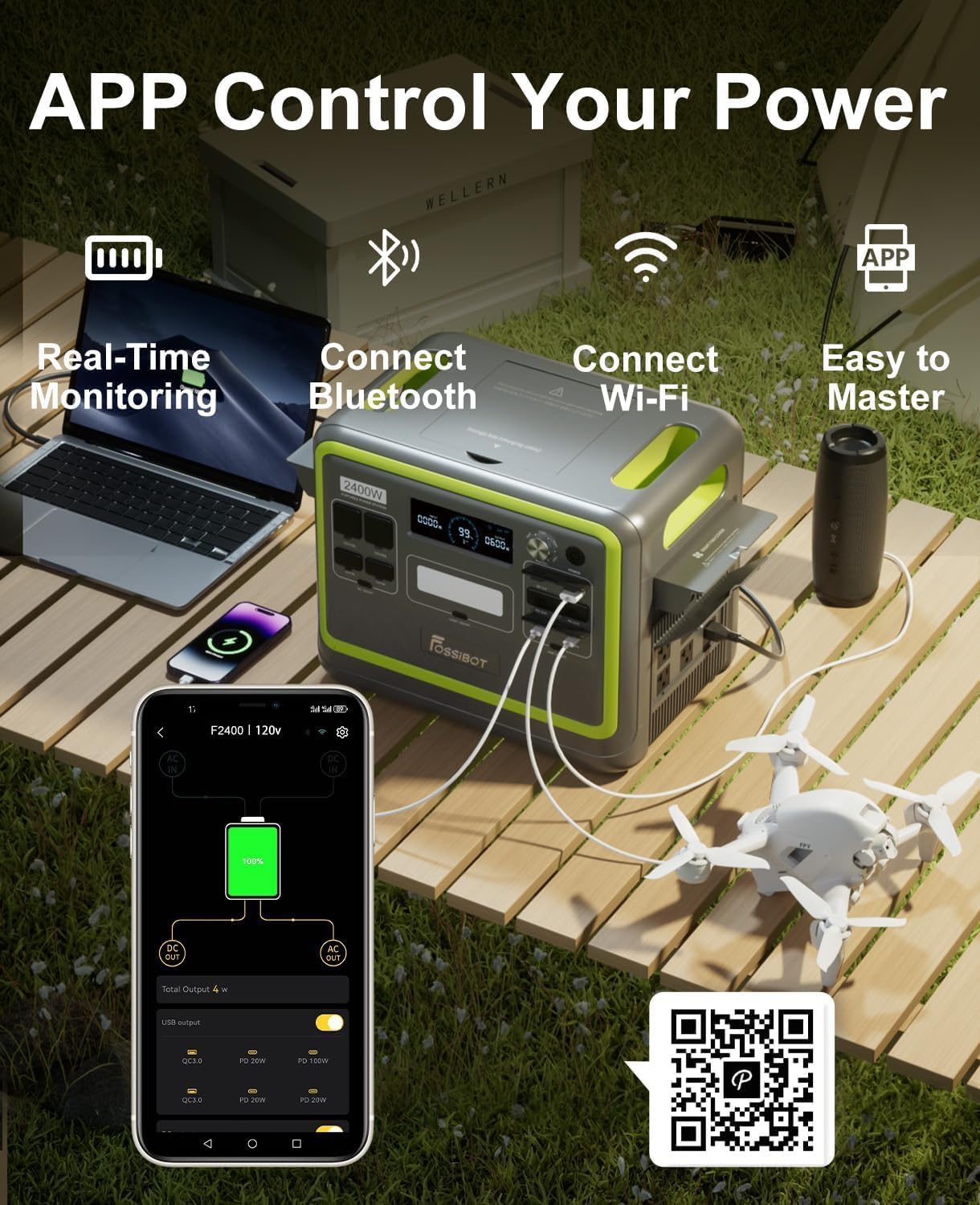
Image: A smartphone displaying the FOSSIBOT app interface, showing real-time monitoring, Bluetooth and Wi-Fi connectivity, and ease of use for controlling the F2400 power station. A QR code is provided for app download.
Download the app here: https://app.sydpower.com/
5.7 LED Lighting
The F2400 includes an integrated LED light for illumination in various modes:
- Flashlight Mode: Long press the light button to turn on the LED light.
- SOS Mode (Slow Blink): Press the light button again to enter SOS mode, where the light blinks slowly.
- SOS Mode (Quick Flash): Press the light button a third time for a quick flash SOS signal.

Image: The FOSSIBOT F2400 demonstrating its warm tone LED lighting, explaining how to activate the flashlight, slow-blinking SOS, and quick-flashing SOS modes.
5.8 Pure Sine Wave Output
The F2400 provides a pure sine wave AC output, which is crucial for sensitive electronics. This ensures stable and clean power, preventing damage to your appliances.

Image: A comparison diagram showing a stable pure sine wave (green) and an unstable fixed wave (red), illustrating how pure sine wave output from the F2400 provides stable current without harm to electrical appliances, unlike unstable fixed waves which can cause long-term damage.
6. Maintenance
6.1 Storage
- Store the unit in a cool, dry place, away from direct sunlight and heat sources.
- For long-term storage, charge the unit to 50-80% every 3-6 months to maintain battery health.
- Avoid storing in extreme temperatures (below 0°C or above 40°C).
6.2 Cleaning
- Disconnect all power sources and devices before cleaning.
- Use a dry, soft cloth to wipe the exterior of the unit.
- Do not use abrasive cleaners or solvents.
7. Troubleshooting
If you encounter issues with your FOSSIBOT F2400, refer to the following common problems and solutions:
| Problem | Possible Cause | Solution |
|---|---|---|
| Unit does not turn on | Battery is depleted; Power button not pressed correctly | Charge the unit; Press and hold the power button for 3 seconds. |
| AC output not working | AC output not activated; Overload protection triggered | Press the AC power button; Reduce the load on AC outlets. |
| Slow charging via AC | Input power knob set too low | Adjust the input power knob to a higher wattage (up to 1100W). |
| Solar charging not working | Solar panels not in direct sunlight; Cables not connected properly; Incompatible solar panels | Reposition solar panels; Check cable connections; Ensure solar panel voltage/wattage is compatible. |
| App connectivity issues | Bluetooth/Wi-Fi off; App not updated; Interference | Ensure Bluetooth/Wi-Fi is enabled on phone and unit; Update app; Move closer to the unit. |
If the problem persists, please contact FOSSIBOT customer support for assistance.
8. Specifications
| Feature | Detail |
|---|---|
| Brand | FOSSIBOT |
| Model | F2400 |
| Battery Type | LiFePO4 |
| Capacity | 2048Wh |
| AC Output | 2400W (4800W Surge) |
| AC Input | 1100W Adjustable Fast Charging |
| Solar Input | Up to 500W |
| UPS Switchover Time | 15ms |
| Cycle Life | 3,500+ cycles to 80% capacity |
| Dimensions | 15.20 x 11.2 x 12.6 inches |
| Weight | 48.5 lbs |

Image: The FOSSIBOT F2400 being transported, illustrating its dimensions (15.20"x11.2"x12.6" inches) and weight (48.5lbs).
9. Warranty & Support
FOSSIBOT offers an industry-leading 48-month warranty (2+2 Years) for the F2400 Portable Power Station. This warranty covers defects in materials and workmanship under normal use.
For technical assistance, troubleshooting, or warranty claims, please contact our professional US-based service team. We guarantee a comprehensive response within 12 hours.
- Warranty Period: 48 Months (2+2 Years)
- Support: 24/7 Lifetime Technical Support
- Response Time: Guaranteed within 12 hours
Your satisfaction is our priority. Please refer to your purchase documentation for specific contact details or visit the official FOSSIBOT website for the most up-to-date support information.