
1. Introduction
The HATTEKER HT-8102 Professional 2-in-1 Body Hair Trimmer is designed for efficient and comfortable body grooming. It features two interchangeable heads: a precision trimmer blade for longer hair and a foil shaver head for a smooth finish. This device is suitable for grooming various body areas including the chest, arms, legs, and underarms. Powered by a 6800 RPM high-performance motor, it delivers reliable cutting performance with low noise. The stainless steel blade ensures accurate trimming and durability. The trimmer offers up to 60 minutes of cordless use after approximately 1 hour of charging, indicated by an LED battery display. USB Type-C charging provides flexible power options. This manual provides instructions for safe operation, maintenance, and troubleshooting.
2. Important Safety Instructions
- Read all instructions before using this appliance.
- Keep the appliance away from water. Do not use it while bathing or showering.
- Do not place or store the appliance where it can fall or be pulled into a tub or sink.
- Unplug the appliance immediately after use and before cleaning.
- This appliance is not intended for use by persons (including children) with reduced physical, sensory or mental capabilities, or lack of experience and knowledge, unless they have been given supervision or instruction concerning use of the appliance by a person responsible for their safety.
- Children should be supervised to ensure that they do not play with the appliance.
- Use this appliance only for its intended use as described in this manual.
- Never operate this appliance if it has a damaged cord or plug, if it is not working properly, or if it has been dropped or damaged.
- Keep the cord away from heated surfaces.
- Never drop or insert any object into any opening.
- Do not use outdoors or operate where aerosol (spray) products are being used or where oxygen is being administered.
- Always attach the plug to the appliance first, then to the outlet. To disconnect, turn all controls to OFF, then remove plug from outlet.
- Do not use an extension cord with this appliance.
- Ensure the charging port is dry before connecting the charging cable.
3. Package Contents
Verify that all items are present in the package:
- HATTEKER HT-8102 Trimmer Unit
- Precision Trimmer Blade Head
- Foil Shaver Head
- Guide Combs (various sizes)
- Cleaning Brush
- Lubricating Oil
- USB Type-C Charging Cable
- Storage Stand
4. Product Features
- 2-in-1 Body Grooming Kit: Includes a precision trimmer blade and a foil shaver head for versatile grooming.
- High-Performance Motor: Equipped with a 6800 RPM motor for efficient and precise trimming with low noise.
- Durable Blade: Features a stainless steel blade for clean, accurate, and long-lasting performance.
- LED Battery Display: Shows the remaining battery level for convenient power management.
- Fast Charging: Provides up to 60 minutes of cordless runtime after approximately 1 hour of charging.
- USB Type-C Charging: Offers flexible charging options from various USB power sources.
- Integrated LED Light: Assists in illuminating the grooming area for enhanced visibility and precision.

Figure 4.1: High-performance 6800 RPM motor for efficient operation.

Figure 4.2: Integrated LED light for improved visibility during grooming.
5. Components Overview
The HATTEKER HT-8102 trimmer consists of a main body, interchangeable blade heads, and various accessories.
- Main Unit: Contains the motor, battery, LED display, and power button.
- Trimmer Blade Head: Designed for cutting longer hair with precision.
- Foil Shaver Head: Provides a close shave for a smooth finish.
- Guide Combs: Attach to the trimmer blade head to control hair length.
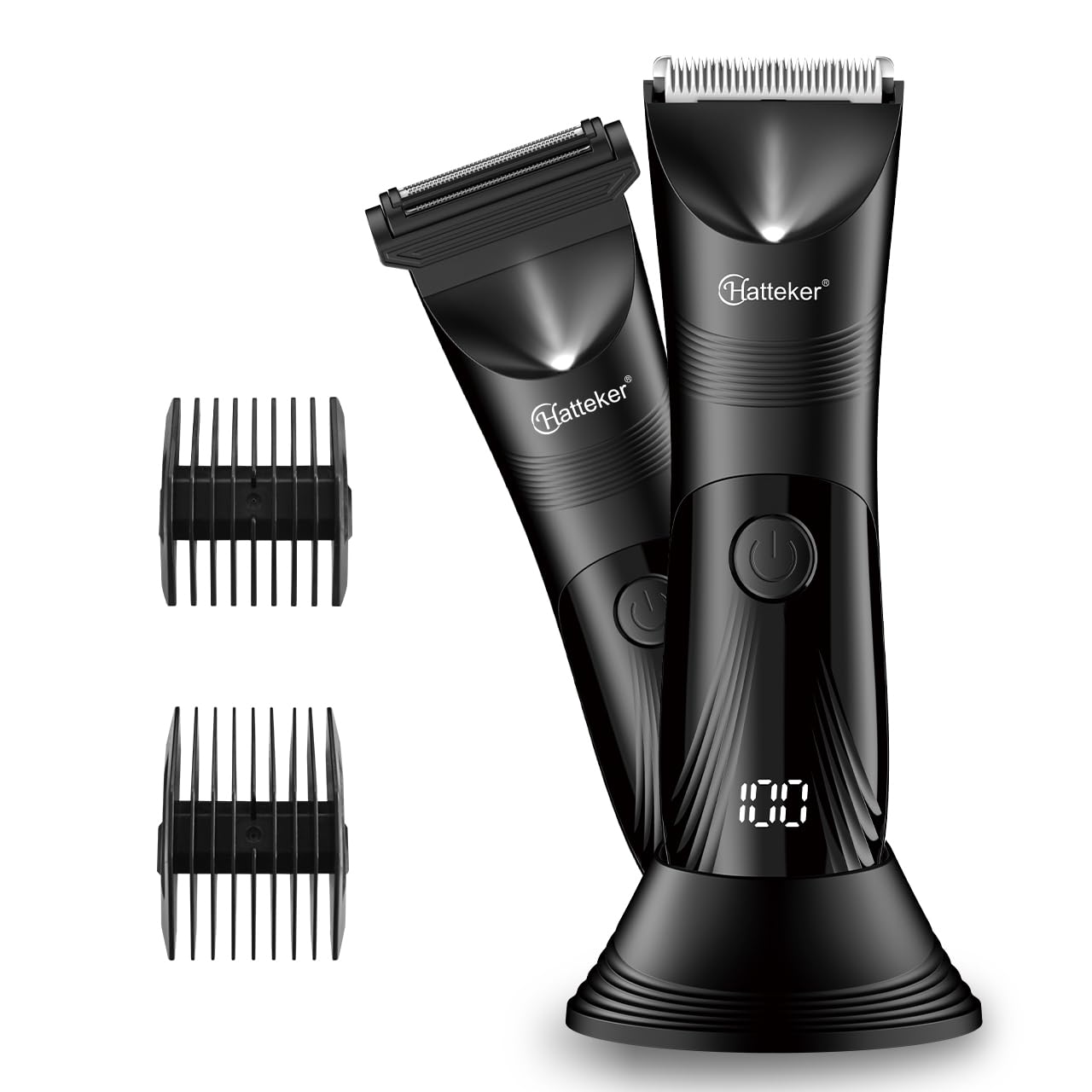
Figure 5.1: Overview of the HATTEKER HT-8102 Trimmer.
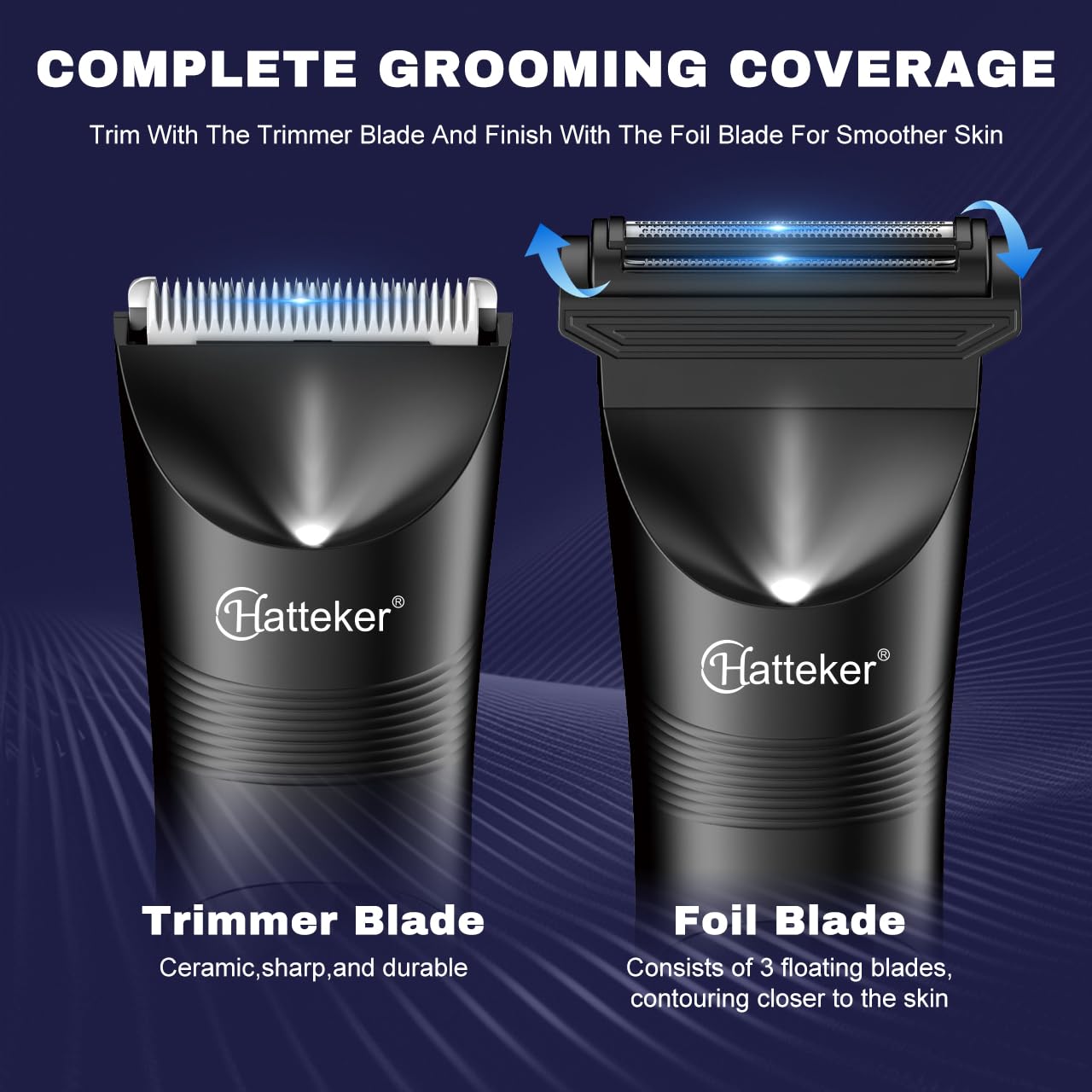
Figure 5.2: Trimmer Blade Head (left) and Foil Shaver Head (right).

Figure 5.3: Detail of the precision trimmer blade.
6. Charging the Device
The HATTEKER HT-8102 is equipped with a rechargeable Lithium-Ion battery. Before first use, fully charge the device.
- Ensure the trimmer is turned off.
- Locate the USB Type-C charging port at the bottom of the trimmer.
- Connect the provided USB Type-C charging cable to the trimmer and then to a compatible USB power source (e.g., laptop, power bank, USB adapter).
- The LED display on the trimmer will show the charging status and battery percentage.
- A full charge takes approximately 1 hour, providing up to 60 minutes of cordless runtime.
- Disconnect the charging cable once fully charged.

Figure 6.1: USB Type-C charging and LED battery display.
7. Attaching and Detaching Heads
The trimmer comes with two interchangeable heads: a trimmer blade and a foil shaver.
7.1. Attaching a Head
- Ensure the trimmer is turned off.
- Align the desired head (trimmer blade or foil shaver) with the main unit.
- Press the head firmly onto the unit until it clicks into place.
7.2. Detaching a Head
- Ensure the trimmer is turned off.
- Grip the main unit firmly with one hand.
- With the other hand, gently pull the attached head upwards and away from the main unit.
8. Operating Instructions
Follow these steps for effective and safe grooming.
8.1. Powering On/Off
- To turn on the trimmer, press the power button once.
- To turn off the trimmer, press the power button again.
8.2. Using the Trimmer Blade
- Attach the precision trimmer blade head to the main unit.
- For desired hair length, attach one of the guide combs to the trimmer blade.
- Turn on the trimmer.
- Hold the trimmer against the skin, moving it slowly against the direction of hair growth.
- Use light pressure and ensure the blade makes even contact with the skin.
8.3. Using the Foil Shaver
- Attach the foil shaver head to the main unit.
- Turn on the trimmer.
- Stretch the skin taut with your free hand.
- Move the shaver in short, gentle strokes against the direction of hair growth.
- The foil shaver is designed for a close finish on shorter hair.

Figure 8.1: Demonstrating use of trimmer and foil shaver for body grooming.

Figure 8.2: The trimmer is suitable for various body areas including armpit, chest, and pubic regions.
9. Maintenance and Cleaning
Regular cleaning and maintenance ensure optimal performance and longevity of your trimmer.
9.1. Cleaning the Blades
- Ensure the trimmer is turned off and disconnected from the charging cable.
- Detach the blade head from the main unit.
- Use the provided cleaning brush to remove any trapped hair from the blades and inside the head.
- The blades can be rinsed under running water. Ensure the main unit is not submerged.
- Allow the blade head to air dry completely before reattaching or storing.
9.2. Lubricating the Blades
- After cleaning and drying, apply 1-2 drops of the provided lubricating oil onto the blades.
- Turn on the trimmer for a few seconds to distribute the oil evenly.
- Wipe off any excess oil with a soft cloth.
- Lubrication helps maintain blade sharpness and smooth operation.
9.3. Storage
- Store the trimmer and its accessories in the provided storage stand or a dry, safe place.
- Keep out of reach of children.
10. Troubleshooting
If you encounter issues with your HATTEKER HT-8102 trimmer, refer to the following common problems and solutions:
| Problem | Possible Cause | Solution |
|---|---|---|
| Trimmer does not turn on. | Battery is depleted. | Charge the trimmer fully (refer to Section 6). |
| Poor trimming performance or pulling hair. | Blades are dull or clogged with hair. | Clean the blades thoroughly and apply lubricating oil (refer to Section 9). |
| Trimmer makes unusual noise. | Blades are not properly aligned or lubricated. | Ensure the blade head is securely attached. Clean and lubricate the blades. |
| LED display not working. | Device malfunction. | Contact customer support for assistance. |
11. Specifications
| Feature | Specification |
|---|---|
| Model Number | HT-8102 |
| Motor Speed | 6800 RPM |
| Blade Material | Stainless Steel |
| Battery Type | 1 Lithium Ion (included) |
| Charging Time | Approx. 1 hour |
| Runtime | Approx. 60 minutes |
| Charging Interface | USB Type-C |
| Product Dimensions (LxWxH) | 19 x 18.5 x 5 cm |
| Item Weight | 380 g |
| Country of Origin | China |
12. Warranty and Support
This product comes with a 1-year quality warranty against defects in materials and workmanship, valid from the date of original purchase (invoice required). This warranty does not cover intentional or unintentional damage caused by the user.
12.1. Initiating a Warranty Claim
To initiate a warranty claim, contact customer support at WARRANTY@wmarkindia.in. Please include a clear description of the problem, associated pictures, and a copy of your original purchase invoice.
12.2. Warranty Resolution
Once the claim is verified, the company will, at its discretion, either repair or exchange the product if a repair is not possible. Customers are responsible for the cost of transporting the product to the service center, while the company will cover the cost of return transportation if a repair or exchange is performed.
12.3. Manufacturer and Importer Information
- Manufacturer: HATTEKER
- Packer: SAAS Consumer Goods
- Importer: SAAS Consumer Goods
