
Introduction
Thank you for choosing the YITAHOME Queen Size Bed Frame. This bed frame is designed to provide comfort and functionality with its integrated RGB LED lighting, adjustable headboard, convenient USB charging ports, and ample under-bed storage. This manual provides essential information for assembly, operation, maintenance, and troubleshooting to ensure a safe and enjoyable experience with your new bed frame.
Please read this manual thoroughly before assembly and retain it for future reference.
Safety Information
- Ensure all parts are present and undamaged before assembly. Do not proceed with assembly if any parts are missing or broken.
- Assemble the bed frame on a soft, clean surface to prevent scratches or damage.
- Tighten all screws and bolts securely, but do not overtighten. Periodically check and retighten fasteners as needed.
- Keep small parts away from children during assembly to prevent choking hazards.
- Do not exceed the recommended weight capacity of 1000 lbs.
- Use only the provided power adapter for the LED lights and USB ports.
- Avoid exposing electrical components to moisture.
Package Contents
The YITAHOME Queen Size Bed Frame package includes the following components:
- Headboard
- Bed Frame Slats
- 4 Storage Drawers
- Installation Manual
- All necessary hardware and tools for assembly
Please verify all components against the parts list in the included Installation Manual PDF.
Assembly Instructions
The YITAHOME Queen Size Bed Frame is designed for straightforward assembly. All parts are numbered, and detailed instructions are provided to guide you through the process.
- Unpack all components and lay them out on a soft, clean surface.
- Identify each part using the labels and the parts list in the manual.
- Follow the step-by-step diagrams and instructions provided in the Installation Manual (PDF).
- Ensure all connections are secure before placing a mattress on the frame.
Assembly can typically be completed in a short amount of time with two people.

Figure 1: Bed Frame Dimensions and Components Overview.
Operating Instructions
RGB LED Lights
The bed frame features integrated RGB LED lights in the headboard, offering a variety of colors and modes to enhance your bedroom ambiance. The lights can be controlled via a 24-key remote control or a smart application on your mobile device.
- Remote Control: Use the included 24-key remote to power the lights on/off, change colors, adjust brightness, and select various dynamic modes.
- Smart APP Control: Download the designated smart app (refer to the Installation Manual for app details) to connect via Bluetooth. The app allows for more advanced control, including music synchronization and timing functions.

Figure 2: RGB LED Lights with Remote and App Control.
USB Charging Ports
The headboard is equipped with built-in USB ports (one Type-A and one Type-C) for convenient charging of your electronic devices.
- Type-A Port: 5V/2A output.
- Type-C Port: 2.5V/2.1A output.
Simply plug your device's charging cable into the appropriate port. Ensure the bed frame is connected to a power source for the USB ports to function.

Figure 3: Integrated USB Charging Station.
Adjustable Headboard
The headboard's height can be adjusted to accommodate mattresses ranging from 8 to 12 inches in height. The adjustable range is between 44.5 and 46.5 inches from the floor.
- To adjust the headboard height, loosen the securing bolts on the headboard supports, slide the headboard to the desired height, and then retighten the bolts firmly.
- Two storage pockets are located on either side of the headboard for small items like remote controls or phones.

Figure 4: Adjustable Headboard Feature.
Storage Drawers
The bed frame includes four under-bed storage drawers, providing ample space for bedding, clothing, or other items. Each drawer is equipped with rollers for smooth operation.
- To open a drawer, gently pull the handle outwards.
- To close, push the drawer back into the frame until it is flush.
- Avoid overloading the drawers to ensure smooth movement and prevent damage.
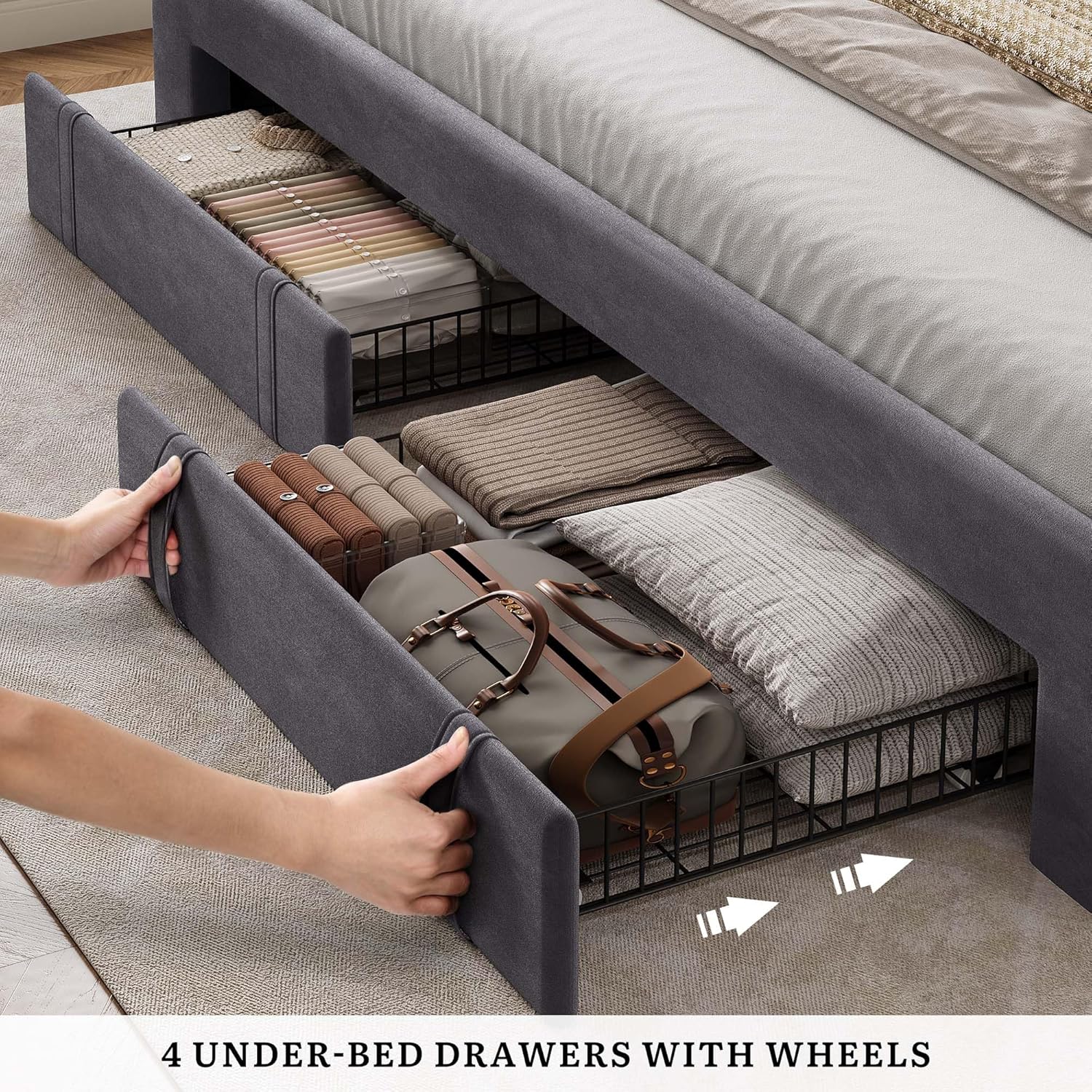
Figure 5: Under-Bed Storage Drawers.
Maintenance
- Cleaning: For the velvet upholstered parts, gently wipe with a soft, damp cloth. For deeper cleaning, use a fabric cleaner suitable for velvet. Avoid harsh chemicals.
- Hardware: Periodically check all bolts and screws to ensure they remain tight. Retighten as necessary to maintain stability and prevent noise.
- Drawers: Keep the drawer tracks clean from dust and debris to ensure smooth operation.
- Electrical Components: Ensure the power cord for the LED lights and USB ports is not pinched or damaged. Unplug the bed frame from the power outlet before cleaning or performing any maintenance on electrical parts.

Figure 6: Soft Velvet Material Detail.
Troubleshooting
| Problem | Possible Cause | Solution |
|---|---|---|
| LED lights not working | Power cable unplugged; Remote battery dead; App not connected. | Ensure power cable is securely plugged in. Replace remote battery. Reconnect app via Bluetooth. |
| USB ports not charging | Bed frame not powered; Device cable faulty. | Verify bed frame is plugged into a working outlet. Try a different charging cable or device. |
| Bed frame is noisy/wobbly | Loose bolts or screws. | Inspect all connection points and tighten any loose hardware. |
| Drawers stick or don't slide smoothly | Overloaded drawer; Debris in tracks. | Reduce contents of the drawer. Clean tracks of any obstructions. |
Specifications
| Feature | Detail |
|---|---|
| Size | Queen |
| Product Dimensions (L x W x H) | 83.8" x 64.5" x 47.2" |
| Material | Metal frame, Velvet upholstered headboard |
| Color | Dark Grey |
| Weight Capacity | 1000 lbs |
| Headboard Adjustment Range | 44.5" - 46.5" |
| Recommended Mattress Height | 8" - 12" |
| Storage Drawers | 4 (with wheels) |
| USB Ports | 1x Type-A (5V/2A), 1x Type-C (2.5V/2.1A) |
| LED Lighting | RGB, Remote & App Control, Music Sync, Timing Function |
| Assembly Required | Yes, detailed instructions provided |
Warranty and Support
YITAHOME is committed to providing quality products and customer satisfaction. While specific warranty details are not provided in this manual, please refer to your purchase documentation or contact YITAHOME customer service for warranty information and support.
For assistance with assembly, missing parts, or any other inquiries, please contact YITAHOME customer support through the retailer where you purchased the product or visit the official YITAHOME website.
We recommend keeping your purchase receipt as proof of purchase for any warranty claims.


