
Introduction
Thank you for choosing the oraimo Neo OEB-310 Neckband Earphones. These earphones are designed to provide a high-quality audio experience with advanced features such as Sound360 Spatial Audio, Environmental Noise Cancellation (ENC), and dual device connectivity. This manual provides detailed instructions for setup, operation, maintenance, and troubleshooting to ensure optimal performance and longevity of your device.
What's in the Box
Carefully unpack the contents and ensure all items are present. If any items are missing or damaged, please contact customer support.
- oraimo Neo Neckband Earphone x1
- Welcome Guide (User Manual) x1
- Type-C Charging Cable x1
- Pair of Eartips x2 (different sizes)
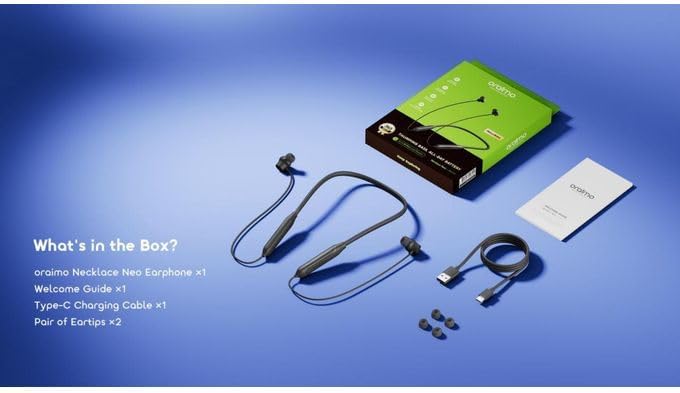
Image: Contents of the oraimo Neo OEB-310 package. This includes the neckband earphones, a USB Type-C charging cable, a welcome guide, and two additional pairs of eartips for different ear sizes.
Product Overview
The oraimo Neo OEB-310 features a lightweight neckband design with integrated controls and magnetic earbuds for convenience. The neckband houses the battery and control buttons, while the earbuds deliver audio.

Image: A visual representation of the oraimo Neo OEB-310 Neckband Earphones, emphasizing its long playtime and powerful bass capabilities.
Setup
1. Charging the Earphones
Before first use, fully charge the earphones. Use the provided USB Type-C cable to connect the earphones to a compatible USB power source (e.g., computer USB port, wall adapter).
- The LED indicator will show charging status.
- A full charge provides up to 30 hours of playtime.
2. Powering On/Off
- To Power On: Press and hold the Multi-function button for approximately 3 seconds until the LED indicator flashes blue.
- To Power Off: Press and hold the Multi-function button for approximately 5 seconds until the LED indicator flashes red and then turns off.
3. Bluetooth Pairing
Pair your earphones with your device for wireless audio.
- Ensure the earphones are powered off.
- Press and hold the Multi-function button for about 5 seconds until the LED indicator flashes red and blue alternately. This indicates pairing mode.
- On your device (smartphone, tablet, laptop), enable Bluetooth and search for available devices.
- Select "oraimo Neo OEB-310" from the list of devices.
- Once connected, the LED indicator will flash blue slowly.
Operating Instructions
1. Music Control
- Play/Pause: Press the Multi-function button once.
- Next Track: Press and hold the Volume + button for 2 seconds.
- Previous Track: Press and hold the Volume - button for 2 seconds.
- Volume Up: Press the Volume + button.
- Volume Down: Press the Volume - button.
2. Call Control
- Answer/End Call: Press the Multi-function button once.
- Reject Call: Press and hold the Multi-function button for 2 seconds.
- Activate Voice Assistant: Double-press the Multi-function button.
3. Dual Device Connection
The earphones support connecting to two Bluetooth devices simultaneously, allowing seamless switching between them.
- Connect the earphones to the first device (e.g., smartphone) as described in the Bluetooth Pairing section.
- Disconnect the earphones from the first device (turn off Bluetooth on the first device or manually disconnect). The earphones will re-enter pairing mode.
- Connect the earphones to the second device (e.g., laptop).
- Re-enable Bluetooth on the first device. The earphones should automatically reconnect to both devices.
- To switch between devices, simply play audio on the desired device.

Image: The oraimo Neo OEB-310 earphones demonstrating their ability to connect to two devices, such as a smartphone and a tablet, simultaneously for smooth switching between work and entertainment.
4. Sound360 Spatial Audio
Activate Sound360 Spatial Audio via the companion app (if available) to experience a wider and more immersive soundstage for music, movies, and games.

Image: A person wearing the oraimo Neo OEB-310 earphones, surrounded by visual representations of sound waves, illustrating the immersive experience of Sound360 Spatial Audio.
5. Low Latency Mode
For an optimized experience during gaming or video streaming, activate the low latency mode. Refer to the companion app or product documentation for specific instructions on how to enable this feature.
Maintenance
- Cleaning: Wipe the earphones with a soft, dry cloth. Do not use harsh chemicals or abrasive materials.
- Storage: When not in use, store the earphones in a cool, dry place. The magnetic earbuds help prevent tangles.
- Battery Care: To prolong battery life, avoid fully discharging the earphones frequently. Charge them regularly, even if not used for extended periods.
- Water Resistance: These earphones are not waterproof. Avoid exposure to liquids.
Troubleshooting
| Problem | Possible Cause | Solution |
|---|---|---|
| Earphones do not power on. | Low battery. | Charge the earphones fully using the provided USB Type-C cable. |
| Cannot pair with device. | Earphones not in pairing mode; Bluetooth off on device; device too far. | Ensure earphones are in pairing mode (flashing red/blue). Turn on Bluetooth on your device. Move device closer to earphones (within 10m). |
| No sound or low volume. | Volume too low; earphones not connected; incorrect audio output selected. | Adjust volume on earphones and device. Reconnect earphones. Check device's audio output settings. |
| Call quality is poor. | Environmental noise; weak Bluetooth connection. | Move to a quieter environment. Ensure earphones are within range of your device. ENC technology helps reduce background noise. |
| Dual device connection not working. | Incorrect setup. | Follow the dual device connection steps carefully. Ensure both devices have Bluetooth enabled and are within range. |
Specifications
| Feature | Detail |
|---|---|
| Model Name | Neo OEB-310 |
| Brand | oraimo |
| Color | Gravity Black |
| Ear Placement | In-Ear |
| Form Factor | Neckband |
| Noise Control | Environmental Noise Cancellation (ENC) |
| Connectivity Technology | Wireless (Bluetooth) |
| Bluetooth Version | 6.0 |
| Bluetooth Range | Up to 10 meters |
| Battery Capacity | 200mAh |
| Playtime | Up to 30 hours |
| Charging Port | USB Type-C |
| Audio Driver Type | Dynamic |
| Compatible Devices | Cellular Phones |
| Special Features | Sound360 Spatial Audio, Magnetic Earbuds, Low Latency Mode |
| Item Weight | 30 grams |
Warranty and Support
The oraimo Neo OEB-310 Neckband Earphones come with an 18-month warranty from the date of purchase. This warranty covers manufacturing defects and workmanship under normal use.
For warranty claims, technical support, or any inquiries regarding your product, please refer to the contact information provided in the Welcome Guide included in your package or visit the official oraimo website.
Please retain your proof of purchase for warranty service.


