
Introduction
This manual provides detailed instructions for the setup, operation, and maintenance of your Gosasa Digital Watch SM 8105. This watch features a 7-color LED backlight, 5ATM water resistance, alarm, stopwatch, countdown timer, dual time, and 12/24-hour format display. Please read this manual thoroughly to ensure proper use and care of your watch.
Product Overview

Figure 1: Front view of the Gosasa Digital Watch SM 8105. The watch features a digital display with a black case and strap.
Button Functions
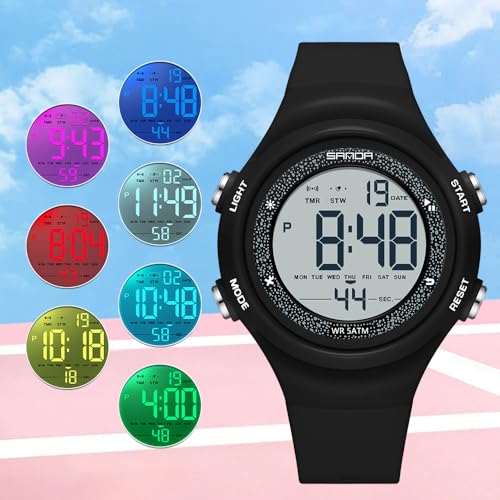
Figure 2: Watch with buttons labeled A, B, C, D for functional reference.
- Button A (Top Left): Activates the LED backlight.
- Button B (Top Right): Used for starting/stopping functions (e.g., stopwatch, countdown) and adjusting values during setting.
- Button C (Bottom Left): Cycles through different modes (Time, Alarm, Stopwatch, Countdown, Dual Time).
- Button D (Bottom Right): Used for selecting items or resetting functions (e.g., stopwatch reset) and advancing values during setting.
Display Elements
The digital display shows the current time (hours, minutes, seconds), date (month, day), day of the week, and indicators for active functions such as alarm, stopwatch, or countdown timer. It also indicates AM/PM for 12-hour format.
Setup
Setting Time and Date
- From the Time Mode, press Button C three times to enter Time Setting Mode. The seconds will flash.
- Press Button D to cycle through the setting items: Seconds → Hour → Minute → Month → Day → Day of Week.
- While an item is flashing, press Button B to adjust its value. For seconds, pressing Button B will reset them to 00.
- To switch between 12-hour and 24-hour format, press Button B while the hour is flashing.
- Once all settings are correct, press Button C to exit Time Setting Mode and return to Time Mode.
Operating Modes
Mode Switching
Press Button C repeatedly to cycle through the following modes:
- Time Mode (default display)
- Alarm Mode
- Stopwatch Mode
- Countdown Timer Mode
- Dual Time Mode
Alarm Mode
- From Time Mode, press Button C once to enter Alarm Mode.
- Press Button D to select the hour or minute to set.
- Press Button B to adjust the flashing value.
- Press Button C to exit Alarm Setting Mode.
- To activate/deactivate the alarm, press Button B while in Alarm Mode (not setting). An alarm icon will appear/disappear on the display.
Stopwatch Mode
- From Time Mode, press Button C twice to enter Stopwatch Mode. The display will show 00:00:00.
- Press Button B to start the stopwatch.
- Press Button B again to stop the stopwatch.
- While the stopwatch is stopped, press Button D to reset it to 00:00:00.
Countdown Timer Mode
- From Time Mode, press Button C three times to enter Countdown Timer Mode.
- Press Button D to select the hour, minute, or second to set.
- Press Button B to adjust the flashing value.
- Press Button C to exit Countdown Setting Mode.
- Press Button B to start or pause the countdown.
- When the countdown is paused, press Button D to reset it to the initial set time.
Dual Time Mode
- From Time Mode, press Button C four times to enter Dual Time Mode.
- Press Button D to select the hour or minute to set.
- Press Button B to adjust the flashing value for the second time zone.
- Press Button C to exit Dual Time Setting Mode.
LED Backlight
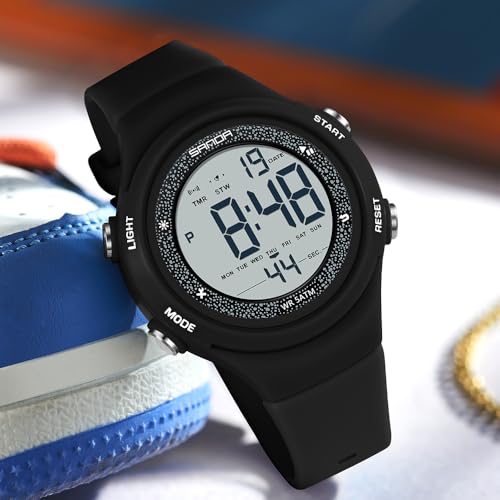
Figure 3: Watch display illuminated by the blue LED backlight.
Press Button A (Top Left) to activate the 7-color LED backlight. The backlight will illuminate the display for a few seconds, enhancing visibility in low-light conditions.
Maintenance
Cleaning
Wipe the watch regularly with a soft, dry cloth. For stubborn dirt, a slightly damp cloth can be used, followed by immediate drying. Avoid using chemical cleaners or abrasive materials.
Battery Replacement
The watch uses 1 Nonstandard Battery. When the display becomes dim or functions are erratic, the battery may need replacement. It is recommended to have the battery replaced by a qualified watch technician to ensure water resistance integrity.
Water Resistance (5ATM)
Your Gosasa Digital Watch is rated 5ATM (50 meters / 168 feet) water resistant. This means it is suitable for daily splashes, hand washing, rain, and sweat. It is not recommended for swimming, bathing, diving, showering, or hot water environments. DO NOT press any buttons while the watch is underwater. Avoid exposure to steam, hot water, saunas, and high-pressure water. If moisture or condensation appears inside the watch, discontinue use immediately and contact customer service. Clean and dry the watch thoroughly after contact with water, sweat, or seawater to prevent damage.
Troubleshooting
- Display is blank or dim: The battery may be low. Replace the battery as described in the Maintenance section.
- Buttons are unresponsive: Ensure the watch is not in a locked mode (if applicable, though this model typically does not have one). If the issue persists, the battery may be low or there could be an internal malfunction.
- Time is incorrect: Re-set the time and date following the instructions in the Setup section. Ensure the 12/24-hour format is correctly selected.
- Water inside the watch: Immediately stop using the watch and contact customer service. Do not attempt to open or dry the watch yourself.
Specifications
| Model Number | SM 8105 |
| Display Type | Digital |
| Movement Type | Digital Quartz |
| Case Material | Acrylonitrile Butadiene Styrene (ABS) |
| Band Material | Thermoplastic Polyurethane (TPU) |
| Crystal Material | Resin |
| Clasp Type | Buckle |
| Case Diameter | 1.61 inches (41 mm) |
| Case Thickness | 0.51 inches (13 mm) |
| Band Width | 0.79 inches (20 mm) |
| Total Watch Length | 9.06 inches (230 mm) |
| Item Weight | 1.38 oz (39 g) |
| Water Resistance | 5ATM (50 meters / 168 feet) |
| Battery Type | 1 Nonstandard Battery |
| Additional Features | Alarm, Easy Reader, Glow In The Dark, Lightweight, Shock Resistant |
Warranty
This product comes with a Limited Warranty. For specific details regarding warranty coverage, terms, and conditions, please refer to the warranty information provided at the time of purchase or contact Gosasa customer service directly.
Support
If you encounter any issues or have questions not covered in this manual, please contact Gosasa customer service for assistance. You can typically find contact information on the product packaging, the official Gosasa website, or through your retailer.