
1. Introduction
The SKYRC NC3000 Octa is an advanced 8-slot battery charger and analyzer designed for AA and AAA NiMH/NiCd rechargeable cells. It offers comprehensive functions including charging, discharging, analyzing, cycling, and conditioning, allowing for precise management of individual batteries. This manual provides detailed instructions for safe and effective use of your device.
2. Safety Precautions
- Use only with AA/AAA NiMH and NiCd batteries. Do not attempt to charge LiPo, Li-ion, alkaline, or other battery types.
- Ensure proper battery polarity when inserting cells into the slots.
- Use a USB-C PD3.0 65W or higher power adapter. Insufficient power may lead to operational issues.
- Do not expose the device to water, moisture, or extreme temperatures.
- Keep out of reach of children.
- Do not disassemble or modify the charger.
- Operate in a well-ventilated area.
3. Package Contents
- SKYRC NC3000 Octa Battery Charger Analyzer
- User Manual (this document)
Note: Power adapter and batteries are not included and must be purchased separately.
4. Product Overview
The NC3000 Octa features eight independent battery slots, a 1.77-inch color TN display, LED status indicators, and a scroll-wheel interface for navigation.
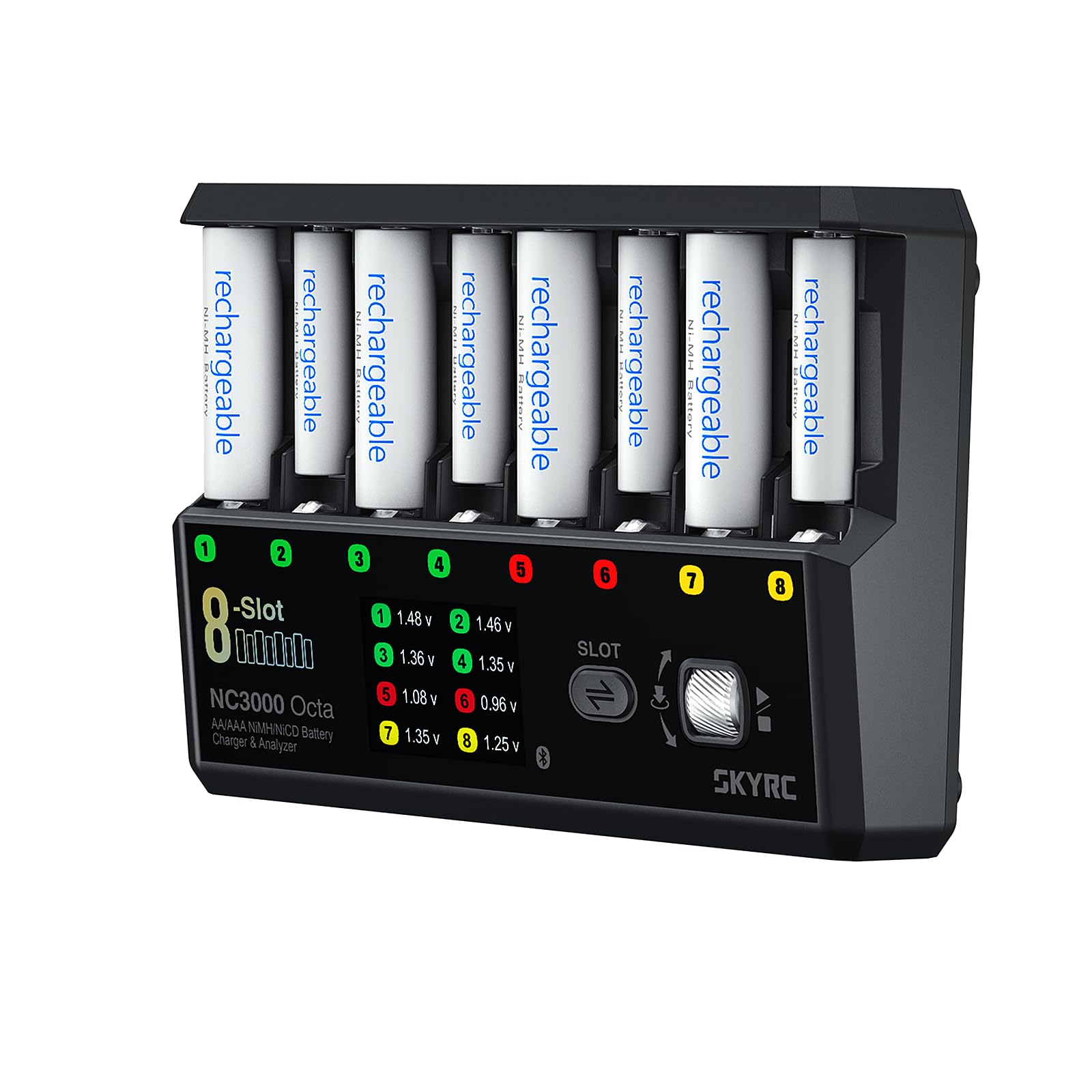
Figure 1: SKYRC NC3000 Octa Battery Charger Analyzer. This image shows the front view of the charger with its eight battery slots, central display, and control wheel.
4.1 Components
- Battery Slots (1-8): Independent slots for AA/AAA NiMH/NiCd batteries.
- 1.77-inch Color TN Display: Shows charging status, parameters, and battery data.
- Scroll Wheel: For navigating menus and adjusting settings.
- LED Indicators: Per-slot LEDs indicating charge status.
- USB-C PD Input Port: For connecting the power adapter.
5. Setup
- Connect Power: Connect a USB-C PD3.0 65W or higher power adapter (not included) to the USB-C input port on the charger. The charger will power on.
- Insert Batteries: Carefully insert AA or AAA NiMH/NiCd batteries into the desired slots, ensuring correct polarity (+/-). The charger will automatically detect the battery type.
6. Operating Modes
The NC3000 Octa offers seven distinct operating modes to manage your batteries. Use the scroll wheel to navigate and select modes for each slot.
6.1 Charge Mode
Charges batteries at a user-defined current.
- Purpose: Standard battery charging.
- Current Range: 0.20A - 3.00A (adjustable in 0.10A increments).
- Procedure: Select 'Charge', set desired current, and confirm.
6.2 Discharge Mode
Discharges batteries to a set voltage.
- Purpose: To reduce memory effect or prepare for storage.
- Current Range: 0.20A - 2.50A (adjustable in 0.10A increments).
- Procedure: Select 'Discharge', set desired current, and confirm.
6.3 Break-in Mode
Conditions new batteries or those that have been stored for a long time.
- Purpose: Optimizes battery performance and capacity.
- Procedure: Select 'Break-in' and confirm. The charger will perform a specific charge/discharge cycle.
6.4 Cycle Mode
Performs multiple charge/discharge cycles to determine actual battery capacity and improve performance.
- Purpose: Capacity testing and battery conditioning.
- Procedure: Select 'Cycle', set desired number of cycles and currents, and confirm.
6.5 MaxBoost Mode
A specialized mode for maximizing battery performance.
- Purpose: For specific applications requiring peak battery output.
- Procedure: Select 'MaxBoost' and confirm. Refer to the on-screen prompts for any adjustable parameters.
6.6 Turbo Mode
Provides a faster charging option.
- Purpose: Quick charging when time is critical.
- Procedure: Select 'Turbo' and confirm.
6.7 3-Stage Charging Mode
A charging process that typically involves constant current, constant voltage, and trickle charge stages.
- Purpose: Optimized charging for battery longevity and full capacity.
- Procedure: Select '3-Stage Charging' and confirm.
7. App Integration
The SKYRC NC3000 Octa supports the Bluetooth 5.0 SkyCharger app, available for compatible smartphones. The app allows for remote monitoring of battery data, viewing graphs, and performing firmware updates.
- Download: Search for "SkyCharger" in your device's app store.
- Connection: Enable Bluetooth on your smartphone and open the SkyCharger app. The app should detect and connect to your NC3000 Octa.
- Features: Monitor individual slot status, view real-time voltage/current graphs, adjust settings, and update firmware.
8. Maintenance
- Cleaning: Disconnect power before cleaning. Use a soft, dry cloth to wipe the exterior. Do not use liquid cleaners or solvents.
- Storage: Store the charger in a cool, dry place away from direct sunlight and extreme temperatures.
- Battery Care: For long-term storage, discharge NiMH/NiCd batteries to approximately 1.0V per cell.
9. Troubleshooting
| Problem | Possible Cause | Solution |
|---|---|---|
| Charger does not power on. | No power, or insufficient power adapter. | Ensure the USB-C PD3.0 65W or higher power adapter is correctly connected and functioning. |
| "Low Input Warning" message. | Power adapter is not providing sufficient wattage (less than 65W). | Use a dedicated USB-C PD3.0 65W or higher power adapter. While the warning may persist, the charger should function if the adapter meets the minimum requirement. |
| Battery not detected or error message. | Incorrect battery type, incorrect polarity, or damaged battery. | Verify battery type (NiMH/NiCd only) and polarity. Try a different battery. |
| App connection issues. | Bluetooth disabled, app glitch, or interference. | Ensure Bluetooth is enabled on your device. Restart the app or toggle Bluetooth off/on. Move closer to the charger. |
| Charger stops mid-cycle. | Battery fault, overheating, or power interruption. | Check the battery for damage. Ensure adequate ventilation. Verify stable power supply. |
10. Specifications
| Feature | Detail |
|---|---|
| Brand | SKYRC |
| Model | NC3000 Octa (SK-100228) |
| Compatible Battery Types | AA/AAA NiMH, NiCd |
| Number of Slots | 8 Independent Slots |
| Input Voltage | USB-C PD3.0 65W or higher |
| Charge Current Range | 0.20A - 3.00A (0.10A increments) |
| Discharge Current Range | 0.20A - 2.50A (0.10A increments) |
| Max Charge Power | 48W |
| Max Discharge Power | 30W |
| Display | 1.77-inch Color TN Display |
| Connectivity | Bluetooth 5.0 (SkyCharger App) |
| Product Dimensions (D x W x H) | 5.87"D x 1.73"W x 4.41"H |
| Item Weight | 602 g |
11. Warranty Information
The SKYRC NC3000 Octa comes with a 1-Year Warranty if purchased from RCJuice. Please retain your proof of purchase for warranty claims.
12. Customer Support
For technical assistance, troubleshooting, or warranty inquiries, please contact your retailer or visit the official SKYRC website.
Official SKYRC Website: www.skyrc.com


