
Marsail MSOC9B-US
Contents
Marsail Ergonomic Office Chair MSOC9B-US User Manual
Model: MSOC9B-US
Introduction
This manual provides instructions for the assembly, operation, and maintenance of your Marsail Ergonomic Office Chair, model MSOC9B-US. This chair is designed to offer adjustable support and comfort for extended periods of use in office or home environments.
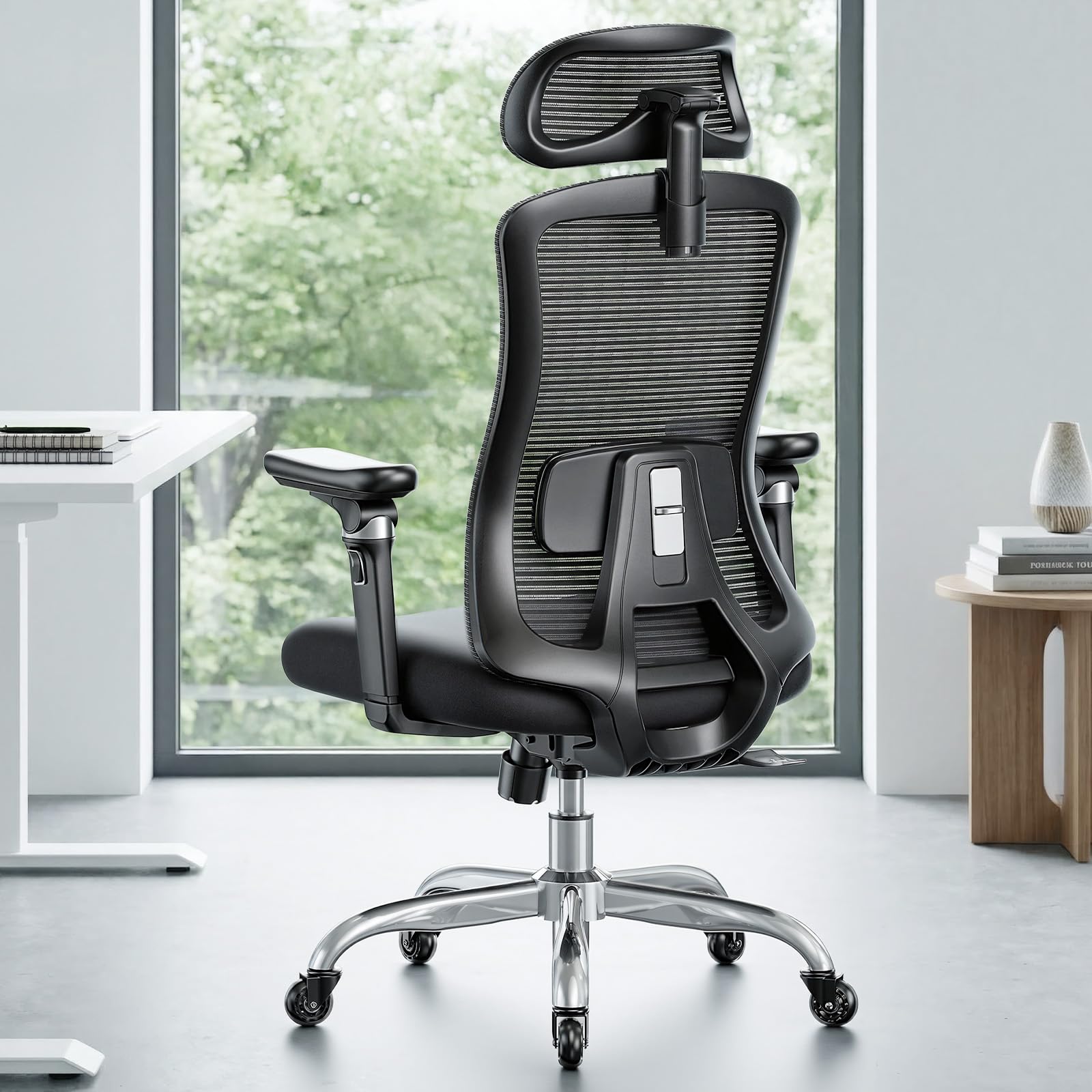
Image: Marsail Ergonomic Office Chair in Dark color, showcasing its design and features.
Safety Information
Important: Please read all safety instructions before assembly and use.
- Assembly required. Ensure all components are securely fastened before use.
- Do not exceed the maximum weight capacity of 330 lbs (136.08 kg).
- Be cautious when adjusting or reclining the chair to prevent injury. Ensure no body parts or objects are in the path of moving components.
- Keep children and pets away during assembly. Small parts may pose a choking hazard.
- Use the chair on a level surface to prevent tipping.
Package Contents
Verify that all parts are present before beginning assembly. If any parts are missing or damaged, contact Marsail customer support.
- Chair Backrest (1)
- Seat Cushion with Mechanism (1)
- Armrests (2)
- Chair Base (1)
- Casters (5)
- Gas Lift Cylinder (1)
- Gas Lift Cover (1)
- Headrest (1)
- Hardware Pack (Screws, Washers, Allen Wrench with handle)
Setup and Assembly Instructions
Assembly typically takes 20-40 minutes. It is recommended to assemble the chair on a soft, clean surface to prevent scratches.
- Attach Casters to Base: Insert each of the five casters into the holes at the end of each leg of the chair base. Push firmly until they click into place.
- Insert Gas Lift: Place the gas lift cylinder into the center hole of the assembled chair base. Cover it with the gas lift cover.
- Attach Armrests to Seat: Align the armrests with the pre-drilled holes on the underside of the seat cushion. Secure them using the provided screws and the Allen wrench. Do not overtighten initially.
- Attach Backrest to Seat Mechanism: Connect the backrest to the seat mechanism using the designated screws. The elongated holes on the support braces facilitate easier alignment. Tighten all screws securely once aligned.
- Attach Headrest: Slide the headrest into the slots at the top of the backrest. Adjust to your preferred height.
- Connect Seat Assembly to Gas Lift: Carefully place the assembled seat and backrest onto the gas lift cylinder, ensuring it is centered and stable.
After assembly, test all adjustments to ensure proper function.
Operating Instructions
Familiarize yourself with the chair's adjustable features to optimize your comfort and ergonomic support.
- Chair Height Adjustment: Locate the lever on the right side under the seat. Pull the lever up to raise the seat; release to lock. To lower, pull the lever up while seated.
- 4-Position Tilt Lock: The chair offers tilt angles of 95°, 104°, 114°, and 123°. Use the tilt lock lever (typically on the left side under the seat) to select and lock your desired recline position.
- 3D Adjustable Headrest: The headrest can be adjusted vertically, tilted, and rotated to support your head and neck.
- Adjustable Lumbar Support: Adjust the lumbar support up or down, and in or out, to fit the natural curve of your lower back.
- Slide Seat Adjustment (Seat Depth): A lever or button allows you to slide the seat cushion forward or backward to accommodate different leg lengths.
- 6D Adjustable Armrests: These armrests offer extensive adjustability:
- Height: Press the button on the side of the armrest and move it up or down.
- Forward/Backward: Slide the armrest pad forward or backward.
- Tilt Up/Down: The armrest can tilt for varied support.
- Rotation: The armrest panels and axis can rotate 360° for horizontal adjustment.
Maintenance
Regular maintenance helps prolong the life and performance of your chair.
- Cleaning:
- For mesh and fabric surfaces, use a soft cloth with mild soap and water. Avoid harsh chemicals.
- Wipe down plastic and metal parts with a damp cloth.
- Caster Care: Periodically clean hair and debris from the casters to ensure smooth movement. The upgraded design helps prevent hair tangling.
- Fastener Check: Every few months, check all screws and bolts to ensure they are tight. Retighten if necessary.
Troubleshooting
| Problem | Possible Cause | Solution |
|---|---|---|
| Chair does not adjust height. | Gas lift cylinder malfunction or lever not engaged. | Ensure the height adjustment lever is fully engaged. If the problem persists, the gas lift may need replacement. Contact support. |
| Casters do not roll smoothly. | Debris (hair, dust) caught in casters. | Remove casters and clean any accumulated debris from the wheels and axles. |
| Chair squeaks or wobbles. | Loose fasteners or components. | Check and tighten all screws and bolts, especially those connecting the seat, backrest, and armrests. |
| Armrests feel loose. | Mounting screws are loose. | Tighten the screws securing the armrests to the seat. |
Specifications
- Brand: Marsail
- Model Name: Office chair
- Model Number: MSOC9B-US
- Color: Dark
- Material: Mesh, Nylon, Foam (Seat), Alloy Steel (Frame)
- Product Dimensions (D x W x H): 20.9" x 21.6" x 41.9"
- Item Weight: 27.1 pounds
- Maximum Weight Recommendation: 330 lbs (136.08 kg)
- Adjustable Features: Adjustable Height, Adjustable Lumbar, Ergonomic Design, Reclining (4 positions), Slide Seat, 6D Adjustable Armrests, 3D Adjustable Headrest
- Casters: Upgraded Quiet Rubber Casters
- UPC: 840478804935
Warranty and Support
For warranty information, technical support, or to order replacement parts, please contact Marsail customer service. Refer to your purchase documentation for specific contact details or visit the official Marsail website.
Online Support: Visit the Marsail Store on Amazon
Ask a question about this manual
Ask about setup, troubleshooting, compatibility, parts, safety, or missing instructions. Manuals+ will review the question and use this page’s manual context to help answer it.