
1. Important Safety Information
Please read and understand all instructions before beginning installation. Failure to follow these instructions could result in electric shock, fire, or personal injury.
- Always disconnect power at the main circuit breaker before installation or servicing.
- All electrical connections must be in accordance with local codes, ordinances, and the National Electrical Code.
- Consult a qualified electrician if you are unsure about wiring or installation procedures.
- Ensure the installation site can support the weight of the fan (approximately 3.99 kg).
- Keep fan blades at least 7 feet (2.1 meters) from the floor.
- Do not operate the fan with damaged blades or housing.
2. Package Contents
Verify that all components are present before installation:
- 52 Inch Ceiling Fan Unit
- 25W Integrated LED Light Kit
- Remote Control
- 5-inch Downrod
- 8-inch Downrod
- Mounting Bracket
- Wire Nuts and other installation hardware
- User Manual

Image: All components included for easy installation, showing the fan motor, blades, light kit, downrods, remote, and hardware.
3. Specifications
| Feature | Specification |
|---|---|
| Brand | LEDIARY |
| Model Number | PY52 |
| Size | 52 Inch Diameter |
| Motor Type | DC Motor (35W) |
| Noise Level | Under 30 dB |
| Air Flow Capacity | 4042 CFM |
| Number of Speeds | 6 |
| Light Kit | 25W Integrated LED, 2500LM, 3CCT (3000K-6000K), 12%-100% Stepless Dimming |
| Control Method | Remote Control, Bluetooth App Control |
| Downrod Lengths Included | 5 inches, 8 inches |
| Ceiling Compatibility | Flat ceilings, Sloped ceilings up to 15° |
| Room Size Recommendation | Up to 225 sq. ft. |
| Indoor/Outdoor Usage | Indoor, Damp-Rated for Covered Outdoors |
4. Setup and Installation
The LEDIARY 52 Inch Ceiling Fan is designed for straightforward installation. It supports both flat ceilings and sloped ceilings up to 15 degrees. Two downrods (5-inch and 8-inch) are included to accommodate various ceiling heights and ensure optimal airflow.
4.1 Pre-Installation Checklist
- Ensure power is OFF at the circuit breaker.
- Confirm you have all necessary tools (screwdriver, wire strippers, ladder, etc.).
- Verify all package contents are present.
4.2 Installation Steps (Simplified)
While detailed video guides and manuals are available, the general steps are:
- Mount the Bracket: Secure the standard hang bracket to your ceiling junction box.
- Assemble Downrod and Motor: Attach the chosen downrod (5-inch or 8-inch) to the fan motor.
- Hang the Fan: Carefully hang the fan motor assembly onto the mounting bracket.
- Wire Connections: Connect the fan's wiring to your household electrical wiring using the provided color-coded wire nuts.
- Attach Blades and Light Kit: Install the five fan blades and then the integrated LED light kit.
- Secure Canopy: Push the canopy up to cover the wiring and secure it.
Note: Installation can typically be completed in under 30 minutes. It is recommended to have a second person assist during the hanging and wiring steps.

Image: Fan dimensions, including 52-inch diameter, 12-inch light disk, and options for 13.7-inch or 16.7-inch total height with 5-inch or 8-inch downrods. Recommended for rooms up to 225 sq ft.
5. Operating Instructions
5.1 Remote and App Control
The fan offers dual control options: an included remote control and a dedicated Bluetooth App. The app uses a direct point-to-point Bluetooth connection, requiring no Wi-Fi or smart hub.
- Power On/Off: Use the designated button on the remote or app.
- Fan Speed Adjustment: Select from 6 adjustable fan speeds.
- Light Control: Turn the light on/off, adjust brightness, and change color temperature.
- Timer Function: Set the fan to turn off automatically after 2 or 4 hours.
- Reversible Function: Change the fan's direction for seasonal use.
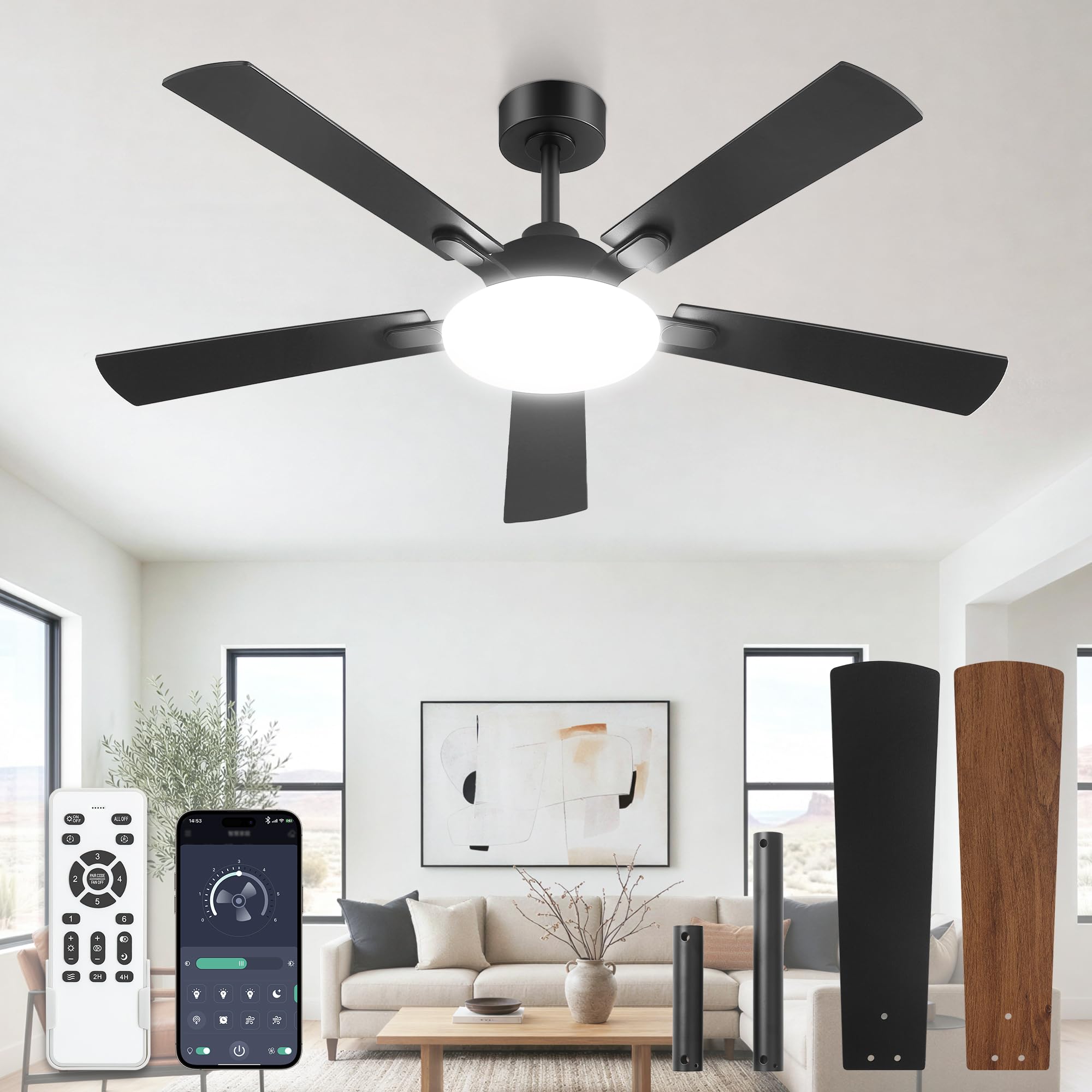
Image: Smart App & Remote Control. Illustrates the convenience of managing fan speeds, light, direction, and timer using either the remote or a smartphone app.

Image: Smart Features. Details timing options (2H, 4H), 6 wind speeds suitable for different activities, reversible DC motor function, and stepless dimming for both brightness (12%-100%) and color temperature (3000K-6000K).
5.2 Light Function
The fan features an ultra-bright 25W integrated LED panel, providing 2500 lumens of brightness with a 12-inch wide light disk for over 120° wide-angle coverage. The light offers 3 CCT (Correlated Color Temperature) options and stepless dimming.
- Brightness Adjustment: Dim the light from 12% to 100% using the remote.
- Color Temperature (3CCT): Switch between warm white (3000K), neutral white, and cool white (6000K) to suit your preference.

Image: Ultra-bright & Wide Illumination. Demonstrates the fan's ability to provide 180° wide-angle lighting, adjustable from 300LM (3000K) to 2500LM (6000K).
5.3 Fan Speed Modes
The 35W DC motor provides 6 adjustable speeds, delivering a powerful 4042 CFM airflow while operating quietly (under 30dB).
- Speeds 1-2: Gentle breeze, ideal for silent sleep.
- Speeds 3-4: Moderate airflow, suitable for reading or general comfort.
- Speeds 5-6: High-speed cooling, perfect for hot days or active environments.

Image: Custom Wind. Shows recommended fan speeds for different activities: 1-2 speeds for sleeping, 3-4 speeds for reading, and 5-6 speeds for exercise.
5.4 Reversible Blade Function
The fan features a reversible function for year-round comfort. Each of the 5 blades has a dual-sided finish, offering aesthetic versatility.
- Downdraft Mode (Summer): Blades rotate counter-clockwise to create a cooling breeze.
- Updraft Mode (Winter): Blades rotate clockwise to circulate warm air, balancing room temperature.

Image: 4042 CFM High-Speed Airflow. Illustrates the downdraft mode for summer cooling and updraft mode for winter circulation.

Image: 1 Fan, 2 Styles. Shows the fan in both a modern and farmhouse setting, highlighting the dual-sided blade finishes that can match various decor styles.
5.5 Timer Function
The remote control allows you to set a timer for the fan to automatically turn off after a specified duration.
- Press the '2H' button for a 2-hour timer.
- Press the '4H' button for a 4-hour timer.

Image: Quiet Operation and Timer. Illustrates the fan's quiet 30dB operation and available 2-hour and 4-hour timer settings, ideal for use during sleep.
5.6 Memory Function
The fan includes an intelligent memory function that automatically restores your last light brightness and color temperature settings after being turned off and then back on.
Please note: Ensure the light is off for at least 10 seconds for the memory function to properly save the settings.

Image: Memory Function. Shows how the fan retains the last light (e.g., 2500K) and wind speed (e.g., 5) settings when turned off and then back on.
6. Maintenance
Regular maintenance ensures optimal performance and longevity of your LEDIARY ceiling fan.
- Cleaning: Use a soft, damp cloth to clean the fan blades and motor housing. Do not use abrasive cleaners or solvents.
- Blade Inspection: Periodically check that all blade screws are tight. Loose blades can cause wobbling and noise.
- Light Kit: The LED light kit is integrated. Do not attempt to replace individual LEDs. If the light kit fails, contact customer support for assistance.
- Damp-Rated Use: This fan is damp-rated, suitable for covered outdoor areas. Ensure it is not directly exposed to water.

Image: Damp-Rated. Illustrates the fan's suitability for covered outdoor environments, emphasizing its damp-rated feature, quiet operation (30dB), and Eco Mode & Timer functions.
7. Troubleshooting
If you encounter issues with your LEDIARY ceiling fan, refer to the following common problems and solutions:
| Problem | Possible Cause | Solution |
|---|---|---|
| Fan does not start | No power, loose wiring, remote battery dead | Check circuit breaker, ensure all connections are secure, replace remote batteries. |
| Light does not work | Loose wiring, LED kit failure | Check light kit wiring connections. If still not working, contact customer support. |
| Fan wobbles | Loose blades, unbalanced blades, loose mounting bracket | Ensure all blade screws are tight. Check mounting bracket for secure installation. |
| Remote/App not responding | Remote batteries dead, interference, app not connected | Replace remote batteries. Ensure Bluetooth is enabled on your device and the app is properly paired. |
| Fan is noisy | Loose screws, motor issue | Check all screws on the fan and mounting. If noise persists, contact customer support. |
8. Warranty and Support
LEDIARY is committed to providing quality products and customer satisfaction.
- Motor Warranty: 10 Years
- Whole Fan Warranty: 2 Years
- Parts Replacement: If your light kit or other accessories are damaged or lost, please contact LEDIARY customer service for assistance.
- Technical Support: LEDIARY provides 24-hour online technical support.

Image: Warranty Information. Clearly states a 10-year warranty for the motor and a 2-year warranty for the entire fan, with an emphasis on replaceable parts.

Friendly Customer Service
Provide 24-hour online technical support and worry-free warranty.