
Introduction
Thank you for choosing the Pondee X5 Robotic Pool Vacuum. This cordless cleaner is designed to provide efficient and thorough cleaning for inground pools, featuring smart navigation, multiple cleaning modes, and extended runtime. Please read this manual carefully before use to ensure proper operation and maintenance of your device.

Image: The Pondee X5 Robotic Pool Vacuum, a compact black and blue unit with tank-like tracks, designed for autonomous pool cleaning.
Safety Information
Always adhere to the following safety guidelines to prevent injury or damage to the device:
- Read all instructions before operating the appliance.
- Do not operate the cleaner when people or pets are in the pool.
- Ensure the charging port is dry before connecting the charger.
- Use only the original charger provided by Pondee.
- Keep the cleaner out of reach of children.
- Store the cleaner in a cool, dry place when not in use.
Product Overview
Key Features:
- Powerful Triple-Motor Cleaning: Three high-performance brushless motors deliver 5500 GPH suction.
- Smart Navigation: Cleans in organized, efficient patterns for complete coverage.
- 4 Cleaning Modes: Auto, Floor Only, Wall Only, and Classic for tailored cleaning.
- Extended Runtime: Up to 180 minutes of continuous cleaning.
- Fast Recharge: 2.5-hour charging time.
- Smart Return: Automatically returns to a preset pickup spot.
- Easy Maintenance: Large-capacity, top-access 3.5L filter basket.
- Versatile Surface Compatibility: Upgraded caterpillar tracks and PVA cotton rollers for vinyl, mosaic tile, concrete, and fiberglass.
Components:
The Pondee X5 includes the main robotic cleaner unit, a charging adapter, and a retrieval hook.

Image: Illustration of the Pondee X5's powerful suction, showing debris like leaves, sand, hair, gravel, and small twigs being drawn into the cleaner.
Setup
1. Initial Charging
- Ensure the charging port on the cleaner is completely dry.
- Connect the charging adapter to the cleaner's charging port.
- Plug the adapter into a power outlet. The indicator lights will show charging status.
- Allow approximately 2.5 hours for a full charge.

Image: Diagram illustrating the 2.5-hour fast charging capability of the Pondee X5 compared to other models.
2. Placing the Cleaner in the Pool
- Once fully charged, ensure the charging port cover is securely closed.
- Gently lower the Pondee X5 into the pool. It will sink to the bottom.
- Ensure there are no air bubbles trapped inside the unit. If bubbles are present, gently rock the cleaner to release them.
Video: A short demonstration titled "One Click, All Clean-Pondee X5 Pool Vacuum for Inground Pool" showing the ease of use and deployment of the Pondee X5.
Operating the Pondee X5
1. Powering On and Selecting a Mode
- Press the power button on the top of the unit to turn it on.
- Select your desired cleaning mode using the mode selection button:
- Auto Mode: Radial pattern cleaning, suitable for general cleaning.
- Floor Only Mode: "S" pattern cleaning, focuses on the pool floor.
- Wall Only Mode: "N" pattern cleaning, focuses on pool walls and waterline.
- Smart Mode: Adapts cleaning based on pool conditions, prioritizing wall and waterline cleaning if needed.
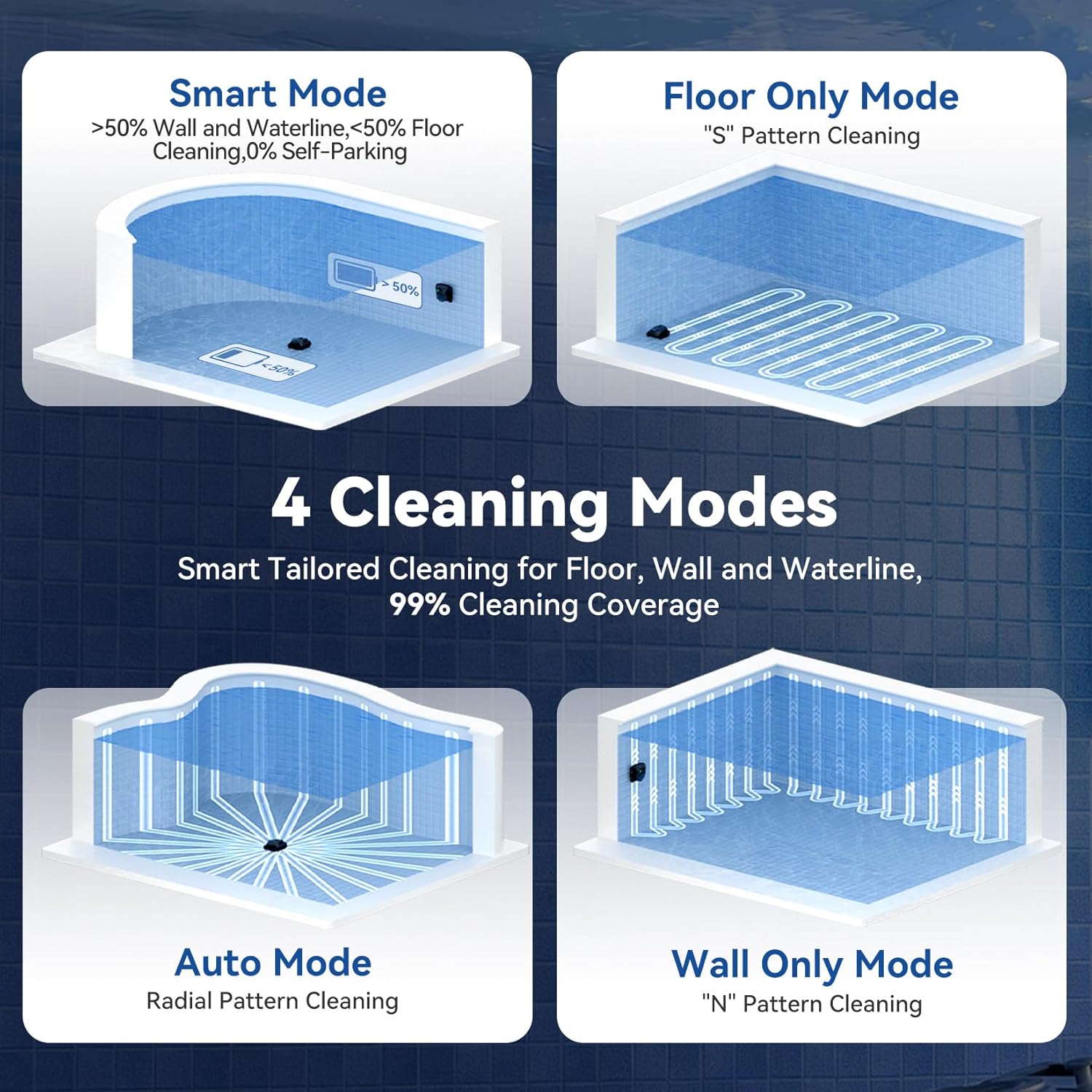
Image: Visual representation of the four cleaning modes (Smart, Floor Only, Auto, Wall Only) and their respective cleaning patterns within a pool.
2. Smart Navigation and Coverage
The X5 utilizes Smart Navigation to clean your pool in systematic patterns, ensuring comprehensive coverage and minimizing missed spots. It is designed for various pool shapes including rectangular, kidney-shaped, L-shaped, and custom designs, and works on vinyl, mosaic tile, concrete, and fiberglass surfaces.

Image: Aerial view of a pool showing the Pondee X5 cleaning in a systematic, S-shaped pattern, demonstrating its smart path planning for complete coverage.
3. Wall and Waterline Scrubbing
The Pondee X5 is capable of scrubbing both the pool floor and climbing walls to clean the waterline, ensuring a spotless pool from top to bottom.

Image: The Pondee X5 shown cleaning both the pool floor and climbing a wall to scrub the waterline, highlighting its versatile cleaning capabilities.
4. Smart Return and Retrieval
Upon completion of its cleaning cycle or when the battery is low, the X5 will automatically return to a preset pickup spot using Smart Directional Return technology. A purple light illuminates for easy retrieval, even in low light conditions.

Image: Two panels illustrating the Smart Precision Docking feature, showing the cleaner returning to a customized docking area, and the Night-Visible Light for easy retrieval in the dark.
Maintenance
1. Cleaning the Filter Basket
Regular cleaning of the filter basket is crucial for optimal performance.
- After each cleaning cycle, remove the Pondee X5 from the pool.
- Open the top lid to access the 3.5L filter basket.
- Remove the filter basket and empty any collected debris.
- Rinse the filter basket thoroughly with a hose to remove fine silt and particles.
- Ensure the filter basket is clean before reinserting it into the cleaner.
- Close the top lid securely.

Image: A close-up view of the Pondee X5's top-access filter basket, showing its design for easy removal and cleaning.
2. General Cleaning and Storage
- Wipe down the exterior of the cleaner with a soft cloth after each use.
- Periodically check the caterpillar tracks and PVA cotton rollers for any trapped debris and clean as necessary.
- Store the Pondee X5 in a cool, dry, and shaded area when not in use, away from direct sunlight and extreme temperatures.
Troubleshooting
| Problem | Possible Cause | Solution |
|---|---|---|
| Cleaner does not turn on. | Low battery or power button not pressed correctly. | Charge the cleaner fully. Ensure the power button is pressed firmly. |
| Poor cleaning performance. | Clogged filter basket or debris in brushes. | Clean the filter basket. Remove any debris from the brushes and tracks. |
| Cleaner gets stuck or moves erratically. | Obstruction in the pool or uneven pool surface. | Remove any large obstructions. Ensure the pool surface is suitable for robotic cleaners. |
| Cleaner does not return to pickup spot. | Battery too low or issue with Smart Directional Return. | Ensure the cleaner is fully charged before use. Manually retrieve if necessary. |
Specifications
- Brand: Pondee
- Model Name: AtlasRobo X5
- Product Dimensions: 11"L x 6"W x 11"H
- Power Source: Battery Powered
- Suction Power: 5500 GPH
- Runtime: Up to 180 minutes
- Charging Time: 2.5 Hours
- Battery Type: Lithium-Ion (4500 mAh)
- Filter Capacity: 3.5 liters
- Control Method: Push Button
- Max Pool Area: Up to 3,229 sq. ft.
- Installation Type: Robotic
Warranty & Support
The Pondee X5 Robotic Pool Vacuum comes with a 2-year warranty, ensuring peace of mind regarding its performance and reliability. Each unit undergoes rigorous underwater functional testing before shipment to ensure consistent, leak-proof operation.
For technical support, troubleshooting assistance, or warranty claims, please refer to the contact information provided in your product packaging or visit the official Pondee website. A multilingual manual (EN/DE/FR/IT/ES) and FAQ guide are included for quick setup and everyday reference.

