
1. Introduction
This manual provides essential information for the safe and efficient use of your Samsung WA40F10H2BTL 10kg Fully-Automatic Top Load Washing Machine. Please read these instructions thoroughly before operating the appliance and retain them for future reference. This washing machine features Eco Bubble technology, Hygiene Steam, a Digital Inverter motor, and a Soft Closing Door for enhanced performance and convenience.
2. Safety Information
To reduce the risk of fire, electric shock, or injury when using your appliance, follow basic precautions, including the following:
- Ensure the washing machine is properly grounded.
- Do not install or store the appliance where it will be exposed to weather or freezing temperatures.
- Do not repair or replace any part of the appliance or attempt any servicing unless specifically recommended in this manual.
- Keep children away from the appliance. Supervise children when they are near the washing machine.
- Do not wash items that have been previously cleaned in, washed with, soaked in, or spotted with gasoline, dry-cleaning solvents, or other flammable or explosive substances.
- Always unplug the washing machine from the power supply before attempting any service or cleaning.
3. Setup and Installation
3.1 Unpacking
Carefully remove all packaging materials. Ensure no parts are missing or damaged. Keep packaging materials out of reach of children.
3.2 Location Requirements
Install the washing machine on a firm, level surface. Ensure there is adequate space for water inlet and drain hoses, and power connection. Avoid direct sunlight or areas with high humidity.
3.3 Connecting Water and Drain Hoses
Connect the water inlet hose to a cold water tap and the washing machine's inlet valve. Securely attach the drain hose to a standpipe or laundry tub, ensuring it is not kinked or blocked.
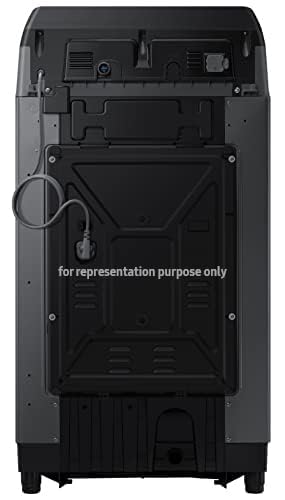
Image: Rear view of the washing machine, illustrating the connection points for water inlet and drain hoses.
3.4 Power Connection
Plug the power cord into a properly grounded electrical outlet. Do not use extension cords or adapters.
3.5 Leveling the Machine
Use a level to ensure the machine is perfectly balanced. Adjust the leveling feet as necessary to prevent vibration and noise during operation.
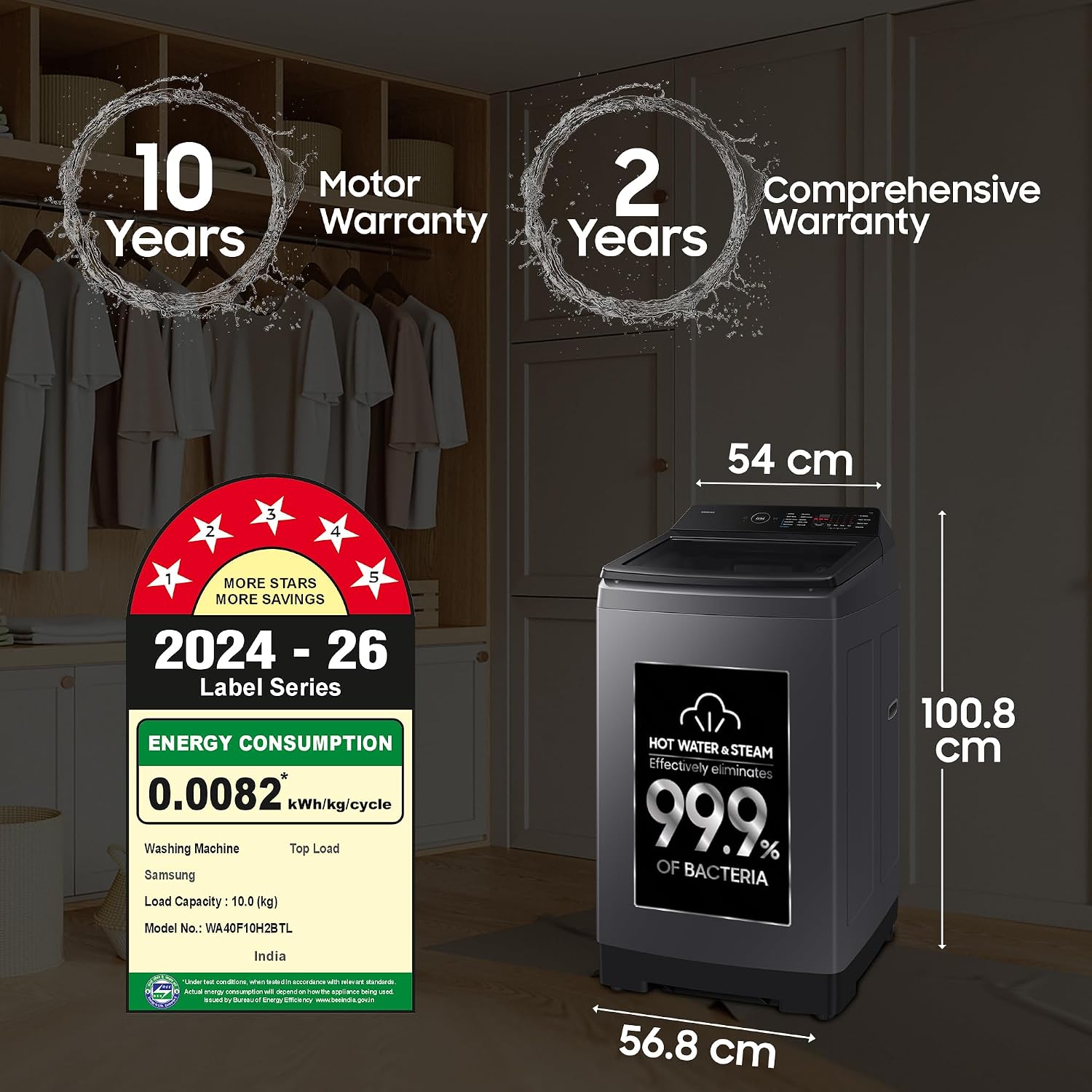
Image: Front view of the washing machine, displaying its dimensions (56.8D x 54W x 100.8H cm) and the energy efficiency label.
4. Operating Instructions
4.1 Control Panel Overview
The washing machine features a Red LED Digital Display and a rear control panel designed to prevent water splash. Familiarize yourself with the buttons and indicators.

Image: An overview of the washing machine's user interface, highlighting the rear control panel, Smart Check function, Magic Dispenser, and Magic Filter.
4.2 Loading Laundry
Open the Soft Closing Door and load clothes loosely into the drum. Do not overload the machine. The Soft Closing Door mechanism ensures quiet and safe operation.

Image: Detail of the Soft Closing Door, designed to prevent sudden slams, and the rust-proof body construction.
4.3 Adding Detergent and Fabric Softener
Use the Magic Dispenser to add appropriate amounts of detergent and fabric softener. The Magic Dispenser is designed for efficient dissolution and distribution.
4.4 Selecting a Wash Program
Turn the program selector to choose one of the 11 available wash programs:
- Hygiene Steam: For deep cleaning and sanitization at 60°C.
- Bedding: Optimized for blankets and large items.
- Delicates: Gentle wash for sensitive fabrics.
- Energy Saving: Efficient wash cycle.
- Normal: Standard daily wash.
- Quick Wash: For small, lightly soiled loads (15 minutes).
- Rinse + Spin: For rinsing and spinning only.
- Stain Wash: For tough stains at 40°C.
- Tub Clean: For cleaning the washing machine drum.
- Warm Wash: For daily laundry at 20°C.
Additional options include Delay End, Ecobubble, Intensive Wash, Monsoon, Power Tub Clean (Long Key), Child Lock (Double Key), Sound Off (Double Key), and Smart Check (Double Key).

Image: Visual representation of the three heater modes: Hygiene Steam for sanitization, Stain Wash for dirt and stains, and Warm Wash for daily laundry.

Image: The Hygiene Steam function, which uses an in-built heater to remove 99.9% of bacteria, resulting in better cleaning quality and less water usage.
4.5 Eco Bubble Technology
The Eco Bubble feature generates bubbles that penetrate fabrics faster, leading to efficient cleaning even in cold water. This results in less energy consumption, water saving, and improved fabric care.

Image: An illustration detailing the Eco Bubble technology, combining BubbleStorm for rich bubbles and Dual Storm for gentle twists, leading to efficient cleaning.
4.6 Starting a Wash Cycle
After selecting the program and options, press the Start/Pause button to begin the wash cycle.
5. Maintenance
5.1 Cleaning the Magic Filter
Regularly clean the Magic Filter to maintain optimal washing performance. Remove the filter, clean it under running water, and reinsert it.
5.2 Tub Clean Program
Run the Tub Clean program periodically to clean the washing machine drum and prevent odor buildup. This program helps keep the drum hygienic and fresh.
5.3 Cleaning the Exterior
Wipe the exterior of the washing machine with a soft, damp cloth. Avoid abrasive cleaners.
5.4 Diamond Drum Care
The Diamond Drum is designed for gentle care of clothes. Ensure no sharp objects are left in pockets that could damage the drum.

Image: Features promoting gentle care and cleanliness: Tub Clean for a hygienic drum, Diamond Drum for gentle washing, and Magic Filter for cleaner laundry.
6. Troubleshooting
If you encounter issues with your washing machine, refer to the following common problems and solutions. For more complex issues, utilize the Smart Check function or contact customer support.
| Problem | Possible Cause | Solution |
|---|---|---|
| Machine does not start | Power cord unplugged, door not closed, power outage. | Check power connection, ensure door is securely closed, check household circuit breaker. |
| Water not draining | Drain hose kinked or blocked, drain filter clogged. | Straighten drain hose, clean drain filter. |
| Excessive vibration/noise | Machine not level, shipping bolts not removed, unbalanced load. | Level the machine, ensure shipping bolts are removed, redistribute laundry evenly. |
| Poor washing performance | Incorrect detergent, overloaded, wrong wash program. | Use appropriate detergent, do not overload, select suitable wash program. |
6.1 Smart Check
The Smart Check function allows for easy troubleshooting using a smartphone app. Refer to the app for diagnostic codes and solutions.
7. Specifications
| Feature | Detail |
|---|---|
| Model Name | WA40F10H2BTL |
| Capacity | 10 kg |
| Product Dimensions (D x W x H) | 56.8D x 54W x 100.8H Centimeters |
| Item Weight | 30 Kilograms |
| Energy Star Rating | 5 Star |
| Motor Type | Digital Inverter Technology |
| Spin Speed | 700 RPM |
| Drum Material | Stainless Steel (Diamond Drum) |
| Pulsator | Dual Storm |
| Water Pressure | 0.01-0.78 Mpa |
| Number of Wash Programs | 11 |
| Special Features | Eco Bubble, Hygiene Steam, Quick Wash, Magic Dispenser, Smart Check, Soft Closing Door, Child Lock, Delay Start, Drum Clean, High Efficiency |

Image: An illustration of the Digital Inverter Technology motor, highlighting its benefits of reduced noise, energy savings, and long-lasting durability.

Image: The 5-star energy efficiency label for the Samsung WA40F10H2BTL washing machine, indicating its low energy consumption.
8. Warranty and Support
8.1 Warranty Information
Your Samsung WA40F10H2BTL washing machine comes with a 2-year comprehensive warranty on the product and a 10-year warranty on the Digital Inverter Motor. Terms and conditions apply. A purchase receipt indicating the purchase date is required for any warranty claim.
8.2 Customer Support
For queries or assistance, please contact Samsung customer service:
- Telephone (Toll Free): 1800 40 7267864 (1800 40 SAMSUNG)
- WhatsApp: 1800-57-267864
- Email: support.india@samsung.com
When contacting support, please provide the product's model name (WA40F10H2BTL) and seller's details as mentioned on your invoice. The brand's service center will arrange a convenient service slot.
Manufacturer: Samsung India Electronics Pvt. Ltd., 6th Floor, DLF Centre, Sansad Marg, New Delhi - 110001

