
1. Product Overview
The Uthfy 100 Pint Dehumidifier is designed for efficient moisture removal in large spaces up to 6,000 square feet. It can extract up to 100 pints of moisture per day under standard conditions (95°F, 90% RH). This unit features smart humidity control, multiple operating modes, and user-friendly design elements for convenience and ease of use.

Image 1.1: The Uthfy 100 Pint Dehumidifier operating in a living room, illustrating its coverage of up to 6000 sq.ft and 100 pints/day capacity.
Key Features:
- High Capacity: Removes up to 100 pints of moisture per day, suitable for areas up to 6,000 sq.ft.
- Adjustable Humidity: Humidity range from 30%–80% for customized comfort.
- Multiple Operating Modes: Auto Mode, Continuous Dehumidification Mode, and Sleep Mode.
- Dual Drainage Options: Manual drainage with a 1.45-gallon (5.5L) detachable water tank or continuous gravity drainage with an included drain hose.
- Smart Controls: Dual LED displays, 3-color digital humidity indicator (Blue <45%, Green 45%-65%, Red >65%), 24-hour timer, child lock, and auto-restart memory function.
- Quiet Operation: Operates as low as 35 dB in Sleep Mode.
- Portability: Built-in handle and smooth universal wheels for easy movement.
- Easy Maintenance: Detachable and washable rear filter.

Image 1.2: Detailed features of the Uthfy Dehumidifier, highlighting its user-friendly design and functionality.
2. Setup and Installation
Unpacking:
- Carefully remove the dehumidifier from its packaging.
- Remove all packing materials, tapes, and protective films.
- Inspect the unit for any shipping damage. If damaged, do not operate and contact customer support.
Placement:
- Place the dehumidifier on a level surface in an area where the temperature will not fall below 41°F (5°C).
- Ensure there is at least 8 inches (20 cm) of space around the unit for proper airflow.
- Avoid placing the unit near heat sources or in direct sunlight.
- The unit is suitable for basements, living rooms, bedrooms, garages, and offices.

Image 2.1: Examples of suitable large-area applications for the dehumidifier, such as basements, garages, bedrooms, living rooms, and offices.
Drainage Options:
The dehumidifier offers two drainage methods:
- Manual Drainage: Water collects in the 1.45-gallon (5.5L) detachable water tank. The unit will automatically shut off and alert you when the tank is full.
- Continuous Gravity Drainage: For extended operation without manual emptying, attach the included drain hose to the continuous drain port. Ensure the hose is sloped downwards to allow water to drain by gravity into a suitable floor drain or container.
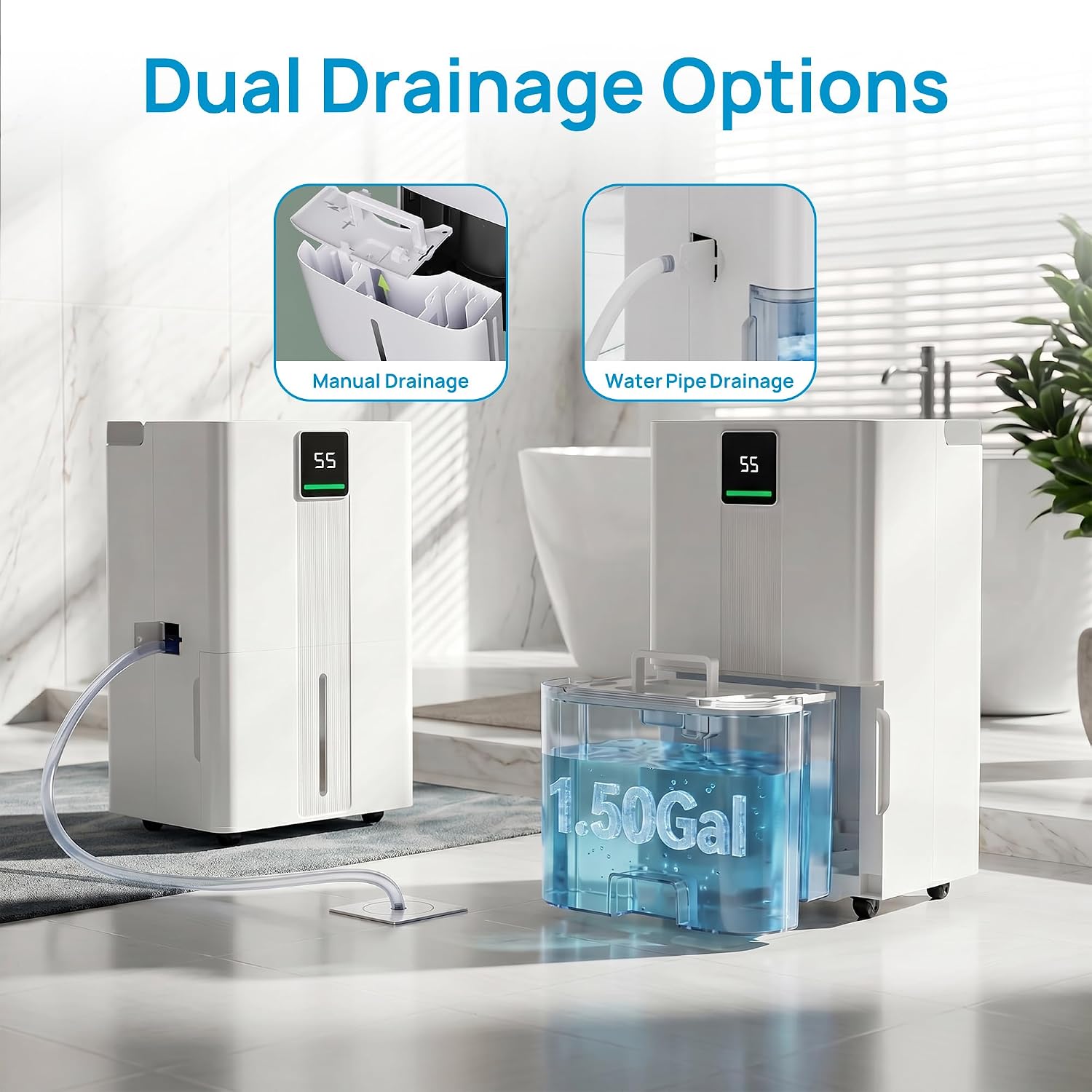
Image 2.2: Illustration of the dual drainage options: manual collection in the water tank and continuous drainage via a hose.
Video 2.1: A detailed video demonstrating the features and operation of the Uthfy Large Dehumidifier for Home, including setup and drainage.
3. Operating Instructions
Control Panel:
The dehumidifier features a user-friendly control panel with dual LED displays and a 3-color humidity indicator for real-time monitoring.

Image 3.1: The smart control panel, illustrating various functions like power, timer, child lock, mode selection, fan speed, and humidity control.
Operating Modes:
Select from three operating modes to suit your needs:
- Auto Mode: The unit intelligently activates when ambient humidity is ≥ your set humidity +3% and shuts off at ≤ set humidity -3%. This mode optimizes energy usage while maintaining consistent comfort.
- Continuous Dehumidification Mode: Operates at high speed with two adjustable fan speeds (low/high). Ideal for rapid drying in very damp areas, such as basements or for drying clothes.
- Sleep Mode: Operates at an ultra-quiet level (≤35dB). In this mode, the display and indicator lights (except the sleep light) turn off for an undisturbed environment. Press any button to temporarily restore the display.

Image 3.2: The three smart modes (Auto, Continuous, Sleep) and two fan speeds (Low, High) for versatile moisture control.

Image 3.3: Visual representation of the three dynamic modes for versatile use in different environments.
Setting Humidity and Timer:
- Humidity Control: Use the humidity control buttons to set your desired humidity level between 30% and 80%.
- 24-Hour Timer: Use the timer function to schedule automatic power-on or power-off. When the unit is off, press the Timer button to set the timer for automatic power-on. When the unit is on, press the Timer button to set the timer for automatic power-off.
Child Lock:
To prevent accidental operation, activate the child lock feature. Press and hold the Child Lock button for a few seconds until the indicator light illuminates. Repeat the process to deactivate.
Video 3.1: An overview video showcasing the Uthfy Dehumidifier's features and how it helps maintain a comfortable home environment.
4. Maintenance
Regular maintenance ensures optimal performance and extends the lifespan of your dehumidifier.
Emptying the Water Tank:
- When the water tank is full, the unit will beep, display a 'FL' indicator, and automatically shut off.
- Carefully pull out the detachable water tank from the front of the unit.
- Empty the collected water.
- Replace the water tank securely into the unit. The unit will resume operation if the humidity level is above the set point.
Cleaning the Air Filter:
The dehumidifier is equipped with a removable and washable rear filter. Clean the filter regularly (every 2-4 weeks, depending on usage) to maintain efficiency.
- Turn off the dehumidifier and unplug it from the power outlet.
- Locate the air filter at the rear of the unit.
- Gently pull out the filter.
- Wash the filter with clean water (not hotter than 104°F / 40°C) and a mild detergent.
- Rinse thoroughly and allow the filter to air dry completely before reinserting it. Do not expose to direct sunlight.
- Reinsert the dry filter into its slot.

Image 4.1: User-friendly details for easy daily use, including the detachable and washable filter for maintenance.
Cleaning the Unit Exterior:
- Wipe the exterior of the unit with a soft, damp cloth.
- Do not use harsh chemicals, abrasive cleaners, or solvents, as these can damage the surface.
5. Troubleshooting
Before contacting customer support, please refer to the following troubleshooting guide for common issues.
| Problem | Possible Cause | Solution |
|---|---|---|
| Unit does not turn on. | No power supply; Power cord not plugged in; Full water tank; Temperature too low. | Check power connection; Empty water tank; Ensure room temperature is above 41°F (5°C). |
| No water collected. | Humidity level too low; Air filter clogged; Room temperature too low; Continuous drain hose improperly installed. | Adjust desired humidity setting; Clean air filter; Ensure room temperature is above 41°F (5°C); Check hose for kinks or proper slope. |
| Unit is noisy. | Unit not on a level surface; Air filter clogged; Obstruction in fan. | Place unit on a flat, stable surface; Clean air filter; Check for and remove any obstructions. |
| Airflow is weak. | Air filter clogged; Air inlet/outlet blocked. | Clean air filter; Ensure clear space around air inlet and outlet. |
| Display shows error code. | Internal malfunction. | Unplug the unit for 10 minutes, then plug it back in. If the error persists, contact customer support. |
6. Specifications
| Feature | Specification |
|---|---|
| Brand | Uthfy |
| Model Name | Dehumidifier |
| Model Number | OL35-D076FFN3B1/E |
| Dehumidification Capacity | 100 Pints per Day (at 95°F, 90% RH) |
| Coverage Area | Up to 6000 Square Feet |
| Humidity Range | 30% - 80% RH |
| Water Tank Capacity | 1.45 Gallons (5.5 Liters) |
| Fan Speeds | 2 (Low, High) |
| Noise Level (Sleep Mode) | As low as 35 dB |
| Product Dimensions (D x W x H) | 13.98"D x 10.83"W x 20.55"H |
| Item Weight | 33.07 Pounds |
| Material | Plastic |
| Special Features | 3 Colors Display, Adjustable Humidity Control, Child Lock, Drain Hose, Water Tank Detachable |
| Included Components | Drain Hose |
7. Warranty and Support
Warranty Information:
This Uthfy dehumidifier comes with a 1-Year Manufacturer Warranty. Please retain your proof of purchase for warranty claims.
Customer Support:
For technical assistance, troubleshooting beyond this manual, or warranty inquiries, please contact Uthfy customer support. Refer to the contact information provided with your product packaging or visit the official Uthfy website.
When contacting support, please have your model number (OL35-D076FFN3B1/E) and purchase date readily available.