
ASKGO GT12
ASKGO GT12 Electric Scooter with Seat User Manual
Model: GT12
1. Introduction
Thank you for choosing the ASKGO GT12 Electric Scooter with Seat. This manual provides essential information for the safe operation, assembly, maintenance, and troubleshooting of your scooter. Please read it thoroughly before your first ride to ensure optimal performance and safety.
The ASKGO GT12 is designed for adult commuting, travel, and shopping, featuring a powerful 650W peak motor, a top speed of 25 MPH, and a range of up to 35 miles. It includes a comfortable seat, dual suspension, and dual braking for a smooth and secure ride.
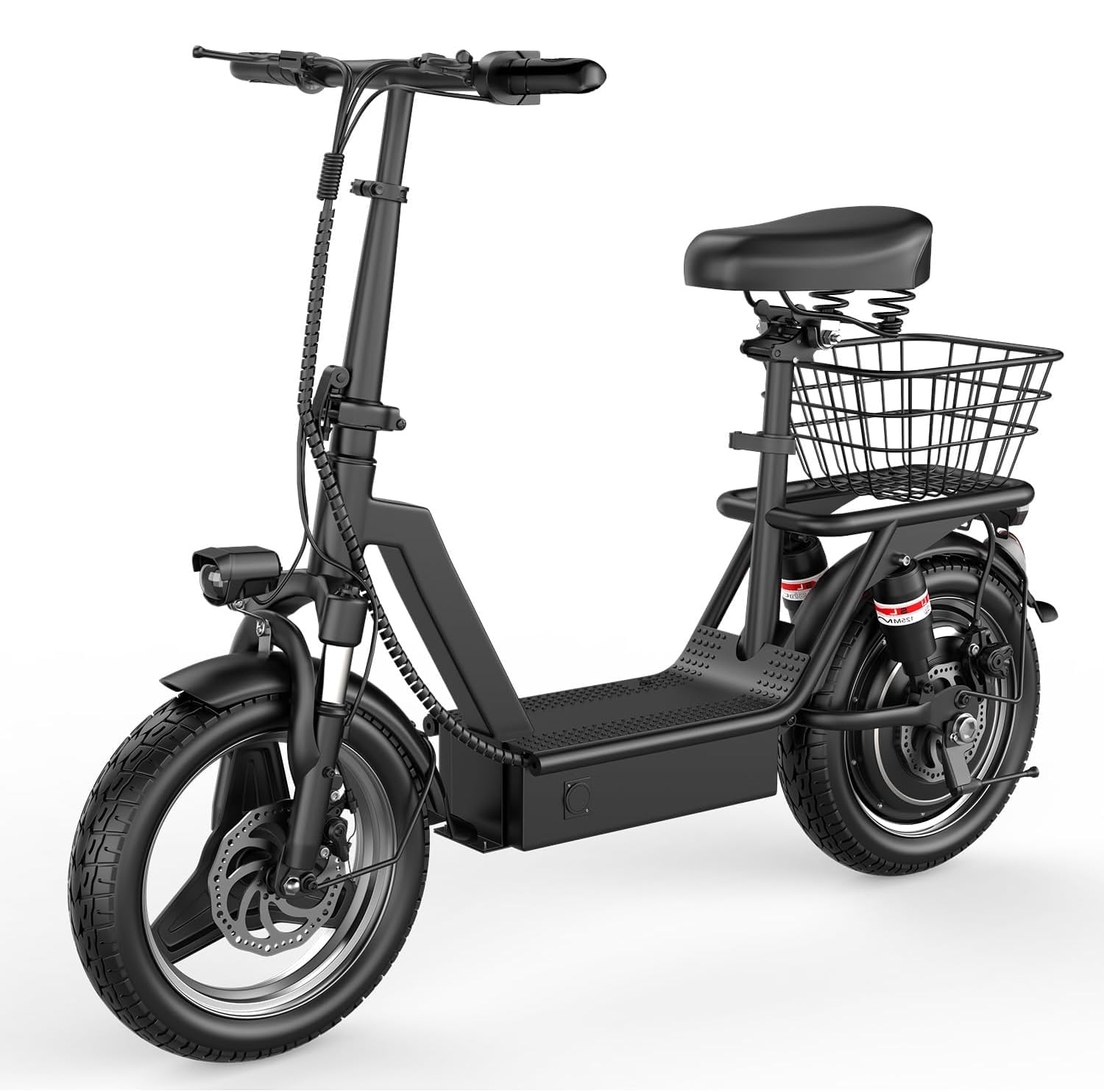
Image: The ASKGO GT12 Electric Scooter with Seat, showcasing its design and features.
2. Package Contents
Upon opening the package, please verify that all components are present and undamaged:
- ASKGO GT12 Electric Scooter
- Charger
- Product Instruction Manual (this document)
- Tool Kit
- Detachable Rear Basket
- Adjustable Seat
If any items are missing or damaged, please contact ASKGO customer support immediately.
3. Setup and Assembly
The ASKGO GT12 scooter requires minimal assembly. Follow these steps carefully:
- Unfolding the Scooter: Carefully remove the scooter from its packaging. Locate the folding mechanism and unfold the main frame and handlebar stem until they lock securely into place.
- Installing the Front Wheel: Attach the front wheel to the fork using the provided axle and fasteners from the tool kit. Ensure it is oriented correctly and tightened securely.
- Attaching the Front Fender: Secure the front fender above the front wheel.
- Inserting the Handlebars: Insert the handlebar assembly into the stem and adjust to a comfortable height. Tighten the quick-release lever or bolts to secure it.
- Installing the Seat: Insert the seat post into the designated slot on the scooter frame. Adjust the seat height for comfort and secure it with the quick-release clamp.
- Attaching the Rear Basket: Mount the detachable rear basket to the rear rack using the provided hardware. Ensure it is firmly attached.
- Connecting the Headlight: If not pre-connected, attach the front headlight and ensure its wiring is properly routed and secured.
- Initial Charge: Before your first ride, fully charge the scooter's battery. Refer to the "Charging the Battery" section for detailed instructions.

Image: The ASKGO GT12 Electric Scooter highlighting the adjustable seat and large capacity basket.

Image: The ASKGO GT12 Electric Scooter demonstrating its foldable design for easy storage and transport.
4. Operating Instructions
4.1 Powering On/Off
To power on the scooter, press and hold the power button on the intelligent LED display. To power off, press and hold the power button again.
4.2 Intelligent LED Display
The intelligent LED display provides real-time information about your ride:
- Battery Level Display: Shows the current battery charge.
- Speed Display: Indicates your current speed.
- Gear Shift: Allows you to switch between three-speed modes (low, medium, high) for different riding conditions.
- One-Touch Startup: For quick activation.

Image: Close-up of the ASKGO GT12 Electric Scooter's intelligent LCD display, showing battery level, speed, and gear shift indicators.

Image: The intelligent LCD display on the ASKGO GT12 Electric Scooter handlebars, providing real-time ride information.
4.3 Riding Modes and Speed Control
Use the gear shift button on the display to cycle through the three available speed modes. The throttle is typically located on the right handlebar. Apply gentle pressure to accelerate. Release the throttle to decelerate.

Image: A rider on the ASKGO GT12 Electric Scooter, illustrating the three-speed adjustable feature for varied riding experiences.
4.4 Braking System
The GT12 is equipped with front and rear dual disc brakes. To brake, gently squeeze the brake levers on the handlebars. Apply even pressure to both levers for balanced stopping. Avoid sudden, hard braking, especially at high speeds, to prevent loss of control.
4.5 Folding the Scooter
To fold the scooter for storage or transport, ensure the scooter is powered off. Locate the folding mechanism on the stem and release the latch. Carefully fold the handlebar stem down towards the deck until it locks into its folded position.
5. Battery and Charging
The ASKGO GT12 features a built-in 720Wh (48V 15AH) high-capacity battery.
5.1 Charging the Battery
- Ensure the scooter is powered off before charging.
- Locate the charging port on the scooter.
- Connect the charger to the charging port, then plug the charger into a standard wall outlet.
- The indicator light on the charger will typically show red during charging and turn green when fully charged.
- Charging time is approximately 4-6 hours for a full charge.
- Do not leave the scooter charging unattended for extended periods once fully charged.

Image: The ASKGO GT12 Electric Scooter highlighting its long-lasting 48V 13AH battery, indicating its capacity and range.

Image: The ASKGO GT12 Electric Scooter showcasing its 48V 13AH high-capacity battery, emphasizing its range and charging time.
5.2 Battery Management System (BMS)
The built-in BMS protects the battery from overcharging, over-discharging, and short circuits, ensuring its longevity and safety.
6. Maintenance
Regular maintenance ensures the longevity and safe operation of your ASKGO GT12 scooter.
- Cleaning: Wipe the scooter with a damp cloth. Avoid using high-pressure water jets or harsh chemicals, which can damage electronic components.
- Tire Pressure: Check tire pressure regularly. The 14-inch pneumatic tires require proper inflation for optimal performance and to prevent punctures. Refer to the tire sidewall for recommended pressure.
- Brake Inspection: Periodically check the brake levers and cables for proper tension and function. Ensure the disc brakes are clean and free from debris.
- Fasteners: Regularly inspect all bolts, screws, and quick-release mechanisms to ensure they are tight and secure.
- Battery Care: Store the scooter in a cool, dry place. If storing for an extended period, charge the battery to approximately 50-70% and recharge every 1-2 months to prevent deep discharge.
- Suspension: The dual suspension system is designed for durability. Inspect for any visible damage or excessive play.
7. Troubleshooting
If you encounter issues with your ASKGO GT12 scooter, refer to the following common problems and solutions:
| Problem | Possible Cause | Solution |
|---|---|---|
| Scooter does not power on | Low battery; loose power connection; faulty power button | Charge the battery; check all connections; contact support if issue persists. |
| Display not working/sequencing | Loose cable connection; display malfunction | Check display cable connections; contact support for assistance. |
| Reduced speed or range | Low battery; improper tire pressure; riding uphill frequently; heavy load | Fully charge battery; inflate tires to recommended pressure; adjust riding style. |
| Brakes feel weak or spongy | Brake cable tension too low; worn brake pads | Adjust brake cable tension; inspect and replace brake pads if necessary. |
| Unusual noises during operation | Loose components; debris in wheels/motor; worn bearings | Inspect for loose parts and tighten; clean wheels; contact support if noise persists. |
For issues not listed here or if troubleshooting steps do not resolve the problem, please contact ASKGO customer support.
8. Specifications
| Feature | Specification |
|---|---|
| Brand | ASKGO |
| Model Name | GT12 |
| Motor | 650W Peak Brushless Motor |
| Max Speed | Up to 25 MPH |
| Max Range | Up to 35 Miles |
| Battery | 48V 15AH (720Wh) High-Capacity |
| Charging Time | 4-6 Hours |
| Wheel Size | 14 inches |
| Tire Type | Pneumatic, Anti-Puncture |
| Brake System | Front and Rear Dual Disc Brakes |
| Suspension | Dual Suspension |
| Frame Material | Alloy Steel |
| Weight Limit | 300 pounds |
| Special Features | Foldable, Digital Display, Seat, Detachable Basket, LED Headlight, Turn Signals, Electric Horn |

Image: Dimensions of the ASKGO GT12 Electric Scooter, including seat height, scooter length, and handle height.

Image: Illustration of the ASKGO GT12 Electric Scooter's 650W peak motor, highlighting its power and climbing angle.
9. Safety Guidelines
Always prioritize safety when operating your electric scooter. Failure to follow safety guidelines can result in injury or damage.
- Always wear a helmet and appropriate safety gear (knee pads, elbow pads) when riding.
- Familiarize yourself with local laws and regulations regarding electric scooter usage.
- Perform a pre-ride check: ensure brakes work, tires are inflated, and all fasteners are tight.
- Do not ride under the influence of alcohol or drugs.
- Avoid riding in heavy rain, snow, or icy conditions.
- Maintain a safe distance from other vehicles and pedestrians.
- Use headlights and taillights during low-light conditions. The GT12 includes bright LED headlights for visibility.
- Do not exceed the maximum weight limit of 300 pounds.
- Avoid sudden acceleration or braking.
- Be aware of your surroundings and potential hazards.
10. Warranty and Support
ASKGO is committed to providing an exceptional shopping experience. Your GT12 Electric Scooter comes with a 12-month warranty covering key components from the date of purchase. This warranty covers manufacturing defects but does not cover damage caused by misuse, accidents, or normal wear and tear.
For warranty claims, technical support, or any questions regarding your scooter, please contact ASKGO customer support. Please have your purchase receipt and scooter model number (GT12) ready when contacting support.

Image: A customer service representative, symbolizing ASKGO's commitment to support.
Ask a question about this manual
Ask about setup, troubleshooting, compatibility, parts, safety, or missing instructions. Manuals+ will review the question and use this page’s manual context to help answer it.