
Introduction
Welcome to your new Sweetcrispy Walking Pad Treadmill, model PBJ-FS01. This manual provides essential information for the safe operation, proper setup, routine maintenance, and effective troubleshooting of your device. Please read this manual thoroughly before initial use and retain it for future reference.
Important Safety Instructions
To reduce the risk of serious injury, always follow basic precautions when using this appliance, including the following:
- Read all instructions in this manual before using the treadmill.
- Keep children and pets away from the treadmill during operation.
- Place the treadmill on a firm, level surface with adequate clearance around it.
- Wear appropriate athletic footwear and clothing during use.
- The safety key must be properly inserted for the treadmill to operate. In case of emergency, pull the safety key to stop the machine immediately.
- Do not exceed the maximum user weight of 200 pounds (90.7 kg).
- Unplug the treadmill from the power outlet when not in use, before cleaning, and before performing any maintenance.
- Do not operate the treadmill if it has a damaged cord or plug, if it is not working properly, or if it has been dropped or damaged.
Package Contents
Verify that all components are present in the package:
- Sweetcrispy Walking Pad Treadmill (PBJ-FS01)
- Remote Control
- Power Cord
- Safety Key
- User Manual
- Silicone Oil
- Allen Wrench

Figure 1: Included Components
Product Overview
The Sweetcrispy Walking Pad Treadmill is designed for home and office use, offering a compact and quiet solution for daily exercise. It features adjustable speed settings, a clear LED display, and convenient remote control operation.

Figure 2: Treadmill Features (Stable, Safe, Low Noise)

Figure 3: Portability and Storage
Setup Instructions
- Unpack the Treadmill: Carefully remove the treadmill and all components from the packaging.
- Position the Treadmill: Place the treadmill on a flat, stable surface. Ensure there is sufficient space around the unit for safe operation. The treadmill is equipped with wheels for easy relocation.
- Connect Power: Plug the power cord into the treadmill and then into a grounded electrical outlet.
- Insert Safety Key: Attach the safety key to the designated slot on the treadmill's console. The treadmill will not operate without the safety key properly inserted.
Operating Instructions
Power On/Off
Ensure the safety key is inserted. Press the power button on the remote control to turn the treadmill on or off.
Safety Key Function
The safety key is a critical safety feature. Attach the clip of the safety key to your clothing before starting your workout. If you need to stop the treadmill quickly, pull the safety key from its slot, and the treadmill will cease operation.
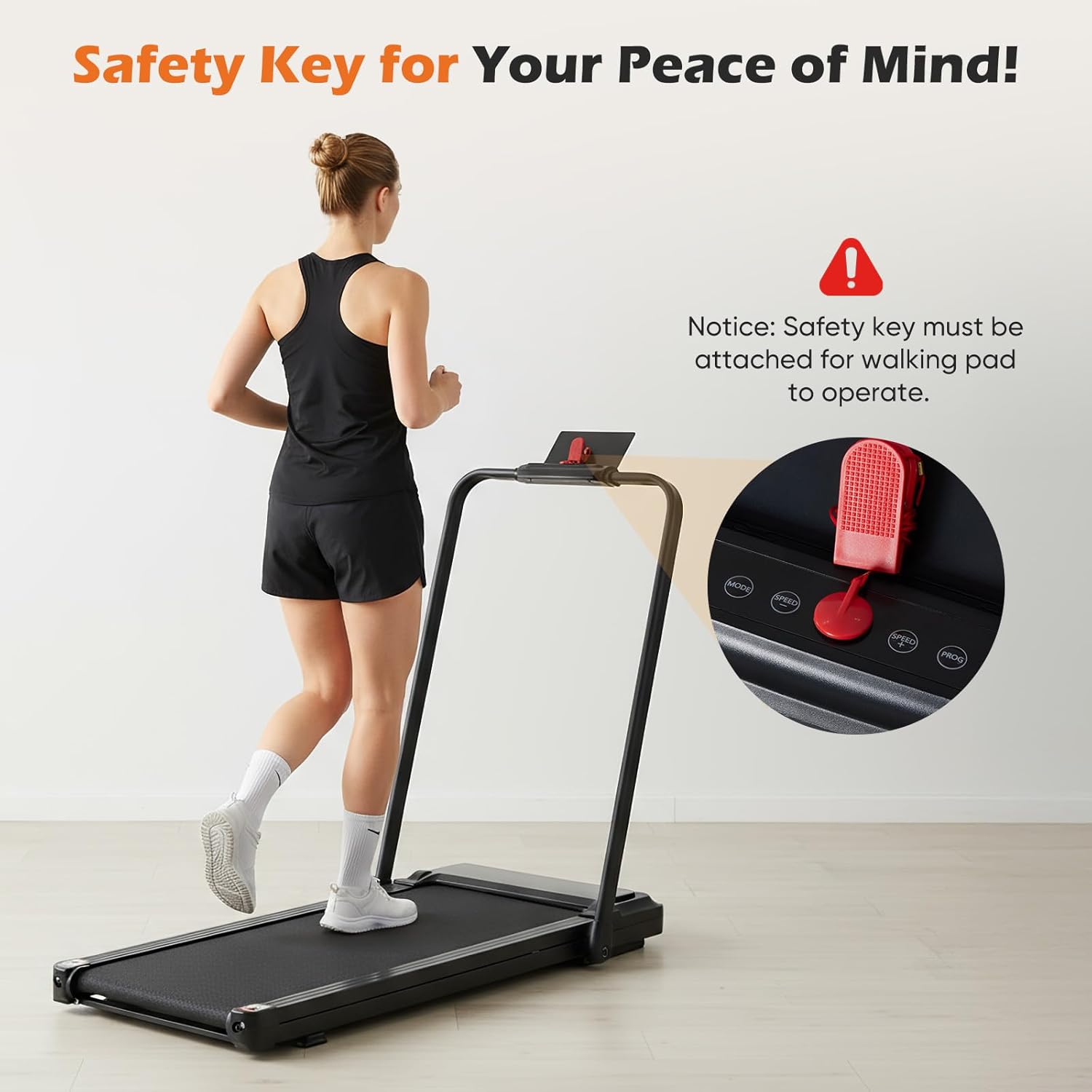
Figure 4: Safety Key Placement
Speed Adjustment
Use the remote control to adjust the speed. The treadmill offers a speed range from 0.6 to 3.8 MPH, suitable for various activities:
- Working Mode: 0.6 - 1.5 MPH (for use while working at a desk)
- Walking Mode: 0.6 - 2.5 MPH (for casual walking)
- Light Running Mode: 2.5 - 3.8 MPH (for light jogging)

Figure 5: Treadmill Usage Modes
LED Display Functions
The integrated LED panel displays key workout metrics:
- Time: Duration of your workout.
- Speed: Current speed in MPH.
- Distance: Total distance traveled.
- Calories: Estimated calories burned.

Figure 6: LED Display and Remote Control
Maintenance
Lubrication
Regular lubrication of the walking belt is essential for optimal performance and longevity. Apply a small amount of the provided silicone oil monthly to the area beneath the walking belt. Refer to the detailed instructions in the included User Manual PDF for the exact procedure.
Cleaning
Wipe down the treadmill surfaces with a damp cloth after each use. Avoid using abrasive cleaners or solvents that could damage the finish.
Troubleshooting
| Problem | Possible Cause | Solution |
|---|---|---|
| Treadmill does not power on or stops unexpectedly. | Safety key not properly inserted (Error E14). | Ensure the safety key is fully inserted into its slot. If the issue persists, check the power cord connection. |
| Unusual noise during operation. | Lack of lubrication or loose components. | Apply silicone oil as per maintenance instructions. Check for any loose screws and tighten if necessary. |
| Walking belt slips or hesitates. | Belt requires adjustment or lubrication. | Lubricate the belt. If slipping continues, refer to the full user manual for belt tension adjustment instructions. |
Product Specifications
| Specification | Detail |
|---|---|
| Brand | Sweetcrispy |
| Model Number | PBJ-FS01 |
| Color | Jet Black |
| Product Dimensions (D x W x H) | 42.2" x 22.1" x 38" (107.2 cm x 56.1 cm x 96.5 cm) |
| Item Weight | 35.9 pounds (16.3 kg) |
| Material | Stainless Steel |
| Maximum Speed | 3.8 MPH (6.1 km/h) |
| Maximum Horsepower | 1.75 hp |
| Maximum Weight Recommendation | 200 pounds (90.7 kg) |
| Display Type | LED |
| Power Source | Corded Electric |
| Metrics Measured | Distance, Speed, Time, Calories |
| Included Components | Power Cord, Remote Control, Safety Key, User Manual |

Figure 7: Visual Product Specifications
Warranty and Customer Support
For detailed warranty information, please refer to the official documentation provided with your product or contact Sweetcrispy customer support. If you encounter any issues not covered in this manual, or require further assistance, please reach out to our customer service team. A comprehensive User Manual (PDF) is also available for download from the product's support page.
For support, please visit the Sweetcrispy Store or refer to the contact information in your product packaging.
