
Introduction
This manual provides instructions for the safe operation and maintenance of your SereneLife Portable Evaporative Air Cooler, model SLACLWHD50. This high-performance evaporative swamp cooler is designed for both indoor and outdoor use, delivering up to 3200 CFM of airflow. It features a 50-liter water tank, 60° automatic oscillation, a 12-hour timer, Wi-Fi connectivity, and remote control for convenient operation.
Safety Information
Please read all safety instructions before operating this appliance. Failure to follow these instructions may result in electric shock, fire, or personal injury.
- Always ensure the unit is placed on a stable, level surface.
- Do not operate the unit with a damaged cord or plug.
- Keep the unit away from water sources and do not immerse it in water.
- Unplug the unit from the power outlet before cleaning, servicing, or moving.
- Do not insert objects into the air vents or openings.
- Supervise children and pets when the unit is in operation.
- Ensure adequate ventilation when using the cooler, especially in enclosed spaces.
- Use only the specified voltage (120V).
Package Contents
Verify that all items are present in the package:
- SereneLife Portable Evaporative Air Cooler (Model SLACLWHD50)
- Remote Control
- Ice Packs (4 included)
- Instruction Manual (this document)
Product Overview
Familiarize yourself with the main components of your air cooler.
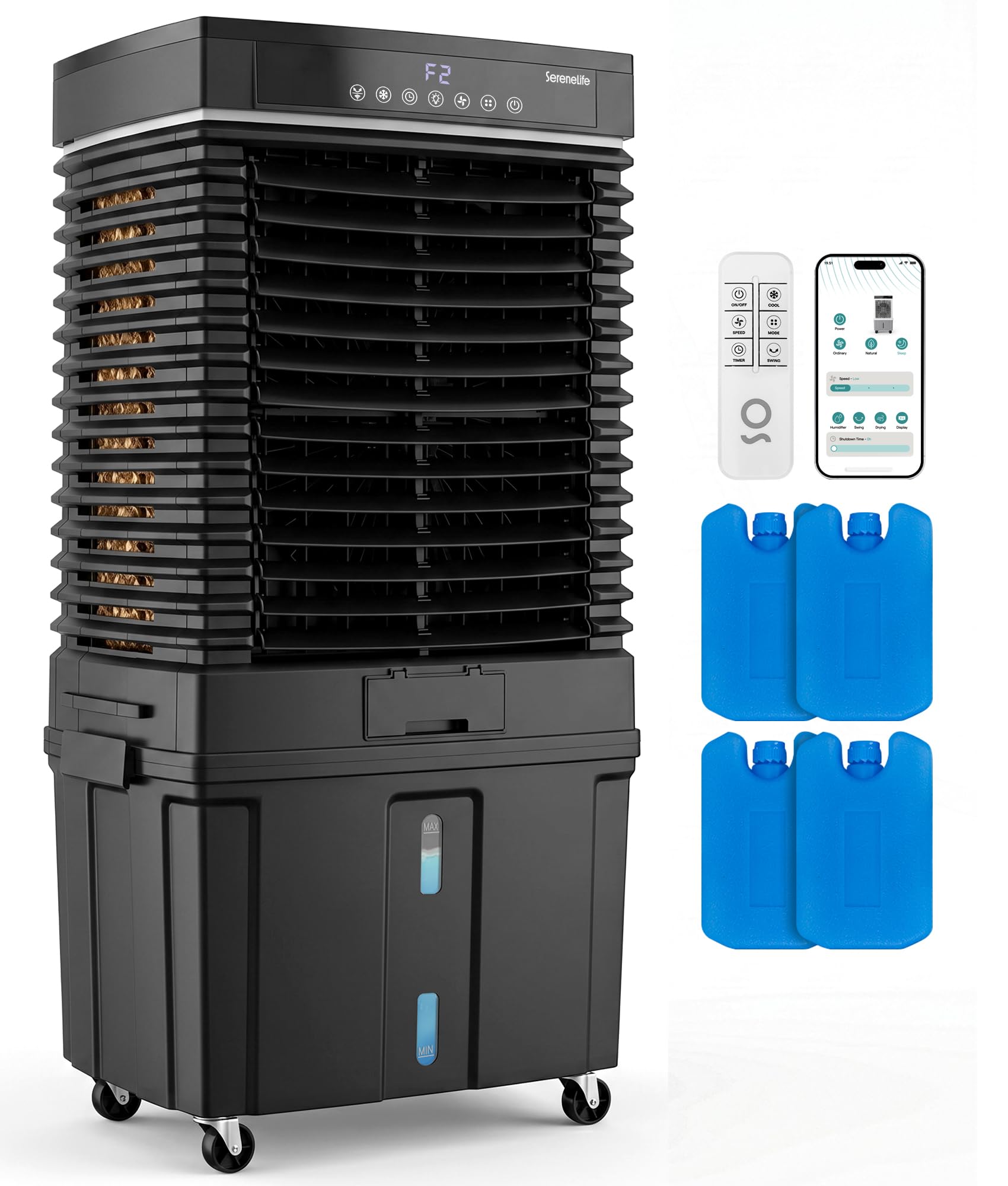
Figure 1: Front view of the SereneLife Portable Evaporative Air Cooler.

Figure 2: The air cooler showing its digital display, remote control, and Wi-Fi app interface.

Figure 3: Exploded view illustrating the internal fan, evaporative cooling pads, and water tank.
Setup Instructions
- Unpacking: Carefully remove the air cooler and all accessories from the packaging. Retain packaging for future storage or transport.
- Placement: Position the air cooler on a firm, level surface. For optimal performance, ensure there is adequate ventilation around the unit. This cooler is suitable for both indoor and outdoor environments such as warehouses, garages, patios, and workshops.
- Filling the Water Tank:

Figure 4: Demonstrates filling the 50-liter water tank.
- Open the water tank cover.
- Fill the 50-liter detachable water tank with clean water. Do not exceed the maximum fill line.
- For enhanced cooling, place the included ice packs into the water tank.
- Close the water tank cover securely.
- Power Connection: Plug the power cord into a standard 120V electrical outlet.
Operating Instructions
The air cooler can be operated using the touch control panel on the unit, the remote control, or via Wi-Fi connectivity.

Figure 5: Close-up of the digital LED display and touch control panel.
Control Panel Functions:
- ON/OFF: Press to power the unit on or off.
- COOL: Activates the evaporative cooling function. Ensure the water tank is filled.
- SPEED: Adjusts fan speed (Low, Medium, High).
- MODE: Selects between Normal and Natural wind modes.
- WIFI/SWING:
- Short press to activate 60° automatic oscillation (swing function).
- Long press to activate Wi-Fi pairing mode. Refer to the Wi-Fi app instructions for detailed setup.
- TIMER: Sets the operating timer from 1 to 12 hours.
- LIGHT: Controls the display panel light.
Remote Control:
The included remote control provides access to all functions available on the control panel. Point the remote control towards the unit's receiver when operating.
Wi-Fi Connectivity:
Download the SereneLife app from your smartphone's app store. Follow the in-app instructions to connect your air cooler to your home Wi-Fi network. This allows for remote control and scheduling.
Water Shortage Alert:
The unit is equipped with a water shortage alarm and pump protection. If the water level in the tank is too low, an indicator will light up, and the cooling function may automatically pause to protect the pump. Refill the water tank to resume cooling.
Maintenance
Regular maintenance ensures optimal performance and extends the lifespan of your air cooler. Always unplug the unit before performing any maintenance.
Cleaning the Water Tank:
- Drain any remaining water from the tank.
- Remove the detachable water tank.
- Clean the tank with a soft cloth and mild detergent. Rinse thoroughly with clean water.
- Allow the tank to air dry completely before reassembling.
- Clean the water tank regularly (e.g., weekly) to prevent mold and mildew growth.
Cleaning the Evaporative Cooling Pads:
The cooling pads should be inspected and cleaned periodically, especially in areas with hard water.
- Carefully remove the cooling pads from the unit (refer to Figure 3 for location).
- Rinse the pads under running water to remove dust and mineral deposits. For heavy buildup, soak them in a solution of water and white vinegar for 30 minutes, then rinse thoroughly.
- Allow the pads to dry completely before reinstalling.
General Cleaning:
- Wipe the exterior of the unit with a soft, damp cloth.
- Do not use abrasive cleaners or solvents.
- Ensure air intake and outlet grilles are free from dust and obstructions.
Troubleshooting
Before contacting customer support, refer to the following common issues and solutions:
| Problem | Possible Cause | Solution |
|---|---|---|
| Unit does not power on. | No power supply; power cord not properly connected. | Check power outlet and ensure the power cord is securely plugged in. |
| No cool air or insufficient cooling. | Water tank empty; cooling pads dirty; "COOL" function not activated. | Fill water tank; clean cooling pads; activate "COOL" mode. Ensure ice packs are used for enhanced cooling. |
| Water leakage. | Water tank overfilled; unit not level; drain plug loose. | Do not overfill the water tank; ensure unit is on a level surface; check if the drain plug is securely closed. |
| Remote control not working. | Batteries depleted; obstruction between remote and unit. | Replace remote control batteries; ensure no obstructions and point directly at the unit. |
| Water shortage alarm active. | Water level is too low. | Refill the water tank to the appropriate level. |
Specifications

Figure 6: Product dimensions: 39.3 inches height, 20.6 inches depth, 14.3 inches width.
| Feature | Detail |
|---|---|
| Brand | SereneLife |
| Model Name | SLACLWHD50 |
| Mounting Type | Freestanding |
| Color | Black |
| Air Flow Capacity | 3200 CFM |
| Controls Type | Remote, Touch Panel, Wi-Fi App |
| Reservoir Capacity | 50 Liters (approx. 13 Gallons) |
| Floor Area Coverage | Up to 700 sq. ft. |
| Item Weight | 26.4 pounds |
| Wattage | 80 watts |
| Noise Level | ≤65 dB |
| Number of Speeds | 3 |
| Voltage | 120 volts |
| Operation Mode | Automatic |
| Item Dimensions (D x W x H) | 40.35"D x 14.76"W x 20.67"H |
| Included Components | Air Cooler, Remote Control, Ice Pack |
| UPC | 842893193038 |
Warranty Information
This SereneLife Portable Evaporative Air Cooler (Model SLACLWHD50) comes with a 1 Year Warranty from the date of purchase. Please retain your proof of purchase for warranty claims. The warranty covers manufacturing defects and malfunctions under normal use. It does not cover damage caused by misuse, accidents, unauthorized repairs, or normal wear and tear.
Customer Support
If you have any questions, require technical assistance, or need to make a warranty claim, please contact SereneLife customer support. Refer to the contact information provided on the product packaging or the official SereneLife website.
For more information, visit the official SereneLife Store: SereneLife Store


