
Introduction
This manual provides detailed instructions for the assembly, operation, maintenance, and troubleshooting of your Bestier 47-inch Computer Desk with 3 Drawers. Please read this manual thoroughly before assembly and use to ensure proper function and safety. Keep this manual for future reference.

Image: The Bestier 47-inch Computer Desk with 3 Drawers, showcasing its black finish and executive style.
Safety Information
- Ensure all parts are present and undamaged before assembly. Do not proceed with assembly if any parts are missing or damaged.
- Assemble the desk on a soft, clean surface to prevent scratches.
- Tighten all screws and fasteners securely, but do not overtighten. Periodically check and retighten fasteners as needed.
- Do not stand or sit on the desk.
- Distribute weight evenly on the desktop and in drawers. Do not exceed the maximum weight capacity of 154 lbs for the desktop and 22 lbs per drawer.
- Keep small parts and packaging materials away from children and pets to prevent choking hazards.
- The rounded corners are designed for safety, but exercise caution during use, especially with children and the elderly present.

Image: A close-up of the desk in a home setting, highlighting its rounded corner design for safety.
Package Contents
Verify that all components listed below are included in your package. If any parts are missing, please contact customer support.
- Desktop Panel
- Side Panels (with arch design)
- Backboard Reinforcement Panel
- Drawer Components (2 storage drawers, 1 file drawer)
- Drawer Slides and Hardware
- Assembly Hardware (screws, dowels, cam locks, etc.)
- Assembly Tool (screwdriver)
- Instruction Manual
Setup and Assembly
Follow the step-by-step instructions provided in the included assembly guide. An assembly video is also available to assist you.
Assembly Video Guide
Video: A detailed assembly guide for the Bestier 47-inch Wood Office Desk with 3 Drawers. This video demonstrates each step of the construction process, from unboxing to final assembly, ensuring a smooth setup experience.
- Prepare the Area: Clear a spacious area and lay down a blanket or cardboard to protect the desk components and your floor.
- Identify Parts: Unpack all components and hardware. Refer to the parts list in the manual to identify each piece.
- Assemble the Frame: Begin by attaching the side panels and backboard reinforcement structure according to the instructions. Ensure the arc backboard is correctly positioned for enhanced stability.
- Install Drawer Slides: Secure the silent soft-close drawer slides to the desk frame and drawer boxes.
- Assemble Drawers: Construct the two storage drawers and one dedicated file drawer.
- Attach Desktop: Carefully place and secure the desktop panel to the assembled frame.
- Insert Drawers: Slide the assembled drawers into their respective compartments.
- Final Check: Ensure all connections are tight and the desk is stable before use.
Operating Instructions
Your Bestier computer desk is designed for versatile use in various settings, including home offices, bedrooms, and living rooms.
Desktop Usage
- The 47-inch desktop provides ample space for laptops, monitors, printers, books, and other work essentials.
- Ensure items are placed stably on the surface.
Drawer Functionality
The desk features two storage drawers and one dedicated file drawer, equipped with quiet soft-close slides.
- Storage Drawers: Use these for stationery, small office supplies, and personal items.
- File Drawer: This drawer is compatible with A4, Letter, and Legal size files, allowing for organized document storage.
- To open and close drawers, gently pull or push the drawer front. The soft-close mechanism will engage to prevent slamming.

Image: The desk's drawers open, illustrating the ample storage space and compatibility with A4, Letter, and Legal size files.
Ergonomics
The desk is designed with ample legroom to promote a comfortable sitting posture during extended work or study sessions.
Product Feature Overview
Video: A brief overview highlighting key features of the Bestier 47-inch Computer Desk with 3 Drawers, including its design and storage capabilities.
Maintenance
- Cleaning: Wipe the desk surfaces with a soft, damp cloth. Avoid harsh chemicals or abrasive cleaners, which can damage the laminated finish.
- Spills: Clean up spills immediately to prevent staining or damage to the wood material.
- Hardware Check: Periodically inspect all screws and fasteners to ensure they remain tight. Retighten as necessary to maintain stability.
- Avoid Extreme Conditions: Do not expose the desk to direct sunlight for prolonged periods or to extreme temperature changes, as this may cause warping or discoloration.
Troubleshooting
| Problem | Possible Cause | Solution |
|---|---|---|
| Desk wobbles | Loose fasteners; uneven floor | Check and tighten all assembly screws. Ensure the desk is on a level surface. |
| Drawers do not slide smoothly | Drawer slides misaligned; obstruction in track | Verify drawer slides are correctly installed and aligned. Check for any debris or obstructions in the tracks. |
| Parts missing or damaged | Manufacturing error; shipping damage | Do not proceed with assembly. Contact Bestier customer support for replacement parts. |
Specifications
- Brand: Bestier
- Model Number: H108412A
- Color: Black 3D Carbon Fiber
- Dimensions (L x W x H): 47.2 x 21.6 x 30 inches (approximate, based on image)
- Number of Drawers: 3 (2 storage, 1 file)
- Drawer Type: File Drawer (compatible with A4, Letter, Legal sizes)
- Material: High-density MDF or curved laminated melamine
- Frame Material Type: Wood
- Desktop Weight Capacity: 154 lbs
- Drawer Weight Capacity: 22 lbs per drawer
- Mounting Type: Freestanding
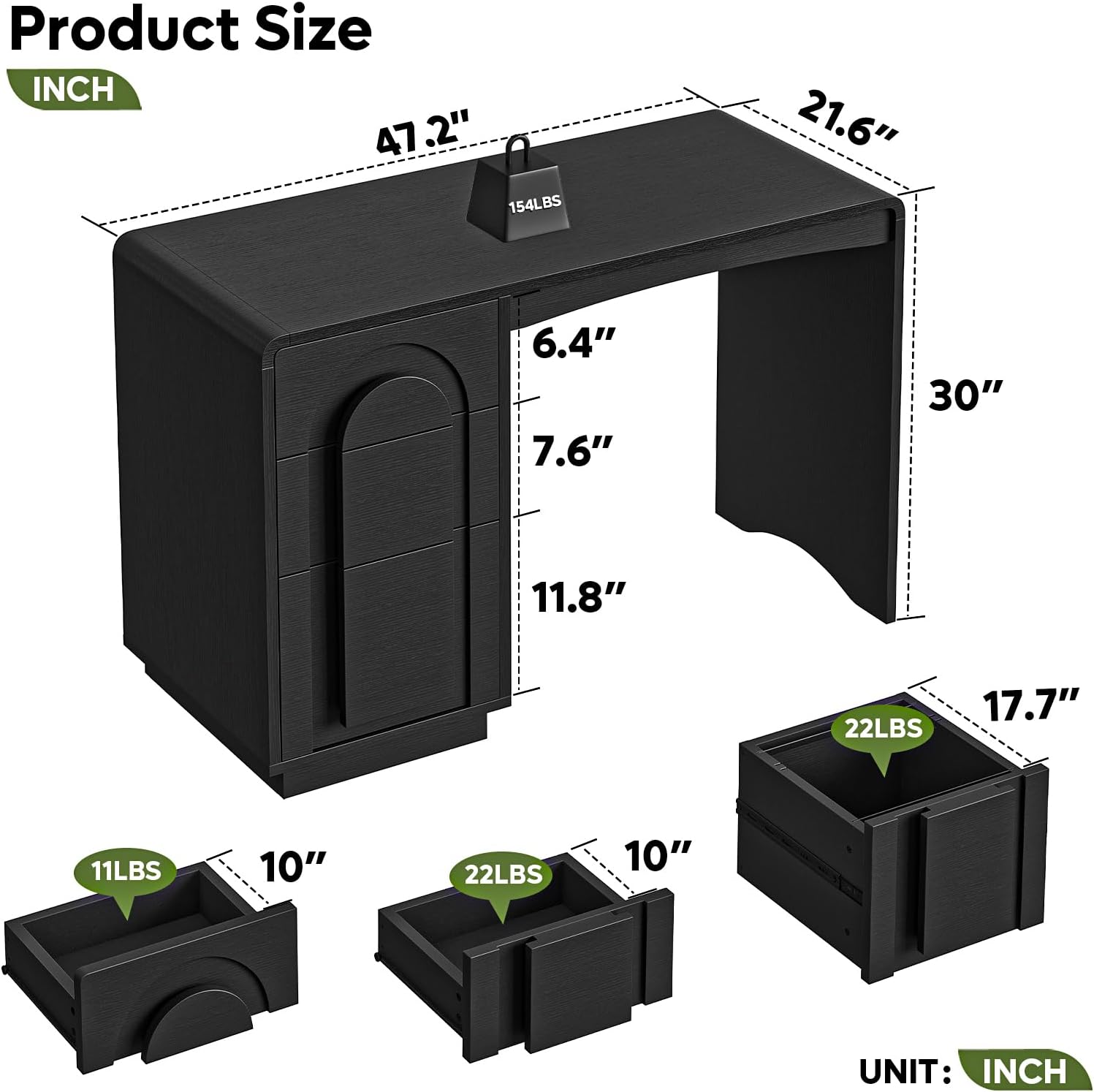
Image: Detailed product dimensions and weight capacities for the Bestier 47-inch Computer Desk.
Warranty and Support
Bestier products are manufactured with quality and customer satisfaction in mind. For specific warranty details, please refer to the warranty card included with your purchase or visit the official Bestier website.
If you encounter any issues with your product, require replacement parts, or have questions regarding assembly or use, please contact Bestier customer support. Contact information can typically be found on the Bestier website or on your purchase receipt.
Bestier USA: Visit the Bestier Store on Amazon

