
1. Product Overview
The TORRAS Ostand L1 Series case is designed for the Samsung Galaxy Z Fold 8, offering enhanced protection and functionality. This case features a built-in kickstand for hands-free viewing, MagSafe compatibility for secure accessory attachment and wireless charging, military-grade drop protection, and full hinge coverage.
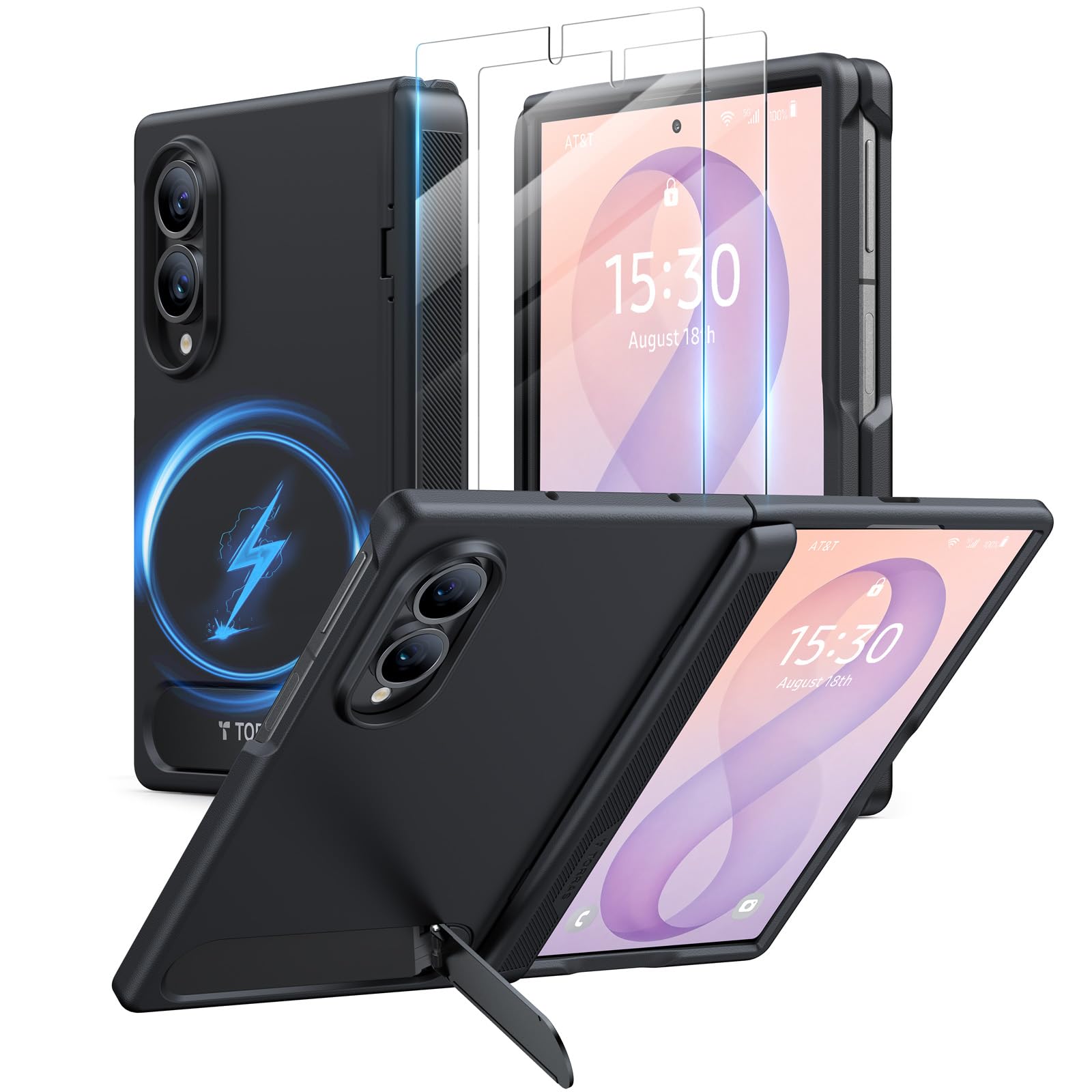
Image: The TORRAS Ostand L1 Series case in black, showcasing its sleek design and integrated features.
Key Features:
- Integrated Kickstand: Provides stable, multi-angle support for both folded and unfolded viewing, without interfering with wireless charging.
- MagSafe Compatibility: Features an invisible N52 magnetic array for secure attachment to MagSafe accessories.
- Military-Grade Drop Protection: Constructed with X-SHOCK air cushioning and durable TPU+TPE materials to absorb impacts.
- Full Hinge Protection: Dual self-returning hinges ensure the device's hinge is fully covered.
- Slim Profile: The flush built-in stand maintains a sleek design without adding bulk.
- Screen Protectors: Includes two front cover films for additional screen protection.
2. Setup and Installation
Follow these steps to properly install your TORRAS Ostand L1 Series case and screen protectors on your Samsung Galaxy Z Fold 8.
2.1 Verifying Phone Model
Ensure your device is a Samsung Galaxy Z Fold 8 (Wide) for precise compatibility.

Image: Visual guide on how to check your phone model via Settings > About phone > Model Name.
2.2 Case and Screen Protector Installation
- Fit the Front Cover: Carefully align and fit the front cover piece onto your Galaxy Z Fold 8.
- Apply Included Screen Protector: Clean the front screen thoroughly. Peel off the backing from one of the included screen protectors and carefully apply it to the front screen, smoothing out any bubbles.
- Snap on the Back Cover: Once the front cover and screen protector are in place, align the back cover piece with the phone and gently press until it snaps securely into place.
- Final Adjustment: Ensure all edges are flush and the case is seated correctly around your device.

Image: Step-by-step visual guide for installing the case and screen protectors.
3. Operating Instructions
Maximize the functionality of your TORRAS Ostand L1 Series case with these operating guidelines.
3.1 Using the Integrated Kickstand
The flush built-in stand can be easily deployed for hands-free viewing. Gently pull out the stand from the back of the case. It provides stable support for both folded and unfolded phone orientations, allowing for comfortable viewing in portrait or landscape mode.

Image: The Galaxy Z Fold 8 case demonstrating hands-free viewing with the kickstand in both folded and unfolded positions.

Image: Illustration of the case providing stable support at various angles for both folded (approx. 60°) and unfolded (approx. 80°) modes.
3.2 MagSafe Compatibility
The case features an invisible N52 magnetic array, providing strong magnetic force for compatibility with MagSafe accessories. Simply snap on your MagSafe charger, car mount, wallet, or other accessories.

Image: The case demonstrating compatibility with MagSafe accessories, including a magnetic grip and a wireless charging stand.
3.3 Hinge Protection
The case incorporates dual self-returning hinges that fully cover the Galaxy Z Fold 8's hinge, whether the phone is open or closed. This design provides continuous protection against impacts and scratches.

Image: Close-up view of the case's hinge protection mechanism, showing auto-return hinges and textured grip.
4. Maintenance and Care
To ensure the longevity and appearance of your TORRAS Ostand L1 Series case, follow these simple maintenance tips:
- Cleaning: Wipe the case regularly with a soft, damp cloth to remove dust and smudges. Avoid using harsh chemicals or abrasive materials, as these can damage the case's finish.
- Avoid Extreme Temperatures: Do not expose the case to extreme heat or cold, as this may affect the material integrity and magnetic properties.
- Inspect Regularly: Periodically check the case for any signs of wear or damage, especially around the hinge and edges.
5. Troubleshooting
If you encounter any issues with your TORRAS Ostand L1 Series case, please refer to the following common concerns:
- Case Does Not Fit: Ensure you have the correct model (Samsung Galaxy Z Fold 8). If the model is incorrect, please contact customer support.
- Damaged Upon Arrival: If the packaging or product is damaged upon receipt, do not attempt to use it. Contact customer support immediately for assistance.
- Kickstand Malfunction: If the kickstand does not operate smoothly or appears loose, ensure no debris is obstructing its mechanism. If the issue persists, contact customer support.
- MagSafe Accessories Not Attaching Securely: Verify that your MagSafe accessories are compatible and clean. Ensure there is no foreign material between the case and the accessory.
6. Specifications
| Brand | TORRAS |
| Compatible Phone Models | for Samsung Galaxy Z Fold 8 (Wide) |
| Color | Black |
| Material | TPU, TPE, Magnets, Stainless Steel |
| Item Dimensions | 6.77 x 3.27 x 0.51 inches |
| Additional Features | Heavy Duty Protection, Kickstand, Magnetic, Slim Fit, Wireless Charging Compatible |
| Water Resistance Level | Not Water Resistant |
| Included Components | 1x TORRAS Case for Z Fold 8 with Magnetic & Kickstand, 2x Screen Protectors |
7. Warranty Information
Your TORRAS Ostand L1 Series case is backed by a 365-day manufacturer’s warranty from the date of purchase. This warranty covers defects in materials and workmanship under normal use. It does not cover damage caused by misuse, accidents, or unauthorized modifications.
For warranty claims, please retain your proof of purchase.
8. Customer Support
If you have any questions, concerns, or require assistance with your TORRAS Ostand L1 Series case, please contact our customer support team.
Contact Method: Via the Amazon Message Center.
Our team is committed to responding to inquiries within 12 hours to provide prompt and effective solutions.


