
Introduction
This manual provides detailed instructions for the assembly, operation, maintenance, and troubleshooting of your Gurexl Smart Nightstand. Please read this manual thoroughly before use to ensure proper function and safety.
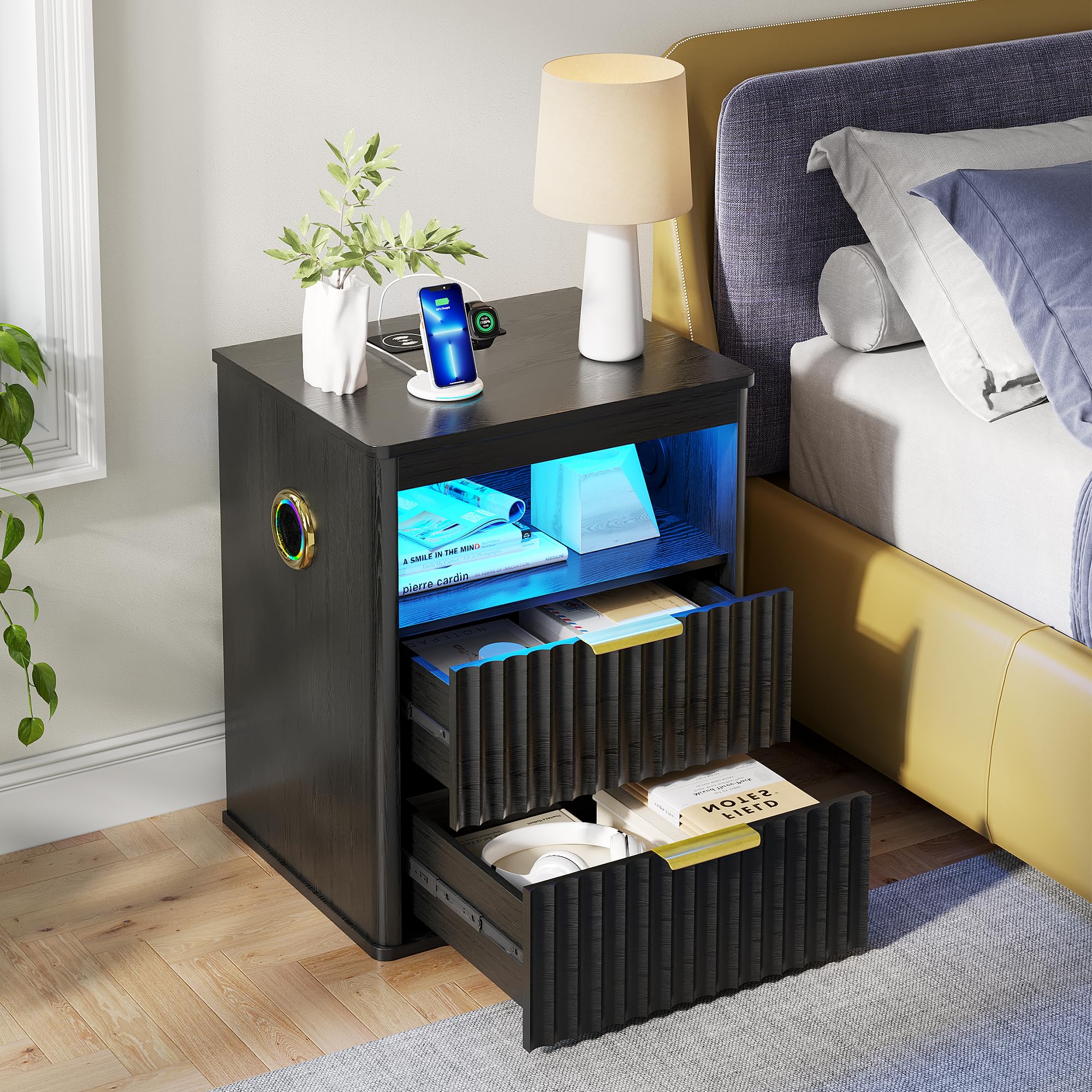
Front view of the Gurexl Smart Nightstand, showcasing its wireless charging pad, USB/Type-C ports, and illuminated open shelf with blue LED lighting.
Safety Information
- Ensure all connections are secure before operating the nightstand's electronic features.
- Do not expose the nightstand to excessive moisture or direct sunlight.
- Keep small children and pets away from electrical components.
- Do not exceed the maximum weight recommendation of 40 pounds on the top surface.
- Use only the provided power adapter or a compatible replacement.
- Avoid placing liquids directly on the wireless charging pad or near USB ports.
Package Contents
Verify that all components are present before beginning assembly:
- 1 x Gurexl Smart Nightstand (main body components)
- 1 x Accessory Pack (screws, dowels, cam locks, drawer slides, handles)
- 1 x Power Adapter
- 1 x Instruction Manual (this document)
Setup and Assembly
Assembly is required for this nightstand. Please follow the steps carefully. It is recommended to have a second person for assistance during certain steps.
Assembly Video Guide
This video demonstrates the assembly process for the Gurexl Smart Nightstand. It shows the step-by-step construction of the frame, drawers, and integration of electronic components.
General Assembly Steps:
- Unpack Components: Carefully remove all parts from the packaging and lay them out on a clean, soft surface to prevent scratches. Verify all parts against the parts list.
- Assemble Frame: Attach the side panels to the base and top panels using the provided hardware (dowels, cam locks, screws). Ensure all connections are tight and secure.
- Install Drawer Slides: Secure the drawer slides to the inner side panels of the nightstand frame using the designated screws. Ensure they are level and aligned.
- Assemble Drawers: Construct the drawer boxes by attaching the side, front, and back panels. Install the drawer handles and the corresponding drawer slides to the drawer boxes.
- Insert Drawers: Carefully slide the assembled drawers into the nightstand frame, ensuring they glide smoothly on the installed slides.
- Connect Power: Plug the power adapter into the designated port on the nightstand and then into a wall outlet.

Detailed product dimensions, including overall height, width, depth, and internal drawer measurements.
Operating Instructions
1. RGB LED Lights
The nightstand features dynamic RGB LED lights in the open shelf area, controlled by a touch sensor.
- Short Click: Tap the touch sensor to turn the LED lights ON/OFF or to cycle through different colors.
- Long Press: Press and hold the touch sensor to adjust the brightness of the LED lights steplessly.

Visual guide for controlling the RGB LED lights: short click for color change/on-off, long press for brightness adjustment.
2. Bluetooth Speaker
The integrated Bluetooth speaker allows for wireless audio playback.
- Power On: Ensure the nightstand is powered on. The Bluetooth speaker will automatically enter pairing mode.
- Pairing: On your mobile device, open Bluetooth settings and search for available devices. Select "Gurexl Nightstand" (or similar name) to connect.
- Playback: Once paired, audio from your device will play through the nightstand's speaker.
3. 3-in-1 Charging Station (Wireless, USB, Type-C)
The nightstand provides multiple charging options on its top surface.
- Wireless Charging: Place your Qi-compatible device (smartphone, earbuds) directly onto the designated wireless charging pad on the top surface. Ensure the device is centered for optimal charging.
- USB Charging: Connect your device's USB cable to the standard USB-A port on the top surface.
- Type-C Charging: Connect your device's USB-C cable to the Type-C port on the top surface.

Summary of key functions: Dynamic RGB LED Lights, Sensor Light, Wireless Charging, USB and Type-C Ports, and Bluetooth Audio.
Maintenance
- Cleaning: Wipe the nightstand surfaces with a soft, damp cloth. Avoid abrasive cleaners or harsh chemicals that may damage the finish.
- Dusting: Regularly dust the surfaces, especially around electronic components, to prevent buildup.
- Drawer Care: Periodically check drawer slides for smooth operation. If needed, clean any debris from the tracks.
- Cable Management: Ensure power cables are not pinched or tangled to prevent damage.
Troubleshooting
| Problem | Possible Cause | Solution |
|---|---|---|
| LED lights not turning on/off or changing color. | Power not connected; faulty touch sensor; power outage. | Check power connection; ensure power adapter is plugged in; try a different outlet. |
| Wireless charging not working. | Device not Qi-compatible; device not centered; thick phone case; power issue. | Ensure device supports Qi wireless charging; reposition device; remove thick phone case; check power connection. |
| Bluetooth speaker not pairing. | Speaker not in pairing mode; device too far; interference. | Ensure nightstand is powered on; bring device closer; restart Bluetooth on your device. |
| USB/Type-C ports not charging. | Cable issue; device issue; power issue. | Try a different cable; test with another device; check power connection to the nightstand. |
Specifications
- Brand: Gurexl
- Model: B0H2YLPCB3
- Product Dimensions (D x W x H): 15.75" x 19.68" x 23.62"
- Maximum Weight Recommendation: 40 Pounds
- Color: Black
- Top Material Type: Engineered Wood
- Material Type: Engineered Wood
- Number of Drawers: 2
- Special Features: Bluetooth Speaker, RGB LED Lights, Wireless Charging, USB Port, Type-C Port, Auto Sensor Light
- Required Assembly: Yes
- Room Type: Bedroom, Guest Room, Home Office, Living Room, Study Room
Warranty and Support
For warranty information and customer support, please refer to the documentation included with your purchase or contact Gurexl customer service directly. Contact details can typically be found on the manufacturer's website or on the product packaging.
Please have your model number (B0H2YLPCB3) and purchase date available when contacting support.