
Introduction
This manual provides detailed instructions for the safe and efficient operation, maintenance, and troubleshooting of your OYLUS Clear Ice Cube Maker, model CE0316. Please read this manual thoroughly before using the appliance and retain it for future reference.

Image: The OYLUS Clear Ice Cube Maker CE0316, a compact appliance designed for countertop use, shown in a kitchen setting.
Safety Information
To ensure safe operation, always follow these basic precautions:
- Ensure the appliance is placed on a stable, level surface away from direct sunlight and heat sources.
- Do not immerse the appliance, power cord, or plug in water or other liquids.
- Supervise children when the appliance is in use.
- Unplug the ice maker before cleaning or when not in use for extended periods.
- Do not operate the appliance with a damaged cord or plug. Contact customer support for assistance.
- Use only potable water in the water tank.
- Allow the unit to stand upright for at least 24 hours before first use if it has been tilted during transport.
What's in the Box
Upon unpacking, please verify that all components are present:
- OYLUS Clear Ice Cube Maker (CE0316)
- Ice Tong
- Warranty Card
- User Manual (this document)
Product Overview
Control Panel
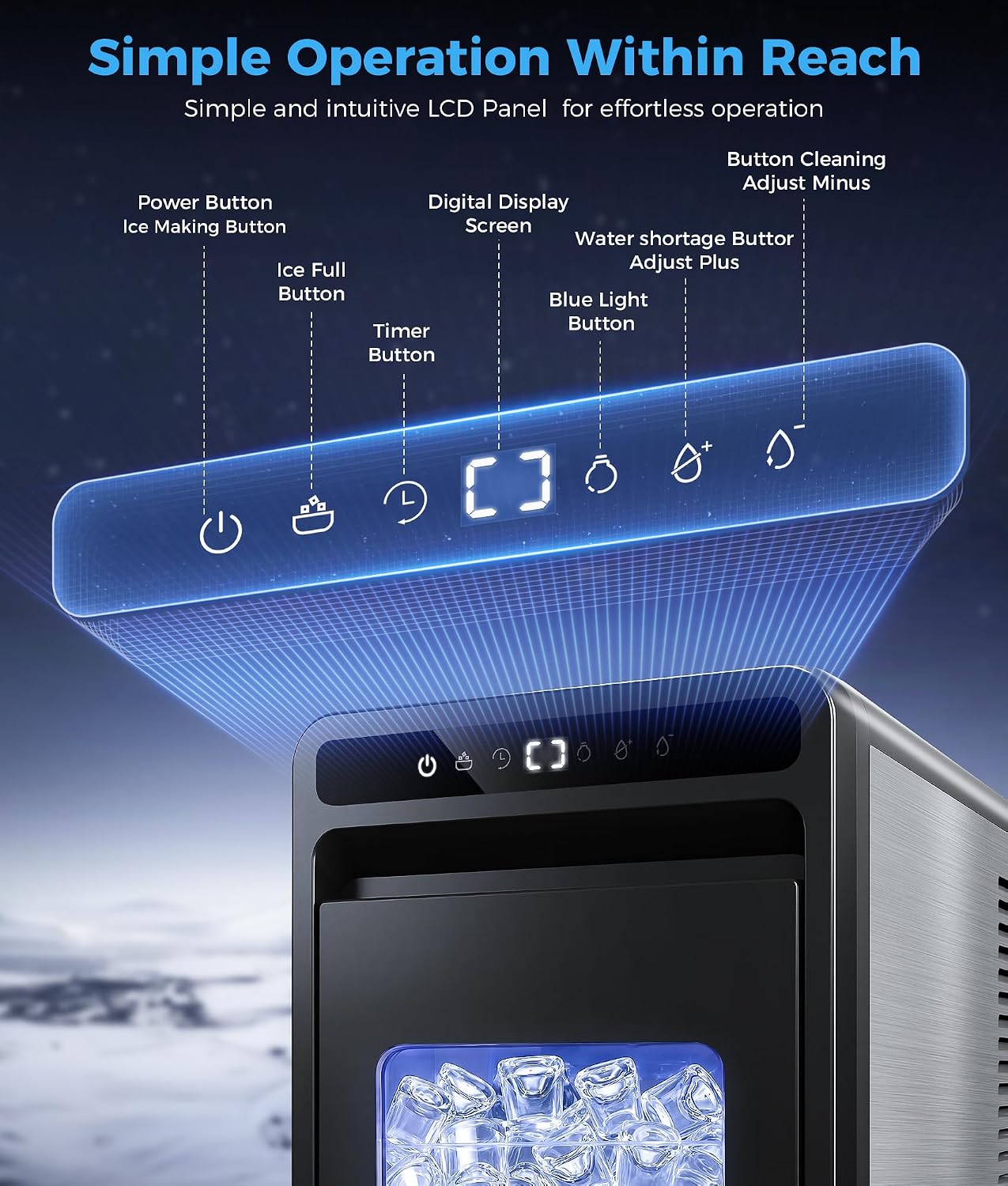
Image: A detailed view of the ice maker's intuitive LCD control panel, highlighting the Power Button, Ice Making Button, Ice Full Indicator, Timer Button, Digital Display Screen, Water Shortage Indicator, Adjust Plus/Minus buttons, and Blue Light Button.
The control panel features an intuitive LCD display and touch buttons for easy operation:
- Power Button: Turns the ice maker on or off.
- Ice Making Button: Initiates or pauses the ice making cycle.
- Ice Full Indicator: Illuminates when the ice basket is full.
- Timer Button: Activates the 24-hour timer function.
- Digital Display Screen: Shows current settings, timer countdown, or error codes.
- Water Shortage Indicator: Illuminates when the water tank needs refilling.
- Adjust Plus/Minus Buttons: Used to adjust ice thickness or set the timer.
- Blue Light Button: Controls the internal blue LED light.
Setup
- Unpack: Carefully remove the ice maker from its packaging. Remove all packing materials, tape, and labels.
- Placement: Place the ice maker on a flat, stable, and heat-resistant surface. Ensure there is adequate ventilation around the unit (at least 4 inches of space on all sides). Avoid placing it near heat sources or in direct sunlight.
- Stabilize: If the unit was tilted during transport, allow it to stand upright for at least 24 hours before plugging it in. This allows the refrigerant to settle.
- Clean: Before first use, clean the interior of the ice maker according to the "Cleaning and Maintenance" section.
- Power Connection: Plug the power cord into a grounded electrical outlet (110 Volts).

Image: The OYLUS Clear Ice Cube Maker CE0316 positioned on a kitchen countertop, demonstrating its compact design and suitability for home environments.
Operating Instructions
Ice Making Process
- Add Water: Open the water tank cover and fill the 1.6L water tank with potable water up to the MAX fill line. Do not overfill.
- Start Ice Making: Press the Power Button, then press the Ice Making Button to start the ice production cycle. The first batch of 8 crystal 1.2-inch jelly ice cubes will be ready in approximately 23 minutes. Subsequent batches may be faster, around 20 minutes.
- Monitor: The ice maker will automatically stop when the ice basket is full (Ice Full Indicator will light up) or when the water tank is empty (Water Shortage Indicator will light up).
- Retrieve Ice: Use the provided ice tong to remove ice from the basket.

Image: A man preparing a drink with clear ice from the OYLUS ice maker, illustrating the product's features including 26.5 lbs/day ice production, 8 pieces in 20 minutes, 1.6L water reservoir, 48 pieces basket capacity, countdown timer, and child lock.
Adjusting Ice Size (Thickness)
The ice maker allows for 10 levels of adjustable ice thickness. This is achieved by controlling the ice-making duration.
- During the ice-making cycle, use the Adjust Plus (+) or Adjust Minus (-) buttons to increase or decrease the ice-making time.
- Each press adjusts the time by approximately 1 minute, within a range of -5 to +5 minutes from the default setting.
- A shorter duration results in thinner ice, while a longer duration produces thicker ice.

Image: A visual guide demonstrating how ice thickness can be adjusted from thin to thick, with examples of different beverages that benefit from varying ice sizes.
Using the 24-Hour Timer
The 24-hour timer function allows you to schedule ice production in advance.
- Press the Timer Button.
- Use the Adjust Plus (+) or Adjust Minus (-) buttons to set the desired delay time (up to 24 hours) before the ice making cycle begins.
- The display will show the countdown. Once the timer reaches zero, the ice maker will start producing ice.

Image: A graphic representation of the 24-hour timer feature, showing how users can schedule ice production for convenience, whether for evening or morning use.
Internal Blue Light
The ice maker features a stylish blue interior light. Press the Blue Light Button on the control panel to turn this light on or off, allowing for easy monitoring of ice production in various lighting conditions.
Maintenance
Self-Cleaning Function
The OYLUS CE0316 ice maker includes a one-button self-cleaning function to ensure hygiene and pure-tasting ice.
- Ensure the water tank is filled with clean water.
- Press and hold the Cleaning Button (often combined with an Adjust button, refer to control panel diagram) for a few seconds to activate the self-cleaning cycle.
- The machine will perform an internal cleaning cycle, typically lasting 15 minutes.
- Once the cycle is complete, proceed to the drainage step.

Image: An internal view of the OYLUS Clear Ice Cube Maker, illustrating the water circulation during the 15-minute automatic deep cleaning process, which ensures fresh ice and long-lasting performance.
Draining the Water
After cleaning or when storing the unit, it is important to drain any remaining water.
- Place a container under the drain plug located at the bottom of the unit.
- Remove the drain plug to allow water to flow out.
- Once all water has drained, securely replace the drain plug.
General Cleaning
- Wipe the exterior with a soft, damp cloth.
- Clean the ice basket and ice scoop with mild detergent and rinse thoroughly.
- Do not use abrasive cleaners or solvents.
Troubleshooting
| Problem | Possible Cause | Solution |
|---|---|---|
| Ice maker not turning on | No power supply | Check power cord connection and wall outlet. |
| Water Shortage Indicator on | Water tank is empty | Refill the water tank with potable water. |
| Ice Full Indicator on | Ice basket is full | Remove ice from the basket. |
| No ice production | Insufficient water, ambient temperature too high, or air blockage | Ensure water tank is full. Operate in a cooler environment. Check for any obstructions. |
| Ice is cloudy or poorly formed | Water quality, air in water, or incorrect ice thickness setting | Use filtered water. Run self-cleaning cycle. Adjust ice thickness setting to a longer duration. |
| Unusual noise | Unit not level, or internal component issue | Ensure the unit is on a level surface. If noise persists, contact support. |
Specifications
| Feature | Detail |
|---|---|
| Brand | OYLUS |
| Model Name | CE0316 |
| Product Dimensions (D x W x H) | 9.8" x 16" x 15.6" |
| Water Tank Capacity | 1.6 Liters |
| Ice Production per Day | Up to 26 lbs (12 Kilograms) |
| Ice Making Time (First Batch) | Approx. 23 minutes |
| Ice Making Time (Subsequent Batches) | Approx. 20 minutes for 8 cubes |
| Ice Cube Size | 1.2 inches (adjustable thickness) |
| Wattage | 260 watts |
| Voltage | 110 Volts |
| Refrigerant | R290a |
| Material Type | Stainless Steel |
| Item Weight | 23.4 Pounds |
| Self-Cleaning Function | Yes, one-button operation |
| Timer Function | 24-hour programmable |

Image: The OYLUS Clear Ice Cube Maker CE0316 displaying its compact dimensions (9.8"D x 15.7"W x 16.1"H), product weight (23.4 lbs), 1.6L water tank, and 1.0L ice drawer, alongside included accessories like the ice clip and ice drawer.
Warranty
The OYLUS Clear Ice Cube Maker CE0316 comes with a 1 Year Manufacturer Warranty. Please refer to the included Warranty Card for detailed terms and conditions. Retain your proof of purchase for warranty claims.
Support
For technical assistance, troubleshooting beyond this manual, or warranty inquiries, please contact OYLUS customer support. Refer to the contact information provided on your Warranty Card or visit the official OYLUS website.
Video: An official product video from Oylus Direct demonstrating the features and operation of the OYLUS Clear Ice Cube Maker, including ice production, adjustable settings, and self-cleaning functions.

