
1. Introduction
The Novastar DH7508-S is a high-performance LED receiving card designed for advanced LED display solutions. It offers robust features for enhancing visual quality and system reliability, making it suitable for various video wall applications. This manual provides essential information for the proper installation, operation, and maintenance of your DH7508-S receiving card.
Key capabilities include support for up to 256x256 pixels per card, point-by-point brightness and chroma correction, 3D output functionality, and a dual backup system for configuration parameters. The card utilizes 8 standard HUB75E interfaces for communication, ensuring high stability and compatibility.
2. Features
- High Pixel Capacity: Supports a maximum of 256x256 pixels per single card (for PWM IC) or 176x256 pixels (for Common IC).
- Advanced Image Processing:
- Pixel-level Brightness and Chroma Correction: Works with NovaStar's high-precision calibration system to ensure uniform brightness and color across the display.
- Quick Dark/Bright Line Adjustment: Allows for easy correction of dark or bright lines that may appear due to module or cabinet splicing.
- 3D Functionality: Supports 3D output when paired with a compatible sending card.
- Connectivity: Equipped with 8 standard HUB75E interfaces, supporting up to 16 groups of RGB parallel data.
- Reliability: Features dual backup of configuration parameters for enhanced system stability.
- Maintainability:
- Quick Calibration Coefficient Upload: Streamlines the process of applying calibration data.
- Mapping Function: Displays receiving card numbers and Ethernet port information for easy identification and topology mapping.
- Pre-stored Image Setting: Customizable image display during startup, Ethernet disconnection, or absence of video signal.
- Compliance: Hardware design adheres to EMC standards (Class A) and RoHS for improved electromagnetic compatibility and environmental safety.
3. Setup and Installation
Proper installation is crucial for the optimal performance and longevity of your Novastar DH7508-S receiving card.
3.1 Safety Precautions
- Ensure all power is disconnected from the LED display system before installing or removing the receiving card.
- Handle the card by its edges to avoid touching sensitive electronic components.
- Use appropriate anti-static measures (e.g., anti-static wrist strap) to prevent electrostatic discharge (ESD) damage.
- Verify correct voltage and polarity when connecting power.
3.2 Physical Installation
- Mounting: Securely mount the DH7508-S card into the designated slot within your LED display module or cabinet using screws. Ensure it is firmly seated to prevent vibration-related issues.
- Power Connection: Connect the 5V DC power supply to the designated power input terminals on the card. Observe correct polarity (+5V and GND).
- Data Connection (HUB75E): Connect the data cables from the LED modules to the HUB75E interfaces on the receiving card. Ensure correct pin alignment and secure connections. The DH7508-S features 8 HUB75E interfaces.
- Ethernet Connection: Connect the Ethernet cable from the sending card or video processor to the Ethernet input port on the DH7508-S. If using multiple cards in a daisy-chain configuration, connect the output of one card to the input of the next.

Figure 3.2.1: Front view of the Novastar DH7508-S LED Receiving Card, showing the Ethernet ports, power input, and HUB75E data output interfaces.
Product ID: 24715M000006871
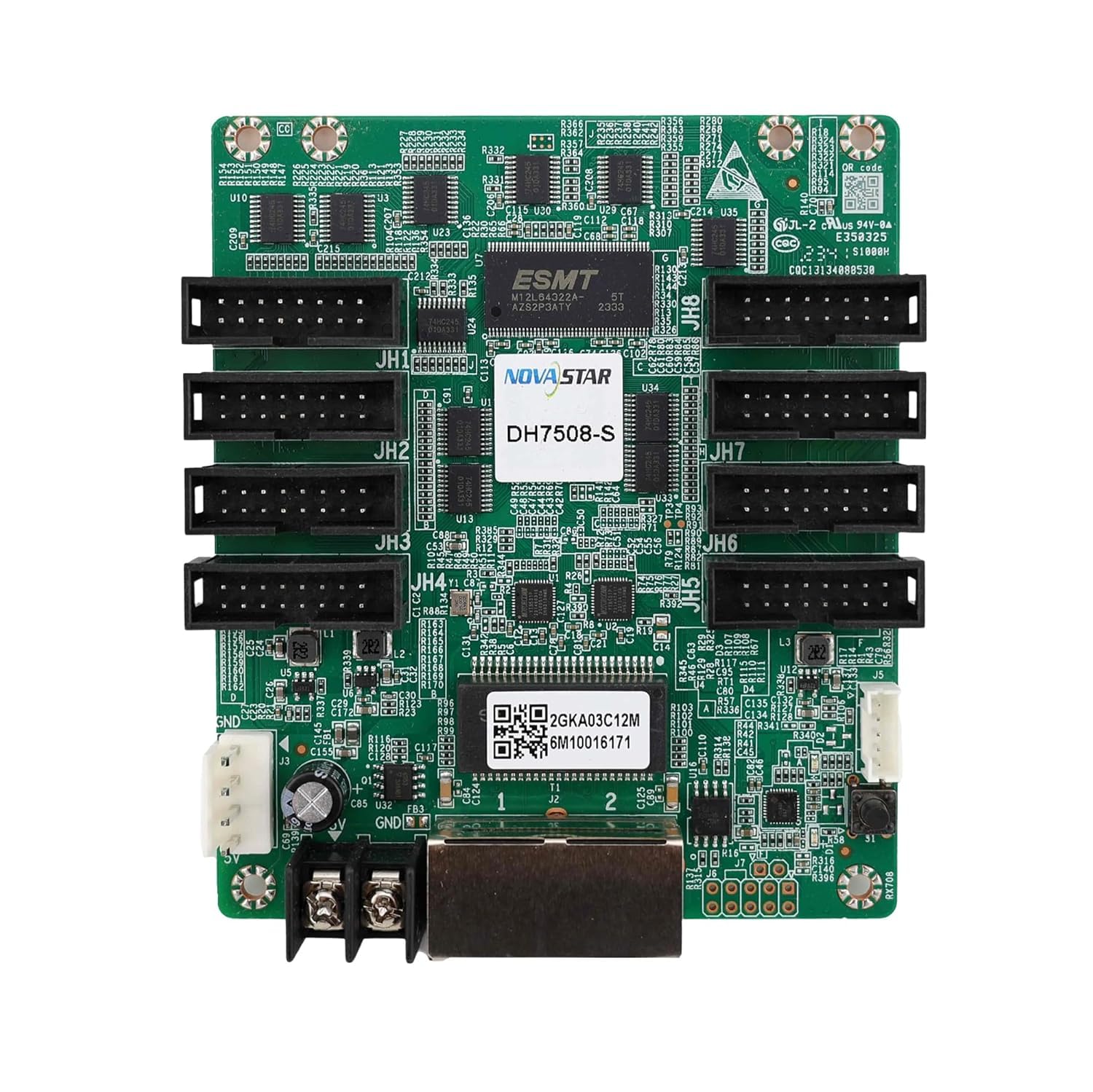
Figure 3.2.2: Back view of the Novastar DH7508-S LED Receiving Card, illustrating the circuit board layout and mounting points.
Product ID: 24919M000036682
4. Operating Instructions
Once physically installed, the Novastar DH7508-S card requires configuration via Novastar's control software (e.g., NovaLCT).
4.1 Software Configuration (NovaLCT)
- Connect to PC: Connect your sending card (or video processor) to a PC running NovaLCT software via USB or Ethernet.
- Screen Configuration: Open NovaLCT and navigate to the "Screen Configuration" section.
- Load Configuration: Load the appropriate configuration file for your LED display setup. This file defines the resolution, module arrangement, and other display parameters.
- Receiving Card Settings:
- Mapping: Use the mapping function to correctly identify and arrange the receiving cards within the software interface, matching their physical layout.
- Pixel-level Correction: If using, initiate the pixel-level brightness and chroma correction process through the software. This requires a compatible calibration device.
- Dark/Bright Line Adjustment: Access the quick adjustment tools to fine-tune any visible dark or bright lines.
- 3D Mode: Enable 3D mode if your sending card and content support it.
- Pre-stored Image: Configure the custom image to be displayed in specific scenarios (e.g., no signal).
- Save to Receiving Card: After configuring all parameters, save the settings directly to the receiving cards. The DH7508-S supports dual backup of these parameters.
Refer to the NovaLCT software user manual for detailed instructions on specific configuration steps.
5. Maintenance
The Novastar DH7508-S is designed for reliability, but regular maintenance practices can extend its lifespan and ensure consistent performance.
- Environmental Control: Operate the card within its specified temperature and humidity ranges. Avoid extreme conditions.
- Dust Removal: Periodically inspect the card and surrounding components for dust accumulation. Use compressed air or a soft brush to gently remove dust, ensuring power is off during cleaning.
- Connection Checks: Regularly verify that all power and data cables are securely connected. Loose connections can lead to intermittent display issues.
- Software Updates: Keep your NovaLCT software and sending card firmware updated to the latest versions provided by Novastar to benefit from performance improvements and bug fixes.
6. Troubleshooting
This section addresses common issues you might encounter with the DH7508-S receiving card.
| Problem | Possible Cause | Solution |
|---|---|---|
| No Display / Black Screen |
|
|
| Partial Display / Incorrect Colors |
|
|
| Flickering / Unstable Display |
|
|
| Dark or Bright Lines on Display |
|
|
7. Specifications
| Model | DH7508-S |
| Max. Pixel Capacity | 256x256 pixels (PWM IC) / 176x256 pixels (Common IC) |
| Interfaces | 8 x HUB75E |
| Data Groups | Up to 16 groups of RGB parallel data |
| Power Input | 5V DC |
| Dimensions (LxWxH) | 10.4 x 8.9 x 1.3 cm |
| Item Weight | 50 g |
| Compliance | RoHS, EMC Class A |
| Manufacturer | BCS LED (EASTAR OPTOELECTRONICS & TECHNOLOGY) |
| Country of Origin | India |
8. Additional Information
For further technical support, software downloads, or detailed documentation, please refer to the official Novastar website or contact your product supplier.


